Введение
This manual provides instructions for the setup, operation, and maintenance of the Promethean OPS-A Android computing module. The OPS-A is designed to integrate seamlessly with the ActivPanel LX, offering an optimized Android experience with pre-loaded applications and access to the Google Play Store.
Содержимое упаковки
Проверьте наличие всех предметов в упаковке:
- OPS-A Module (x1)
- Антенны (2 шт.)
- Инструкция по установке (1 шт.)
Инструкции по установке
The Promethean OPS-A module is designed for straightforward installation into a compatible ActivPanel LX.
- Prepare the ActivPanel LX: Ensure your ActivPanel LX is powered off and unplugged from the main power source before proceeding with the installation.
- Locate the OPS Slot: Identify the OPS (Open Pluggable Specification) slot on your ActivPanel LX. This is typically located on the side or rear of the panel.
- Insert the OPS-A Module: Carefully slide the OPS-A module into the OPS slot until it is fully seated. Ensure the module is oriented correctly.
- Закрепите модуль: If your ActivPanel LX has a locking mechanism for the OPS slot, engage it to secure the module.
- Прикрепите антенны: Screw the two provided antennas onto the corresponding connectors on the rear of the OPS-A module. Position them vertically for optimal signal reception.
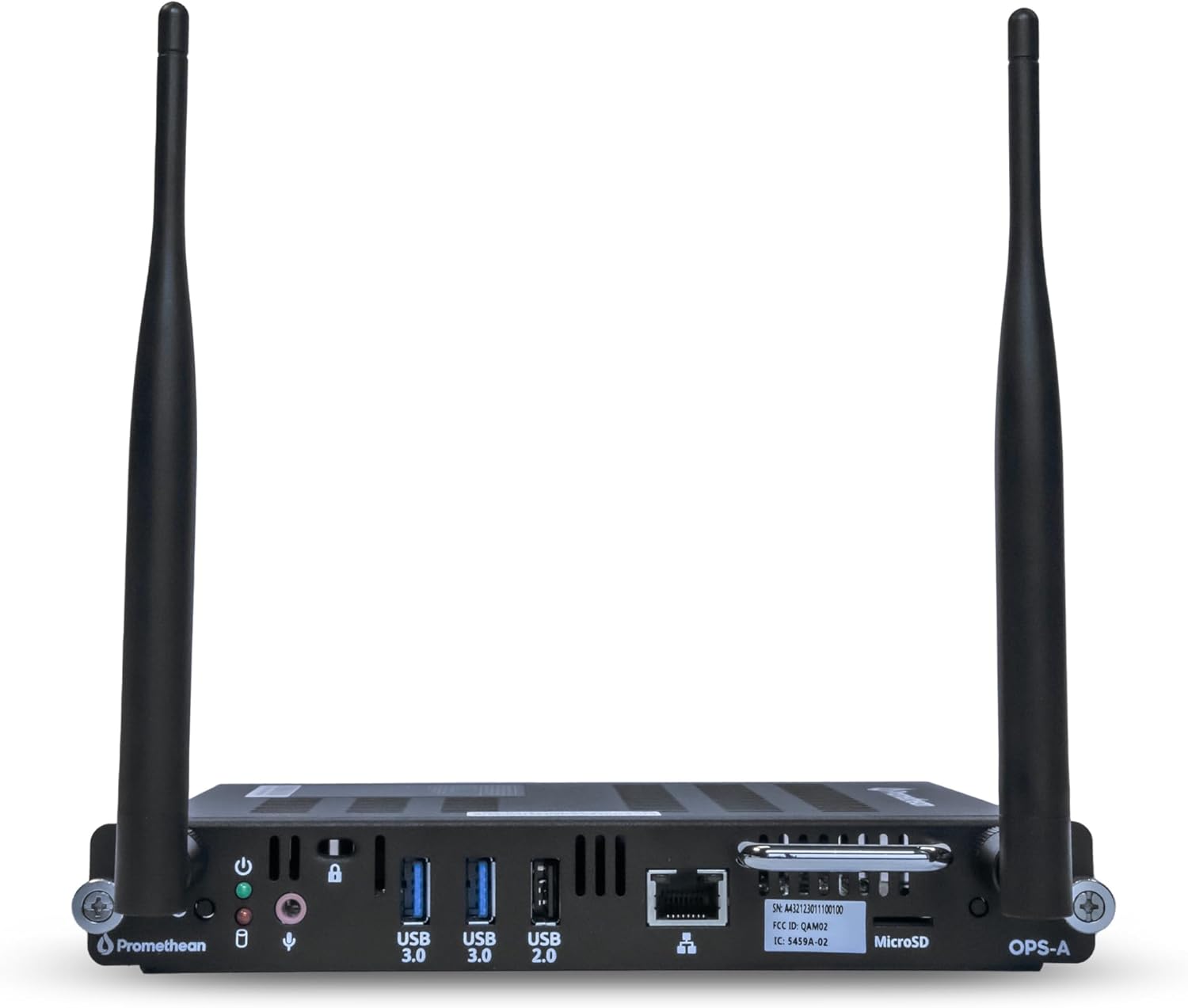
Рисунок 1: Сзади view of the Promethean OPS-A module, showing USB ports, network port, and antenna connectors.
- Включение питания: Plug the ActivPanel LX back into the power source and power it on. The ActivPanel LX should detect the OPS-A module automatically.
- Начальная конфигурация: Follow the on-screen prompts on your ActivPanel LX to complete the initial setup of the Android operating system, including network connection and Google account login.
Инструкция по эксплуатации
The OPS-A module runs on Android 14, providing a familiar and intuitive interface.
Accessing the OPS-A
Once installed and powered on, you can switch to the OPS-A input source on your ActivPanel LX. This will display the Android desktop environment.
Pre-loaded Applications
The OPS-A comes with several applications pre-installed for immediate use:
- Google Workspace Apps: Docs, Slides, Chrome, Drive.
- Promethean Apps: Annotate, Screen Capture, Screen Share, Spinner, Timer, Whiteboard.
Магазин Google Play
The Google Play Store is preinstalled, allowing you to download and install additional applications to suit your specific requirements. Ensure you are connected to the internet and logged into a Google account to access the Play Store.

Figure 2: The OPS-A module integrated with an ActivPanel LX, demonstrating its use in a collaborative environment.
Обслуживание
To ensure optimal performance and longevity of your Promethean OPS-A module, consider the following maintenance guidelines:
- Обновления программного обеспечения: Regularly check for and install system updates for Android 14 and updates for installed applications via the Google Play Store. This ensures security and access to the latest features.
- Уборка: Keep the module's exterior clean and free of dust. Use a soft, dry cloth. Avoid liquid cleaners directly on the device.
- Вентиляция: Ensure the ventilation slots on the module are not obstructed to prevent overheating.
Поиск неисправностей
If you encounter issues with your OPS-A module, try the following steps:
- Нет питания/нет дисплея:
- Ensure the ActivPanel LX is powered on and the OPS-A module is correctly seated in its slot.
- Verify that the ActivPanel LX input source is set to the OPS-A.
- Проблемы с сетевым подключением:
- Check that the antennas are securely attached.
- Verify Wi-Fi settings in the Android system.
- При использовании проводного подключения убедитесь, что кабель Ethernet правильно подключен.
- Application Malfunction:
- Попробуйте перезапустить приложение.
- Clear the application's cache or data through Android settings.
- Если проблема не исчезнет, удалите и переустановите приложение.
- Общие проблемы с производительностью:
- Restart the OPS-A module by powering off and on the ActivPanel LX.
- Убедитесь, что имеется достаточно свободного места для хранения.
For further assistance, refer to the Promethean support webсайт или свяжитесь с их службой поддержки.
Технические характеристики
| Особенность | Деталь |
|---|---|
| Название модели | OPS-A1-4R32S-A |
| Операционная система | Андроид 14 |
| Процессор | 5x86 (IBM) |
| Установленный размер оперативной памяти | 8 ГБ |
| Hard Drive (via USB) | 80 USB Drive (Interface: USB, Rotational Speed: 7200 RPM) |
| Графический сопроцессор | Интегрированная графика |
| Размер оперативной памяти видеокарты | 1 ГБ |
| Порты USB 2.0 | 2 |
| Порты USB 3.0 | 1 |
| Технология связи | HDMI |
| Класс диапазона частот | Однополосный |
| Вес товара | 2.25 фунта |
| Размеры упаковки | 10.39 x 8.46 x 2.13 дюйма |
Гарантия и поддержка
For information regarding product warranty, please refer to the warranty documentation included with your purchase or visit the official Promethean webсайт.
For technical support, product registration, or to access additional resources, please visit the Promethean support portal: www.prometheanworld.com/support.