1. Информация по технике безопасности
Внимательно прочтите все инструкции перед установкой и использованием. Сохраните это руководство для дальнейшего использования.
- Не подвергайте замок воздействию экстремальных температур или прямых солнечных лучей в течение длительного времени.
- Avoid contact with water or corrosive substances.
- Use only the specified battery type (3 x 1.5V alkaline batteries). Do not mix old and new batteries or different battery types.
- При установке батареек соблюдайте правильную полярность.
- Храните механические ключи в безопасном месте за пределами дома.
- Do not attempt to disassemble or repair the lock yourself. Contact support if issues arise.
2. Продукт закончилсяview
The AVATTO Smart Door Lock SDL-S1 offers multiple unlocking methods for enhanced security and convenience.

Рисунок 2.1: Болееview of the AVATTO Smart Door Lock and its accessories.
2.1 Основные характеристики
- Несколько методов разблокировки: Fingerprint, Password, RFID Card, Smart Life App, and Mechanical Key.
- Регулируемая длина цилиндра: The interior and exterior cylinder lengths can be freely adjusted (30-45mm exterior, 30-65mm interior).
- Совместимость по толщине двери: Suitable for doors with a thickness of 60mm to 90mm.
- Symmetric and Asymmetric Door Support: Adapters (5mm, 10mm, 20mm) are included to accommodate various door types.
- Интеграция с приложением Smart Life: Manage users, set administrative rights, view lock logs, and receive notifications.
- Bluetooth-подключение: Effective transmission distance of 50 meters. A separate AVATTO Bluetooth Gateway is required for remote control via the app outside of Bluetooth range.

Figure 2.2: The five primary methods for unlocking the smart door lock.

Рисунок 2.3: Подробная информация view of the AVATTO Door Lock components.
3 Перед установкой
Before proceeding with installation, it is crucial to confirm the following measurements and door characteristics:
- Confirm Cylinder Type: Ensure your existing door lock cylinder is compatible.
- Confirm Cylinder Hole Size: Measure the dimensions of the cylinder hole in your door.
- Измерьте толщину двери: The lock is suitable for doors between 60mm and 90mm thick.
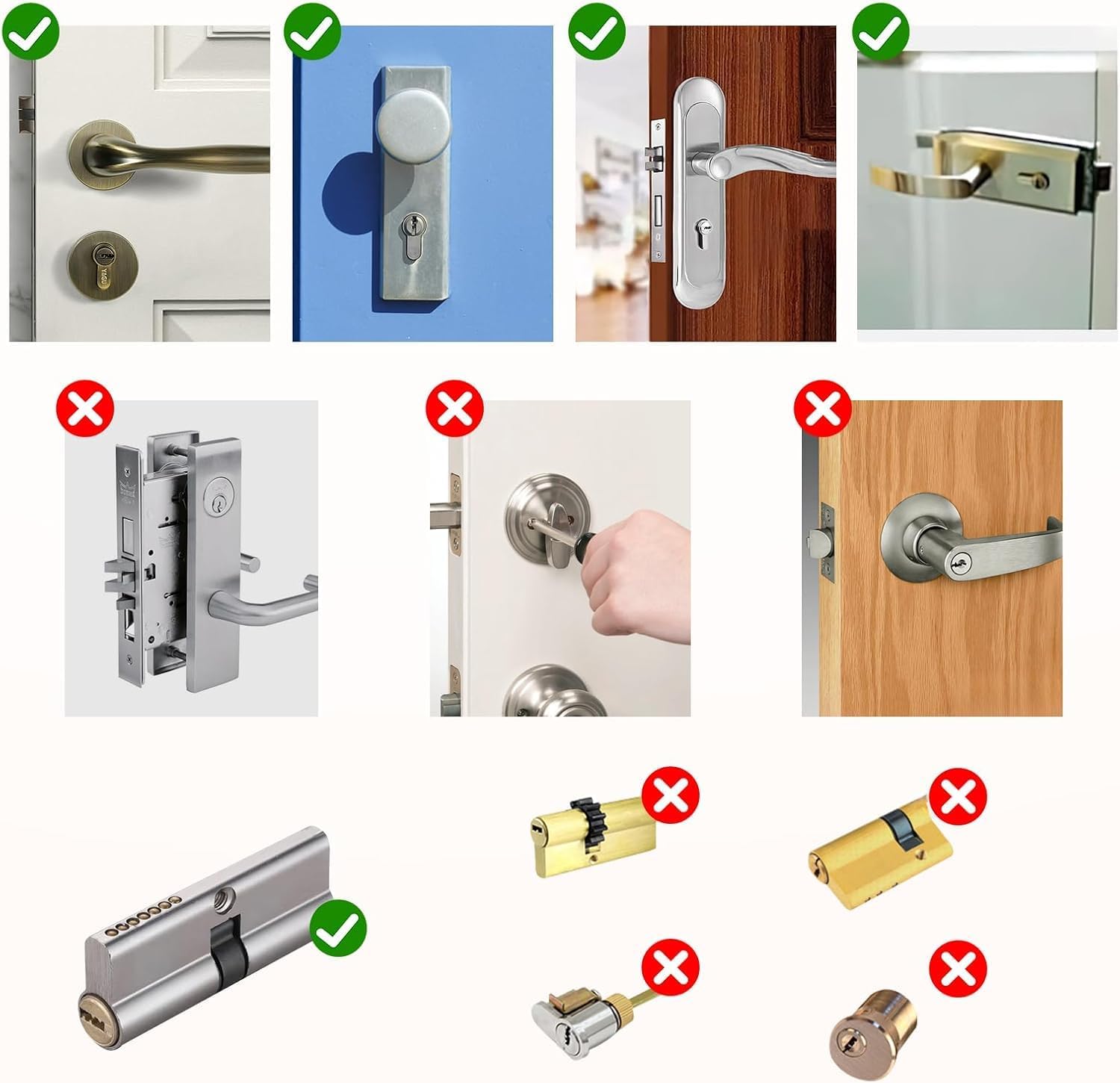
Рисунок 3.1: Examples of compatible (green check) and incompatible (red cross) door lock types.

Figure 3.2: Required dimensions for the lock cylinder hole.
4. Руководство по установке
The AVATTO Smart Door Lock is designed for easy installation. Follow these general steps:
- Подготовьте дверь: Ensure your door meets the thickness and cylinder hole requirements as outlined in Section 3.
- Adjust Cylinder Length: The lock cylinder length is adjustable to fit various door thicknesses. Refer to the table below and the diagrams for symmetric and asymmetric door configurations. The interior length can be adjusted from 30mm to 65mm, and the exterior from 30mm to 45mm.
- Install the Cylinder: Insert the adjusted cylinder into the door's lock hole.
- Защитите замок: Fasten the lock components securely using the provided screws.
- Вставьте батареи: Open the battery compartment and insert 3 x 1.5V alkaline batteries, ensuring correct polarity.
- Тестовая функциональность: After installation, test all unlocking methods (mechanical key, fingerprint, password, RFID card) to ensure proper operation before closing the door.

Figure 4.1: Adjustable lock cylinder length guide. Note: Product is suitable for 60-90mm door thickness.
4.1 Symmetric Door Installation
For symmetric doors, the distance from the center screw hole to both the interior and exterior sides of the door is equal.

Рисунок 4.2: Пример установкиample for a symmetric door (e.g., 60mm door with 30mm interior and 30mm exterior).
4.2 Asymmetric Door Installation
For asymmetric doors, the distances from the center screw hole to the interior and exterior sides of the door are different. Use the provided adapters (5mm, 10mm, 20mm) to achieve the correct length.

Рисунок 4.3: Пример установкиample for an asymmetric door, demonstrating the use of adapters.
5. Инструкция по эксплуатации
5.1 Методы разблокировки
- Разблокировка отпечатков пальцев: Приложите зарегистрированный палец к сканеру отпечатков пальцев. Замок разблокируется, если отпечаток пальца распознан.
- Разблокировка пароля: Введите зарегистрированный пароль на клавиатуре.
- Разблокировка RFID-карты: Tap your registered RFID card on the designated area of the lock.
- Разблокировка приложения Smart Life: Open the Smart Life app on your smartphone and follow the prompts to unlock the door. Ensure Bluetooth is enabled on your phone and you are within range.
- Разблокировка механическим ключом: In case of emergency or battery depletion, use one of the provided mechanical keys to unlock the door.

Figure 5.1: The smart lock showing various unlocking interfaces.
5.2 Smart Life App Usage
The Smart Life app allows comprehensive management of your AVATTO Smart Door Lock:
- Добавление пользователей: Register new fingerprints, passwords, and RFID cards for family members or guests.
- Administrative Rights: Assign different levels of access and control to various users.
- Lock Log: View a history of all lock and unlock events, including method and time.
- Уведомления: Receive real-time alerts on your phone for lock activity.
- Дистанционное управление (со шлюзом): To control the lock remotely from outside your home or office, an AVATTO Bluetooth Gateway (sold separately) is required. The gateway connects the lock to your Wi-Fi network.
5.3 Состояние батареи
The battery status can be checked via the Smart Life app interface. When the battery is low, the lock may provide an audible or visual warning. In case of complete battery depletion, you can use an external battery (via the Type-C port) or the mechanical key to open the lock.
6. Техническое обслуживание
- Замена батареи: Replace all three 1.5V alkaline batteries when the low battery indicator appears.
- Уборка: Протрите поверхность замка мягкой сухой тканью. Не используйте абразивные чистящие средства или растворители.
- Регулярные проверки: Периодически проверяйте, чтобы все винты были затянуты, а замок работал плавно.
7. Поиск Неисправностей
| Проблема | Возможная причина | Решение |
|---|---|---|
| Блокировка не отвечает. | Низкий заряд или полная разрядка батарей. | Replace batteries. Use external battery or mechanical key for emergency access. |
| Отпечаток пальца не распознан. | Finger is dirty or wet; fingerprint not properly registered. | Clean and dry finger. Re-register fingerprint if issue persists. Try another registered fingerprint. |
| Пароль не работает. | Incorrect password entered; keypad issue. | Ensure correct password. Try resetting password via app if possible. |
| RFID-карта не работает. | Card not registered or damaged. | Register the card via the app. Try another registered card. |
| Smart Life App cannot connect to lock. | Bluetooth off; out of range; app issue. | Ensure Bluetooth is on and you are within 50m. Restart app/phone. Check gateway connection for remote access. |
| Lock is stuck or difficult to turn. | Improper installation; mechanical obstruction. | Recheck installation steps. Ensure no foreign objects are obstructing the mechanism. Do not force. |
8. Технические характеристики
- Модель: СДЛ-С1
- Бренд: АВАТТО
- Размеры (Д x Ш x В): 1.8 x 4 x 4 cm (Cylinder); 680 grams
- Материал: Металл
- Цвет: Черный
- Тип питания: Electric operation (Battery-powered)
- Требуемые батареи: 3 x 1.5V Alkaline Batteries (not included)
- Совместимость по толщине двери: 60 мм - 90 мм
- Особые характеристики: Fingerprint Unlock, Password Unlock, RFID Unlock, Smart Life App Unlock, Mechanical Key Unlock, Adjustable Cylinder Length.
- Включенные компоненты: Smart Door Lock, 2 Mechanical Keys, IC Card, User Manual.
9. Гарантия и поддержка
Этот продукт поставляется с Гарантия 2 год с даты покупки.
For any questions, technical support, or to obtain additional resources such as detailed installation videos, network connection guides, or product presentation videos, please contact AVATTO customer support. Refer to your purchase documentation for specific contact details.
You can also visit the official AVATTO webСайт с актуальной информацией о поддержке и часто задаваемыми вопросами.


