1. Введение
Thank you for choosing the Sharkoon AK6 RGB ATX PC Case. This manual provides essential information for the proper installation, operation, and maintenance of your new PC case. Please read this guide thoroughly before beginning the assembly process to ensure optimal performance and longevity of your components.
2. Информация по технике безопасности
- Перед установкой или извлечением любых компонентов из корпуса ПК всегда отключайте блок питания от розетки.
- Обращайтесь с панелями из закаленного стекла осторожно. Они хрупкие и могут разбиться при падении или ударе.
- Избегайте воздействия на чехол экстремальных температур, влажности или прямых солнечных лучей.
- Храните мелкие детали и винты в недоступном для детей месте.
- Ensure proper grounding to prevent electrostatic discharge (ESD) damage to sensitive electronic components.
3. Содержимое упаковки
Пожалуйста, проверьте наличие всех предметов в вашей посылке:
- Корпус для ПК Sharkoon AK6 RGB ATX
- Коробка с принадлежностями (содержащая винты, кабельные стяжки и другие мелкие детали)
- Руководство пользователя (этот документ)
4. Продукт закончилсяview
The Sharkoon AK6 RGB ATX PC Case is designed with a modern glass aesthetic, featuring seamless integration of tempered glass on the front and side panels. It includes four pre-installed 120mm addressable RGB PWM fans for optimal airflow and visual appeal. The case supports a wide range of components, including BTF motherboards, and offers ample space for high-performance hardware.

Figure 4.1: Front interior view of the Sharkoon AK6 RGB PC case, showcasing the pre-installed addressable RGB fans and the spacious main chamber.

Рисунок 4.2: Наклонный view of the Sharkoon AK6 RGB PC case, highlighting the tempered glass side panel and the top mesh for ventilation.

Рисунок 4.3: Сзади view of the Sharkoon AK6 RGB PC case, showing the I/O shield cutout, rear exhaust fan mount, and expansion slots.
Передняя панель ввода/вывода
The front I/O panel is located on the side of the case and includes:
- Кнопка питания
- Кнопка сброса
- 2 x USB Ports (Type-A)
- 1 порта USB Type-C
- Audio Jacks (TRRS)
5. Настройка и установка
Follow these steps to install your components into the Sharkoon AK6 RGB PC Case.
5.1 Подготовка дела
- Поместите корпус на ровную, устойчивую поверхность.
- Carefully remove the tempered glass side panel by unscrewing the thumb screws at the rear and gently pulling the panel away.
- Remove the rear metal side panel by unscrewing the thumb screws.
5.2 Установка материнской платы
The AK6 RGB supports Mini-ITX, Micro-ATX, ATX, and BTF motherboards.
- Install the I/O shield into the cutout at the rear of the case (if not pre-installed on your motherboard).
- Align your motherboard with the standoffs inside the case. Ensure all standoffs match the motherboard's mounting holes.
- Закрепите материнскую плату соответствующими винтами из комплекта поставки.
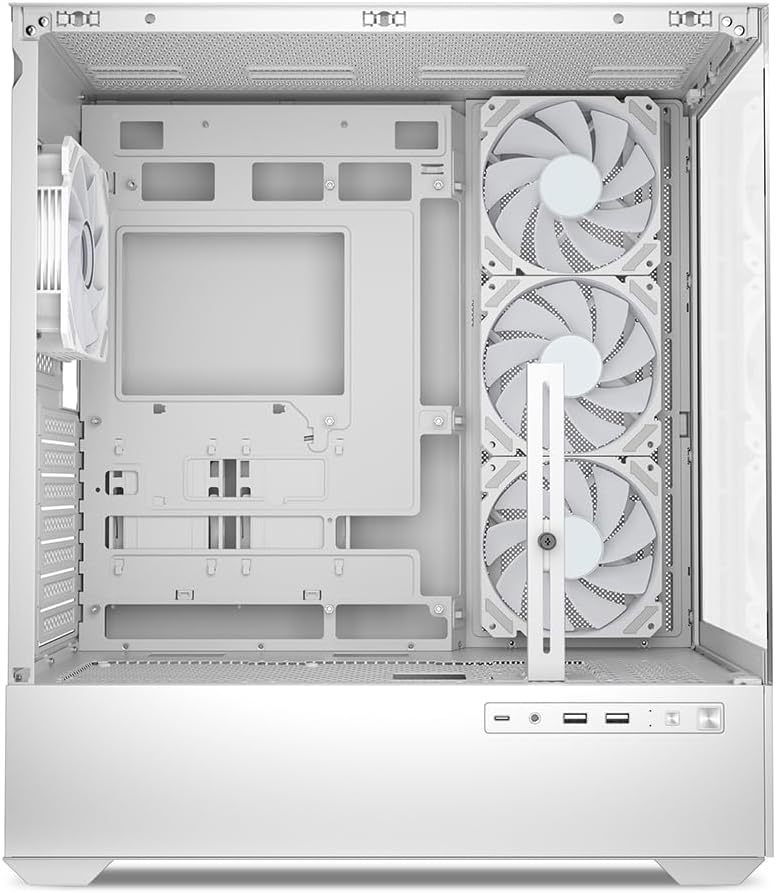
Рисунок 5.1: Интерьер view of the Sharkoon AK6 RGB PC case, illustrating the motherboard tray, cable management cutouts, and front fan mounting points.
5.3 Установка блока питания
The case features a bottom-mount power supply design.
- Вставьте блок питания (БП) в специальный отсек в нижней задней части корпуса.
- Align the PSU with the screw holes at the rear of the case.
- Закрепите блок питания с помощью прилагаемых винтов.
5.4 Установка запоминающего устройства
The AK6 RGB supports up to two 3.5" HDDs or four 2.5" SSDs.
- Для 3.5-дюймовых жестких дисков: Locate the drive cages beneath the PSU shroud. Slide the HDD into a drive tray and secure it with screws.
- Для SSD-накопителей 2.5 дюйма: SSDs can be mounted on the dedicated brackets behind the motherboard tray or on the 3.5" drive trays using adapter screws.
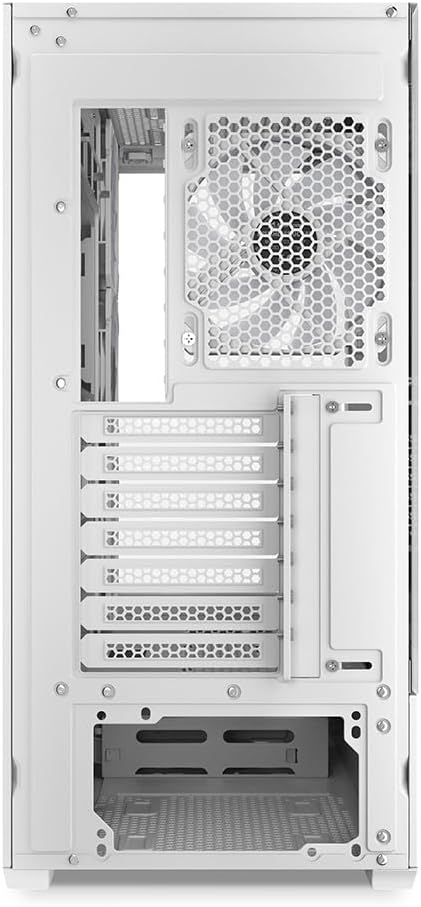
Рисунок 5.2: Задняя часть салона view of the Sharkoon AK6 RGB PC case, detailing the drive cages for 3.5-inch HDDs and 2.5-inch SSDs, and the power supply shroud area.
5.5 Установка видеокарты и платы расширения
- Снимите необходимые заглушки слотов расширения на задней панели корпуса.
- Вставьте видеокарту или другие платы расширения в соответствующие слоты PCIe на материнской плате.
- Secure the cards with screws. The case includes a rubberized graphics card support for larger cards.
5.6 CPU Cooler and Radiator Installation
The case supports CPU coolers up to 17 cm in height and allows for extensive liquid cooling setups.
- Установите кулер процессора в соответствии с инструкциями производителя.
- For liquid cooling, the case can accommodate a 360mm radiator at the top and an additional 280mm radiator.
5.7 Управление кабелями
Используйте вырезы и точки крепления кабелей за лотком материнской платы для прокладки и фиксации проводов. Это улучшит циркуляцию воздуха и внешний вид.
6. Инструкция по эксплуатации
6.1 Включение
After all components are installed and cables are connected, replace the side panels. Connect the power cable to your PSU and a wall outlet, then press the power button on the front I/O panel to start your system.
6.2 Управление RGB-вентилятором
The AK6 RGB comes with four pre-installed addressable RGB PWM fans. These fans are connected to an RGB controller which also provides connections for up to four LED elements and four PWM fans. The RGB lighting can typically be controlled via your motherboard's RGB software (if compatible) or through a dedicated button on the case (if present and connected).
6.3 Оптимизация воздушного потока
The case is designed for ideal airflow, with three inverted fans drawing air from the side into the case. The top and rear fan mounts allow for additional exhaust fans. Ensure proper fan orientation for optimal cooling performance.

Рисунок 6.1: Example of a fully assembled system within the Sharkoon AK6 RGB PC case, featuring various components and active RGB lighting.
7. Техническое обслуживание
Regular maintenance helps ensure the longevity and performance of your PC components.
- Пылевые фильтры: Periodically clean the removable dust filters (e.g., on the top and bottom) to maintain optimal airflow and prevent dust buildup inside the case. Use compressed air or a soft brush.
- Стеклянные панели: Очищайте панели из закаленного стекла мягкой безворсовой тканью и средством для чистки стекол. Избегайте использования абразивных материалов, которые могут поцарапать поверхность.
- Чистка салона: Для удаления пыли с внутренних компонентов и вентиляторов используйте сжатый воздух. Перед чисткой убедитесь, что система выключена и отсоединена от сети.
8. Поиск Неисправностей
If you encounter issues with your PC case, refer to the following common troubleshooting steps:
- Нет питания: Ensure the power supply is properly connected to the wall outlet and the motherboard. Check all internal power cables (24-pin ATX, 8-pin CPU, PCIe power).
- Вентиляторы не вращаются/RGB не работает: Verify that all fan and RGB cables are correctly connected to the motherboard or the included RGB controller. Check your motherboard's BIOS/UEFI settings or RGB software for fan speed and lighting control.
- Передние порты ввода/вывода не работают: Confirm that the front panel connectors (USB, audio, power/reset switches) are correctly plugged into the corresponding headers on your motherboard.
- Перегрев: Ensure all fans are spinning correctly and oriented for proper airflow. Clean dust filters and internal components. Verify CPU cooler installation.
For further assistance, please contact Sharkoon support.
9. Технические характеристики
| Особенность | Спецификация |
|---|---|
| Бренд | Шаркун |
| Название модели | АК6 РГБ |
| Номер модели | C-AK6W |
| Тип корпуса | Башня ATX |
| Цвет | Белый |
| Материал | Закаленное стекло |
| Совместимость с материнской платой | Mini ITX, Micro ATX, ATX, BTF |
| Тип крепления блока питания | Нижнее крепление |
| Метод охлаждения | Воздух |
| Предустановленные вентиляторы | 4 x 120mm Addressable RGB PWM Fans |
| Макс. высота кулера ЦП | 17 см |
| Максимальная длина видеокарты | 41 cm (with rubberized support) |
| Максимальная длина блока питания | 23.5 см |
| Поддержка радиатора | Top: up to 360mm, Additional: up to 280mm |
| Отсеки для дисков | 2 жестких диска по 3.5 дюйма или 4 твердотельных накопителя по 2.5 дюйма |
| Передние порты ввода / вывода | 2 x USB Type-A, 1 x USB Type-C, Audio (TRRS) |
| Вес товара | 6.1 Килограмма |
| Особые возможности | RGB Lighting, Unique Glass Appearance, BTF Motherboard Support |
10. Гарантия
Sharkoon products are manufactured to high quality standards. For detailed warranty information, please refer to the warranty card included with your product or visit the official Sharkoon webГарантия, как правило, распространяется на дефекты материалов и изготовления при нормальной эксплуатации.
11 Поддержка
If you require technical assistance or have questions regarding your Sharkoon AK6 RGB ATX PC Case, please visit the official Sharkoon website for support resources, FAQs, and contact information. You may also find updated drivers or software for the RGB controller there.
Webсайт: www.sharkoon.com


