1. Введение
Thank you for choosing the LEVN LM101 Wireless Microphone System. This system is designed to provide high-quality audio recording for various applications, including vlogging, live streaming, interviews, and content creation. It features dual wireless lavalier microphones, dual receivers (USB-C and Lightning), AI noise cancellation, and a portable charging case, offering extensive compatibility with iOS, Android, and PC devices.
2. Что в коробке
- 2 x Wireless Lavalier Microphones (Transmitters)
- 2 x Receivers (1 x USB-C, 1 x Lightning)
- 1 х чехол для зарядки
- Зарядный кабель 1 x USB-C
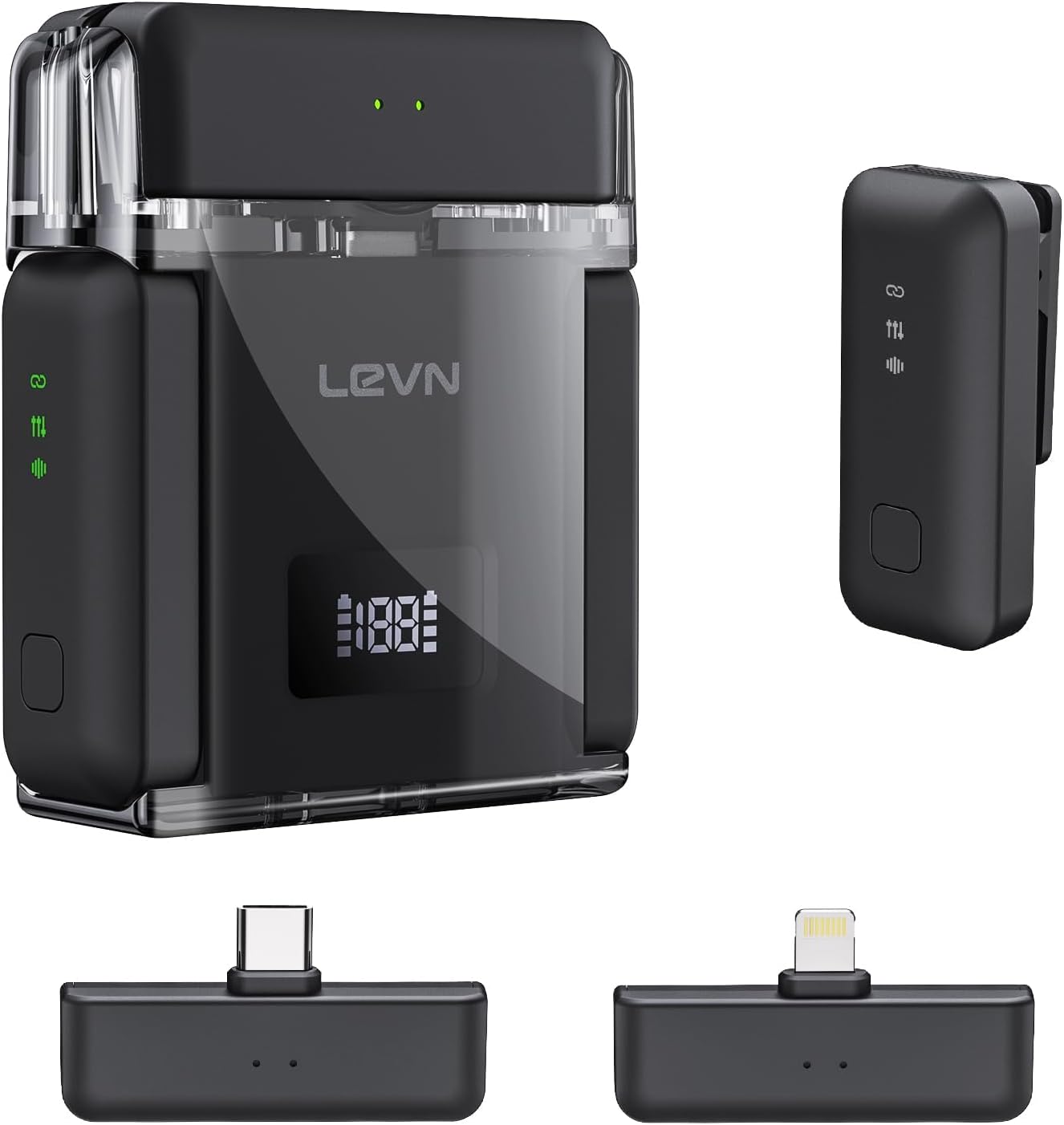
3. Продукт закончилсяview
The LEVN LM101 system consists of two compact wireless lavalier microphones (transmitters), two receivers for broad device compatibility, and a portable charging case. Each microphone features a clip for easy attachment and an omnidirectional pickup pattern. The receivers are designed for direct connection to your recording device's port.
Ключевые компоненты:
- Беспроводные микрофоны: Small, clip-on devices with built-in batteries and AI noise cancellation.
- Приемники: USB-C and Lightning connectors for compatibility with various smartphones, tablets, and computers.
- Зарядный футляр: Stores and recharges the microphones, extending their operational time.
4. Инструкции по настройке
4.1 Зарядка системы
Before first use, ensure all components are fully charged. Place the microphones into the charging case. Connect the charging case to a power source using the provided USB-C cable. The charging case provides up to 30 hours of extended battery life for the microphones, with approximately 6 hours of continuous recording per microphone on a single charge. The charging time for the case is less than 1.5 hours.

4.2 Подключение приемника
- Identify the correct receiver for your device: USB-C for Android phones, PCs, and newer iPhones/iPads; Lightning for older iPhones/iPads.
- Plug the appropriate receiver directly into your recording device's charging/data port.
- The receiver's green indicator light will illuminate, signifying it is ready to connect.

4.3 Автоматическое сопряжение
Once the receiver is plugged in and powered on, simply take the microphones out of the charging case. The microphones will automatically power on and pair with the receiver. No manual pairing steps are required. The receiver's green light will remain steady, indicating a successful connection and readiness for recording.
5. Инструкция по эксплуатации
5.1 Запись звука
- Ensure the microphone is securely clipped to your clothing, ideally near your mouth for optimal sound capture.
- Confirm the receiver is connected to your device and the green indicator light is solid.
- Open your preferred recording application (e.g., camera app, voice recorder, streaming software) on your smartphone, tablet, or PC.
- Start recording. The system will automatically capture audio through the wireless microphone.

5.2 Шумоподавление с использованием ИИ
The LEVN LM101 features 3-level AI noise cancellation (Weak/Medium/Strong) to reduce ambient noise. To activate or adjust the noise cancellation, press the dedicated noise reduction button on the microphone. A single press will cycle through the noise reduction levels. This feature is particularly useful in noisy environments to ensure clear voice capture.

5.3 Радиус действия беспроводной связи
The system offers a stable wireless transmission range of up to 328 feet (100 meters) in open environments. This allows for flexible recording setups without compromising audio quality or signal stability.

5.4 Разнообразные сценарии
The LEVN LM101 is suitable for a wide array of content creation scenarios, including:
- Vlogging and YouTube videos
- Live streaming on various platforms
- Интерviews and podcasts
- Online meetings and presentations

6. Техническое обслуживание
- Уборка: Use a soft, dry cloth to clean the microphones, receivers, and charging case. Avoid using liquids or abrasive cleaners.
- Хранилище: Store the system in its charging case when not in use to protect it from dust and damage. Keep it in a cool, dry place away from direct sunlight and extreme temperatures.
- Уход батареи: For optimal battery longevity, avoid fully discharging the batteries frequently. Recharge the system regularly, even if not in constant use.
7. Поиск Неисправностей
- Нет звука/низкая громкость:
- Убедитесь, что приемник полностью вставлен в порт вашего устройства.
- Check if the microphone is powered on and paired (solid green light on receiver).
- Verify your device's audio input settings are configured to use the external microphone.
- Adjust the recording volume within your recording application.
- Помехи/плохое качество звука:
- Move closer to the receiver to reduce potential signal dropouts.
- Ensure there are no major obstructions (e.g., thick walls, large metal objects) between the microphone and receiver.
- Activate or adjust the AI noise cancellation feature on the microphone.
- Avoid using the system near other strong wireless signals (Wi-Fi routers, other 2.4Ghz devices).
- Микрофон не заряжается:
- Ensure the microphones are correctly seated in the charging case.
- Verify the charging case is connected to a working power source and the USB-C cable is functional.
- Проверьте уровень заряда батареи зарядного чехла.
8. Технические характеристики
| Особенность | Деталь |
|---|---|
| Название модели | ЛМ101 |
| Бренд | ЛЕВН |
| Форм-фактор микрофона | Петличный |
| Технология связи | Беспроводная связь (2.4G) |
| Тип разъема | Lightning, USB Type-C |
| Совместимые устройства | Laptop, Smartphone (iOS & Android) |
| Дальность беспроводной связи | До 328 футов (100 м) |
| Battery Life (Microphone) | До 6 часов (непрерывная запись) |
| Общее время работы аккумулятора (с зарядным чехлом) | До 30 часов |
| Время зарядки (кейс) | Менее 1.5 часов |
| Особые возможности | 1-Touch Recording, Battery Indicator Light, Clip, 3-Level AI Noise Reduction |
| Полярная диаграмма | Всенаправленный |
| Вес товара | 0.11 килограмма (3.87 унции) |
| Количество каналов | 2 |
9. Гарантия и поддержка
Подробная информация о гарантии и контактные данные службы поддержки отсутствуют в имеющихся данных о продукте. Пожалуйста, обратитесь к упаковке продукта или официальному сайту производителя. website for warranty claims and customer support inquiries.


