1. Введение
Thank you for choosing the EvoFox Ronin Wired Mechanical Gaming Keyboard. This manual provides detailed instructions for setting up, operating, and maintaining your keyboard to ensure optimal performance and longevity. The EvoFox Ronin is designed for a superior typing and gaming experience, featuring advanced sound dampening, customizable switches, and dynamic RGB lighting.

Image 1.1: EvoFox Ronin Wired Mechanical Gaming Keyboard (Black)
Основные характеристики:
- 9-Layer Gasket Structure: Advanced design for reduced noise, improved stability, and enhanced tactile feedback.
- Hot-Swappable Outemu Red Silent Switches: Customizable, durable, and smooth typing experience with included switch puller.
- Per-Key RGB Backlighting: 21 effects and Audio Sync Mode for personalized and immersive lighting.
- Специальная ручка регулировки громкости: Convenient control over audio levels.
- Powerful Windows Software: Program keys, create macros, control backlighting, and manage profiles with onboard memory.
- Кроссплатформенная совместимость: Easily switch between Windows and Mac modes.
- Detachable Braided USB-C Cable: Robust 1.5m cable with EMI ring for reliable connection and portability.
2. Содержимое упаковки
Пожалуйста, проверьте наличие всех предметов в вашей посылке:
- 1 x EvoFox Ronin Mechanical Gaming Keyboard
- 1 x Съемник клавиш
- 4 x Outemu Red Switches (Spare)
- 1 х Руководство пользователя
3. Продукт закончилсяview
3.1 Конструкция прокладки
The EvoFox Ronin features an advanced 9-layer gasket structure. This design incorporates silicone gaskets, a mounting plate, and multiple layers of vibration and sound dampening materials to provide a stable, quiet, and comfortable typing experience by minimizing unwanted noise and resonance.
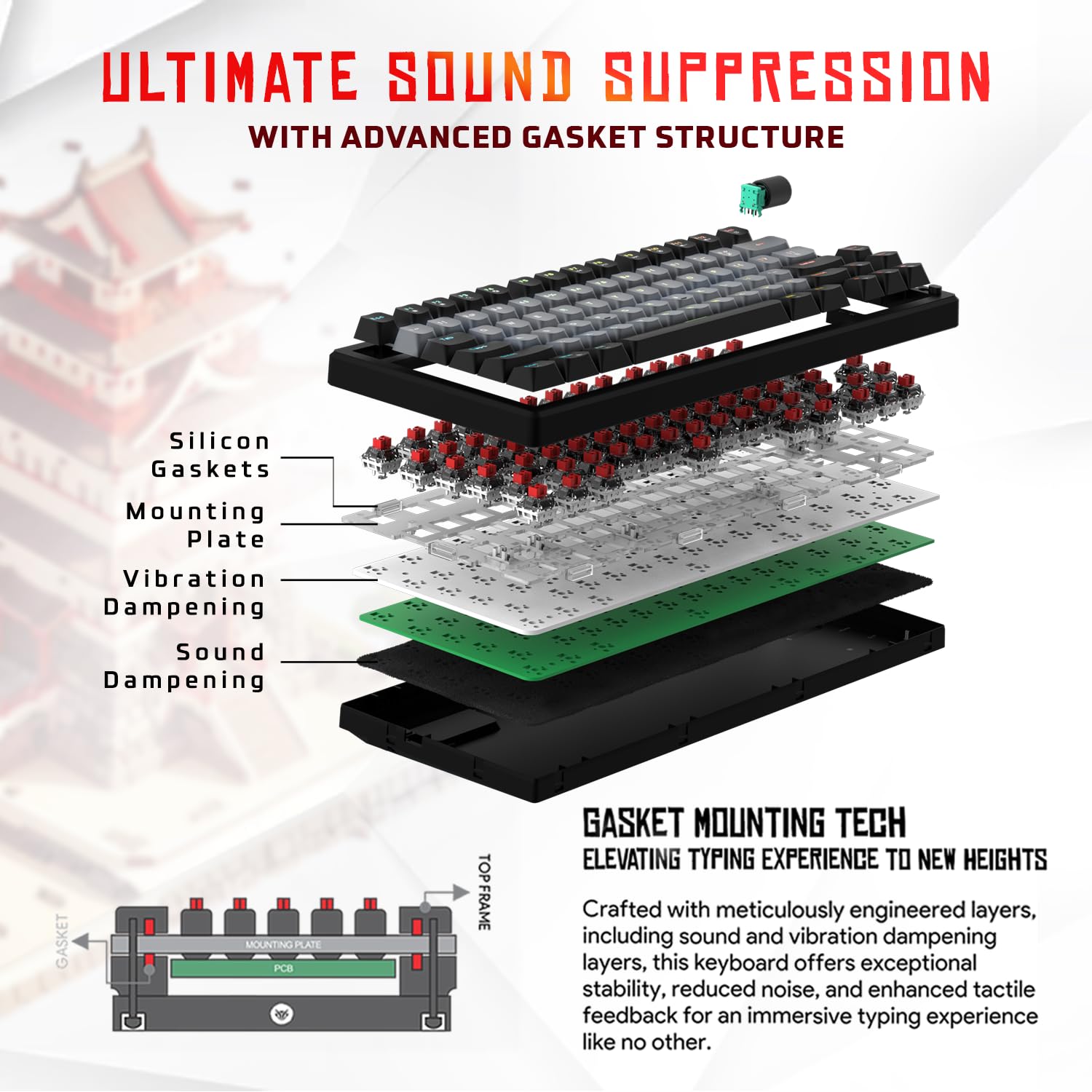
Изображение 3.1: В разобранном виде view of the 9-layer gasket structure, showing silicone gaskets, mounting plate, and dampслои образования.
3.2 Outemu Red Silent Switches
The keyboard is equipped with Outemu Red Dust Proof Switches, known for their linear and silent operation. These switches are hot-swappable, allowing users to easily replace them with other compatible 3-pin mechanical switches without soldering, enabling full customization of the typing feel.

Image 3.2: Close-up of Outemu Red switches and the included switch puller, demonstrating hot-swappable functionality.
3.3 Per-Key RGB Backlighting
Each key on the EvoFox Ronin features individual RGB backlighting, offering 16 million colors and 21 pre-set lighting effects. The lighting can be customized directly on the keyboard or through the dedicated software, including an Audio Sync Mode that reacts to sound.

Image 3.3: The EvoFox Ronin keyboard showcasing. Настраиваемая RGB-подсветка каждой клавиши.
3.4 Dedicated Volume Knob
A metal volume knob is integrated into the keyboard for quick and precise audio adjustments. Rotate to change volume, and press to mute/unmute.
3.5 Detachable USB-C Cable
The keyboard connects via a robust 1.5-meter braided USB-C cable, which is detachable for easy portability and storage. The cable includes an EMI ring to minimize signal interference.

Image 3.4: Features of the EvoFox Ronin, including the volume knob, detachable USB-C cable, and double-height adjustable legs.
4. Инструкции по настройке
Follow these steps to set up your EvoFox Ronin keyboard:
- Распакуйте клавиатуру: Осторожно извлеките клавиатуру и все аксессуары из упаковки.
- Подключите кабель USB-C: Insert the USB-C end of the provided cable into the port on the back of the keyboard.
- Подключиться к компьютеру: Подключите разъем USB-A кабеля к свободному USB-порту на вашем компьютере (ПК или Mac).
- Установка драйвера: Клавиатура работает по принципу Plug-and-Play. Ваша операционная система должна автоматически обнаружить и установить необходимые драйверы.
- Дополнительная установка программного обеспечения: For advanced customization, download the dedicated Windows software from the official EvoFox webсайт.
5. Инструкция по эксплуатации
5.1 Основные функции клавиш
The EvoFox Ronin functions as a standard TKL (Tenkeyless) keyboard. All keys perform their labeled functions. The keyboard supports N-Key Rollover, ensuring every key press is registered accurately, even during rapid input.
5.2 Мультимедийные и функциональные клавиши
Access multimedia and additional functions by pressing the Fn key in combination with the designated F-keys or other keys. Refer to the keycap legends for specific functions (e.g., Fn + F1 for media player, Fn + F2 for volume down).
5.3 Управление RGB-подсветкой
You can control the RGB lighting directly from the keyboard:
- Эффекты изменений: Использовать Фн + \| для переключения между 21 различными световыми эффектами.
- Отрегулируйте яркость: Использовать Fn + Стрелка вверх увеличить яркость и Fn + стрелка вниз для уменьшения яркости.
- Отрегулируйте скорость: Использовать Fn + стрелка влево уменьшить скорость действия и Fn + стрелка вправо для увеличения скорости действия.
- Audio Sync Mode: Activate specific modes that react to audio input.
5.4 Настройка программного обеспечения
The dedicated Windows software allows for comprehensive customization:
- Ключевое программирование: Переназначьте любую клавишу на другую функцию.
- Создание макроса: Записывать и назначать сложные последовательности клавиш одной клавише.
- Эффекты подсветки: Fine-tune RGB colors, effects, brightness, and speed.
- Профиfile Управление: Создайте и сохраните несколько профессиональныхfileдля различных приложений или игр.
- Скорость опроса: Увеличьте частоту опроса до 1000 Гц.

Image 5.1: Screenshot of the EvoFox Ronin's dedicated software, showing options for light settings, button settings, and macro management.
5.5 Cross-Platform Compatibility
The keyboard supports both Windows and Mac operating systems. Use the designated key combination (typically Fn + Win or similar, refer to keycap legends) to switch between modes, ensuring correct key mapping for your OS.
6. Техническое обслуживание
6.1 Чистка клавиатуры
Чтобы сохранить внешний вид и функциональность клавиатуры:
- Перед чисткой отсоедините клавиатуру от компьютера.
- Используйте баллончик со сжатым воздухом для удаления пыли и мусора из-под клавишных колпачков.
- Протирайте клавиши и поверхность клавиатуры мягкой, слегка шершавой тканью.amp Ткань. Избегайте чрезмерной влажности.
- Не используйте агрессивные химикаты или абразивные чистящие средства.
6.2 Замена переключателей
The EvoFox Ronin features hot-swappable switches, allowing for easy replacement without soldering:
- Отключите клавиатуру от компьютера.
- Используйте прилагаемый съемник клавиш, чтобы аккуратно снять нужную клавишу.
- С помощью прилагаемого инструмента для снятия выключателя аккуратно захватите верхнюю и нижнюю защелки выключателя и потяните его прямо вверх.
- Align the pins of the new switch with the holes on the PCB and gently press it down until it clicks into place. Ensure the pins are not bent.
- Установите на место колпачок клавиши.

Image 6.1: A keycap being removed from the keyboard using a keycap puller.
7. Поиск Неисправностей
If you encounter issues with your EvoFox Ronin keyboard, refer to the following common solutions:
- Клавиатура не отвечает:
- Убедитесь, что кабель USB-C надежно подключен к клавиатуре и компьютеру.
- Попробуйте подключить клавиатуру к другому USB-порту вашего компьютера.
- Проверьте клавиатуру на другом компьютере, чтобы исключить неполадки, связанные с самим компьютером.
- Перезагрузите компьютер.
- RGB-подсветка не работает/неправильно:
- Check the on-board lighting controls (Fn key combinations) to ensure brightness is not set to zero or an effect is not disabled.
- If using the software, ensure it is running and the correct profile активен.
- Если проблемы сохраняются, переустановите программное обеспечение клавиатуры.
- Ключи не регистрируются:
- Убедитесь, что под клавишной крышкой или переключателем нет мусора.
- If a specific key is not working, try replacing its switch (refer to Section 6.2).
- Check for bent pins on the switch if you recently replaced one.
- Software Issues (e.g., Antivirus Flagging):
- Ensure you download the software from the official EvoFox website to avoid unofficial versions.
- If your antivirus flags the software, you may need to add an exception for the software's executable file. Proceed with caution and only if you trust the source.
- Contact EvoFox support for the latest software version or assistance.
8. Технические характеристики
| Особенность | Деталь |
|---|---|
| Бренд | ЭвоФокс |
| Название модели | EvoFox Ronin TKL Wired |
| Описание клавиатуры | Механический |
| Технология связи | USB-C (проводной) |
| Переключатели | Outemu Red Silent Dust Proof Switches (Hot-Swappable) |
| Подсветка | Per-Key RGB (16 Million Colors, 21 Effects, Audio Sync Mode) |
| Скорость опроса | До 1000 Гц |
| Переключение ключей | N-Key Rollover (All Anti-Ghosting Keys) |
| Особые возможности | Advanced Gasket Structure, Compact TKL Design, Multimedia Keys, Pro Mod Hotswap Module, Powerful Windows Software, Dedicated Volume Controller |
| Совместимые устройства | Ноутбук, ПК |
| Аппаратная платформа | ПК/Мак/Линук/Юникс |
| Длина кабеля | 1.5m Detachable Braided Type-C with EMI Ring |
| Материал | Пластик |
| Размеры продукта | 32 х 13.5 х 2.6 см |
| Вес товара | 640 г |
| Страна происхождения | Китай |
9. Гарантия и поддержка
The EvoFox Ronin Mechanical Gaming Keyboard comes with a standard manufacturer's warranty. Please refer to the warranty card included in your package for specific terms and conditions, including warranty period and coverage details.
For technical support, troubleshooting assistance, or warranty claims, please contact EvoFox customer support. You can find contact information on the official EvoFox website or through the manufacturer, Allied Electronics & Magnetics Private Limited.
Производитель: Allied Electronics & Magnetics Private Limited
Адрес: C-64/4, Okhla Phase - 2, New Delhi - 110020


