1. Введение
The JSAUX HB0609 6-in-1 Multifunctional Docking Station is designed to enhance the functionality and connectivity of your portable gaming handhelds. This modular docking station provides a comprehensive solution for expanding your device's capabilities, offering high-resolution video output, stable network connectivity, and multiple USB ports for peripherals, all while ensuring efficient power delivery.

Image: The JSAUX HB0609 docking station connected to a handheld gaming device, showcasing благодаря компактному дизайну и встроенному кабелю.
2. Особенности продукта
- Возможность подключения 6-в-1: Features HDMI 4K@120Hz output, Gigabit Ethernet, USB-C Power Delivery (PD) charging, one USB-C 3.2 Gen 1 port, and two USB-A 3.2 Gen 1 ports.
- Вывод видео высокого разрешения: Supports crisp 4K@120Hz or 1080P@240Hz HDMI output for vivid gaming visuals on external displays.
- Модульная конструкция: The docking station can be used with the gaming console directly on the base, or the base can be detached for standalone use as a stand.
- Настройка: Allows for personalization by adding a custom card between the front cover and the dock.
- Эффективная зарядка: Supports up to 100W max power delivery, enabling full-speed charging for compatible handhelds when paired with an appropriate charger.

Изображение: Подробный view of the JSAUX HB0609 docking station highlighting its various ports: USB-C (5Gbps), USB-A (5Gbps), Gigabit Ethernet, HDMI 2.1 (4K@120Hz), and USB-C (PD 100W input).
3. Совместимость
The JSAUX HB0609 Docking Station is compatible with a wide range of portable gaming handhelds, including:
- ROG Xbox Ally X (2025)
- ROG Xbox Ally (2025)
- ROG Ally X
- Союзник ROG
- Паровая палуба
- Легион Идти
- Легион Идти S
- Razer Эдж
- АЯ НЕО
- AYA ODIN
- Logitech G Cloud
- ОНЕXPLAYER

Image: A visual compatibility list displaying several handheld gaming consoles, including ROG Ally, Steam Deck, and Legion Go, positioned on the JSAUX docking station.
4. Инструкции по настройке
4.1. Распаковка и компоненты
The JSAUX HB0609 docking station consists of two main parts: the hub with integrated USB-C cable and the detachable stand base. An extra silicone pad is included for optimal fit with various devices.
4.2. Подключение питания
- Connect a USB-C Power Delivery (PD) charger to the 'PD 100W' USB-C input port on the back of the docking station.
- Важное примечание: For optimal performance and to avoid 'Not enough power to charge efficiently' messages, a PD 100W charger is recommended. Using a 65W or lower PD charger may result in slower charging speeds, especially during active gameplay.
4.3. Handheld Device Connection
- Place your handheld gaming device onto the stand base.
- Connect the integrated USB-C cable from the docking station to the USB-C port on your handheld device.
- If using a thinner device like the Steam Deck, attach the extra silicone pad to the stand base for a more secure fit and improved stability.

Image: A handheld gaming device docked with various cables connected to the JSAUX docking station, including USB devices and an Ethernet cable, demonstrating its expanded connectivity.
4.4. Подключение внешнего дисплея
- Connect an HDMI cable from the HDMI output port on the docking station to your external display (TV, monitor, projector).
- Убедитесь, что ваш дисплей настроен на правильный источник входного сигнала HDMI.
4.5. Периферийные подключения
Connect your desired peripherals to the available ports:
- Гигабитный Ethernet: Connect an Ethernet cable to the RJ45 port for a stable and fast wired internet connection.
- Устройства с разъемом USB-A: Use the two USB-A 3.2 Gen 1 ports for connecting external keyboards, mice, game controllers, or other USB accessories.
- Устройства USB-C: Use the USB-C 3.2 Gen 1 port for connecting compatible USB-C peripherals.
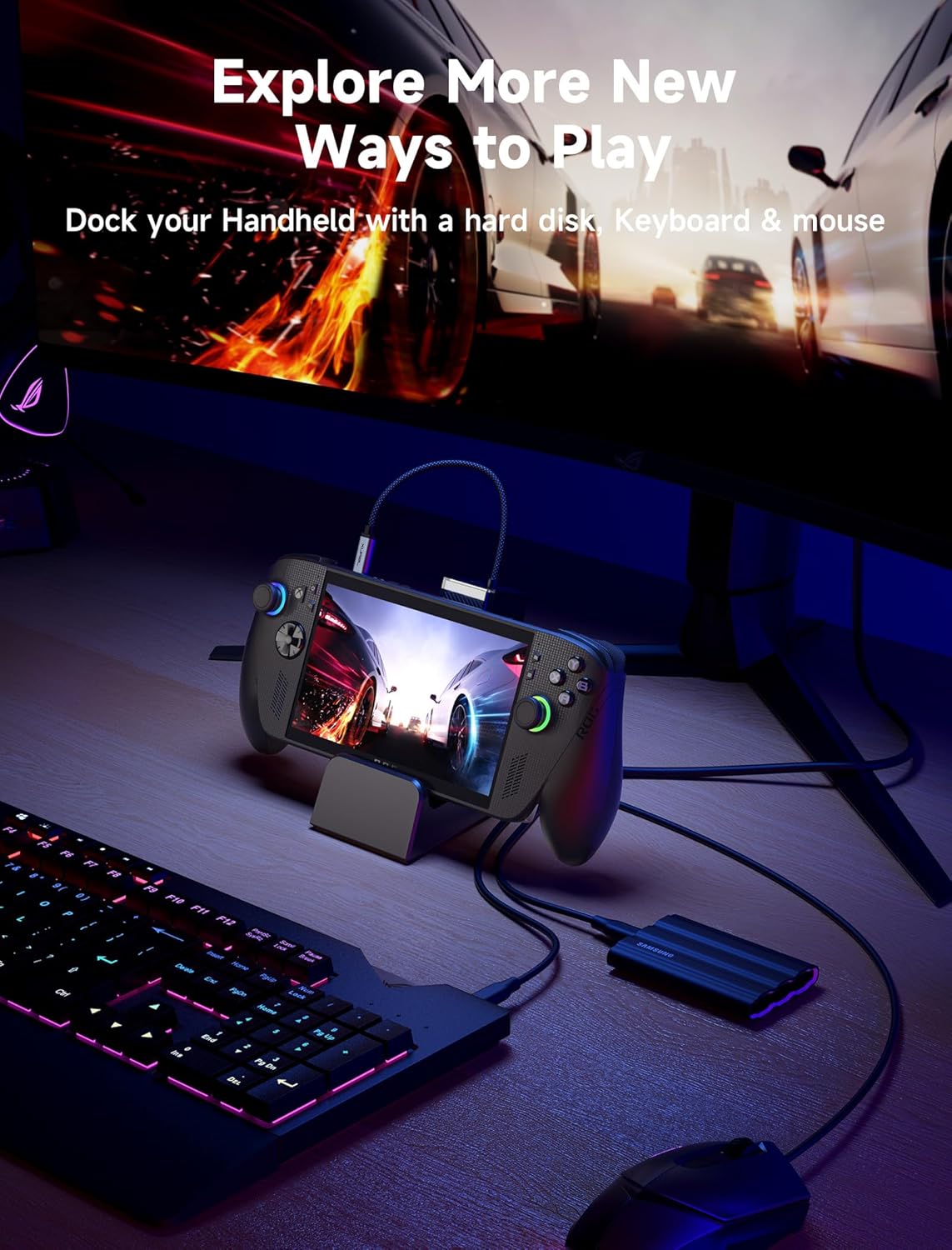
Image: A handheld gaming device docked with the JSAUX station, connected to an external monitor, keyboard, mouse, and a portable hard drive, illustrating a full desktop gaming setup.
5. Инструкция по эксплуатации
5.1. Вывод на экран
Once connected to an external display via HDMI, your handheld device should automatically detect and output video. You can configure display settings on your handheld for optimal resolution and refresh rate:
- For 4K resolution, select 3840x2160 at 120Hz.
- For 1080P resolution, select 1920x1080 at 240Hz.

Image: A handheld gaming device docked and displaying a vibrant game on a large external monitor, emphasizing the 4K@120Hz HDMI output capability of the JSAUX docking station.
5.2. Функция зарядки
The docking station provides up to 100W Power Delivery to your connected handheld device. Ensure your power adapter is capable of delivering sufficient wattage for fast charging, especially during demanding tasks or gaming sessions.

Image: A handheld gaming device docked and connected to a 100W power source via the JSAUX docking station, indicating fast charging capabilities.
5.3. Сетевое подключение
Utilize the Gigabit Ethernet port for a more reliable and faster internet connection compared to Wi-Fi, which is beneficial for online gaming and large downloads.

Image: A close-up of the JSAUX docking station's Ethernet port, with a graphic illustrating the speed advantage of Gigabit Ethernet (1000Mbps) over typical Wi-Fi (30Mbps).
5.4. Customizing Your Dock
The docking station features a customizable front panel. To personalize:
- Gently remove the front cover of the dock.
- Insert a custom card (recommended size: 3.00" x 1.13" x 0.01" / 76.3mm x 28.7mm x 0.3mm) into the designated slot.
- Установите крышку на место.

Image: An illustration demonstrating the DIY customization feature of the JSAUX docking station, showing how to insert a custom card behind the front panel.
6. Техническое обслуживание
To ensure the longevity and optimal performance of your JSAUX HB0609 Docking Station:
- Содержите устройство в чистоте, протирая его мягкой сухой тканью.
- Avoid exposing the docking station to liquids, excessive moisture, or extreme temperatures.
- Не пытайтесь разбирать или ремонтировать устройство самостоятельно, так как это может привести к аннулированию гарантии.
- Когда док-станция не используется, храните её в прохладном, сухом месте.
7. Поиск Неисправностей
7.1. Power and Charging Issues
- "Not enough power to charge efficiently" message: This message may appear when using a 65W or lower PD charger, as part of the input power is consumed by the dock itself. While it does not affect gameplay, charging speed may be slower. For optimal charging, use a PD 100W charger.
- Устройство не заряжается: Ensure the 100W PD charger is securely connected to the correct USB-C input port on the dock and that the dock's integrated USB-C cable is firmly connected to your handheld device.
7.2. Display Output Issues
- На внешнем мониторе нет изображения: Verify that the HDMI cable is securely connected to both the dock and the monitor. Check the monitor's input source selection. Ensure your handheld device's display settings are correctly configured for external output.
- Неправильное разрешение или частота обновления: Adjust the display settings on your handheld device to match the desired output (e.g., 4K@120Hz or 1080P@240Hz).
- VRR/ALLM Support: The HB0609 dock does not support Variable Refresh Rate (VRR) or Auto Low Latency Mode (ALLM). If these features are required, consider the JSAUX HB0705 dock (Color: Black-RGB Fan Cooling).
7.3. Peripheral Connectivity Issues
- USB-устройства не распознаны: Ensure USB devices are properly inserted into the USB-A or USB-C 3.2 Gen 1 ports. Try connecting the device directly to your handheld to rule out device-specific issues.
- Ethernet connection unstable: Check the Ethernet cable connections at both the dock and your router/modem. Ensure the Ethernet port on the dock is clean and free of debris.
8. Технические характеристики
| Бренд | JSAUX |
| Модель | HB0609 |
| Размеры продукта | 3.35 x 1.93 x 4.92 дюйма (8.51 x 4.90 x 12.50 см) |
| Вес товара | 9.6 унций (0.27 килограмма) |
| аппаратный интерфейс | Ethernet, HDMI, USB 3.0 Type A, USB 3.0 Type C, USB Docking Station, USB Type C |
| Общее количество портов USB | 4 (2x USB-A 3.2 Gen 1, 1x USB-C 3.2 Gen 1, 1x USB-C PD 100W input) |
| Всего портов HDMI | 1 (HDMI 2.1, supports 4K@120Hz, 1080P@240Hz) |
| Количество портов | 6 |
| Ватtage | 100 Вт (Power Delivery) |
| Производитель | Shenzhen Wuyishi Technology Co.,Ltd |
9. Гарантия и поддержка
For warranty information, technical support, or further assistance, please visit the official JSAUX website or contact their customer service directly. Details regarding product registration and support channels can typically be found on the manufacturer's webна сайте или внутри упаковки продукта.
Производитель: Shenzhen Wuyishi Technology Co.,Ltd
JSAUX Official Webсайт: www.jsaux.com


