Введение
The Sound Oasis Baby Sound Machine with Bluetooth is designed to create a soothing and familiar sound environment for infants, promoting relaxation and sleep. This portable device features 20 built-in sounds, Bluetooth connectivity for streaming, and a rechargeable battery for use at home or while traveling.

Image: The Sound Oasis Baby Sound Machine positioned near a sleeping baby, illustrating its purpose in aiding relaxation and sleep.
Информация по безопасности
Please read and understand the following safety guidelines before using the Sound Oasis Baby Sound Machine:
- Avoid prolonged exposure of infants to loud sounds. Ensure the volume level is set appropriately for a baby's sensitive hearing.
- Handle the device with care to prevent electric shock. Do not expose to water or excessive moisture.
- Keep the device out of reach of children when not in use or when charging to prevent accidental damage or ingestion of small parts.
- Используйте только прилагаемый USB-кабель для зарядки или сертифицированный аналог.
Содержимое упаковки
Проверьте наличие всех предметов в упаковке:
- Sound Oasis Baby Sound Machine (Model BST-80-20B)
- USB-кабель для зарядки
- Руководство по эксплуатации (данный документ)
- Micro SD Card (pre-loaded with 20 sounds)
- Help Booklet for New Parents

Изображение: Оверview of the Sound Oasis Baby Sound Machine package contents, showing the device, USB charging cable, instruction manual, and a removable SD card.
Продукт болееview
The Sound Oasis Baby Sound Machine features a compact design with intuitive controls.

Изображение: Спереди view of the Sound Oasis Baby Sound Machine, highlighting the control buttons and the blue LED indicator light.
Элементы управления и порты:
- Кнопка уменьшения громкости (-): Уменьшает громкость звука.
- Play/Pause/Sound Select Button (Circle):
- Press once to play/pause the current sound.
- Press and hold to cycle through the built-in sounds.
- Кнопка увеличения громкости (+): Увеличивает громкость звука.
- Светодиодный индикатор: Отображает состояние питания, состояние зарядки и состояние сопряжения Bluetooth.
- Порт Micro USB: Для зарядки устройства.
- Слот для карты Micro SD: Allows for changing or adding sound files.

Изображение: крупный план view of the Micro SD card slot on the side of the sound machine, with an SD card partially inserted.
Настраивать
1. Зарядка устройства
Before first use, fully charge the sound machine. Connect the supplied USB charging cable to the Micro USB port on the device and the other end to a USB power adapter (not included) or a computer's USB port.
- Светодиодный индикатор будет отображать состояние зарядки (например, красный — зарядка, выключенный — полная зарядка).
- Полная зарядка обеспечивает приблизительно 4–5 часов непрерывной работы.

Image: The Sound Oasis Baby Sound Machine with the USB charging cable connected, illustrating the charging process.
2. Inserting/Changing the Micro SD Card
The device comes with a Micro SD card pre-loaded with 20 doctor-developed sounds. To change or add sounds:
- Найдите слот для карты Micro SD на боковой панели устройства.
- Gently push the existing Micro SD card until it clicks and ejects. Remove it.
- Insert a new Micro SD card (with desired sound fileвставьте в паз до щелчка.
- Ensure the device is powered off before inserting or removing the SD card.
Инструкция по эксплуатации
1. Включение/выключение питания
To power on the device, press and hold the Play/Pause/Sound Select button (circle) for a few seconds until the LED indicator lights up. To power off, press and hold the same button until the LED indicator turns off.
2. Playing Built-in Sounds
Once powered on, the device will automatically start playing the last selected sound or the first sound on the SD card.
- Выбор звука: Press and hold the Play/Pause/Sound Select button (circle) to cycle through the 20 available sounds. Release the button when your desired sound is playing.
- Регулятор громкости: Use the Volume Up (+) and Volume Down (-) buttons to adjust the sound level.
- Пауза/Воспроизведение: Press the Play/Pause/Sound Select button (circle) once to pause or resume playback.
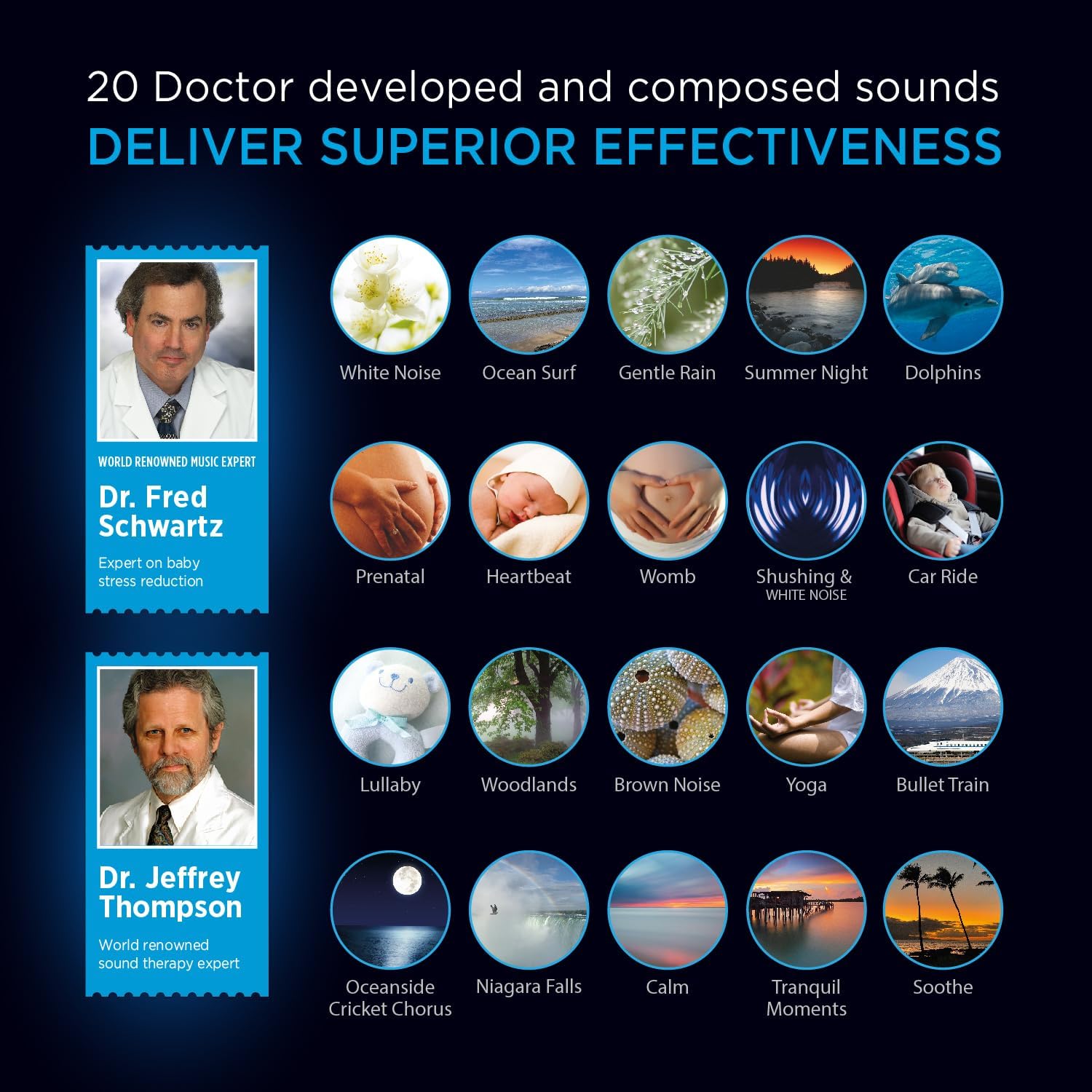
Image: A visual representation of the 20 doctor-developed sounds available on the Sound Oasis Baby Sound Machine, including categories like White Noise, Ocean Surf, Prenatal, and Lullaby.
3. Сопряжение по Bluetooth
The Sound Oasis Baby Sound Machine can stream audio wirelessly from your mobile device or computer.
- Ensure the sound machine is powered on.
- Активируйте Bluetooth на своем мобильном устройстве или компьютере.
- Искать available devices and select "Sound Oasis" from the list.
- The LED indicator on the sound machine will change to indicate a successful connection (e.g., solid blue).
- You can now stream audio from your device to the sound machine. The wireless range is approximately 30 feet (10 meters).

Image: A hand holding a smartphone, demonstrating the use of a mobile device to stream sounds or music to the Sound Oasis Baby Sound Machine via Bluetooth.
4. Sound Oasis Baby App
A complimentary Sound Oasis Baby App is available to enhance your experience. Refer to the included Help Booklet for details on downloading and using the app to access additional features or manage sounds.
Обслуживание
- Уборка: Протирайте устройство мягкой сухой тканью. Не используйте жидкие чистящие средства или абразивные материалы.
- Хранилище: Храните устройство в прохладном, сухом месте, вдали от прямых солнечных лучей и экстремальных температур.
- Уход батареи: Для оптимального срока службы аккумулятора избегайте частой полной разрядки. Регулярно заряжайте устройство, даже если оно не используется постоянно.
Поиск неисправностей
| Проблема | Возможное решение |
|---|---|
| Устройство не включается. | Ensure the device is charged. Connect to a power source using the USB cable. |
| Нет звука или низкая громкость. | Check volume levels using the (+) button. Ensure a sound is selected and not paused. If using Bluetooth, check volume on both the device and the streaming source. |
| Невозможно подключиться через Bluetooth. | Ensure Bluetooth is enabled on your streaming device and the sound machine is in pairing mode. Move closer to the sound machine. Try unpairing and re-pairing. |
| Sounds are not changing. | Press and hold the Play/Pause/Sound Select button (circle) to cycle through sounds. Ensure the Micro SD card is properly inserted. |
Технические характеристики
- Номер модели: BST-80-20B
- Размеры: 5 x 3 x 3 дюйма
- Масса: 8 унции
- Аккумулятор: 1 литий-ионный аккумулятор (входит в комплект)
- Источник питания: Battery Powered / USB Charging
- Материал: Металл
- Диапазон Bluetooth: Приблизительно 30 футов (10 метра)
- Время выполнения: 4-5 часа на одном заряде
Гарантия и поддержка
For warranty information or technical support, please contact Sound Oasis customer service. Refer to the Sound Oasis website or the included Help Booklet for contact details.
Интернет-ресурсы:
Правовая оговорка
Statements regarding dietary supplements have not been evaluated by the FDA and are not intended to diagnose, treat, cure, or prevent any disease or health condition. This product is intended to provide a soothing sound environment and is not a medical device.


