1. Введение
The BUSICOM PC-SeaV15c is a 15-inch Windows IoT touch panel PC designed for commercial and industrial applications. This manual provides essential information for the safe and efficient setup, operation, and maintenance of your device. Please read this manual thoroughly before using the product and retain it for future reference.
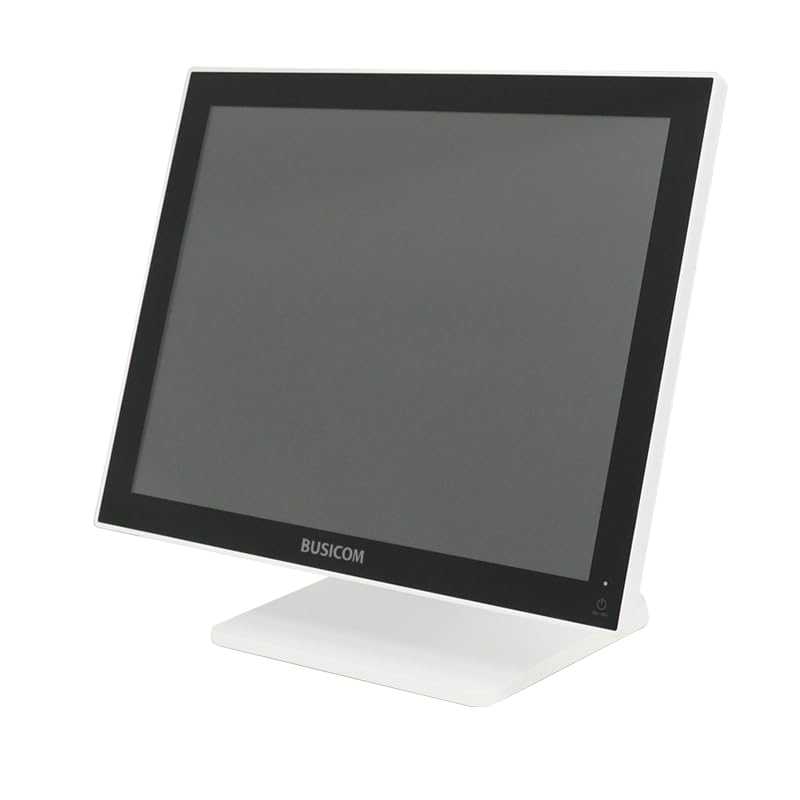
Рисунок 1: Передняя часть view of the BUSICOM PC-SeaV15c Touch Panel PC.
2. Продукт закончилсяview
2.1 Основные характеристики
- Расширенный дизайн: Features an ultra-thin bezel and a highly durable 7H reinforced display for enhanced aesthetics and protection.
- Превосходная производительность: Equipped with Microsoft Windows 10 IoT Enterprise, ensuring long-term support and reliable operation.
- Интуитивно понятная сенсорная панель: Utilizes a capacitive touch method, offering a familiar and responsive touch experience similar to smartphones and tablets.
- Простота обслуживания: Designed for simple RAM and SSD replacement, facilitating upgrades and servicing.
- Универсальные интерфейсы: Provides a wide range of connectivity options to integrate with various peripherals.
- Эффективное хранение: SSD storage ensures fast processing speeds, quiet operation, and excellent shock resistance.
2.2 Компоненты
The package typically includes the BUSICOM PC-SeaV15c unit and a power adapter. Additional accessories may vary.

Figure 2: Front and side profile of the PC-SeaV15c unit.

Рисунок 3: Сзади view showing access panels for RAM and SSD components.
3. Инструкции по настройке
3.1 Распаковка
- Carefully remove the PC-SeaV15c from its packaging.
- Check for any visible damage. If damaged, contact your vendor immediately.
- Убедитесь, что все перечисленные компоненты присутствуют.
3.2 Подключение периферийных устройств
Refer to the interface diagram below for port locations and types.

Figure 4: Detailed diagram of the PC-SeaV15c's rear and bottom interfaces.
- Подключение питания: Connect the provided power adapter to the DC In port and then to a power outlet.
- USB-устройства: Use the USB 2.0 (4 ports) and USB 3.0 (2 ports) for connecting keyboards, mice, printers, and other USB peripherals.
- Подключение к сети: Connect an Ethernet cable to the LAN port for wired network access.
- Аудиовыход: Connect external speakers or headphones to the Audio Out port.
- Serial Ports (RJ45): Utilize COM1, COM2, COM3, and COM6 for connecting specialized POS peripherals such as barcode scanners or receipt printers.
- Cash Drawer (RJ11): Connect a compatible cash drawer to the RJ11 port.
- Внешний дисплей: If an external monitor is required, connect it to the Mini DisplayPort.
- USB-порт типа C: Для совместимых устройств.
3.3 Включение/выключение питания
- Включение питания: Press the power button located on the upper right side of the display bezel or the power mark on the rear panel.
- Выключение: To safely shut down the system, use the standard Windows shutdown procedure. Avoid direct power disconnection during operation to prevent data loss.
4. Инструкция по эксплуатации
4.1 Windows 10 IoT Enterprise
The PC-SeaV15c operates on Windows 10 IoT Enterprise 2021. Familiarize yourself with the Windows operating system for basic navigation, application management, and system settings.
4.2 Touch Panel Usage
The capacitive touch screen supports multi-touch gestures.
- Кран: Эквивалентно щелчку мыши.
- Двойное нажатие: Эквивалентно двойному щелчку.
- Нажмите и удерживайте: Эквивалентно щелчку правой кнопкой мыши.
- Проведите пальцем по экрану: For scrolling or navigating.
- Масштабирование сведением пальцев: Для увеличения или уменьшения масштаба используйте два пальца.
5. Техническое обслуживание
5.1 Очистка устройства
- Перед чисткой всегда выключайте устройство и отключайте его от сети.
- Используйте мягкую, безворсовую ткань, слегкаampпромыть водой или неабразивным очистителем для экранов.
- Do not spray liquids directly onto the screen or device.
- Избегайте использования едких химикатов, растворителей и абразивных материалов.
5.2 RAM and SSD Replacement
The PC-SeaV15c is designed for easy replacement of RAM and SSD components. Refer to Figure 3 for the access panel location. For detailed instructions on component replacement, consult a qualified technician or the BUSICOM support webсайт.
6. Поиск Неисправностей
В этом разделе приведены решения распространенных проблем, с которыми вы можете столкнуться.
- Устройство не включается:
- Убедитесь, что адаптер питания надежно подключен к устройству и к работающей розетке.
- Проверьте работоспособность розетки, подключив к ней другое устройство.
- Сенсорный экран не реагирует:
- Перезагрузите устройство.
- Убедитесь, что экран чистый и на нем нет препятствий.
- Нет дисплея:
- Проверьте, включено ли устройство.
- If an external display is connected, ensure the correct input source is selected on the external display.
- Периферийные устройства не обнаружены:
- Ensure the peripheral is correctly connected to the appropriate port (USB, LAN, COM).
- Попробуйте подключить периферийное устройство к другому порту.
- Check the peripheral's own power supply, if applicable.
For further assistance, please contact BUSICOM customer support.
7. Технические характеристики
| Особенность | Деталь |
|---|---|
| Бренд | БУСИКОМ |
| Название модели | PC-SeaV15c |
| Цвет | Белый |
| Размер экрана | 15 дюймов |
| Разрешение | 1024x768 |
| Операционная система | Windows 10 Интернет вещей Корпоративная 2021 |
| Марка процессора | Интел |
| Разъем процессора | Intel® N97 |
| Скорость ЦП | 3.6 ГГц |
| Тип памяти | DDR4 |
| Установленная оперативная память | 4 ГБ |
| Тип жесткого диска | SSD |
| Емкость SSD-накопителя | 128 ГБ (согласно названию продукта) |
| Тип видеокарты | Интегрированный |
| Тип видеопамяти | DDR4 SDRAM |
| Емкость VRAM | 4 ГБ |
| Порты USB 2.0 | 4 |
| Порты USB 3.0 | 2 |
| Оптический привод | Никто |
| Вес продукта | 6 Килограмма |
| Высота (приблизительно) | 307.5 mm (as per dimension diagram) |

Рисунок 5: Сзади view of the PC-SeaV15c with approximate height dimension.
8. Гарантия и поддержка
For warranty information and technical support, please refer to the warranty card included with your product or visit the official BUSICOM webСохраните чек о покупке в качестве подтверждения покупки для предъявления гарантийных претензий.
BUSICOM Official Webсайт: BUSICOM Store on Amazon.co.jp


