1. Введение
This manual provides detailed instructions for the installation, operation, and maintenance of your Reobiux D20-1P 2K Outdoor Surveillance Camera. Please read this manual thoroughly before using the product to ensure proper functionality and safety.
2. Содержимое упаковки
Убедитесь, что все перечисленные ниже предметы входят в комплект. Если какие-либо предметы отсутствуют или повреждены, обратитесь в службу поддержки клиентов.
- 1x Reobiux D20-1P Solar PTZ Camera
- 1x Solar Collector
- 1x Руководство пользователя
- 1x монтажная база
- 1x Power Supply (for initial charging)
- 1x Пакет с винтами (для установки)
- 1x Type-C Charging Line
3. Продукт закончилсяview
The Reobiux D20-1P is a 2K outdoor surveillance camera designed for comprehensive home security. It features dual lenses, 360° Pan-Tilt-Zoom (PTZ) capabilities, and operates wirelessly via Wi-Fi. Key features include PIR motion detection, color night vision, two-way audio, and an IP66 weatherproof rating, powered by a solar panel and rechargeable battery.
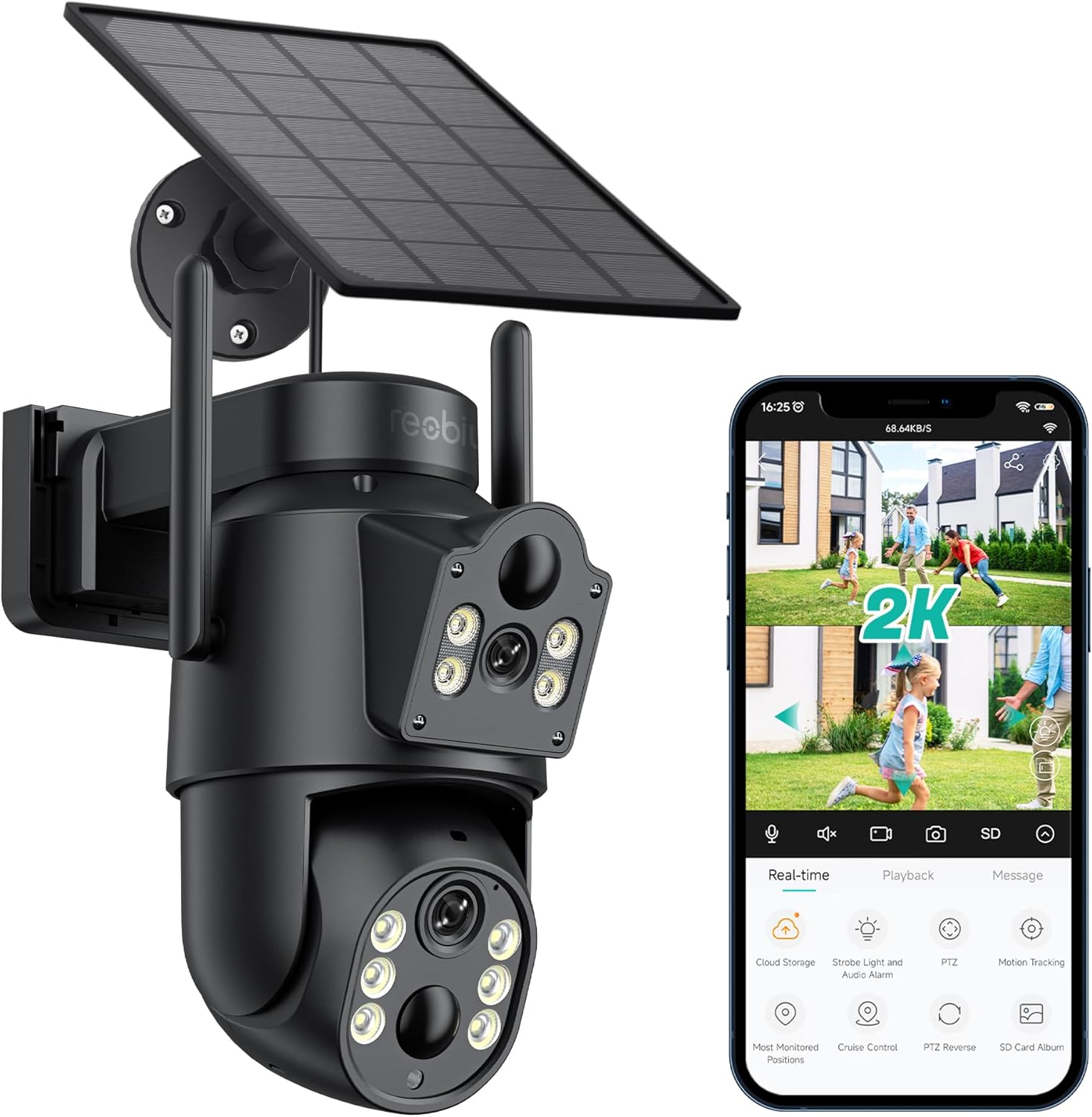
Рисунок 3.1: Reobiux D20-1P Solar PTZ Camera and its mobile application interface showing real-time monitoring, playback, and various control options.
Основные характеристики:
- 2K QHD High Resolution: Предоставляет четкие и подробные видеофрагменты.tage.
- Конструкция с двумя линзами: Combines a fixed lens with a rotating lens for comprehensive coverage.
- Функция поворота и наклона на 360°: Allows remote control of pan, tilt, and zoom for flexible viewуглы.
- Solar Powered with Rechargeable Battery: Обеспечивает непрерывную работу с минимальным количеством ручной зарядки.
- Обнаружение движения PIR: Intelligently detects human movement to reduce false alarms.
- Цветное ночное видение: Offers full-color video even in low-light conditions, alongside infrared night vision.
- Двустороннее аудио: Обеспечивает связь с посетителями или отпугивает нарушителей.
- Защита от атмосферных воздействий IP66: Разработан для работы в различных погодных условиях на открытом воздухе.
- Wireless Wi-Fi Connectivity: Easy setup and remote access via smartphone.
4. Руководство по установке
4.1 Первоначальная зарядка
Before first use, fully charge the camera's internal battery using the provided Type-C charging line and power supply. This ensures the camera has sufficient power for initial setup and operation, especially if solar charging conditions are not optimal immediately after installation.
4.2 Установка приложения и создание учетной записи
- Загрузить iCSee Загрузите приложение из магазина приложений вашего смартфона (iOS App Store или Google Play Store).
- Установите приложение и откройте его.
- Follow the on-screen instructions to create a new account or log in if you already have one.
4.3 Подключение камеры к Wi-Fi
- Убедитесь, что ваша камера включена.
- In the iCSee app, tap the "+" icon to add a new device.
- Select the option for "Wi-Fi Camera" or "Add Device by AP Hotspot" (refer to app for exact wording).
- Follow the app's instructions to connect the camera to your 2.4GHz Wi-Fi network. You may need to scan a QR code displayed on your phone with the camera, or listen for a sound prompt.
- После подключения вы можете дать своей камере имя и начать наблюдение.
4.4 Установка камеры
Choose a location that provides optimal surveillance coverage and receives direct sunlight for the solar panel. Ensure the camera is within range of your Wi-Fi network.
- Выберите местоположение: Identify a suitable wall or surface for mounting. Consider the camera's viewing angle (355° pan, 90° tilt) and the solar panel's exposure to sunlight.
- Отметьте точки бурения: Use the mounting base as a template to mark the screw holes on the wall.
- Отверстия для сверления: Drill pilot holes at the marked positions. Insert wall anchors if necessary.
- Прикрепите монтажное основание: Закрепите монтажное основание на стене с помощью прилагаемых винтов.
- Прикрепить камеру: Mount the camera onto the secured base.
- Отрегулируйте солнечную панель: Position the solar panel to maximize sunlight exposure throughout the day.

Рисунок 4.1: Illustration of the camera mounted with its solar panel, highlighting the fixed and rotating lenses and the benefit of continuous solar power.
5. Инструкция по эксплуатации
5.1 Прямой эфир View и воспроизведение
Open the iCSee app and select your camera to access the live view. Отсюда вы можете:
- Мониторинг в реальном времени: View прямая видеотрансляция.
- Управление PTZ: Use the on-screen joystick to pan (355°) and tilt (90°) the camera.
- Цифровой зум: Pinch to zoom on the live feed.
- Воспроизведение: Доступ к записанному footagфайлы хранятся на SD-карте или в облачном хранилище.

Рисунок 5.1: Demonstrates the superior clarity of 2K QHD resolution compared to 1080P, providing more details for monitoring.
5.2 Обнаружение движения и оповещения
The camera utilizes PIR (Passive Infrared) intelligent detection to identify human movement, minimizing false alarms from pets or swaying branches.
- Включить/Выключить: Activate or deactivate motion detection in the app settings.
- Регулировка чувствительности: Adjust the PIR sensor's sensitivity to suit your environment.
- Уведомления о тревоге: Получайте мгновенные push-уведомления на свой смартфон при обнаружении движения.
- Звуковая и световая сигнализация: Configure the camera to trigger a strobe light and audible alarm upon detection.

Рисунок 5.2: The camera's PIR intelligent detection distinguishes human movement from other objects, reducing unnecessary alerts.

Рисунок 5.3: When motion is detected, the camera can send real-time push notifications and activate a sound and light alarm to deter intruders.
5.3 Режимы ночного видения
The camera offers two night vision modes for clear visibility in the dark:
- Spotlight Full Color Night Vision: Utilizes built-in spotlights to provide full-color video in low-light conditions.
- Spotlight Infrared Night Vision: Uses infrared LEDs for black-and-white video in complete darkness, with a range of up to 30 meters.
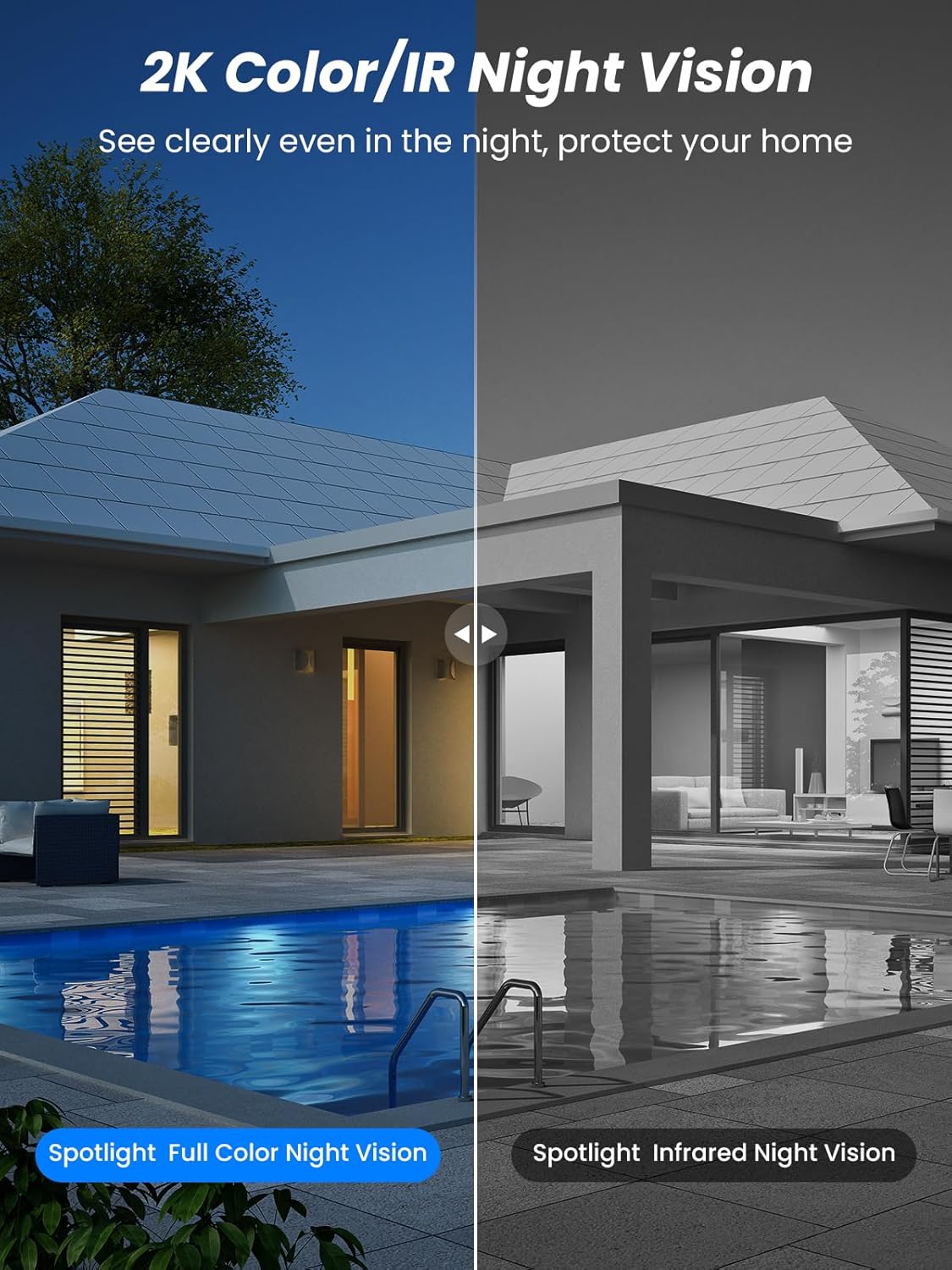
Рисунок 5.4: Illustrates the difference between full-color night vision, enabled by spotlights, and traditional infrared night vision.
5.4 Двусторонняя аудиосвязь
Встроенные микрофон и динамик обеспечивают двустороннюю связь.
- Говорить: Нажмите значок микрофона в приложении, чтобы говорить через динамик камеры.
- Слушать: The camera's microphone captures audio from its surroundings.

Рисунок 5.5: The two-way audio function allows for direct communication through the camera, useful for interacting with visitors or delivery personnel.
6. Техническое обслуживание
- Уборка: Периодически очищайте объектив камеры и солнечную панель мягкой тряпкой.amp cloth to ensure optimal performance and clear image quality. Avoid abrasive cleaners.
- Состояние аккумулятора: While solar-powered, extreme weather or prolonged periods of low sunlight may require manual charging. Monitor battery levels via the app.
- Обновления прошивки: Check the iCSee app regularly for available firmware updates to ensure your camera has the latest features and security enhancements.
- Защита от непогоды: The camera is IP66 weatherproof, designed to withstand rain, snow, and sun. However, ensure all connections are secure to maintain water resistance.

Рисунок 6.1: The IP66 rating ensures the camera's durability and functionality in various outdoor weather conditions, including snow, rain, and direct sunlight.
7. Поиск Неисправностей
- Камера не подключается к Wi-Fi:
- Ensure the camera is within range of your 2.4GHz Wi-Fi network. 5GHz networks are not supported.
- Проверьте правильность пароля вашего Wi-Fi.
- Перезагрузите маршрутизатор и камеру.
- If issues persist, try resetting the camera (refer to app or product for reset button location).
- Battery not charging or draining quickly:
- Убедитесь, что солнечная панель чистая и получает прямой солнечный свет в течение нескольких часов ежедневно.
- Проверьте соединение между солнечной панелью и камерой.
- If in a low-light environment, manually charge the camera using the Type-C cable.
- Частые события обнаружения движения или в режиме реального времени view streaming can consume battery faster. Adjust settings if needed.
- Ложные срабатывания датчика движения:
- Adjust the PIR motion detection sensitivity in the iCSee app.
- Ensure the camera is not pointed at areas with constant movement (e.g., busy roads, swaying trees) if not intended for monitoring.
- Плохое качество изображения:
- Очистите объектив камеры.
- Для оптимальной фотосъемки, особенно в ночное время, необходимо обеспечить достаточное освещение.
- Проверьте уровень сигнала Wi-Fi; слабый сигнал может повлиять на качество потокового видео.
8. Технические характеристики
| Особенность | Деталь |
|---|---|
| Название модели | Д20-1П |
| Разрешение видеозахвата | 2.5К |
| Эффективное разрешение видео | 2K QHD |
| Технология беспроводной связи | Wi-Fi (2.4 ГГц) |
| Форм-фактор | Купол |
| Viewугол наклона | 355 градусов (панорамирование), 90 градусов (наклон) |
| Тип установки | Настенный |
| Диапазон ночного видения | 30 метра |
| Частота кадров | 25 кадров в секунду |
| Материал | Пластик |
| Томtage | 12 Вольт (постоянный ток) |
| Ватtage | 5 Вт |
| Источник питания | Работает на батарейках и солнечных батареях |
| Аккумуляторы | 3 литий-ионных аккумулятора (в комплекте) |
| Протокол подключения | Wi-Fi |
| Тип контроллера | Приложение iCSee |
| Особые возможности | Night Vision (Color/IR), PIR Motion Detection, Two-Way Audio, IP66 Weatherproof |
| Вес товара | 1.06 кг |
| Размеры посылки | 21.7 х 19.5 х 13.8 см |
9. Гарантия и поддержка
Reobiux offers a Гарантия 1 год for this product. For any issues or inquiries, please do not hesitate to reach out to our customer service. We provide 20 hours of online service to assist you.
For support, please refer to the contact information provided with your purchase or within the iCSee application.


