1. Введение
The LSC Smart Connect Solar IP Camera is designed to provide reliable outdoor surveillance with the convenience of solar power. This camera offers 1080p video recording, two-way audio, and night vision capabilities up to 10 meters. It integrates seamlessly with the LSC Smart Connect app, allowing for remote monitoring and control. Key features include a light and sound alarm, flash function, and privacy mode to enhance security.
This manual provides essential information for the proper setup, operation, and maintenance of your LSC Smart Connect Solar IP Camera, ensuring optimal performance and longevity.
2. Комплектация и настройка
Before beginning installation, please ensure all components are present and undamaged.

Изображение 2.1: The LSC Smart Connect Solar IP Camera packaging, showing the camera, solar panel, and app interface. This image represents the complete product package as received.
2.1 Компоненты вышеview
The package typically includes the LSC Smart Connect Solar IP Camera unit, a solar panel for continuous power, and mounting accessories.
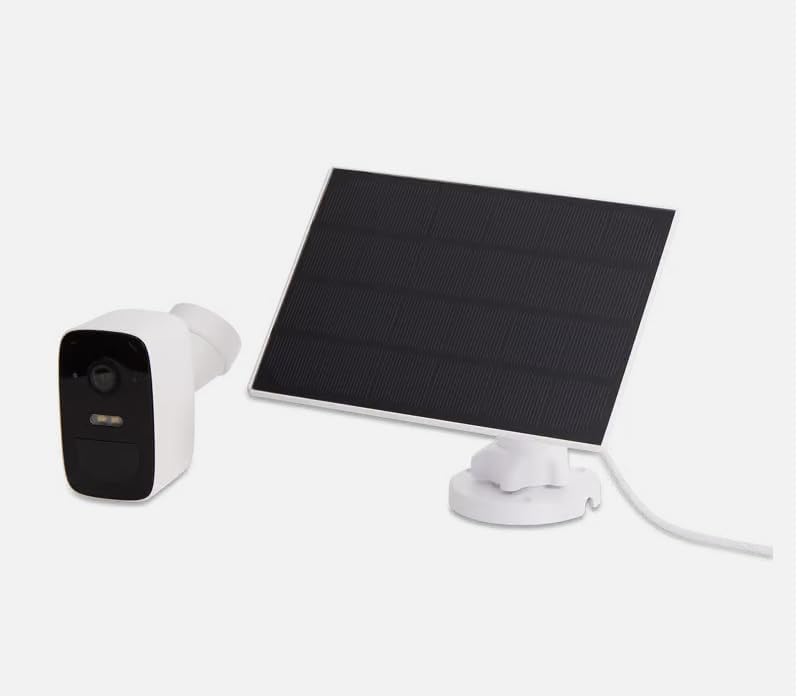
Изображение 2.2: The LSC Smart Connect Solar IP Camera shown alongside its separate solar panel. This illustrates the two main components of the surveillance system.
2.2 Начальные шаги настройки
- Загрузите приложение: Download the "LSC Smart Connect" app from your smartphone's app store (iOS or Android).
- Зарегистрироваться: Откройте приложение и зарегистрируйте новую учетную запись или войдите в систему, если она у вас уже есть.
- Включение камеры: Ensure the camera is charged or connected to the solar panel. The camera should enter pairing mode (indicated by an LED light).
- Добавить устройство: In the app, select "Add Device" or the "+" icon. Follow the on-screen instructions to connect the camera to your 2.4GHz Wi-Fi network. Ensure your Wi-Fi signal is strong at the installation location.
- Монтаж: Choose a suitable outdoor location for the camera and solar panel. The solar panel should receive direct sunlight for most of the day. Use the provided screws and mounting brackets for secure installation. The camera supports wall mounting.
For detailed mounting instructions, refer to the quick start guide included in your product packaging.
3. Инструкция по эксплуатации
Once your camera is set up and connected, you can begin monitoring and utilizing its features through the LSC Smart Connect app.
- Жить View: Откройте приложение и выберите камеру для съемки. view прямая трансляция.
- Двустороннее аудио: Use the microphone icon in the app to speak through the camera and the speaker icon to hear audio from the camera's vicinity.
- Ночное видение: The camera automatically switches to night vision in low-light conditions, providing clear images up to 10 meters.
- Обнаружение движения и оповещения: Configure motion detection sensitivity and set up push notifications to receive alerts on your smartphone when activity is detected.
- Функции будильника: Activate the light and sound alarm or flash function via the app to deter intruders.
- Запись и воспроизведение: The camera supports local storage (e.g., microSD card, not included) or cloud storage (subscription may be required) for recording. Access recorded footagе через функцию воспроизведения приложения.
- Режим конфиденциальности: Utilize the privacy function to temporarily disable recording and live view for specific periods.
4. Техническое обслуживание
Regular maintenance ensures the optimal performance and longevity of your LSC Smart Connect Solar IP Camera.
- Уборка: Периодически очищайте объектив камеры и солнечную панель мягкой тряпкой.amp Ткань для удаления пыли, грязи и мусора. Избегайте использования абразивных чистящих средств.
- Эффективность солнечной панели: Ensure the solar panel is free from obstructions (e.g., leaves, snow) that could block sunlight and reduce charging efficiency.
- Обновления прошивки: Check the LSC Smart Connect app regularly for firmware updates. Keeping the camera's firmware updated ensures access to the latest features and security enhancements.
- Проверка связи: Periodically verify the Wi-Fi connection strength and camera status in the app.
5. Поиск Неисправностей
If you encounter issues with your LSC Smart Connect Solar IP Camera, refer to the following common troubleshooting steps:
- Камера в автономном режиме:
- Проверьте уровень сигнала Wi-Fi в месте установки камеры.
- Ensure the camera is receiving adequate power from the solar panel or is sufficiently charged.
- Перезагрузите Wi-Fi-роутер и камеру.
- Убедитесь, что камера подключена к сети Wi-Fi 2.4 ГГц.
- Плохое качество изображения:
- Очистите объектив камеры.
- Убедитесь, что перед объективом нет никаких препятствий.
- Проверьте скорость вашего интернет-соединения.
- Обнаружение движения не работает:
- Verify motion detection settings in the app (sensitivity, detection zones).
- Ensure notifications are enabled on your smartphone and in the app.
- Аккумулятор не заряжается:
- Убедитесь, что солнечная панель чистая и получает прямые солнечные лучи.
- Проверьте соединение между солнечной панелью и камерой.
If issues persist, consult the LSC Smart Connect app's help section or the manufacturer's support resources.
6. Технические характеристики
| Особенность | Спецификация |
|---|---|
| Разрешение видеозаписи | 1080p |
| Цвет | Черный/Белый |
| Технология беспроводной связи | Wi-Fi (2.4 ГГц) |
| Тип установки | Винтовое/настенное крепление |
| Диапазон ночного видения | 10 метра |
| Размеры изделия (Д x Ш x В) | 15 х 6 х 15 см |
| Производитель | LSC |
| Номер модели | 3203968 |
| ASIN | B0D899HFXL |
| Рекомендации по применению продукта | Безопасность на открытом воздухе |
| Технология связи | Беспроводной |
| Совместимые устройства | Смартфон |
| Тип контроллера | SmartThings (via LSC Smart Connect App) |
| Для использования в помещении и на открытом воздухе | На открытом воздухе |
7. Гарантия и поддержка
For warranty information, please refer to the documentation included with your purchase or contact the retailer/manufacturer directly. Typically, products come with a limited warranty covering manufacturing defects.
For technical support, frequently asked questions, or further assistance, please visit the official LSC Smart Connect website or utilize the support section within the LSC Smart Connect mobile application.
Интернет-ресурсы:
- LSC Smart Connect App (available on iOS App Store and Google Play Store)
- Manufacturer's Official Website (for product updates and support)


