1. Введение
Welcome to the user manual for your new XGODY S200 Flip Phone. This device is designed for ease of use, featuring large buttons, a clear display, and essential functions for reliable communication. Please read this manual carefully to understand how to operate your phone safely and efficiently.
2. Содержимое упаковки
Пожалуйста, отметьте галочкой следующие пункты:
- XGODY S200 Flip Phone
- Аккумуляторная батарея
- Зарядный кабель USB Type-C
- Адаптер питания
- Руководство пользователя
3. Устройство перешлоview
Familiarize yourself with the key components of your XGODY S200 Flip Phone.

Рисунок 3.1: Передняя часть view of the XGODY S200 flip phone in its open position, displaying the screen and large keypad.

Figure 3.2: Detail of the XGODY S200's side, showing the USB Type-C charging port, 3.5mm headphone jack, and a flashlight.
3.1. Расположение клавиатуры
- Навигационные клавиши: Up, Down, Left, Right, and OK/Confirm button in the center.
- Клавиша вызова: Green button to make or answer calls.
- Клавиша завершения/питания: Red button to end calls or power the phone on/off.
- Ключ SOS: Dedicated button for emergency calls (often on the back or side).
- Цифровая клавиатура: Large, easy-to-read buttons for dialing numbers and text input.
4. Настройка
4.1. Установка батареи
- Open the back cover of the phone by gently prying it from the notch.
- Совместите контакты батареи с клеммами внутри телефона.
- Плотно прижмите батарею, пока она надежно не зафиксируется на месте.
- Установите на место заднюю крышку, убедившись, что она защелкнулась.
4.2. Установка SIM-карты (карт)
The XGODY S200 supports dual SIM cards.
- Извлеките аккумулятор и найдите слот(ы) для SIM-карты.
- Insert your SIM card(s) into the slot(s) with the gold contacts facing down and the cut corner aligned as indicated.
- Убедитесь, что SIM-карта (или карты) вставлены полностью.
- Установите на место аккумулятор и заднюю крышку.
4.3. Зарядка телефона
- Connect the USB Type-C cable to the charging port on the side of the phone.
- Plug the other end of the cable into the power adapter, then plug the adapter into a wall outlet.
- Значок батареи на экране будет показывать состояние зарядки.
- Charge the phone fully before first use (approximately 2-3 hours).
5. Использование телефона
5.1. Включение/выключение питания
- Для включения: Press and hold the Red End/Power Key until the screen lights up.
- Чтобы выключить: Press and hold the Red End/Power Key until the power-off options appear, then select 'Power Off'.
5.2. Совершение и прием звонков
- Звонок: Enter the phone number using the keypad and press the Green Call Key.
- Ответ на звонок: When the phone rings, press the Green Call Key.
- Завершение вызова: Press the Red End/Power Key.
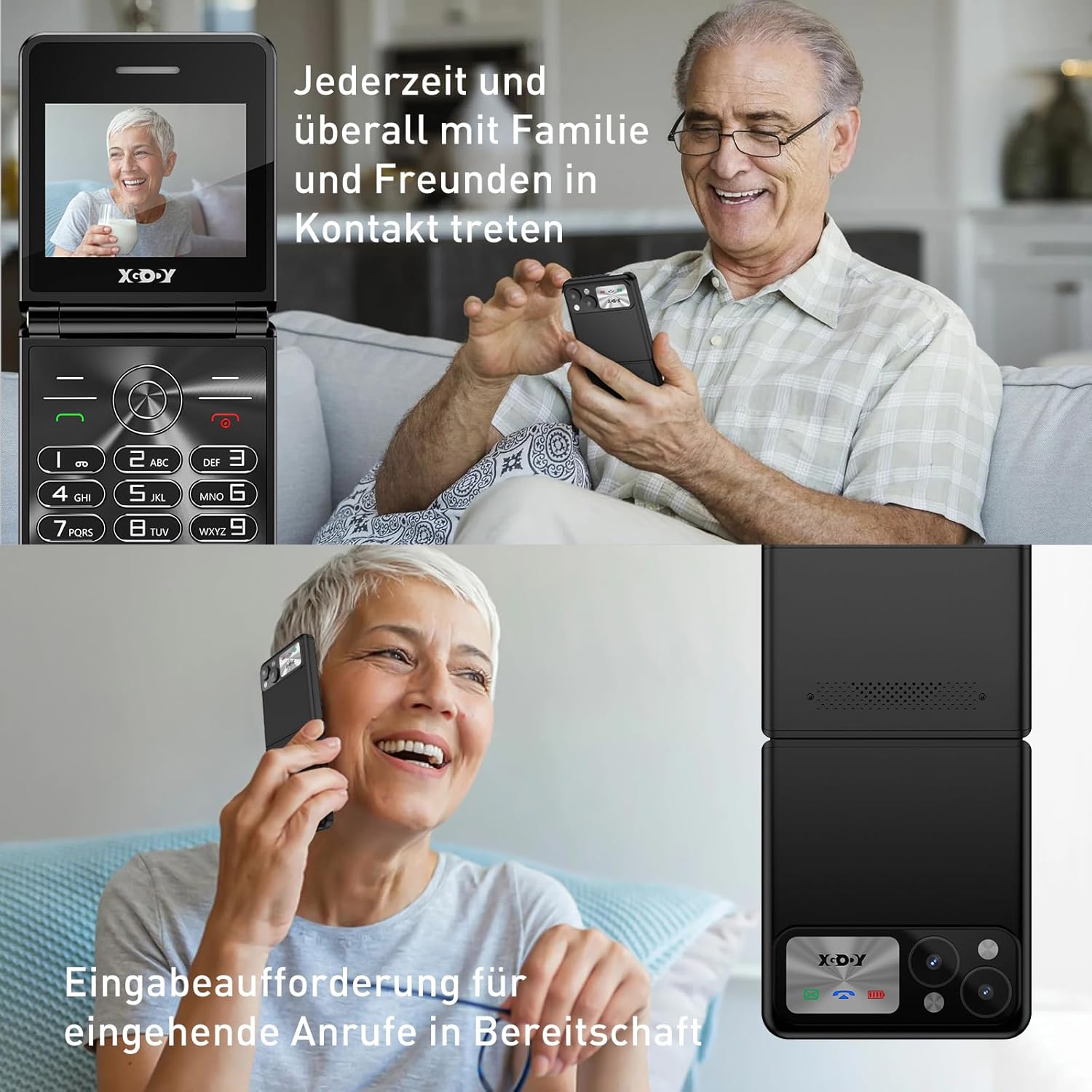
Figure 5.1: The XGODY S200 features loud and clear call volume, beneficial for users with hearing impairments.
5.3. Контакты (телефонная книга)
- From the main screen, navigate to 'Contacts' or 'Phonebook' using the navigation keys and press the OK key.
- Select 'Add New Contact' to save a number.
- Введите имя и номер телефона, затем сохраните.
5.4. Функция экстренного вызова SOS
Функция SOS позволяет быстро связаться с предварительно заданными номерами экстренных служб.

Figure 5.2: Illustration of the SOS emergency call feature, allowing users to quickly contact up to five pre-set family members or emergency services.
- Настройка номеров SOS: Перейдите в «Настройки» > «Настройки SOS» и добавьте до 5 экстренных контактов.
- Активация SOS: Press and hold the dedicated SOS button (usually on the back or side of the phone) for a few seconds. The phone will automatically dial the pre-set numbers in sequence until one is answered. It may also send an emergency SMS.
5.5. FM-радио
To use the FM Radio, you may need to connect headphones (not always included) as they often act as an antenna.
- Navigate to 'FM Radio' from the main menu.
- Используйте клавиши навигации для поиска станций или для ручной настройки.
5.6. Фонарик
Для удобства телефон оснащен встроенным фонариком.

Figure 5.3: An image demonstrating the built-in flashlight feature of the XGODY S200, activated by a long press, providing convenience in low-light conditions.
- Чтобы включить/выключить: Press and hold the dedicated flashlight button (if available) or a specific key combination as indicated in the phone's quick guide.
6. Техническое обслуживание
- Уборка: Для очистки экрана и корпуса телефона используйте мягкую сухую ткань. Избегайте использования жидких чистящих средств.
- Уход батареи: Do not expose the battery to extreme temperatures. If the phone will not be used for an extended period, charge it partially before storing.
- Хранилище: Храните телефон в прохладном, сухом месте, вдали от прямых солнечных лучей и влаги.
7. Поиск Неисправностей
| Проблема | Возможное решение |
|---|---|
| Телефон не включается | Убедитесь, что батарея правильно установлена и полностью заряжена. Попробуйте заряжать телефон не менее 30 минут. |
| Невозможно совершать и принимать звонки | Check if the SIM card is properly inserted. Ensure you have network signal. Contact your service provider if the issue persists. |
| Плохое качество связи | Move to an area with better network reception. Ensure the microphone and speaker are not obstructed. |
| Аккумулятор быстро разряжается | Reduce screen brightness. Close unused applications. If the battery is old, consider replacing it. |
| Функция SOS не работает. | Verify that emergency numbers are correctly set in the SOS settings. Ensure the phone has network signal. |
8. Технические характеристики
| Особенность | Деталь |
|---|---|
| Бренд | Xgody |
| Название модели | С200 |
| Операционная система | Basic OS |
| Размер экрана | 2.4 дюйма |
| Разрешение | 240 х 320 |
| Размер оперативной памяти | 32 МБ |
| Емкость памяти | 32 МБ |
| Беспроводной оператор | Все операторы связи (разблокированы) |
| Сотовые технологии | 2G |
| Технология связи | 2G (GSM) |
| Аккумулятор | 1 литий-полимерный (в комплекте) |
| Порт зарядки | USB-порт типа C |
9. Гарантия и поддержка
Specific warranty details for the XGODY S200 Flip Phone are not provided within this manual. For warranty information, technical support, or service inquiries, please refer to the documentation included with your purchase or visit the official XGODY webСохраните чек о покупке для предъявления гарантийных претензий.


