Введение
Welcome to the KIDYWOLF Kidyprint Instant Print Camera user manual. This guide provides essential information for the safe and effective use of your new instant camera. The Kidyprint is designed to allow children to capture and instantly print their memories, fostering creativity and exploration.
Продукт болееview
The KIDYWOLF Kidyprint is an instant print camera for children, featuring thermal printing technology that produces black and white images without the need for ink cartridges. It includes a range of creative tools to enhance the photography experience.
- Thermal Printing System: Prints black and white images instantly without ink or cartridges.
- Творческие особенности: Equipped with 21 filters, an 8Mpx selfie camera, and a 2.4-inch LCD screen for viewинг и навигация.
- Прочный и портативный дизайн: Lightweight, robust, and rechargeable via USB-C. Includes a safety neck strap for secure carrying.
- Входящие в комплект аксессуары: Comes with thermal paper rolls (including sticker and colored options), magnetic frames, and stickers for photo customization.

The camera's intuitive interface allows for easy navigation and photo capture, making it suitable for young users.
Настраивать
1. Распаковка и первоначальный осмотр
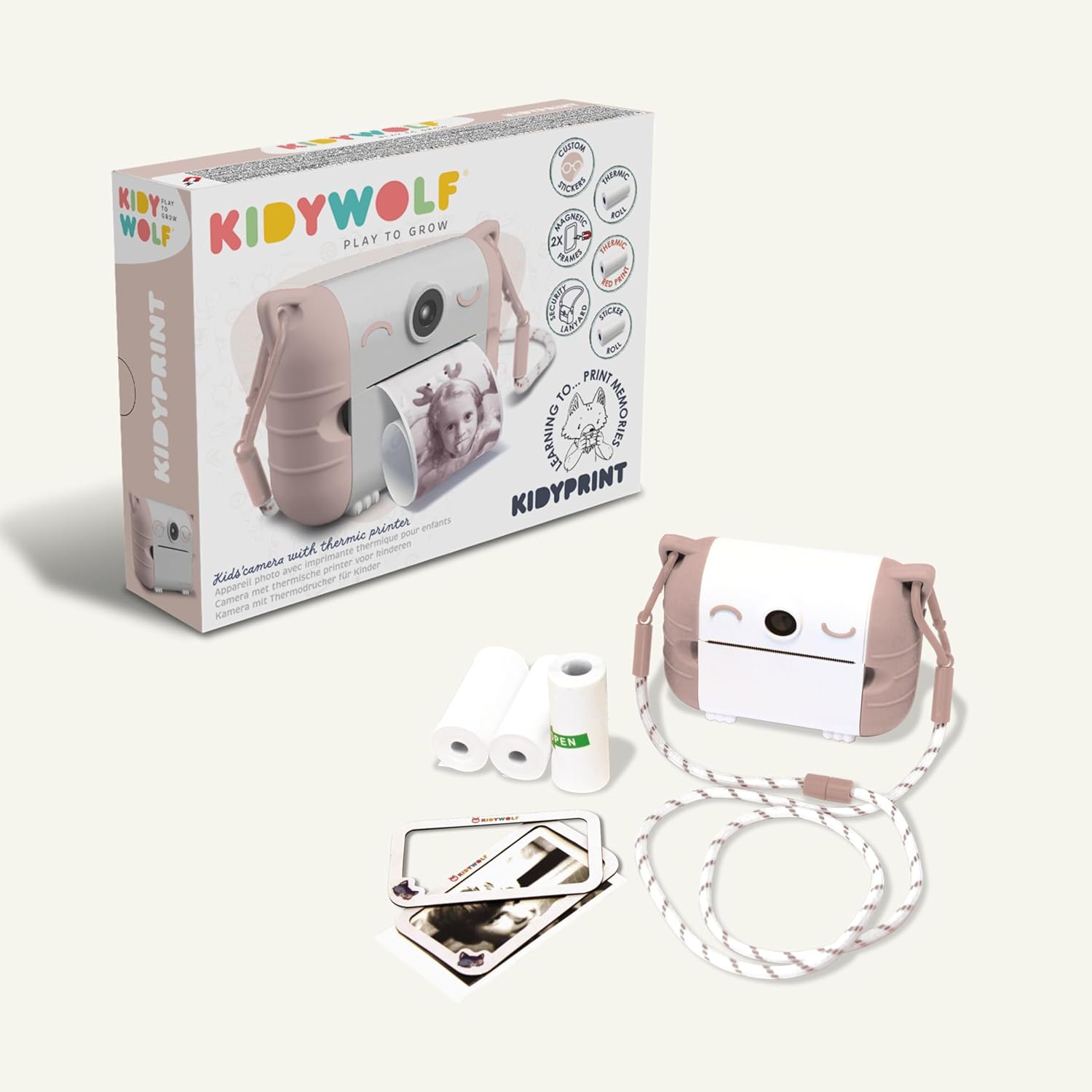
Аккуратно извлеките все компоненты из упаковки. Убедитесь, что все перечисленные ниже элементы присутствуют и не повреждены:
- KIDYWOLF Kidyprint Camera
- Зарядный кабель USB-C
- Thermal Paper Rolls (standard, sticker, colored)
- Magnetic Photo Frames
- Ремешок на шею
2. Зарядка камеры
Before first use, fully charge the camera. Connect the provided USB-C cable to the camera's charging port and plug the other end into a compatible USB power adapter (not included) or computer. The charging indicator light will show the charging status.
3. Inserting Thermal Paper
- Locate the paper compartment on the camera.
- Откройте крышку отсека.
- Insert a roll of thermal paper, ensuring the paper feeds correctly.
- Close the compartment cover, leaving a small portion of paper extended.
4. Крепление шейного ремня
Attach the safety neck strap to the designated attachment points on the camera. Ensure it is securely fastened to prevent accidental drops.
Инструкция по эксплуатации
1. Включение и выключение
Press and hold the power button (usually marked with a power symbol) to turn the camera on or off. The 2.4-inch LCD screen will illuminate upon startup.
2. Фотографирование
Point the camera at your subject. Use the 8Mpx selfie camera for self-portraits. Press the shutter button to capture an image. The camera will display a preview на экране.

3. Navigating Menus and Applying Filters
Use the navigation buttons (up, down, left, right, OK) to browse through the camera's menu options. Select from 21 available filters to add creative effects to your photos before printing.
4. Печать фотографий
After capturing or selecting an image, press the print button. The camera will instantly print the image in black and white using its thermal printing system. Allow the print to fully emerge before tearing it off.

5. Viewing Photos and Connectivity
Access the gallery mode to view previously captured images. The camera supports HDMI and USB connectivity for transferring photos to compatible devices like TVs, computers, smartphones, or tablets.

Обслуживание
1. Чистка камеры
Use a soft, dry cloth to clean the exterior of the camera. Do not use liquid cleaners or solvents. For the lens and screen, use a specialized lens cleaning cloth.
2. Replacing Thermal Paper
When the paper roll is depleted, replace it with a new KIDYWOLF thermal paper roll. Follow the instructions in the 'Inserting Thermal Paper' section.

3. Уход за аккумулятором
The camera uses an Alkaline battery. To prolong battery life, avoid fully discharging the camera frequently. Recharge the camera using the USB-C cable when the battery level is low. Store the camera in a cool, dry place when not in use for extended periods.
4. Водостойкость
The KIDYWOLF Kidyprint camera is не водонепроницаемый. Avoid exposure to water or excessive moisture to prevent damage.
Поиск неисправностей
- Камера не включается: Ensure the battery is charged. Connect the camera to a power source using the USB-C cable and try again.
- Плохое качество печати: Check if the thermal paper is correctly inserted and not damaged. Ensure the camera lens is clean.
- Замятие бумаги: Open the paper compartment and carefully remove any jammed paper. Reinsert a new roll if necessary.
- Экран не отвечает: Try restarting the camera by holding the power button. If the issue persists, contact customer support.
Технические характеристики
| Бренд | КИДИВОЛК |
| Модель | KIDYPRINTPAR |
| Цвет | Роза |
| Экран | 2.4-дюймовый ЖК-дисплей |
| Технология связи | HDMI, USB |
| Разрешение видео | 720p |
| Состав батареи | Щелочной |
| Размеры продукта (Д x Ш x В) | 23.8 х 5.5 х 17.5 см |
| Вес продукта | 610 грамм |
| Стабилизация изображения | Никто |
| Скорость в режиме серийной съемки | 30 кадров в секунду |
| Диапазон ИСО | 100-3200 |
| Поддерживается File Формат | JPEG |
| Уровень водонепроницаемости | Не водонепроницаемый |
| Совместимые устройства | TV, computer, smartphone, tablet |
Гарантия и поддержка
Информация о гарантии
The KIDYWOLF Kidyprint camera comes with a 2-летняя гарантия производителяДанная гарантия распространяется на дефекты материалов и изготовления при условии нормального использования. Сохраните чек о покупке для предъявления гарантийных претензий.
Поддержка клиентов
For any questions, technical assistance, or warranty claims, please contact KIDYWOLF customer service. Our team is available to provide reactive support and ensure your satisfaction.


