1. Введение
The vretti BQ1 Bluetooth Label Printer is a compact, portable thermal label printer designed for various labeling needs in home, office, school, and small business environments. It connects wirelessly to your smartphone via Bluetooth, allowing for quick and easy label creation and printing through the dedicated "xeasy label" application.
This printer utilizes thermal printing technology, eliminating the need for ink or toner, which saves on replacement costs and maintenance. It supports label sizes from 25mm to 58mm, offering flexibility for printing address labels, price tags, food labels, clothing tags, barcodes, QR codes, and more.

Image 1.1: The vretti BQ1 Bluetooth Label Printer, highlighting its Bluetooth connectivity and compatibility with iOS and Android devices.
2. Настройка
2.1 Содержимое упаковки
Прежде чем начать, пожалуйста, проверьте, что в ваш пакет включены все предметы:
- 1 x vretti BQ1 Label Printer
- 1 x Руководство пользователя (этот документ)
- 1 x 50x30mm Label Paper Roll (pre-installed inside the machine)
- 1 x USB-кабель для зарядки типа C
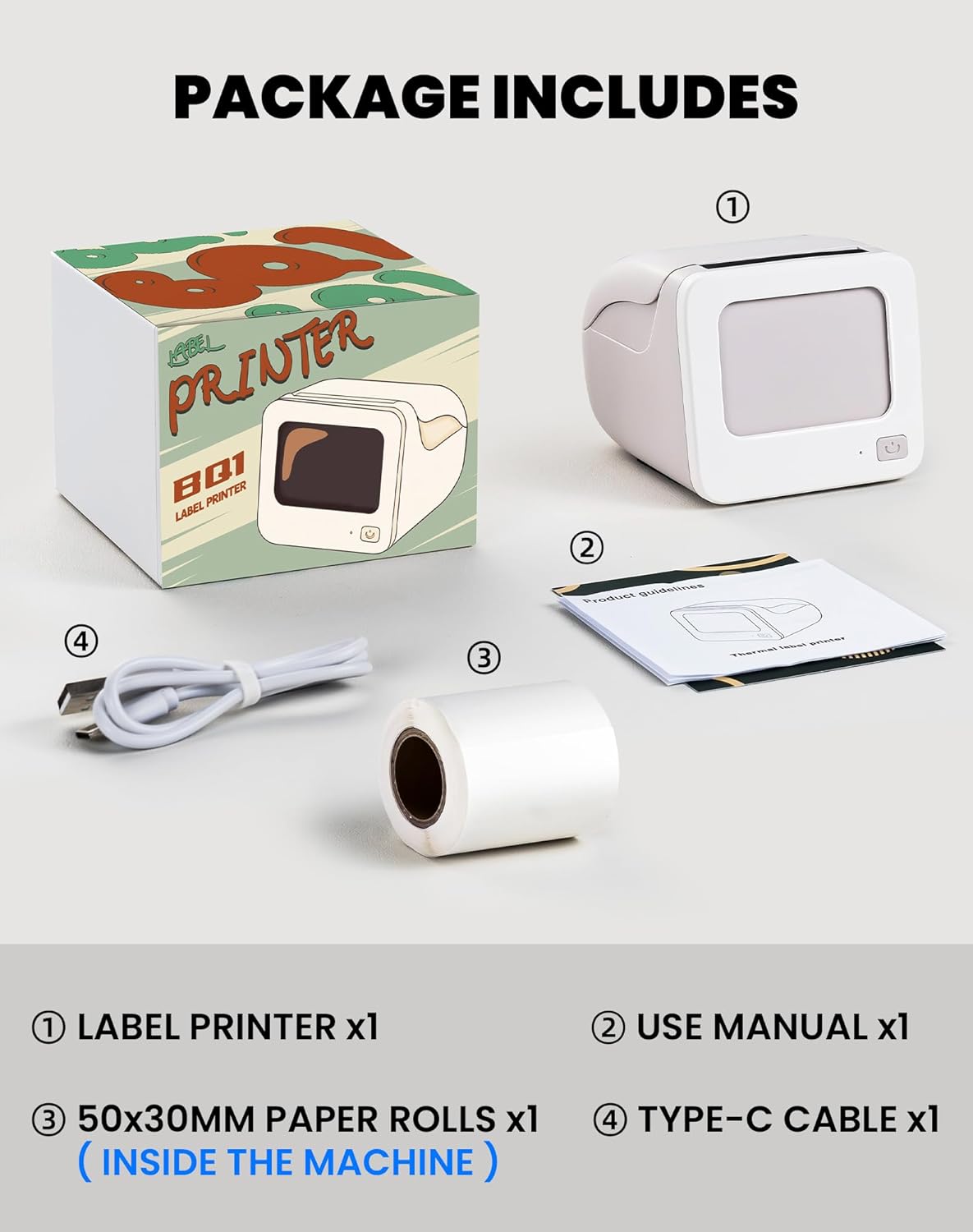
Image 2.1: Visual representation of the items included in the vretti BQ1 label printer package.
2.2 Загрузка этикеточной бумаги
The printer comes with a label roll pre-installed. If you need to replace or load a new roll:
- Аккуратно откройте крышку принтера.
- Insert the new label roll into the compartment, ensuring the labels feed out smoothly. The printable side of the label should face upwards.
- Плотно закройте крышку принтера.

Image 2.2: Proper insertion of a label roll into the vretti BQ1 printer, demonstrating the supported label width range.
2.3 Установка приложения и подключение по Bluetooth
To use your vretti BQ1 printer, you need to download and connect it via the "xeasy label" application.
- Загрузите приложение: Искать "xeasy label" in your smartphone's app store (Google Play Store for Android or Apple App Store for iOS) and install it.
- Включите Bluetooth: Убедитесь, что Bluetooth включен на вашем смартфоне.
- Откройте приложение и подключитесь: Open the "xeasy label" app. The app will guide you to connect to your printer. Select "BQ1" from the list of available devices.
- Включение питания: Нажмите и удерживайте кнопку питания на принтере, пока не загорится индикатор.

Image 2.3: Step-by-step guide for downloading the "xeasy label" app, connecting to the printer via Bluetooth, and preparing to edit a label.
3. Инструкция по эксплуатации
3.1 Создание и печать этикеток
Once connected, the "xeasy label" app provides a user-friendly interface for designing and printing labels.
- Select a Template or Create New: The app offers a variety of pre-designed templates, fonts, icons, and frames. You can choose an existing template or start a new design.
- Настройте свою этикетку: Edit text, add images, barcodes, QR codes, and adjust the layout to fit your needs. The app supports various customization options.
- Предварительноview и распечатать: Перед печатью предварительноview your label to ensure it looks as desired. Then, tap the print button in the app to send the design to your vretti BQ1 printer.
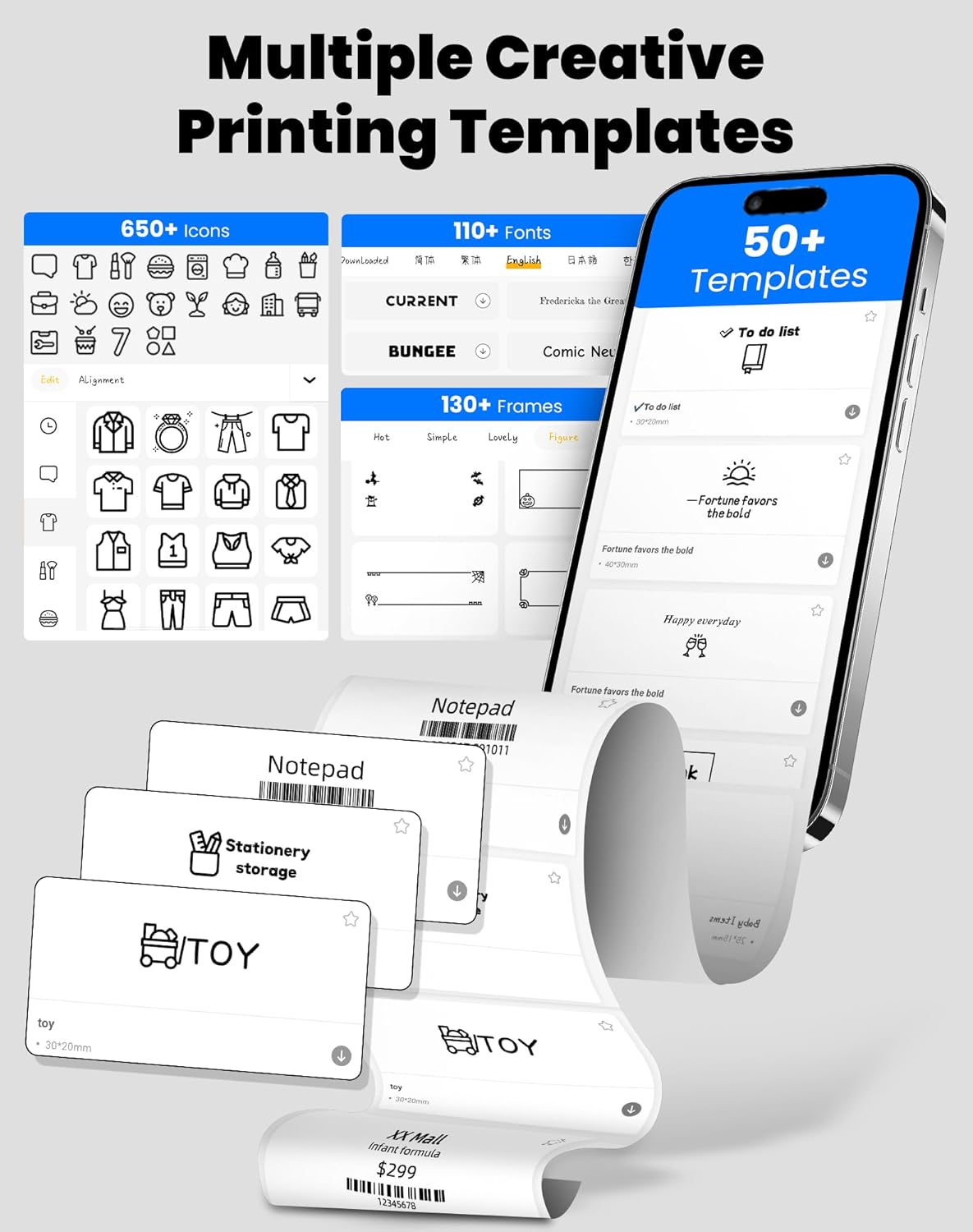
Image 3.1: The "xeasy label" app interface, showcasing a wide range of creative printing templates, icons, and fonts available for label design.

Изображение 3.2: оконченоview of the multi-functional applications within the "xeasy label" app, including support for barcodes, QR codes, images, various borders, font shapes, and hundreds of icons.
3.2 Common Label Applications
The vretti BQ1 printer is versatile and suitable for a wide range of applications:
- Домашняя организация: Label storage bins, pantry items, spice jars, and more.
- Офис и школа: Организовать files, label stationery, create name tags, or mark assets.
- Retail & Small Business: Print price tags, product labels, address labels for shipping, and inventory management labels.
- Личное использование: Create decorative labels for gifts, DIY projects, or personal items.

Изображение 3.3: Примерamples of the vretti BQ1 printer's versatility, showing labels used for toy classification, light switches, to-do lists, clothing, and gifts.

Image 3.4: Demonstrations of common label types that can be printed, including address labels, price labels, food labels, and customizable DIY labels.
4. Техническое обслуживание
4.1 Чистка принтера
To ensure optimal performance and print quality, regular cleaning is recommended:
- Экстерьер: Протрите корпус принтера мягкой сухой тканью. Избегайте использования абразивных чистящих средств или растворителей.
- Печатающая головка: If print quality degrades, gently clean the thermal print head with an alcohol swab. Ensure the printer is turned off and cooled down before cleaning.
4.2 Label Roll Storage
Store label rolls in a cool, dry place away from direct sunlight and excessive heat to preserve their adhesive properties and print quality.
5. Поиск Неисправностей
If you encounter issues with your vretti BQ1 printer, try the following steps:
- Принтер не включается: Ensure the printer is charged. Connect it to a power source using the provided Type-C cable.
- Не удаётся подключиться через Bluetooth:
- Убедитесь, что на вашем смартфоне включен Bluetooth.
- Убедитесь, что принтер включен и находится в зоне действия сигнала.
- Restart both the printer and your smartphone.
- Try reconnecting through the "xeasy label" app.
- Плохое качество печати:
- Check if the label roll is inserted correctly and is not damaged.
- Очистите термоголовку, как описано в разделе «Техническое обслуживание».
- Ensure the label type is compatible with thermal printing.
- Неправильная подача этикеток:
- Verify the label roll is properly seated and not jammed.
- Убедитесь, что крышка принтера полностью закрыта.
Видео 5.1: Общий продуктview video for the vretti BQ1 label printer, demonstrating its features and operation. If the video does not load, please ensure your browser supports HLS streaming.
6. Технические характеристики
| Бренд | вретти |
| Название модели | БК1 |
| Технология связи | Bluetooth |
| Технология печати | Термальный |
| Максимальный размер носителя | 58 mm (supports 25-58mm width) |
| Разрешение печати | 203 dpi (монохромный режим) |
| Совместимые устройства | Смартфон (Android, iOS) |
| Включенные компоненты | 1 Label Printer, 1 Label Roll (starter), 1 Type-C Cable |
| Размеры продукта | 10.3Г x 10.4Ш x 8В см |
| Специальная характеристика | Elegant TV-like design |
7. Гарантия и поддержка
7.1 Информация о гарантии
The vretti BQ1 Label Printer typically comes with a гарантия один год Гарантия действует с даты покупки. Пожалуйста, сохраните чек о покупке для предъявления гарантийных претензий. Гарантия распространяется на производственные дефекты, но не распространяется на повреждения, вызванные неправильным использованием, несчастными случаями или несанкционированными модификациями.
7.2 Поддержка клиентов
For further assistance, technical support, or warranty inquiries, please refer to the official vretti website or contact their customer service through the contact information provided on their official channels. Ensure you have your product model number (BQ1) and purchase details ready when contacting support.


