1. Введение
This manual provides detailed instructions for the setup, operation, maintenance, and troubleshooting of your Koiiko Wireless Gaming Controller Z01. This versatile controller is designed for compatibility across multiple platforms, including iOS, Android, PC, Nintendo Switch, PlayStation 3, and PlayStation 4, offering an enhanced gaming experience with its advanced features.

Изображение 1.1: Спереди view of the Koiiko Wireless Gaming Controller Z01, showcasing its design and illuminated elements.
2. Компоненты контроллера
Familiarize yourself with the various buttons and features of your Koiiko Z01 controller:
- Left/Right Analog Sticks (Hall Effect): For precise 3D movement and input, featuring Hall Effect sensors to prevent drift.
- Крестовина: Кнопочный переключатель для цифрового ввода.
- Кнопки действий (A, B, X, Y): Standard gaming input buttons, with interchangeable key values.
- Shoulder Buttons (LB, RB) & Triggers (Hall Effect Linear): For additional actions and responsive input, featuring Hall Effect linear triggers.
- Домашняя кнопка: For system menu access and power control.
- Select/Share Button: Для различных внутриигровых или системных функций.
- Start/Options Button: Для различных внутриигровых или системных функций.
- Кнопки M1/M2: Programmable back buttons for custom actions.
- Кнопка Турбо: Activates continuous input for other buttons.
- Light Adjustment Button: Controls the 7-color RGB breathing light modes.
- Порт USB-C: Для зарядки контроллера.

Изображение 2.1: Подробное описаниеview of the Koiiko Wireless Gaming Controller Z01, highlighting its main features.
3.Основные характеристики
- Широкая совместимость: Supports iOS (iPhone, iPad), Android (phones, tablets), PC, Nintendo Switch/Switch OLED/Switch Lite, PlayStation 3, and PlayStation 4. Compatible with Steam, Xbox Game Pass, Nvidia GeForce Now, Amazon Luna, Google Stadia, and other cloud gaming services.
- Технология эффекта Холла: Equipped with Hall Effect joysticks and linear triggers for enhanced precision, durability, and prevention of stick drift.
- Настраиваемая RGB-подсветка: Features a 7-color RGB breathing light with 5 distinct lighting modes on the joysticks, adjustable via a dedicated button.
- Программируемые кнопки: Includes two programmable back buttons (M1, M2) and highly customizable LB, RB buttons, supporting up to 30 action keys.
- Six-Axis Gyro: Built-in 6-axis gyroscope for motion control, supported on PC, PS3, PS4, and Switch.
- Турбо-функция: Allows for continuous input with a single press, enhancing gameplay for rapid actions.
- Долговечный аккумулятор: Integrated 600mAh lithium battery provides approximately 10-15 hours of continuous use on a single charge.
- Портативная конструкция: Small and lightweight, making it easy to carry and store.
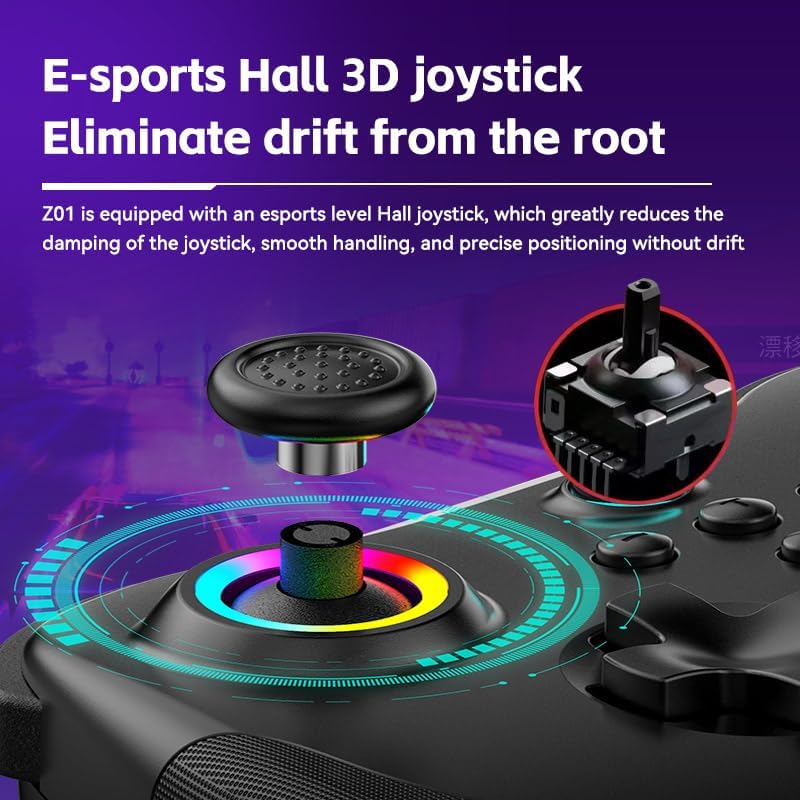
Image 3.1: Illustration of the Hall Effect 3D joystick, highlighting its drift-prevention design.
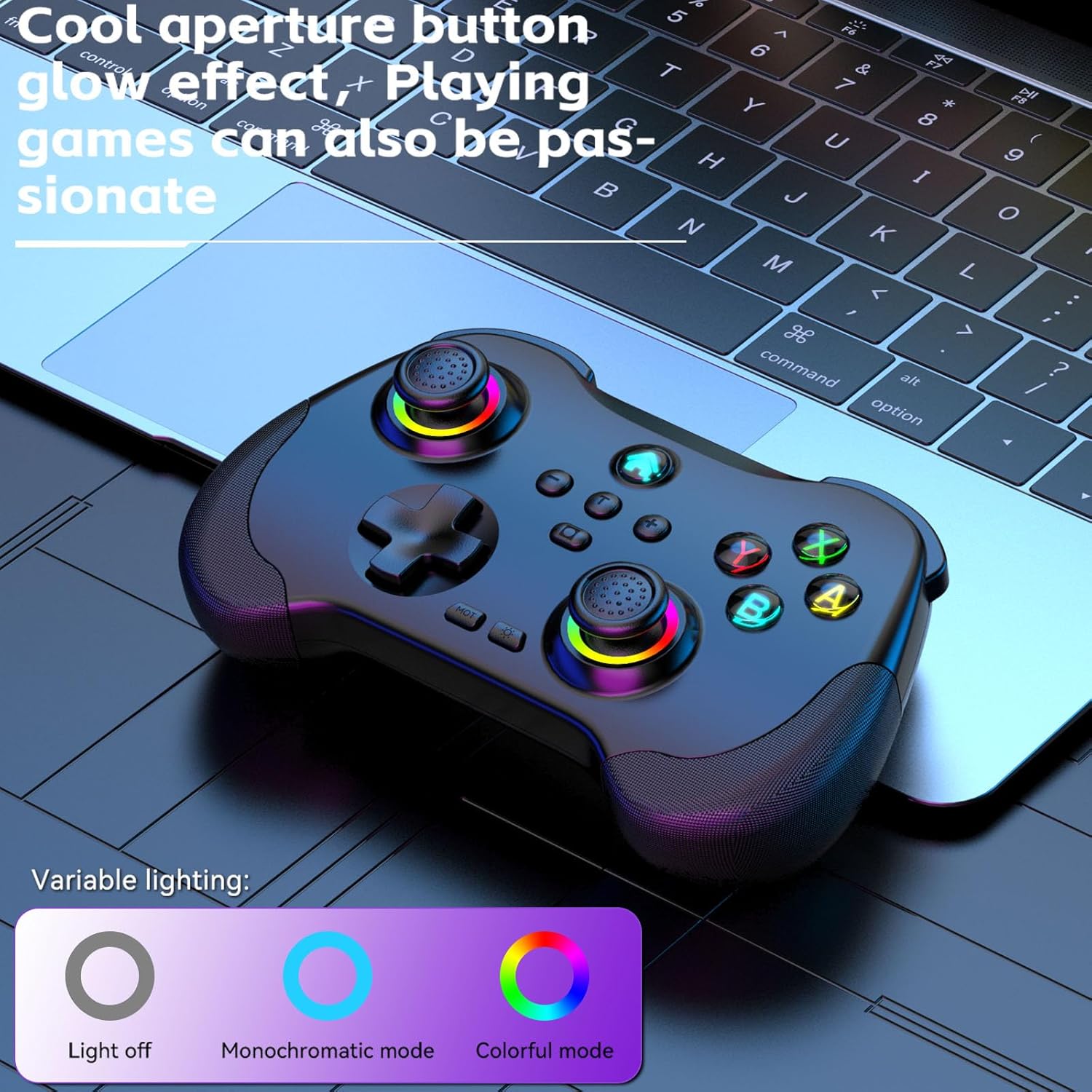
Image 3.2: The controller displaying its customizable RGB lighting on joysticks and buttons.
4. Настройка и зарядка
4.1. Зарядка контроллера
Before first use, fully charge the controller. Connect the included USB-C cable to the controller's charging port and the other end to a USB power source (e.g., computer, wall adapter). The LED indicators will show charging status and turn off or change color when fully charged.
- Емкость аккумулятора: 600мАч
- Время зарядки: Примерно 2 часа
- Выносливость: Примерно 10-15 часа
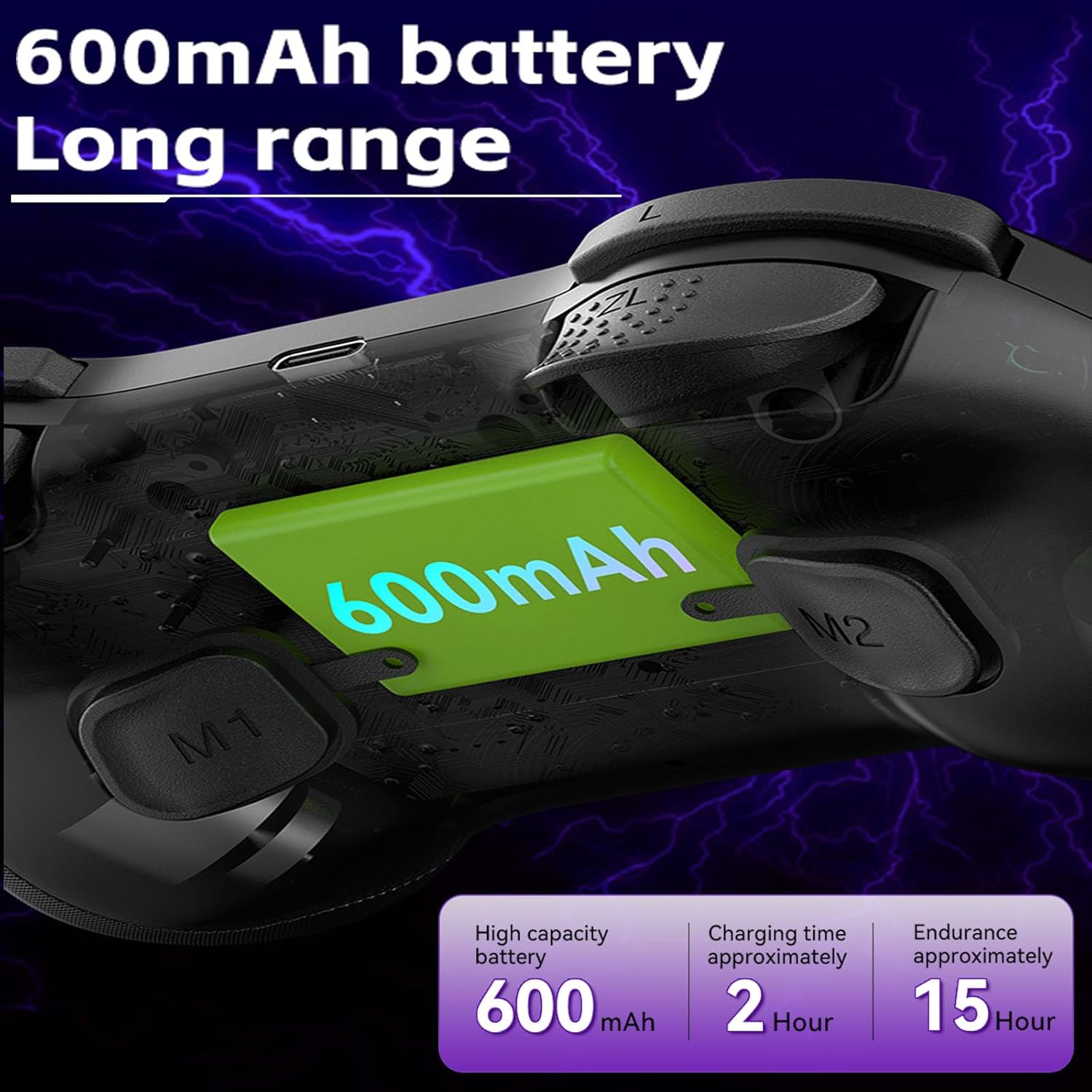
Image 4.1: Diagram illustrating the 600mAh battery capacity and charging specifications.
4.2. Включение и выключение
- Для включения: Press and hold the Home button for 1-2 seconds.
- Чтобы выключить: Press and hold the Home button for 3-5 seconds until the indicator lights turn off.
5. Инструкция по эксплуатации
5.1. Подключение к устройствам
The Koiiko Z01 controller supports various connection modes. The specific button combination to enter pairing mode may vary by platform. Please refer to the included physical user manual for exact button combinations for each mode. Below are general guidelines:
- Общие настройки сопряжения Bluetooth: Typically involves holding a combination of buttons (e.g., Home + X, Home + A, Home + B) until the indicator lights flash rapidly, indicating pairing mode. Then, search for "Koiiko Z01" or similar on your device's Bluetooth settings and connect.
- Nintendo Switch: Navigate to the 'Controllers' menu on your Switch, then 'Change Grip/Order'. Hold the specific pairing button combination on the controller until it connects.
- ПК (Windows): Ensure your PC has Bluetooth enabled. Hold the specific pairing button combination, then go to 'Bluetooth & other devices' in Windows settings and add a new Bluetooth device. The controller will typically connect as an X-Input device.
- iOS/Android: Enable Bluetooth on your mobile device. Hold the specific pairing button combination, then select the controller from the list of available Bluetooth devices.
- PlayStation 3/4: Connect the controller via USB cable first to register it, then it may be used wirelessly. Specific pairing methods may vary; consult your console's instructions.

Image 5.1: Connection guideline for PC.

Image 5.2: Connection guideline for Nintendo Switch.
5.2. ABXY Key Value Interchange
The controller allows you to switch the ABXY button layout between Nintendo Switch and Xbox settings without physically removing the buttons.
- To Interchange: Нажмите и удерживайте X + B + HOME keys simultaneously. The controller will switch its ABXY key value. Repeat the combination to revert to the previous setting.

Image 5.3: ABXY key value interchange function.
5.3. Регулировка RGB-подсветки
The controller features customizable RGB lighting around the joysticks and on the buttons.
- Для смены режимов: Press the dedicated Light Adjustment button (refer to the controller diagram in your physical manual for location) to cycle through the 5 available RGB light modes, including a mode to turn the lights off.
5.4. Программируемые кнопки на задней панели (M1/M2)
The M1 and M2 buttons on the back of the controller can be programmed to perform specific actions or sequences.
- Шаги программирования: Refer to your physical user manual for detailed instructions on how to program the M1 and M2 buttons, as the process typically involves entering a programming mode and then inputting the desired button sequence.
5.5. Функция Турбо
The Turbo function allows a button to register continuous presses when held down.
- Активировать: Нажмите ТУРБО button simultaneously with the desired action button (e.g., TURBO + A).
- Чтобы деактивировать: Repeat the activation step (TURBO + A) for the same button.

Изображение 5.4: оконченоview of advanced functions including macro programming and Turbo mode.
6. Техническое обслуживание
Правильный уход продлит срок службы вашего контроллера.
- Уборка: Протирайте контроллер мягкой сухой тканью. Для удаления стойких загрязнений слегка потрите.ampСмочите ткань водой. Избегайте использования агрессивных химикатов и абразивных чистящих средств.
- Хранилище: Храните контроллер в прохладном, сухом месте, вдали от прямых солнечных лучей и экстремальных температур.
- Уход батареи: To maintain battery health, avoid fully discharging the controller frequently. If storing for an extended period, charge it to about 50% every few months.
- Избегайте физического воздействия: Не роняйте и не подвергайте контроллер сильным ударам, так как это может повредить внутренние компоненты.
7. Поиск Неисправностей
If you encounter issues with your Koiiko Z01 controller, try the following solutions:
| Проблема | Возможное решение |
|---|---|
| Контроллер не включается. | Убедитесь, что контроллер заряжен. Подключите его к источнику питания с помощью кабеля USB-C. |
| Невозможно подключиться через Bluetooth. |
|
| Buttons or joysticks are unresponsive or drifting. |
|
| RGB-подсветка не работает. | Press the Light Adjustment button to cycle through modes or turn them on. Ensure the controller is powered on. |
| Контроллер часто отключается. |
|
8. Технические характеристики
| Особенность | Деталь |
|---|---|
| Модель | Z01 |
| Размеры продукта | 2.44 x 6.85 x 4.84 дюйма (6.2 x 17.4 x 12.3 см) |
| Вес товара | 12.6 унции (357.2 грамма) |
| Аккумулятор | 1 AA battery required (included) - Note: Product features mention 600mAh Lithium, please refer to product packaging for exact battery type. |
| Емкость аккумулятора | 600mAh (Lithium, built-in) |
| Время зарядки | Примерно 2 часа |
| Продолжительность использования | Примерно 10-15 часа |
| Расстояние передачи Bluetooth | ≤ 8 метров |
| Рабочий объемtage | DC3.7V |
| Рабочий ток | < 35мА |
| Производитель | ShenZhen ShanWan Technology Co., Ltd. |
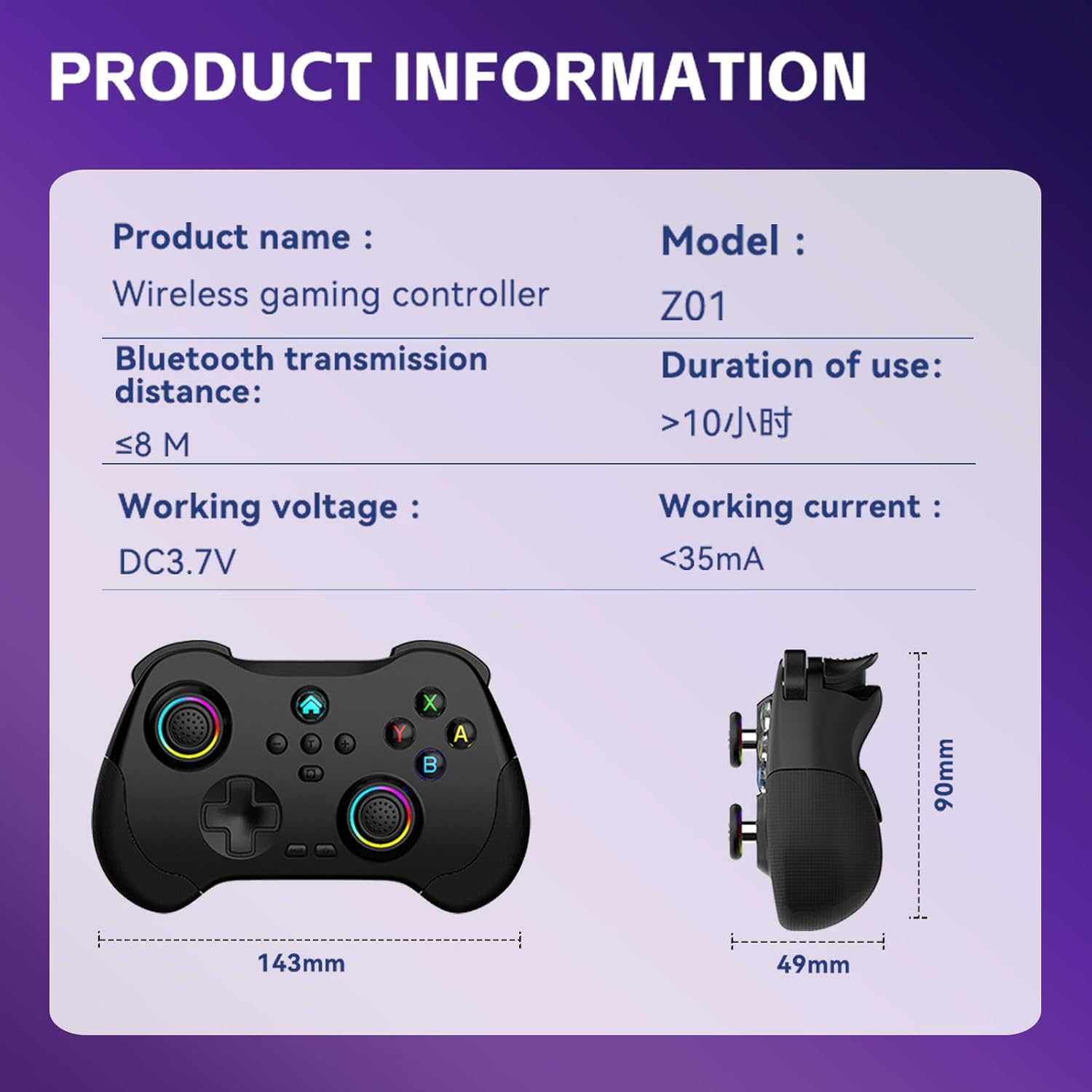
Image 8.1: Product information table with key specifications.
9. Гарантия и поддержка
Koiiko provides technical support for its products. If you have any questions, encounter issues, or require assistance with your Koiiko Wireless Gaming Controller Z01, please contact our customer support team.
- Контактная информация: Please refer to the contact details provided on your product packaging or the official Koiiko webсайт для получения самых актуальных каналов поддержки.
- Гарантия: Information regarding product warranty periods and terms can be found on the official Koiiko webна сайте или внутри упаковки вашего продукта.


