1. Введение
This manual provides instructions for the setup, operation, and maintenance of your SPYPOINT Force 48 Non-Cellular Trail Camera. The Force 48 is designed to capture high-resolution photos and videos of wildlife with its 48MP photo capability and 720p video recording. It features 48 low-glow LEDs for night imaging, an 80-foot flash range, and an 80-foot detection range, along with an LCD screen for easy configuration.

Image 1.1: The SPYPOINT Force 48 Trail Camera, shown with its packaging and an included installation strap.
2. Особенности продукта
- Визуализация высокого разрешения: Captures 48-megapixel photos and 720p videos.
- Ночное видение: Equipped with 48 low-glow LEDs and Infrared Boost Technology for clear nighttime images and videos.
- Высокая скорость срабатывания: Features an ultra-fast 0.2-second trigger speed to capture movement effectively.
- Detection and Flash Range: Offers an 80-foot detection range and an 80-foot flash range.
- Удобный интерфейс: Includes an intuitive LCD screen for easy setup and adjustment of settings.
- Универсальные режимы съемки: Supports Photo, Video, and Time-Lapse modes.
- Multi-Shot Functionality: Capable of capturing up to five photos per detection event.

Image 2.1: Key specifications of the Force 48 camera, including its 48-megapixel resolution, 720p video capability, 0.5-second trigger speed, and 80-foot detection and flash range.
3. Содержимое упаковки
The SPYPOINT Force 48 Trail Camera package includes:
- 1x SPYPOINT Force 48 Trail Camera
- 1x Installation Strap
4. Настройка
4.1. Установка аккумулятора
The Force 48 camera requires 8 AA batteries for operation. Ensure the camera is powered off before installing batteries. Open the camera casing and insert the batteries according to the polarity indicators inside the battery compartment.

Image 4.1: Proper insertion of 8 AA batteries into the camera's battery compartment.
4.2. Установка и форматирование SD-карты
A compatible SDHC memory card (up to 32 GB) is required to store photos and videos. Insert the SD card into the designated slot. It is recommended to format the SD card directly through the camera's menu before first use and periodically thereafter to ensure optimal performance and prevent data corruption.

Image 4.2: Instructions for inserting and formatting the SD card within the camera.
4.3. Basic Settings Adjustment
Utilize the camera's internal LCD screen and navigation buttons to adjust essential settings such as date, time, capture mode (photo, video, time-lapse), photo resolution, video length, and detection delay. The 'SETUP' position on the power switch allows access to these settings.

Image 4.3: The camera's LCD screen and control buttons for adjusting settings.

Image 4.4: Adjusting camera settings using the on-camera buttons and LCD screen.
4.4. Установка камеры
Mount the camera to a tree or post using the provided installation strap. For optimal detection and image capture, position the camera approximately 25 feet (7.5 meters) from the target area, at mid-body height of the animals you intend to monitor.

Image 4.5: Recommended camera placement for effective monitoring.

Image 4.6: Securing the camera to a tree with the installation strap.
5. Операция
5.1. Режимы съемки
The Force 48 offers three primary capture modes:
- Режим фото: Captures still images at the selected resolution (up to 48MP).
- Видеорежим: Records video clips at 720p resolution. Nighttime video recording is limited to 20 seconds.
- Режим покадровой съемки: Captures images at predetermined intervals, useful for monitoring large areas over extended periods.
5.2. Trigger Speed and Detection
The camera's 0.2-second trigger speed ensures that motion is captured quickly. The 80-foot detection range allows for monitoring a significant area. When motion is detected, the camera will activate according to the configured settings.
5.3. Ночное видение
The 48 low-glow LEDs provide illumination for clear black-and-white images and videos during nighttime operation. Infrared Boost Technology enhances visibility in low-light conditions without disturbing wildlife.

Изображение 5.1: Примерample of a daytime photo captured by the Force 48 camera, showing deer in a snowy environment.

Image 5.2: A 48MP photo example from the Force 48 camera, viewред. на ноутбуке.
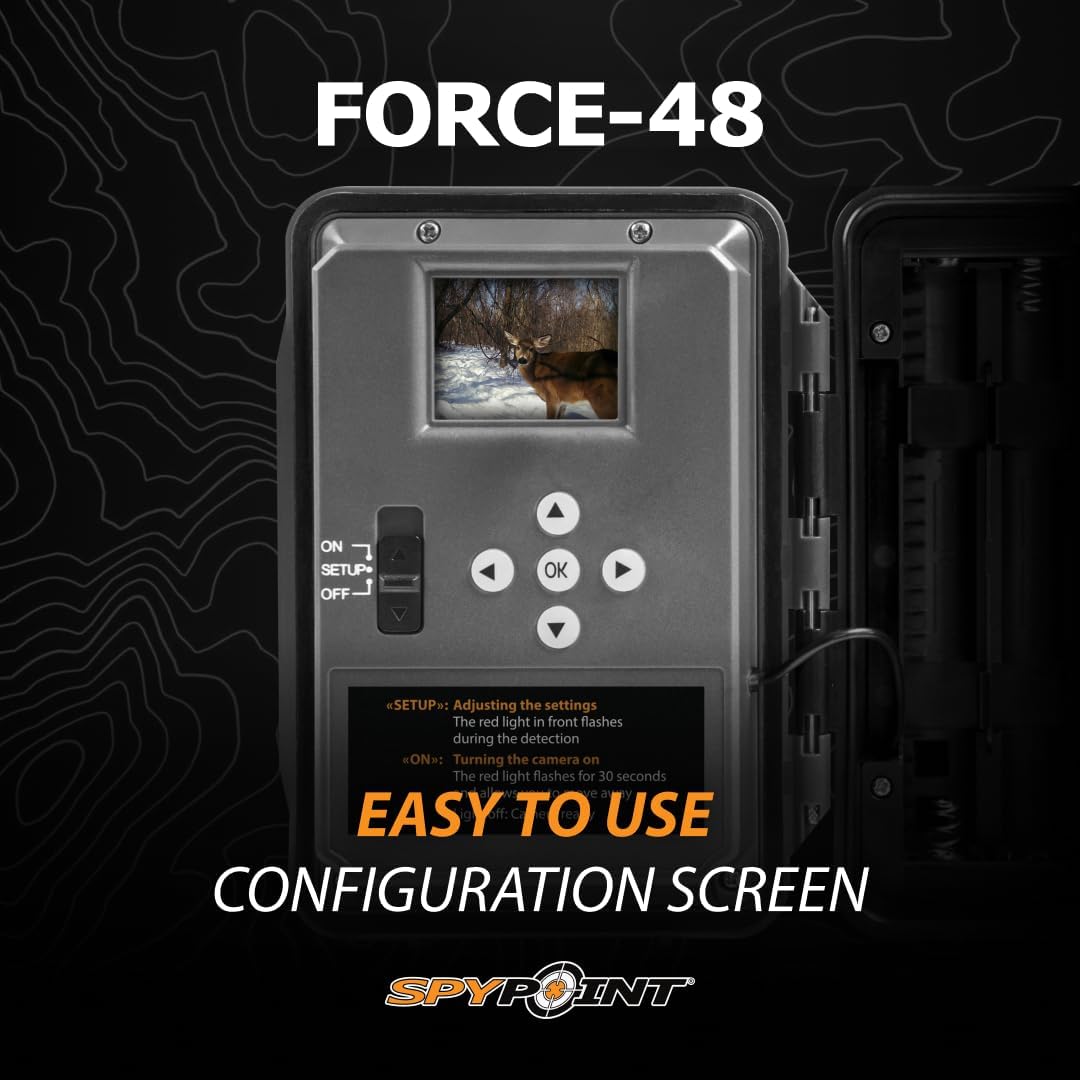
Image 5.3: A 720p video example from the Force 48 camera, viewред. на ноутбуке.
6. Техническое обслуживание
6.1. Замена батареи
Regularly check battery levels. Replace all 8 AA batteries simultaneously with new, high-quality alkaline or lithium batteries to ensure consistent power and prevent operational issues.
6.2. Управление SD-картой
Periodically remove the SD card to transfer captured media to a computer. Format the SD card using the camera's menu after transferring files or before deploying the camera for a new session to maintain optimal performance and prevent storage errors.
6.3. Уборка
Gently clean the camera lens and the PIR sensor window with a soft, lint-free cloth. Avoid abrasive materials or harsh chemicals. Ensure the camera casing is free of dirt and debris, especially around seals, to maintain its weather resistance.
7. Поиск Неисправностей
- Камера не включается: Ensure batteries are correctly inserted with proper polarity and are fully charged. Check that the power switch is in the 'ON' or 'SETUP' position.
- Фото/видеосъемка не производилась: Verify that the SD card is inserted correctly and has sufficient free space. Format the SD card if necessary. Check detection settings and ensure the camera is placed within the detection range of the target area.
- Плохое качество изображения: Clean the camera lens and ensure it is free from obstructions. Check battery levels, as low power can affect flash performance.
- Date/Time Not Setting: Access the camera's setup menu and manually set the date and time. Ensure the settings are saved before exiting the menu.
- Difficulty with SD Card Insertion/Removal: The SD card slot is designed for a secure fit. Ensure the card is oriented correctly and press firmly until it clicks into place. For removal, press the card in slightly until it springs out.
8. Технические характеристики
| Особенность | Спецификация |
|---|---|
| Номер модели | СИЛА-48 |
| Разрешение фото | 48 мегапикселей |
| Разрешение видео | 720p |
| Скорость триггера | 0.2 секунд |
| Диапазон вспышки | 80 футов |
| Диапазон обнаружения | 80 футов |
| светодиоды | 48 Low-Glow LEDs |
| Размер экрана | 2 дюйма (ЖК-дисплей) |
| Тип карты памяти | SDHC (up to 32 GB) |
| Источник питания | 8 батарейки типа АА |
| Размеры продукта | 3.5 x 5 x 5 дюйма |
| Вес товара | 9.6 унции |
| Технология связи | Wireless (Non-Cellular) |
| Специальная характеристика | Обнаружение движения |
9. Гарантия и поддержка
The SPYPOINT Force 48 Trail Camera comes with a 2-year warranty. For technical assistance, troubleshooting beyond this manual, or warranty claims, please refer to the official SPYPOINT webПосетите их сайт или свяжитесь напрямую со службой поддержки клиентов. Сохраните чек о покупке для подтверждения гарантии.


