Введение
This manual provides essential instructions for the safe and effective use of your Sony FX30 Digital Cinema Camera. The Sony FX30 is designed for content creators and filmmakers, featuring an APS-C sensor for cinematic capture. Please read this manual thoroughly before operating the camera and retain it for future reference.
Содержимое упаковки
Убедитесь, что все перечисленные ниже предметы присутствуют в вашей посылке. Если какие-либо предметы отсутствуют или повреждены, обратитесь к продавцу.

Image: The Sony FX30 Digital Cinema Camera body with various accessories including a memory card, LED light, microphone, and stabilization grip.
Sony Manufacturer Items:
- Sony FX30 Digital Cinema Camera Body
- Sony NP-FZ100 Rechargeable Lithium-Ion Battery
- Sony AC Adapter
- Защитная крышка Sony ALC-B1EM для камер с байонетом E.
- Защитная крышка для многофункционального разъема Sony
- Кабель USB-A — USB-C (USB 3.2)
Bundled Items:
- SanDisk 128GB High Speed Extreme Pro SD Memory Card
- High Power LED Light with Diffusers
- Микрофон-пушка
- Padded Deluxe Camera Bag
- U-Stabilization Grip
- Extra Replacement Battery (Compatible with NP-FZ100)
- Pistol Hand Grip
- Photo & Video Editing Software (1 Year Digital Download)
- USB Memory Card Reader
- Camera Hand Grip Strap
- Ручка для линз
- Воздуходувка для линз
- Camera Starter Kit (Microfiber Cloth, Memory Card Case, Buds)
Настраивать
1. Установка аккумулятора
Insert the provided Sony NP-FZ100 battery into the battery compartment located at the bottom of the camera. Ensure it clicks into place securely. Charge the battery fully before first use using the supplied AC adapter and USB-A to USB-C cable.
2. Установка карты памяти
The FX30 supports SD memory cards. Open the memory card slot cover, typically located on the side of the camera. Insert the SanDisk 128GB Extreme Pro SD card with the label facing the correct direction until it clicks into place. The camera features dual card slots for extended recording or backup.

Изображение: сзади view of the Sony FX30 showing the open memory card slots with two SD cards partially inserted.
3. Attaching the Body Cap
When no lens is attached, always keep the Sony ALC-B1EM Body Cap on the camera's E-mount to protect the sensor from dust and damage.
4. Первоначальное включение
Press the power button to turn on the camera. Follow any on-screen prompts for initial setup, such as language selection and date/time settings.
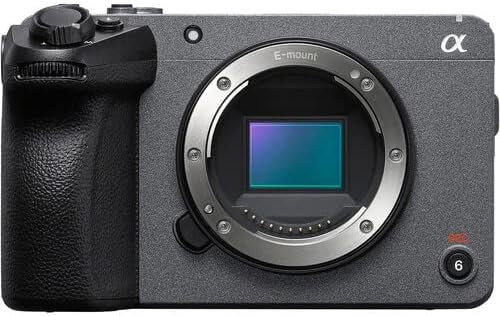
Изображение: Спереди view of the Sony FX30 camera body, showcasing the E-mount lens interface and grip.
5. Прикрепление аксессуаров
Attach the U-Stabilization Grip, Shotgun Microphone, and LED Light as needed for your shooting requirements. The camera features a Multi Interface Shoe for compatible accessories.
Эксплуатация камеры
Основные элементы управленияview
Familiarize yourself with the camera's main controls for efficient operation.

Изображение: сзади view of the Sony FX30, highlighting the LCD screen, MODE dial, MENU button, and various control buttons and dials.
- MODE Dial: Selects shooting modes.
- Кнопка МЕНЮ: Accesses camera settings and functions.
- FOCUS MAG: Magnifies the display for precise focusing.
- Кнопка Fn (функция): Обеспечивает быстрый доступ к часто используемым настройкам.
- Кнопка DISP (дисплей): Changes the information displayed on the screen.
- Колесо управления: Позволяет перемещаться по меню и настраивать параметры.
- Zebra/Peaking: Assists with exposure and focus.

Изображение: сверху view of the Sony FX30, showing the Multi Interface Shoe, IRIS, WB, ISO buttons, and the REC button.
- IRIS Button: Adjusts aperture.
- WB (White Balance) Button: Sets white balance.
- Кнопка ISO: Adjusts ISO sensitivity.
- Кнопка REC: Запускает и останавливает запись видео.
Управление с помощью сенсорного экрана
The FX30 features a touch-sensitive LCD screen for intuitive control. You can tap to select menu items, adjust focus, and navigate settings directly on the display.

Image: A hand interacting with the touch-sensitive LCD screen on the back of the Sony FX30 camera.
Запись видео
To begin recording, ensure a memory card is inserted and the battery is charged. Press the REC button to start recording. Press it again to stop. The camera supports video capture resolutions up to 4K and 1080p in MP4 format.
Связность
The Sony FX30 supports Wi-Fi connectivity for remote control, file transfer, and other smart functions. Refer to the camera's on-screen menu for Wi-Fi setup instructions.
Обслуживание
- Чистка корпуса камеры: Протрите корпус камеры мягкой сухой тканью. Для удаления стойких загрязнений слегка потрите.ampПромокните ткань водой. Избегайте использования сильнодействующих чистящих средств.
- Очистка объектива и сенсора: Use a lens blower to remove dust from the lens and sensor. For smudges on the lens, use a lens pen or a specialized lens cleaning solution with a microfiber cloth. Sensor cleaning should be performed with extreme care or by a professional.
- Уход батареи: Store batteries in a cool, dry place. Avoid fully discharging batteries frequently to prolong their lifespan.
- Хранилище: When not in use, store the camera in a dry, dust-free environment, preferably in the padded deluxe camera bag provided.
Поиск неисправностей
This section addresses common issues you might encounter. For more detailed troubleshooting, refer to the official Sony support webсайт.
- Камера не включается: Ensure the battery is fully charged and correctly inserted. Try using the extra replacement battery.
- Ошибка карты памяти: Reinsert the memory card. Ensure it is formatted correctly by the camera. Try a different memory card if the issue persists.
- Нет видеозаписи: Check if the memory card has sufficient free space. Verify that the camera is in a video recording mode.
- Проблемы с качеством изображения: Check lens cleanliness. Ensure appropriate ISO, aperture, and shutter speed settings for your lighting conditions.
Технические характеристики
| Особенность | Деталь |
|---|---|
| Размеры продукта | 3.3 x 3.1 x 3.3 дюйма |
| Вес товара | 8 фунта |
| ASIN | B0D1RWMS36 |
| Номер модели товара | CC-FX30BODY-41524 |
| Производитель | Сони |
| Бренд | Сони |
| Технология фотодатчика | АПС-С |
| Разрешение видеозахвата | 1080p, 4К |
| Тип флэш-памяти | SD |
| Формат захвата видео | МП4 |
| Поддерживаемый аудиоформат | ААС, МР3 |
| Размер экрана | 3 дюйма |
| Технология связи | Wi-Fi |
| Цвет | Черный |
| Специальная характеристика | Беспроводной |
Гарантия и поддержка
The Sony FX30 Digital Cinema Camera comes with a Limited 1-Year Manufacturer Warranty. Please retain your proof of purchase for warranty claims.
For technical support, service, or further information, please visit the official Sony support webили свяжитесь с их службой поддержки клиентов. Более подробную информацию можно найти на сайте. Поддержка Сони Webсайт.


