1. Введение
This instruction manual provides essential information for the safe and efficient use of your NIIMBOT D110M Bluetooth Label Maker. Please read this manual thoroughly before operating the device and retain it for future reference. The NIIMBOT D110M is a compact, wireless thermal label printer designed for various organizational tasks in home, office, and school environments.

Image 1.1: The NIIMBOT D110M Label Maker, a roll of blank labels, and three example labels showing a barcode, 'Biscuits', and 'Tools'.
2. Содержимое упаковки
Убедитесь, что все перечисленные ниже предметы входят в комплект. Если какие-либо предметы отсутствуют или повреждены, обратитесь в службу поддержки клиентов.

Image 2.1: The complete package contents for the NIIMBOT D110M, neatly arranged.
- NIIMBOT D110M Label Maker
- Руководство пользователя
- Зарядный кабель типа C
- Упаковочная коробка
- Label Paper Roll (12x40mm)
3. Продукт закончилсяview и особенности
The NIIMBOT D110M is designed for ease of use and portability, featuring advanced thermal printing technology.
Основные характеристики:
- Bluetooth-подключение: Seamless wireless connection to smartphones via the NIIMBOT app.
- Термальная печать: Utilizes BPA-Free Direct Thermal Technology, eliminating the need for ink or toner.
- Высокое разрешение: 203 DPI for clear and crisp print quality.
- Портативная конструкция: Compact and lightweight, powered by a built-in 1500mAh rechargeable Lithium-Ion battery.
- Быстрая зарядка: Fully charged in approximately 2 hours via Type-C cable.
- Длительный срок службы батареи: Up to 5 hours of continuous printing on a full charge.
- Интеллектуальная идентификация: Built-in RFID chip automatically recognizes label types for simplified setup.
- Долговечные этикетки: Compatible labels are waterproof, oil-proof, abrasion-resistant, and fade-resistant.

Image 3.1: Visual representation of the NIIMBOT D110M's key features, including text printing, scanning, inkless operation, portability, high-speed printing, and Bluetooth connectivity.

Image 3.2: Details on the D110M's upgraded battery performance, highlighting its 1500mAh capacity, charging time, and print speed.
4. Настройка
4.1 Зарядка устройства
Before first use, fully charge the label maker. Connect the provided Type-C charging cable to the device and a compatible USB power adapter. The indicator light will show charging status.
4.2 Установка этикеточной бумаги
- Откройте крышку отсека для этикеток.
- Insert the label roll with the printing surface facing upwards, ensuring the first label extends slightly out of the printing slot.
- Close the cover securely. The device's RFID chip will automatically detect the label type.
4.3 Загрузка приложения и подключение по Bluetooth
- Download the "NIIMBOT" app from your smartphone's app store (available for iOS and Android).
- Turn on the NIIMBOT D110M label maker by pressing the power button. The indicator light will illuminate.
- Включите Bluetooth на вашем смартфоне.
- Open the NIIMBOT app and follow the on-screen instructions to connect to your D110M device. The device name typically appears as "D110_XXXX".
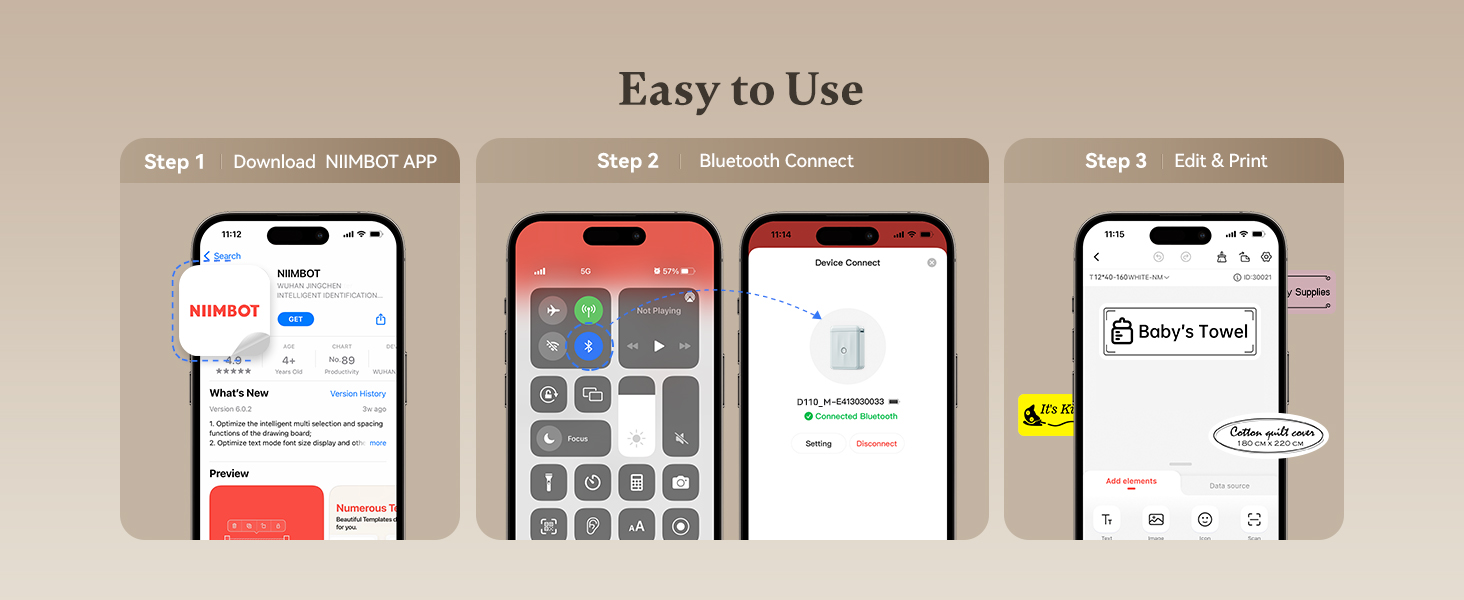
Image 4.1: A visual guide to the three-step setup process: downloading the app, connecting via Bluetooth, and then editing and printing labels.
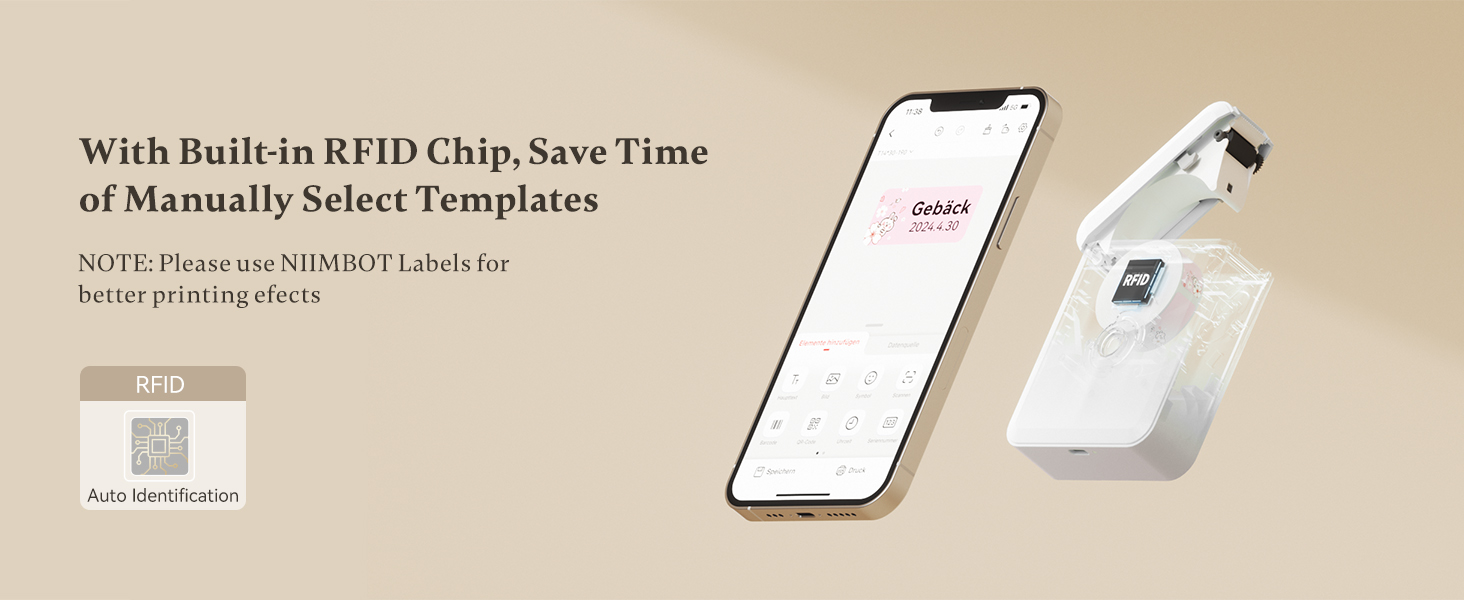
Image 4.2: The NIIMBOT app interface on a smartphone, demonstrating the automatic label identification feature via the built-in RFID chip.
5. Инструкция по эксплуатации
5.1 Создание и редактирование меток
Once connected, use the NIIMBOT app to design your labels. The app offers various templates, fonts, symbols, and customization options.
- Выберите шаблон или начните новый дизайн этикетки.
- Enter text, add icons, barcodes, or QR codes.
- Adjust font size, style, and alignment.
- Предварительноview your label before printing.

Image 5.1: The NIIMBOT app displaying options for personalizing labels, including different categories of icons and templates.
5.2 Печать этикеток
After designing your label, tap the print button in the app. You can choose to print a single label or multiple copies (batch printing).
- Ensure the label maker has sufficient battery and label paper.
- Confirm the label design in the app.
- Tap "Print" and select the number of copies.
- The label will print rapidly from the device.

Image 5.2: Illustration of different printing modes available with the D110M, including real-time printing and reprinting previous labels.
5.3 Применение этикеток
The NIIMBOT D110M is versatile for various labeling needs:
- Домашняя организация: Labeling storage bins, kitchen containers, spice jars, and personal items.
- Офисное использование: Организация files, folders, cables, and office supplies.
- School Supplies: Naming school items, books, and craft materials.
- Розничная торговля: Creating price tags and product labels for small businesses.

Изображение 5.3: Примерamples of the D110M label maker's versatility across different categories like toys, kitchen, pricing, cosmetics, and personal items.

Image 5.4: Demonstrations of label durability, showcasing resistance to water, grease, abrasion, and fading.
6. Техническое обслуживание
6.1 Очистка печатающей головки
Для обеспечения оптимального качества печати регулярно очищайте печатающую головку. Используйте ватный тампон, слегка протерев его.ampened with isopropyl alcohol to gently wipe the print head surface. Allow it to dry completely before use.
6.2 Уход за аккумулятором
To prolong battery life, avoid fully discharging the device frequently. Charge the device regularly, even if not in constant use. Store the device in a cool, dry place.
6.3 Хранение этикеток
Store label rolls in a cool, dry place away from direct sunlight and heat to prevent degradation of the thermal material.
7. Поиск Неисправностей
If you encounter issues with your NIIMBOT D110M, refer to the following common problems and solutions:
| Проблема | Возможная причина | Решение |
|---|---|---|
| Устройство не включается | Низкий заряд батареи | Зарядите устройство с помощью кабеля Type-C. |
| Невозможно подключиться через Bluetooth | Bluetooth off on phone; Device not discoverable; App issue | Ensure phone Bluetooth is on. Restart the label maker. Restart the NIIMBOT app. |
| Низкое качество печати / Слабая печать | Dirty print head; Incorrect label orientation; Low battery | Clean the print head. Ensure label paper is inserted correctly. Charge the device. |
| Этикетки подаются неправильно | Label roll improperly installed; Obstruction | Re-install the label roll, ensuring it's straight. Check for any debris in the paper path. |
| App does not recognize label type | Non-NIIMBOT labels; RFID chip issue | Ensure you are using genuine NIIMBOT labels. Restart the device and app. |
8. Технические характеристики
Detailed technical specifications for the NIIMBOT D110M Label Maker:
- Модель: D110M (Item model number: D110-M-New)
- Технология печати: Термальный
- Разрешение печати: 203 точек на дюйм
- Скорость печати: 30 мм/с
- Связь: Bluetooth
- Совместимые устройства: Смартфоны (Android, iOS)
- Источник питания: 1500mAh Lithium-Ion Battery (rechargeable)
- Интерфейс зарядки: Тип-C USB
- Размеры продукта: 0.8 x 2.7 x 3.9 дюйма
- Вес товара: 10.9 унции
- Цвет чернил: Monochrome (Black text only)
- Особая особенность: Portable, RFID Automatic Label Identification
9. Гарантия и поддержка
9.1 Информация о гарантии
The NIIMBOT D110M Label Maker comes with a Limited Warranty. Please refer to the warranty card included in your package or contact NIIMBOT customer service for specific terms and conditions.
9.2 Поддержка клиентов
For further assistance, technical support, or inquiries regarding your product, please visit the official NIIMBOT webсайт или обратитесь к контактной информации, указанной на упаковке вашего продукта.
Электронная версия руководства пользователя доступна для скачивания: Руководство пользователя (PDF)


