1. Введение
The MASTECH MS8236 is a versatile 2-in-1 digital multimeter and network cable track tester designed for electrical and network diagnostics. This device combines the functions of a digital multimeter for measuring electrical parameters with a network cable tester for verifying cable integrity and a tone generator for tracing wires. It is suitable for professional and DIY use in various applications.
2. Информация по технике безопасности
Always adhere to basic safety precautions when using this device to prevent personal injury or damage to the meter or equipment under test. Read all instructions carefully before use.
- Не превышайте максимальные входные значения, указанные для каждой функции.
- Будьте предельно осторожны при работе с цепями под напряжением.
- Перед проведением измерений убедитесь, что переключатель функций находится в правильном положении.
- Не используйте измерительный прибор, если он выглядит поврежденным или если повреждены измерительные щупы.
- При появлении индикатора низкого заряда батареи немедленно заменяйте ее, чтобы обеспечить точность показаний.
- Avoid using the device in environments with high humidity, extreme temperatures, or explosive gases.
- Always disconnect power to the circuit before testing continuity or resistance.
3. Продукт закончилсяview
The MASTECH MS8236 integrates a digital multimeter with a detachable cable tracker/tone generator. The main unit features a clear digital display, function selector dial, and input jacks. The cable tracker assists in identifying and tracing network and telephone lines.
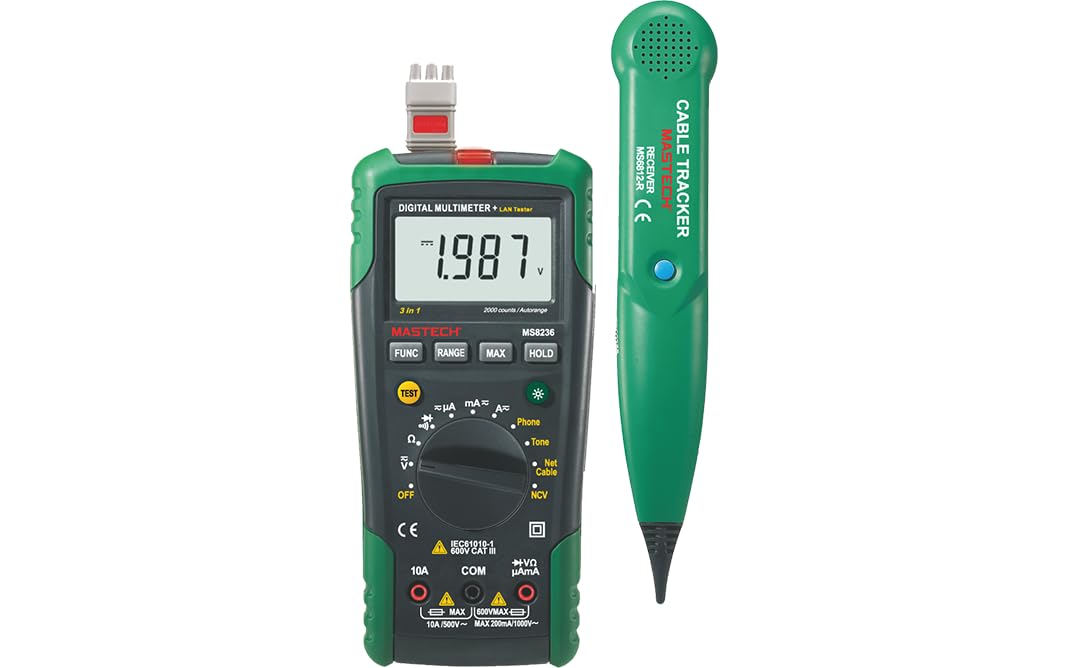
Figure 3.1: MASTECH MS8236 Digital Multimeter and Cable Tracker. The image shows the main multimeter unit on the left and the separate cable tracker unit on the right. Both are green and black.
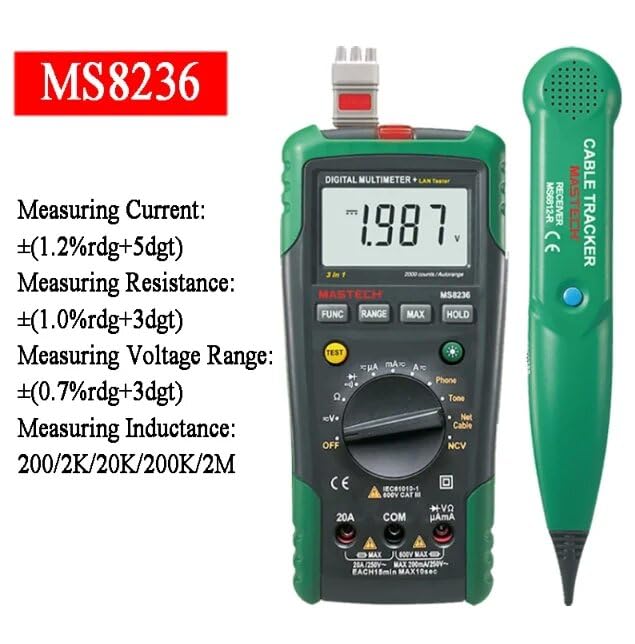
Figure 3.2: Close-up of the MASTECH MS8236 Multimeter Display and Controls. The display shows '1.987 V' and the function dial indicates various measurement modes including V, A, Ohm, Diode, Continuity, Phone, Net Cable, and NCV.
Основные характеристики:
- Дисплей: количество 2000
- Ranging: Auto & Manual
- Бесконтактный объемtage (NCV) Детектор
- Диод открытtagе: 1.7 В
- Сигнализатор непрерывности: активируется при сопротивлении ниже 70 Ом
- Функция удержания данных
- Низкий дисплей батареи
- Подсветка дисплея
- Автоматическое выключение питания
- Network Cable Check: Tests for open circuits, shorts, miss-wires, reversals, split pairs, and shield detection. Supports T568A, T568B, 10Base-T.
- Telephone Line Check: Identifies line states (Busy, Ringing, Clear) and continuity.
- Tone Function: For tracking cables and diagnosing break points.
4. Настройка
4.1. Распаковка и осмотр
Carefully unpack the MS8236 and all accessories. Inspect the device for any signs of damage. If any damage is found, contact your supplier immediately.
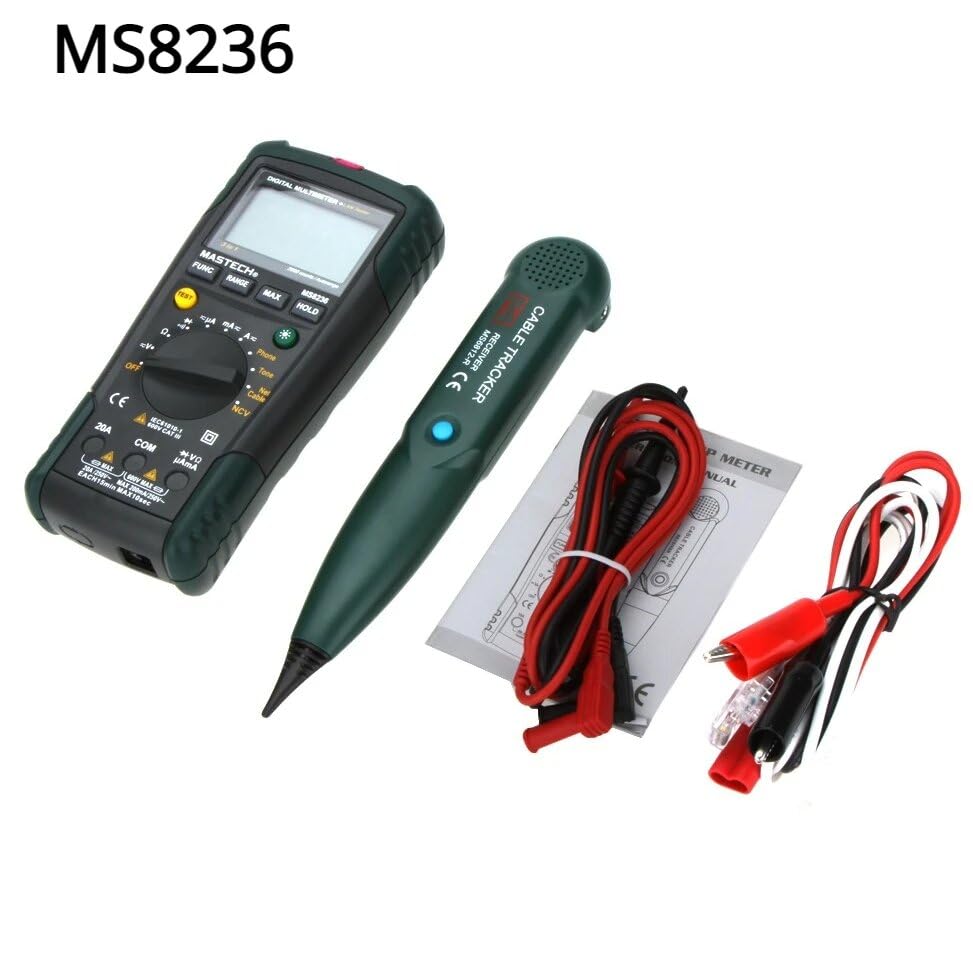
Figure 4.1: MASTECH MS8236 Kit Contents. The image displays the multimeter, cable tracker, red and black test leads, a network cable adapter, and a small instruction manual.
4.2. Установка аккумулятора
The MS8236 requires 2 LR44 batteries, which are included. To install or replace batteries:
- Locate the battery compartment cover on the back of the multimeter unit.
- Используйте отвертку, чтобы открыть батарейный отсек.
- Insert the 2 LR44 batteries, observing the correct polarity (+/-).
- Надежно закройте крышку батарейного отсека.
5. Инструкция по эксплуатации
5.1. Basic Multimeter Functions
Connect the test leads to the appropriate input jacks (COM for black lead, VΩmA for red lead for most measurements, or 20A for high current). Select the desired function using the rotary switch.
- Томtage Измерение (DCV/ACV): Turn the rotary switch to the 'V' position. Select DC or AC voltage if applicable. Connect test leads in parallel to the circuit.
- Измерение тока (DCA/ACA): Turn the rotary switch to the 'A' position. Select DC or AC current. Connect test leads in series with the circuit. Ensure the correct input jack (mA or 20A) is used.
- Измерение сопротивления (Ом): Turn the rotary switch to the 'Ω' position. Ensure the circuit is de-energized. Connect test leads across the component.
- Проверка диода (→|): Turn the rotary switch to the diode symbol. Connect the red lead to the anode and the black lead to the cathode of the diode.
- Тест непрерывности ()))): Turn the rotary switch to the continuity symbol. The buzzer will sound if the resistance is below approximately 70Ω.
5.2. Network Cable Check
This function tests the integrity of network cables (RJ45). It can detect open circuits, shorts, miss-wires, reversals, split pairs, and shield detection for T568A, T568B, and 10Base-T standards.
- Turn the rotary switch to the 'Net Cable' position.
- Connect one end of the network cable to the RJ45 port on the main multimeter unit.
- Connect the other end of the network cable to the RJ45 port on the remote cable tracker unit.
- Observe the display for test results, which will indicate the cable status. The device also features a debug mode for detailed fault identification.
5.3. Telephone Line Check
This function allows for checking the state of a working telephone line and its continuity.
- Turn the rotary switch to the 'Phone' position.
- Connect the telephone line to the appropriate port on the main unit.
- The device will identify the state of the line as Busy, Ringing, or Clear. It can also judge the continuity of the telephone cables or wires.
5.4. Tone Function
The tone function is used with the cable tracker to trace cables and wires and diagnose break points.
- Turn the rotary switch to the 'Tone' position.
- Connect the test leads or RJ11/RJ45 plug to the cable you wish to trace.
- Use the remote cable tracker unit to follow the cable. The tracker will emit an audible tone when it detects the signal from the main unit, helping to locate the cable and identify breaks.
5.5. Бесконтактный Voltage (NCV) Обнаружение
Функция NCV позволяет определять напряжение переменного тока.tagбез прямого контакта с проводником.
- Поверните поворотный переключатель в положение «NCV».
- Поднесите верхнюю часть мультиметра к источнику переменного тока под напряжением.tagэлектронный источник.
- Устройство покажет наличие переменного тока.tagс помощью звукового сигнала тревоги и/или визуального индикатора.
5.6. Дополнительные функции
- Хранение данных: Нажмите кнопку «HOLD», чтобы зафиксировать текущие показания на дисплее. Нажмите ещё раз, чтобы отменить фиксацию.
- Подсветка: Press the backlight button (often labeled with a light bulb symbol) to illuminate the display for better visibility in low-light conditions.
- Автоматическое выключение: Устройство автоматически выключится после периода бездействия для экономии заряда батареи.
6. Техническое обслуживание
6.1. Уборка
Протрите дело с рекламойamp Ткань и мягкое моющее средство. Не используйте абразивные материалы и растворители. Перед использованием убедитесь, что устройство полностью высохло.
6.2. Замена батареи
When the low battery indicator appears on the display, replace the batteries as described in Section 4.2. Remove batteries if the device will not be used for an extended period.
7. Поиск Неисправностей
- Нет изображения или оно слабое: Проверьте правильность установки батарей и уровень заряда. При необходимости замените батареи.
- Неправильные показания: Ensure test leads are properly connected and the correct function is selected. Verify the circuit is de-energized for resistance/continuity tests.
- Network cable test failure: Ensure both ends of the cable are securely connected to the main unit and remote. Check for physical damage to the cable or connectors.
- No tone from cable tracker: Verify the main unit is in 'Tone' mode and properly connected to the cable. Check the cable tracker's battery.
8. Технические характеристики
The following table outlines the general and electrical specifications for the MASTECH MS8236.

Figure 8.1: MASTECH MS8236 Features and Specifications Table. This image provides detailed electrical specifications for DC Voltagд, переменный ток объемtage, DC Current, AC Current, and Resistance, including ranges, resolutions, and accuracies.
| Параметр | Диапазон | Разрешение | Точность |
|---|---|---|---|
| DC Томtage | 200mV/2V/20V/200V/600V | 0.1mV/1mV/10mV/100mV/1V | ±(0.5%+5) |
| том переменного токаtage | 200mV/2V/20V/200V/600V | 0.1mV/1mV/10mV/100mV/1V | ±(0.8%+5) |
| Постоянный ток | 200µA/2000µA/20mA/200mA/2A/10A | 0.1µA/1µA/10µA/0.1mA/1mA/10mA | ±(1.2%+5) ±(2.0%+10) for 10A |
| Переменный ток | 200µA/2000µA/20mA/200mA/2A/10A | 0.1µA/1µA/10µA/0.1mA/1mA/10mA | ±(1.5%+5) ±(3.0%+10) for 10A |
| Сопротивление | 200Ω/2kΩ/20kΩ/200kΩ/2MΩ/20MΩ | 0.1Ω/1Ω/10Ω/100Ω/1kΩ/10kΩ | ±(1.0%+5) ±(1.5%+5) for 20MΩ |
| Диод открытtage | 1.7В | ||
| Непрерывный зуммер | <70 Ом | ||
| Отображать | 2000 отсчетов | ||
| Ранжирование | Автоматический и ручной режим | ||
| Бесконтактный объемtage Детектор | Да | ||
| Автоматическое выключение питания | Да | ||
| Удержание данных | Да | ||
| Низкий дисплей батареи | Да | ||
| Подсветка дисплея | Да | ||
| Источник питания | 2 батарейки LR44 (в комплекте) | ||
| Размеры продукта | 16 х 9 х 5 см | ||
| Вес товара | 500 г | ||
| Материал | Акрилонитрилбутадиенстирол (АБС) | ||
| Сертификаты | CE, RoHS | ||
9. Гарантия и поддержка
For warranty information and technical support, please refer to the documentation provided with your purchase or contact the seller or manufacturer directly. Specific warranty terms may vary by region and retailer.


