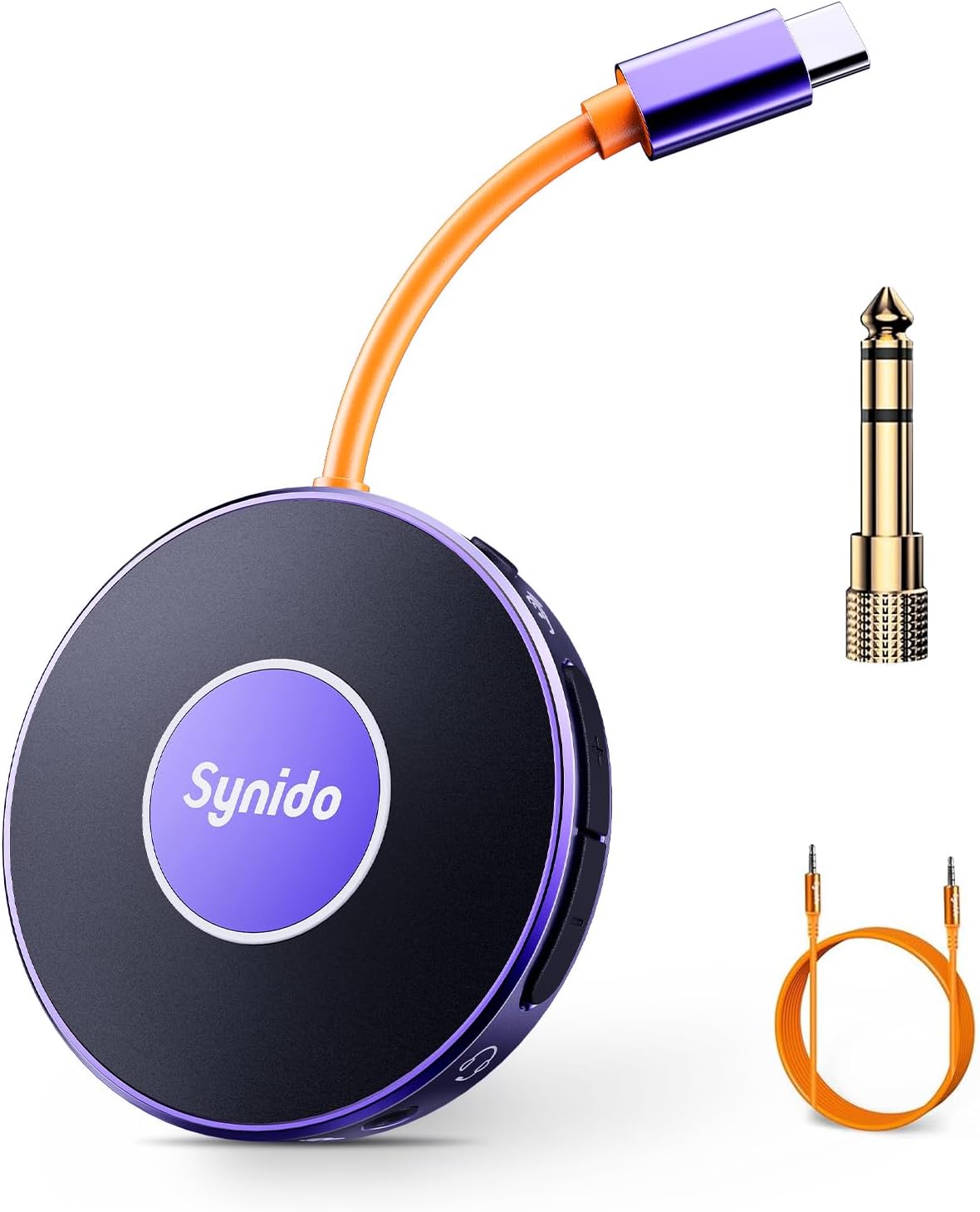
Руководство пользователя портативного аудиоинтерфейса Synido
Model: LIVE A10 V1
Введение
Thank you for choosing the Synido Portable Audio Interface. This compact and versatile device is designed to enhance your live streaming, music recording, and audio experience across various platforms and devices. This manual provides detailed instructions on setting up, operating, maintaining, and troubleshooting your audio interface to ensure optimal performance.
Содержимое упаковки
Пожалуйста, убедитесь, что все перечисленные ниже предметы включены в ваш пакет:
Portable Audio Interface (1 unit)
6.35mm (1/4'') Instrument Adapter (1 unit)
3.5mm (1/8'') Audio Cable (1 unit)
Руководство пользователя (1 шт.)
Figure 1: Contents of the Synido Portable Audio Interface package, including the main unit, adapters, and cables. Note: A Lightning adapter for certain iPhone models is not included and must be purchased separately if needed for data transmission.
Продукт болееview
The Synido Portable Audio Interface is a mini sound card and audio converter designed for mobile live broadcasts and high-quality music recording. It features a USB-C interface for direct connection to mobile phones or computers, and can simultaneously charge your device during live broadcasts. With 24-bit 48kHz resolution and a dual-core chip, it ensures pristine audio quality and low latency.
Figure 2: The Synido Portable Audio Interface, showcasinг компактный дизайн и входящие в комплект аксессуары.
Основные характеристики:
Charging while Broadcasting: Connect a charging cable to power your mobile phone during live streams.
High-Quality Sound & Low Latency: Studio-grade 24-bit 48kHz resolution with dual-core chip for clear audio and minimal delay.
Designed for Players: Features ultra-clear internal loopback and monitor functions, ideal for instrument recording. Includes a 6.35mm (1/4'') instrument adapter.
Sophisticated Functional Design: Dual independent volume buttons for headphone and microphone, independent In-Ear monitor switch, and a secure USB-C buckle design.
Многократное использование: Suitable for live streaming, instrument recording, enhancing music listening, gaming, and voice calls.
Figure 3: Visual breakdown of the Synido audio interface's design elements, highlighting its user-friendly controls and secure connections.
Figure 4: The Synido audio interface in a live streaming setup, emphasizing its compact form factor and versatile features for mobile content creation.
Настраивать
Первоначальное подключение:
Connect the USB-C cable of the Synido Portable Audio Interface directly to your mobile phone or computer.
Once connected, your device should automatically recognize the audio interface. For mobile phones, a headphone icon typically appears in the status bar, indicating a successful connection.
Plug your headphones into the designated earphone interface on the audio interface.
If using for live streaming or recording, open your preferred application (e.g., live streaming software, DAW) and select the Synido audio interface as your input/output device.
Figure 5: The Synido audio interface is designed for plug-and-play compatibility with Windows, Mac OS, and Android devices. Please note that a Lightning adapter is required for certain iPhone models to ensure data transmission.
Video Guide: Setting up for Gaming and Voice Streaming (Mobile Phone)
Video 1: This video demonstrates how to set up the Synido audio interface for live streaming with wireless accompaniment, showing connections for streaming phone, accompaniment phone (via Bluetooth), and headset. It highlights the successful connection indicator and how to toggle Bluetooth.
Video Guide: Setting up for Instrument Recording (Mobile Phone and Instrument)
Video 2: This video showcases the Synido audio interface's capabilities for guitar recording and live streaming. It illustrates connecting the device to a phone and a guitar, demonstrating the monitoring feature and wireless accompaniment for a seamless recording and streaming experience.
Инструкция по эксплуатации
Live Streaming with Wireless Accompaniment:
Connect the Synido audio interface to your main streaming phone via USB-C.
Plug your headset into the audio interface's earphone jack.
Press the center button on the Synido Live Dock A10 to turn on Bluetooth. The light will change from steady white to steady blue when connected.
On your accompaniment phone, enable Bluetooth and connect to 'Synido Live Dock' to play background music or accompaniment wirelessly.
Open your live streaming software on the main phone and begin your broadcast.
Запись инструмента:
Connect the Synido audio interface to your mobile phone or computer.
Plug the 6.35mm (1/4'') instrument adapter into the instrument input on the audio interface.
Connect your instrument (e.g., electric guitar) to the adapter using an instrument audio cable.
Plug your headphones into the earphone jack for real-time monitoring.
Press the Loopback switch on the audio interface to enable internal playback and recording.
Open your recording software on your phone or computer and start recording your instrument.
Figure 6: The Synido audio interface facilitating guitar recording, demonstrating the loopback feature for clear audio capture.
Общие сценарии использования:
The Synido Portable Audio Interface is versatile and can be used in various scenarios:
Charging while Broadcasting: Maintain phone battery during extended live sessions.
Hi-Fi Music Experience: Enhance sound quality when listening to music from your phone or computer.
Игры: Experience low-latency audio for an immersive gaming experience.
Голосовые звонки: Support for high-definition voice calls.
Figure 7: A visual representation of the diverse applications of the Synido audio interface, from live streaming to music listening.
Additional Video Demonstrations:
Video 3: This video focuses on using the Synido portable audio interface specifically for electric guitar recording. It demonstrates the connection process and highlights features like real-time monitoring and loopback for high-quality instrument recording.
Видео 4: Это видео дает общее представление о...view of the Synido portable mini audio interface for live use. It shows the device's compact size, ease of connection, and various applications, including charging while streaming, gaming, and voice calls, emphasizing its versatility.
Обслуживание
To ensure the longevity and optimal performance of your Synido Portable Audio Interface, follow these maintenance guidelines:
Уборка: Use a soft, dry cloth to wipe the surface of the device. Avoid using abrasive cleaners, solvents, or strong chemicals, as they may damage the finish or internal components.
Хранилище: Храните устройство в прохладном, сухом месте, вдали от прямых солнечных лучей, экстремальных температур и высокой влажности.
Умение обращаться: Handle the device with care. Avoid dropping it or subjecting it to strong impacts, which can cause internal damage.
Соединения: Always insert and remove cables gently to prevent damage to the ports. Ensure connections are secure during use.
Поиск неисправностей
If you encounter issues with your Synido Portable Audio Interface, please refer to the following common problems and solutions:
Нет вывода/ввода звука:
Ensure all cables are securely connected to the audio interface, your device, and your headphones/instrument.
Check the volume levels on both the audio interface (using the dual volume buttons) and your connected device.
Verify that the Synido audio interface is selected as the default input/output device in your operating system's sound settings or your application's audio preferences.
If using an iPhone, ensure you have a compatible Lightning adapter that supports data transmission, as it is not included with the product.
Помехи или шум в аудио:
Проверьте надежность соединений.
Ensure you are using high-quality cables.
Avoid placing the device near sources of electromagnetic interference (e.g., power adapters, Wi-Fi routers).
If charging while streaming, some electrical interference may occur. Try operating without charging to see if the noise persists.
Проблемы с подключением Bluetooth:
Ensure the Bluetooth function on the audio interface is activated (steady blue light).
Make sure Bluetooth is enabled on your accompaniment device and it is within range.
Забудьте об устройстве в настройках Bluetooth и повторите попытку сопряжения.
Устройство не распознано:
Try connecting to a different USB-C port or a different device to rule out port or device specific issues.
Restart your connected phone or computer.
Технические характеристики
Бренд
Синидо
Номер модели
LIVE A10 V1
Вес товара
5.9 унции
Размеры упаковки
6.97 x 5.2 x 1.54 дюйма
Страна происхождения
Китай
Совместимые устройства
Смартфон
Поддерживаемое программное обеспечение
Ableton Live, FL Studio, Audacity
Операционная система
Sound card (driverless for most modern OS)
Технология связи
USB
Количество каналов
2
Аудио разрешение
24 бит / 48 кГц
Figure 8: The Synido audio interface is designed to be highly portable, easily fitting into small bags or pockets for on-the-go use.
Гарантия и поддержка
For warranty information and customer support, please refer to the official Synido webили свяжитесь со службой поддержки напрямую. Вы также можете посетить Synido Brand Store on Amazon Для получения дополнительной информации и контактных данных.
Synido is committed to providing high-quality products and excellent customer service. If you have any questions or require assistance, do not hesitate to reach out.
Связанные документы - LIVE A10 V1
Руководство пользователя аудиоинтерфейса Synido Live 2x2 High-Fidelity Comprehensive user guide for the Synido Live 2x2 high-fidelity audio interface, covering product introduction, function descriptions for Solo and Duet models, driver installation, control panel usage, technical specifications, package contents, FAQs, and safety precautions. Compatible with Windows, macOS, Android, and iOS.
Аудиоинтерфейс Synido Live GO MK2: руководство пользователя и функции Полное руководство по портативному аудиоинтерфейсу Synido Live GO MK2, охватывающее все аспекты продуктаview, описания функций, инструкции по подключению, устранение неполадок и важные меры предосторожности при потоковой передаче и подкастинге.