Введение
This manual provides detailed instructions for setting up, operating, and maintaining your Samsung HW-Q6CC 3.1Ch 340W Soundbar System. This system is designed to enhance your audio experience with 340W of power, a dedicated wireless subwoofer, and support for Dolby Atmos and DTS. It also features built-in Bluetooth for streaming audio from your mobile devices.
Что в коробке?
Убедитесь, что в упаковке присутствуют все компоненты:
- Samsung 3.1Ch Soundbar with AC power cord
- Subwoofer with AC power cord
- HDMI-кабель
- Адаптер переменного тока
- Wallmount kit
- Remote control with 2x AAA batteries

Figure 1: Contents of the Samsung HW-Q6CC Soundbar System box, showing the soundbar, wireless subwoofer, remote control, HDMI cable, power adapter, and wall mount kit.
Настраивать
1. Физическое размещение
Place the soundbar directly in front of your television, centered for optimal audio projection. Ensure there are no obstructions in front of the soundbar. The wireless subwoofer can be placed anywhere in the room, ideally near a power outlet and within range of the soundbar for a stable wireless connection. Consider placing it in a corner for enhanced bass response.

Figure 2: The Samsung HW-Q6CC Soundbar and its wireless subwoofer in a typical home setup.
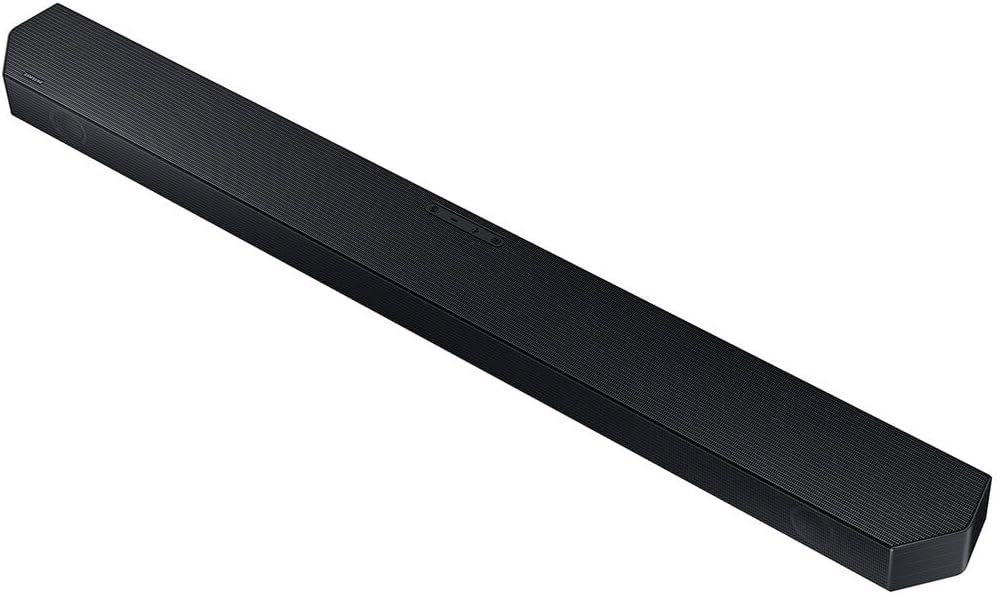
Рисунок 3: Подробная информация view of the Samsung HW-Q6CC Soundbar unit.

Рисунок 4: Подробная информация view of the Samsung HW-Q6CC Wireless Subwoofer unit.
2. Связи
- Подключение питания: Connect the AC power cords to the soundbar and the wireless subwoofer, then plug them into a wall outlet.
- Подключение HDMI eARC: For the best audio quality and control, connect the soundbar to your TV's HDMI eARC port using the provided HDMI cable. This allows for high-quality audio transmission and control of the soundbar volume using your TV remote.
- Оптическое соединение (альтернативный вариант): If your TV does not have an HDMI eARC port, you can use an optical cable (not included) to connect the soundbar to your TV's optical digital audio output.
3. Беспроводное сопряжение сабвуфера
The wireless subwoofer should automatically pair with the soundbar upon powering on. If the connection is not established, check the indicator light on the subwoofer. If it's blinking, press the 'ID SET' button on the back of the subwoofer, then press the 'PAIR' button on the soundbar remote control. The indicator light should turn solid blue once paired.
Инструкция по эксплуатации
1. Основные элементы управления
The soundbar can be controlled using the buttons on the top panel or the included remote control.
- Кнопки верхней панели: Includes Power, Volume Up/Down, and Source Selection.
- Дистанционное управление: Provides comprehensive control over power, volume, sound modes, subwoofer level, and Bluetooth pairing.
2. Режимы звука
Optimize your audio experience with various sound modes:
- Адаптивный звук Lite: Automatically analyzes content and optimizes sound settings for clear dialogue.
- Dolby Atmos & DTS Surround: Provides an immersive, virtualized surround sound experience for compatible content.
- Режим игры: Synchronizes gaming audio for a more dynamic and responsive experience.
3. Потоковая передача через Bluetooth
Connect your mobile devices to the soundbar via Bluetooth to stream music, podcasts, and other audio content wirelessly. Use the 'Bluetooth Multi Connection' feature to switch between two connected devices effortlessly. For quick pairing, utilize the 'Tap Sound' feature by gently tapping your compatible Samsung mobile device to the soundbar.
Обслуживание
Чтобы обеспечить долговечность и оптимальную производительность вашей звуковой системы:
- Для поддержания чистоты саундбара и сабвуфера протирайте их мягкой сухой тканью.
- Избегайте использования жидких чистящих средств или абразивных материалов.
- Для предотвращения перегрева обеспечьте надлежащую вентиляцию вокруг обоих устройств.
- Не подвергайте устройства воздействию экстремальных температур, влажности или прямых солнечных лучей.
Поиск неисправностей
If you encounter issues with your soundbar system, try the following:
- Нет питания: Check if the power cords are securely connected to both the soundbar, subwoofer, and the wall outlets.
- Нет звука: Verify the input source on the soundbar matches your TV's output. Check all cable connections. Ensure the TV's internal speakers are turned off or set to external audio.
- Сабвуфер не подключается: Follow the wireless subwoofer pairing instructions in the Setup section. Ensure the subwoofer is within range and not obstructed.
- Проблемы с подключением Bluetooth: Ensure Bluetooth is enabled on your mobile device and the soundbar is in Bluetooth pairing mode. Try unpairing and re-pairing the device.
- Пульт дистанционного управления не работает: Check the batteries in the remote control. Ensure there are no obstructions between the remote and the soundbar.
Технические характеристики
| Особенность | Спецификация |
|---|---|
| Название модели | HW-Q6CC |
| Бренд | Samsung |
| Тип динамика | Саундбар |
| Конфигурация каналов объемного звука | 3.1 |
| Максимальная выходная мощность динамика | 340 Вт |
| Технология связи | Bluetooth, HDMI, оптический |
| Режим аудиовыхода | Dolby Atmos, DTS Surround |
| Технология беспроводной связи | Bluetooth, Wi-Fi |
| Технология подключения сабвуфера | Беспроводной |
| Размеры продукта | 2.2"Д x 40.6"Ш x 4.1"В |
| Вес товара | 25.1 фунта |
| Цвет | Черный |
| Материал | Металл, Пластик |
| Тип крепления | Настенное крепление |
| Метод контроля | Удаленный |
Гарантия и поддержка
This Samsung Soundbar System comes with a Ограниченная гарантия. For specific terms and conditions, please refer to the warranty card included in your product packaging or visit the official Samsung support webсайт.
Для получения дополнительной помощи, технической поддержки или по вопросам обслуживания, пожалуйста, свяжитесь со службой поддержки клиентов Samsung через их официальный сайт. webсайт или контактную информацию, указанную в документации к вашему продукту.


