Введение
Thank you for choosing the Reobiux Security Camera Outdoor with Dual Lens. This advanced security system is designed to provide comprehensive surveillance for your home or business, featuring 2.5K/6MP resolution, auto-tracking, human detection, color night vision, and two-way audio. This manual will guide you through the setup, operation, and maintenance of your new security cameras.

Image: Two Reobiux outdoor security cameras, showcasing their design and the accompanying mobile application interface.
Что в коробке?
Внимательно проверьте комплектацию. Если какие-либо предметы отсутствуют или повреждены, обратитесь в службу поддержки клиентов.
- Reobiux Security Cameras (2 units)
- Руководство пользователя
- Сумка с винтом для установки
- Power Cables (10-foot)

Изображение: Визуальное представление всех предметов, входящих в комплект поставки.
Продукт болееview
The Reobiux security camera features a unique dual-lens design for comprehensive coverage and advanced monitoring capabilities.

Image: Detailed diagram illustrating the fixed and rotating lenses, along with the 355° pan and 90° tilt functionality of the camera.
Ключевые компоненты:
- Фиксированная линза: Обеспечивает стабильность view of a primary area.
- Вращающаяся линза: Offers broader coverage with 355° pan and 90° tilt capabilities.
- Инфракрасные светодиоды: For clear night vision in low light.
- В центре внимания: For full-color night vision and alarm illumination.
- Микрофон: Для аудиовхода и двусторонней связи.
- Спикер: Для аудиовыхода и двусторонней связи.
- Антенны: For stable Wi-Fi connectivity.
- Монтажное основание: Для надежной установки.
Руководство по настройке
1. Загрузка приложения и регистрация учетной записи
- Activate Permissions: Ensure Bluetooth and 2.4GHz Wi-Fi are enabled on your smartphone.
- Загрузите приложение: Scan the QR code below or search for "iCSee" in the App Store (iOS) or Google Play Store (Android).
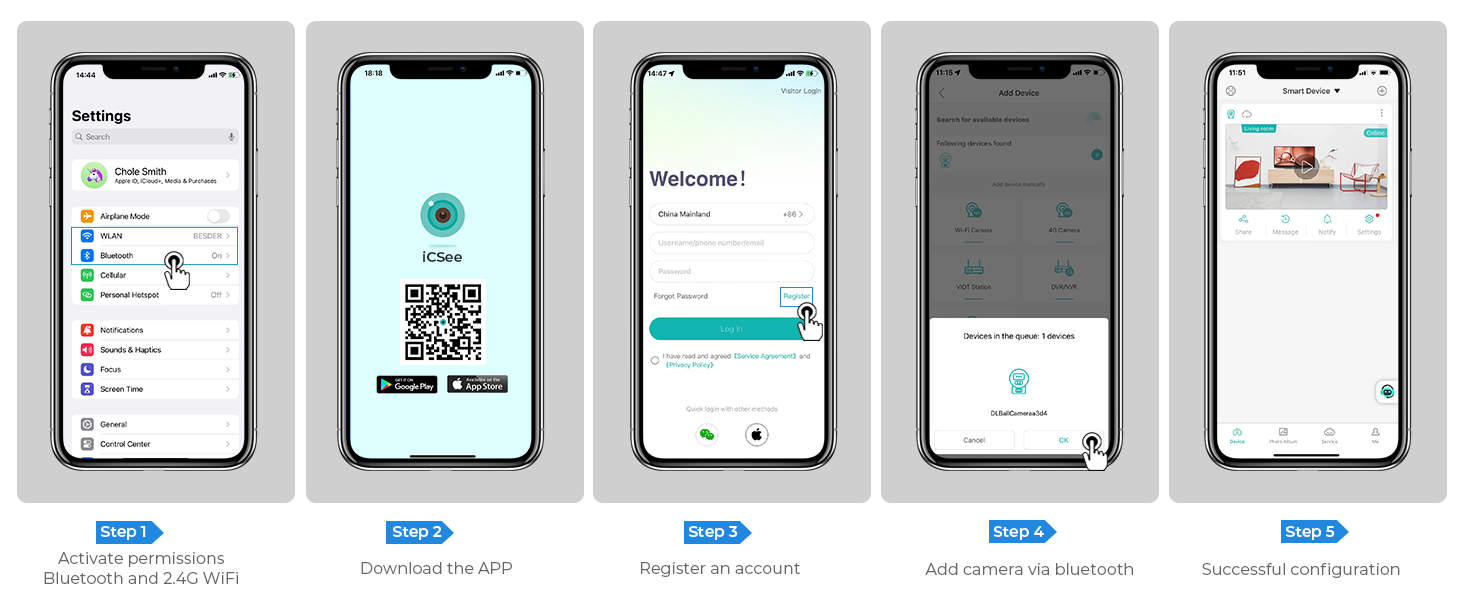
Image: Step-by-step guide for app download, account registration, and device configuration.
Alternatively, download the iCSee app directly from: http://d.xmeye.net/CSee
- Зарегистрируйте учетную запись: Open the iCSee app and follow the on-screen instructions to register a new account.
- Add Camera via Bluetooth: Once logged in, select "Add Device" and choose to add the camera via Bluetooth. The app will guide you through the pairing process.
- Successful Configuration: After successful pairing, your camera will be ready for use.
2. Питание камеры
Connect the provided power cable to the camera's power input port and then plug it into a standard electrical outlet. The camera will power on and initiate its startup sequence.
3. Варианты подключения к сети
- Wi-Fi-соединение: The camera supports 2.4GHz Wi-Fi networks only. During app setup, select your Wi-Fi network and enter the password.
- Подключение Ethernet-кабеля: Для более стабильного соединения вы можете подключить камеру напрямую к маршрутизатору с помощью кабеля Ethernet.
- Personal Hotspot: In situations where Wi-Fi is unavailable, the camera can also connect via a personal hotspot from your smartphone.
4. Установка камеры
The camera is designed for both indoor and outdoor use and can be ceiling-mounted. Choose a location that provides optimal viewing angles and is within range of your Wi-Fi network or Ethernet connection.
- Отметьте точки бурения: Use the mounting template (if provided) or the camera base to mark the drilling points on the desired surface.
- Отверстия для сверления: Drill holes at the marked points. Insert wall anchors if mounting on drywall or masonry.
- Обеспечьте безопасность базы: Прикрепите основание крепления камеры к поверхности с помощью прилагаемых винтов.
- Прикрепите камеру: Надежно закрепите камеру на подставке.

Image: The camera installed outdoors, highlighting its robust IP66 waterproof design suitable for various weather conditions.
Инструкция по эксплуатации
1. Жить View и воспроизведение
Воспользуйтесь приложением iCSee, чтобы view жить фуtage from your cameras. You can switch between the fixed and rotating lens views. The app also allows you to review записано фуtage stored on the SD card or cloud.

Image: The dual-screen feature in the iCSee app, displaying simultaneous views from the fixed and rotating lenses.
2. Pan, Tilt, and Digital Zoom
Use the iCSee app to remotely control the rotating lens. You can pan the camera 355° horizontally and tilt it 90° vertically to cover a wide area. The camera also supports 5x digital zoom to view подробности.

Изображение: вид сверху view demonstrating the camera's extensive 355° pan and 90° tilt range, covering a large residential area.
3. Motion Tracking and Human Detection
The camera is equipped with advanced motion tracking. When human motion is detected, the rotating lens will automatically track the subject's movement. You will receive real-time alerts on your smartphone via the iCSee app, capturing images or video of the activity.

Image: The camera's alarm features, including real-time push notifications, siren, and light activation upon detecting suspicious activity.
4. Двусторонняя аудиосвязь
With the built-in microphone and speaker, you can communicate with visitors or deter intruders directly through the iCSee app from anywhere.

Image: Illustration of the two-way audio function, allowing communication with individuals near the camera.
5 Режимы ночного видения
The camera offers three night vision modes, selectable via the app, to ensure clear visibility up to 30 meters (98 feet) in various lighting conditions:
- Полноцветное ночное видение: Utilizes built-in spotlights to provide vivid, full-color images even in complete darkness.
- Инфракрасное ночное видение: Uses infrared LEDs for clear black-and-white images in low-light conditions.
- Smart Vision: Автоматически переключается между инфракрасным и полноцветным режимами в зависимости от обнаруженного движения или условий освещения.

Image: Visual comparison of infrared night vision and full-color night vision capabilities at night.
6. Варианты хранения
- Микро SD-карта: Supports up to 128GB micro SD card for local storage of recordings. (Card not included)
- Облачное хранилище: Optional cloud storage service available for secure, remote access to your video recordings.
7. Интеграция с умным домом
The Reobiux camera is compatible with NVR systems for continuous recording and can be integrated with Amazon Alexa for convenient voice control.

Image: The camera's compatibility with smart home devices like Amazon Alexa for voice-controlled viewинж.
Обслуживание
- Уборка: Регулярно протирайте объектив и корпус камеры мягкой тряпкой.amp Протрите поверхность тканью для удаления пыли и грязи. Не используйте едкие химикаты или абразивные чистящие средства.
- Обновления прошивки: Для обеспечения оптимальной производительности и безопасности периодически проверяйте приложение iCSee на наличие обновлений прошивки.
- Источник питания: Убедитесь, что кабель питания надежно подключен и не поврежден.
- Условия окружающей среды: While IP66 rated, avoid prolonged exposure to extreme temperatures outside the operating range (-20°C to 55°C) or direct high-pressure water jets.
Поиск неисправностей
| Проблема | Возможная причина | Решение |
|---|---|---|
| Камера отключена/невозможно подключиться к Wi-Fi | Incorrect Wi-Fi password; Camera too far from router; 5GHz Wi-Fi network used; Network interference. |
|
| Плохое качество изображения | Загрязнённый объектив; Недостаточное освещение; Проблемы с пропускной способностью сети. |
|
| Обнаружение движения не работает | Detection sensitivity too low; Detection zone not set correctly; Obstructions in view. |
|
| Проблемы с двусторонней аудиосвязью | Микрофон/динамик отключен в приложении; слишком низкая громкость; задержка в сети. |
|
Технические характеристики
| Особенность | Деталь |
|---|---|
| Номер модели | A9Q-2PCS |
| Разрешение видео | 2.5K/6MP (2048p) |
| Эффективное разрешение неподвижного изображения | 3 МП |
| Линзы | Dual Lens (Fixed and Rotating) |
| Диапазон панорамирования/наклона | Панорама 355 °, наклон 90 ° |
| Цифровой зум | 5x |
| Диапазон ночного видения | До 30 метров (98 фута) |
| Режимы ночного видения | Full-color, Infrared, Smart Vision |
| Связность | 2.4GHz Wi-Fi, Ethernet, Bluetooth, ONVIF, RTSP |
| Варианты хранения | Карта Micro SD (до 128 ГБ), облачное хранилище |
| Аудио | Двусторонняя аудиосвязь (встроенный микрофон и динамик) |
| Обнаружение | Human Detection, Motion Tracking |
| Оповещения | Real-time App Notifications, Siren, Light Alarm |
| Устойчивость к погодным условиям | Водонепроницаемость IP66 |
| Источник питания | Электрический с проводом (12 вольт, 3 ватт) |
| Рабочая температура | До 55°С |
| Размеры (Д x Ш x В) | 5.88 x 4.68 x 6.2 дюйма |
| Масса | 2.75 фунта |
| Совместимые устройства | Smartphone, Tablet, Laptop, NVR Systems, Amazon Alexa |
| Метод контроля | Приложение iCSee |
Гарантия и поддержка
Reobiux provides dedicated customer support for its products. For any technical assistance, warranty claims, or inquiries, please contact our 24/7 online customer support team. Refer to your purchase documentation for specific warranty terms and conditions.

Image: Reobiux customer support representative ready to assist.


