1. Введение
This manual provides essential instructions for the safe and effective operation of your HIKMICRO B01S Thermal Camera. Please read this manual thoroughly before using the device and retain it for future reference. The HIKMICRO B01S is a handheld thermal imaging camera designed for various applications, including home inspection, electrical maintenance, and mechanical fault detection.
2. Информация по технике безопасности
Для предотвращения травм и повреждения устройства соблюдайте следующие меры предосторожности:
- Do not point the camera directly at intense heat sources such as the sun or lasers, as this may damage the thermal sensor.
- Держите устройство сухим. Не подвергайте его воздействию дождя или влаги.
- Operate the camera within the specified temperature and humidity ranges.
- Используйте только зарядное устройство и аксессуары, предоставленные или одобренные компанией HIKMICRO.
- Не пытайтесь разбирать или модифицировать устройство. Ремонт должен выполняться только уполномоченным персоналом.
- Перед первым использованием убедитесь, что аккумулятор полностью заряжен.
3. Настройка
3.1 Содержимое упаковки
Проверьте наличие всех предметов в посылке:
- HIKMICRO B01S Thermal Camera
- 2-in-1 USB C to USB A and USB C Cable
- Carrying Case with Shoulder Strap
- Ремешок на запястье
- Руководство пользователя
- Калибровочная карта

Figure 3.1: Included items in the HIKMICRO B01S Thermal Camera package.
3.2 Устройство большеview
Familiarize yourself with the physical components of the HIKMICRO B01S Thermal Camera.

Рисунок 3.2: Передняя часть view of the HIKMICRO B01S Thermal Camera and included accessories.

Figure 3.3: The 3.2-inch LCD screen provides a clear display for thermal imaging.
3.3 Первое включение и зарядка
- Зарядка аккумулятора: Connect the camera to a power source using the provided USB-C cable. The charging indicator will illuminate. A full charge supports approximately 6 hours of continuous operation.
- Включение/выключение: Press and hold the power button until the screen illuminates to power on. Repeat the action to power off.
- Крепление ремешка на запястье: Attach the wrist strap to the designated loop on the camera for secure handling.
- Установка штатива: The camera features a standard tripod mount for stable, scheduled captures. This is useful for monitoring temperature changes over time in a fixed location.

Figure 3.4: The camera can be mounted on a tripod for stable, continuous monitoring.
4. Инструкция по эксплуатации
4.1 Базовая тепловизионная съемка
The HIKMICRO B01S provides clear thermal imagery with a 25Hz refresh rate for smooth viewинж.
- ViewЖивое изображение: Once powered on, the camera displays a live thermal image on the 3.2-inch LCD screen.
- Захват изображений: Press the capture button to save a thermal image to the internal 16GB eMMC flash storage, which can hold over 90,000 images.
- Цветовые палитры: The camera supports 6 color palettes to visualize temperature differences. Cycle through these palettes using the dedicated button to find the most suitable display for your inspection.

Figure 4.1: Multiple color palettes are available for different viewing preferences and analysis.
4.2 Измерение температуры
The B01S offers precise temperature measurement capabilities:
- Measurement Presets: Utilize automatic Center Spot, Hot Spot, and Cold Spot tracking to quickly identify temperature extremes. Three user-defined spots can also be set for specific areas of interest.
- Диапазон температур: The camera measures temperatures from -20°C to 550°C (-4°F to 1022°F).
- Регулируемые настройки: For improved accuracy, adjust emissivity settings based on the material being inspected and input the distance to the object.
- Аварийный сигнал высокой/низкой температуры: Configure the camera to trigger an audio alarm and warning light when temperatures exceed or fall below preset thresholds.
- Level and Span Selection: Switch between automatic and manual level and span adjustments to precisely highlight specific temperature ranges.

Figure 4.2: Instant temperature display with automatic and user-defined spot measurements.

Figure 4.3: High/Low temperature alarm indicators on the display.

Figure 4.4: Adjustable settings for emissivity and temperature range to enhance measurement accuracy.

Figure 4.5: Manual level and span selection for precise temperature visualization.
4.3 дополнительных функций
- SuperIR Image Enhancement: The B01S utilizes HIKMICRO's SuperIR technology to upscale thermal images from 256x192 pixels to 640x480 pixels, providing enhanced detail for analysis.
- SuperScene Detection: This feature, powered by deep learning, automatically detects potential moisture leaks and insulation defects, simplifying inspections.
- Pro Scene Color Alarm: For advanced diagnostics, the Pro Scene Color Alarm provides customized data-driven alerts for thermal anomalies, such as condensation or insulation issues.
- Image Transfer & Auto-Update: Wirelessly transfer images and reports to mobile devices using the HIKMICRO Viewer app (available on Google Play and Apple App Store). The app also facilitates seamless firmware updates.
- Image Analysis & Instant Projection: Use the HIKMICRO Analyzer PC software for comprehensive image analysis, screen projection, real-time monitoring, and 3D plotting.

Figure 4.6: SuperIR technology enhances thermal image resolution for greater detail.

Figure 4.7: SuperScene detection highlights potential water leaks and insulation voids.

Figure 4.8: Pro Scene Color Alarm identifies specific thermal anomalies like condensation.

Figure 4.9: Wireless image transfer and auto-update functionality via the HIKMICRO Viewэ приложение.
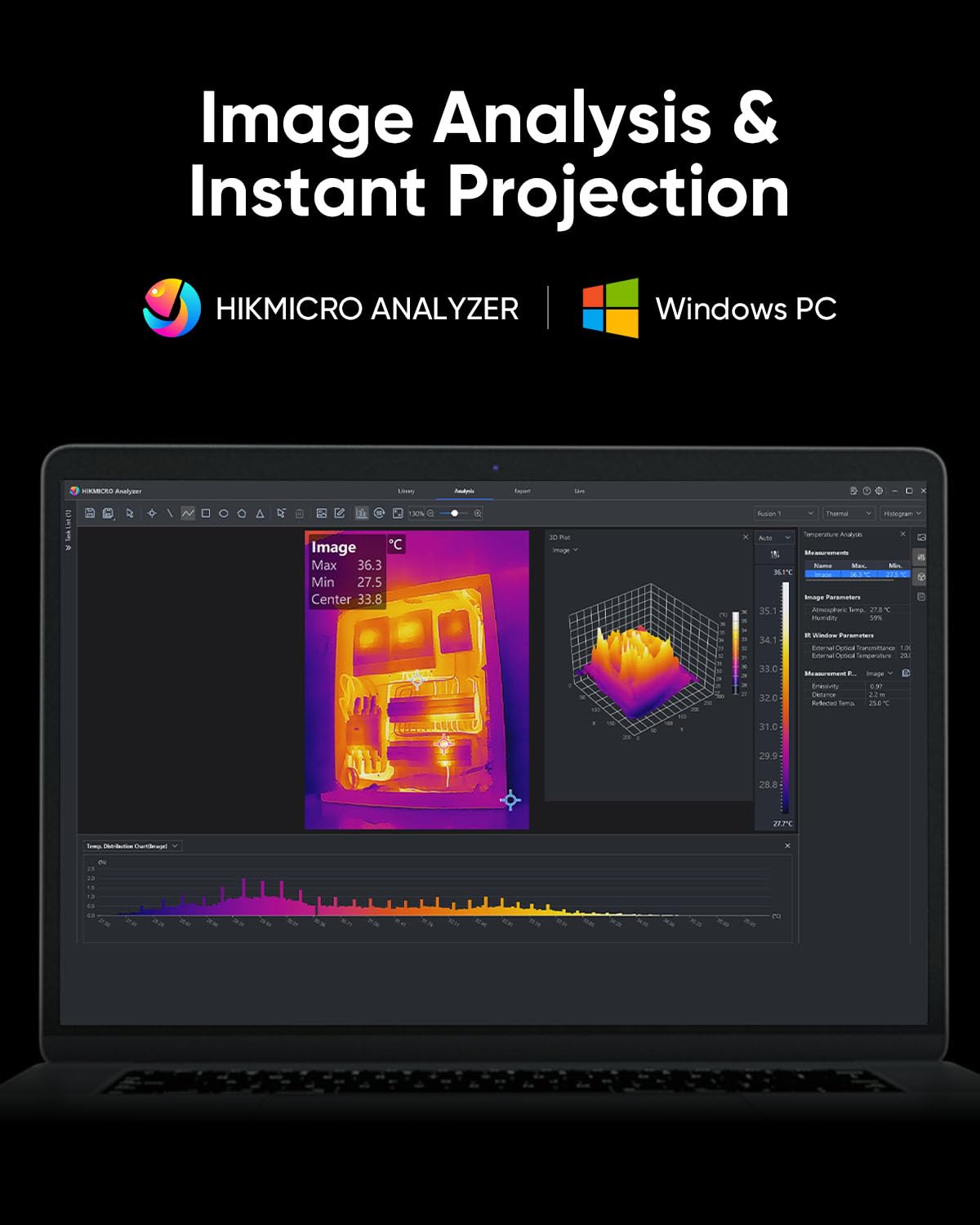
Figure 4.10: HIKMICRO Analyzer PC software for detailed image analysis and projection.
5. Техническое обслуживание
5.1 Очистка
- Для чистки корпуса камеры используйте мягкую сухую ткань.
- Для чистки линз используйте специальную салфетку и раствор, чтобы избежать царапин.
- Не используйте абразивные чистящие средства или растворители.
5.2 Хранение
- Store the camera in its protective carrying case when not in use.
- Храните устройство в прохладном, сухом месте, вдали от прямых солнечных лучей и экстремальных температур.
- При длительном хранении убедитесь, что батарея частично заряжена (примерно на 50%), и заряжайте ее каждые несколько месяцев, чтобы поддерживать ее работоспособность.
5.3 Долговечность
The HIKMICRO B01S is designed for durability, featuring an IP54 rating for dust and water resistance and a 2-meter (6.6 ft) drop resistance.

Figure 5.1: The B01S is built to be durable with IP54 protection and 6.6 ft drop resistance.
6. Поиск Неисправностей
If you encounter issues with your HIKMICRO B01S, refer to the following common problems and solutions:
| Проблема | Возможная причина | Решение |
|---|---|---|
| Устройство не включается | Низкий заряд батареи; кнопка питания нажата неправильно | Charge the battery; Press and hold the power button firmly for a few seconds |
| Fuzzy or unclear image | Lens is dirty; Incorrect focus (if applicable); Extreme temperature difference | Clean the lens; Adjust focus (if manual focus is available); Allow camera to acclimate to environment |
| Неточные показания температуры | Incorrect emissivity setting; Incorrect distance setting; Object outside temperature range | Adjust emissivity for the material; Input correct distance; Ensure object temperature is within camera's range |
| Cannot connect to app/PC software | Wi-Fi/USB connection issue; Outdated app/software; Firewall blocking connection | Ensure Wi-Fi is enabled on camera and device; Check USB cable connection; Update app/software; Temporarily disable firewall |
| Короткое время работы батареи | Battery degradation; Frequent use of power-intensive features | Contact support for battery replacement; Reduce screen brightness or turn off Wi-Fi when not needed |
7. Технические характеристики
| Особенность | Спецификация |
|---|---|
| ИК-разрешение | 256 x 192 (49,152 XNUMX пикселя) |
| Разрешение сверхИК-диапазона | 640 x 480 (307,200 XNUMX пикселя) |
| Температурная чувствительность (NETD) | < 40 мК |
| Диапазон температур | -20°C до 550°C (-4°F до 1022°F) |
| Точность температуры | ±2°C или ±2% (в зависимости от того, что больше) |
| Частота обновления | 25 Гц |
| Экран дисплея | 3.2" LCD, 640 x 480 resolution |
| Хранилище | 16 ГБ eMMC (вмещает более 90 000 изображений) |
| Связность | Wi-Fi, USB-C |
| Тип батареи | 1 литий-ионный аккумулятор (входит в комплект) |
| Срок службы батареи | Approx. 6 hours continuous operation |
| Рейтинг IP | IP54 |
| Устойчивость к падениям | 2 6.6 метров (XNUMX XNUMX футов) |
| Размеры (посылки) | 31.2 х 21.1 х 11.8 см |
| Вес (посылки) | 1.08 кг |
| Номер модели | HM-TP52+-3AQF/W-B01S |
| Производитель | ХИКМИКРО |
| Страна происхождения | Китай |
8. Гарантия и поддержка
HIKMICRO products are covered by a limited warranty. Please refer to the warranty card included in your package for specific terms and conditions. For technical support, service, or warranty claims, please contact HIKMICRO customer service through their official website or the contact information provided on your calibration card.


