Введение
Thank you for choosing the ACS APG8201 PINhandy 1 OTP Generator. This device is designed to provide secure One-Time Passwords (OTPs) for enhanced authentication in various applications. This manual provides essential information for the proper setup, operation, and maintenance of your OTP generator. Please read this manual thoroughly before using the device to ensure optimal performance and safety.
Информация по безопасности
- Держите устройство вдали от воды и чрезмерной влажности.
- Не подвергайте устройство воздействию экстремальных температур или прямых солнечных лучей.
- Не роняйте устройство и не подвергайте его сильным ударам.
- Не пытайтесь разбирать или ремонтировать устройство самостоятельно. Обратитесь к квалифицированному специалисту.
- Утилизируйте устройство и его батарею в соответствии с местными правилами.
Содержимое упаковки
Пожалуйста, проверьте содержимое посылки после распаковки. Если какие-либо товары отсутствуют или повреждены, немедленно свяжитесь с продавцом.
- 1 x ACS APG8201 PINhandy 1 OTP Generator
- 1 x USB Cable (for power/connection)
- 1 x Quick Start Guide (this document serves as the full manual)
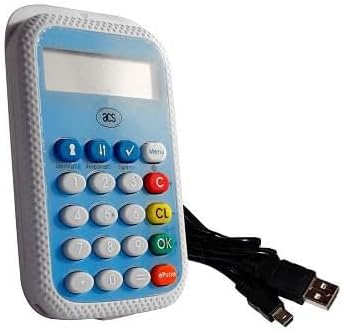
Image: The ACS APG8201 PINhandy 1 OTP Generator, a compact device featuring a display screen, a numeric keypad, and function buttons. A USB cable is shown connected to the device.
Настраивать
Начальное включение
- Connect the provided USB cable to the micro-USB port on the OTP generator.
- Connect the other end of the USB cable to a powered USB port on a computer or a USB wall adapter.
- The device display should light up, indicating it is receiving power.
Driver Installation (if applicable)
For certain applications, a driver may be required for the device to communicate with your computer. Refer to the software documentation provided by your service provider for driver installation instructions. Typically, modern operating systems may automatically install necessary drivers.
Инструкция по эксплуатации
Generating an OTP
- Убедитесь, что устройство включено.
- Press the designated OTP generation button (often labeled "OK" or a specific function key, refer to your service provider's instructions for the exact button).
- If prompted, enter your PIN using the numeric keypad. Press "OK" to confirm.
- The display will show the generated One-Time Password.
- Enter this OTP into the required application or website within the specified time limit.
Управление PIN-кодом
PIN management functions (e.g., changing PIN) are typically initiated through the service provider's application or website, which then interacts with the device. Follow the on-screen prompts from your service provider.
Обслуживание
Очистка устройства
- Для очистки внешней поверхности устройства используйте мягкую, сухую, безворсовую ткань.
- Не используйте абразивные чистящие средства, растворители или аэрозольные распылители.
- Избегайте попадания влаги в отверстия.
Хранилище
Если устройство не используется, храните его в прохладном, сухом месте, вдали от прямых солнечных лучей и экстремальных температур.
Поиск неисправностей
| Проблема | Возможная причина | Решение |
|---|---|---|
| Устройство не включается. | No power supply or faulty USB cable. | Ensure USB cable is securely connected to a powered USB port. Try a different USB port or cable. |
| OTP not accepted. | Incorrect PIN, time synchronization issue, or expired OTP. | Verify the PIN entered. Ensure your system's time is synchronized. Generate a new OTP. Contact your service provider for time synchronization issues. |
| Дисплей пустой или нечитаемый. | Device malfunction or low power. | Ensure adequate power supply. If problem persists, contact support. |
Технические характеристики
| Особенность | Деталь |
|---|---|
| Модель | APG8201-CAC |
| Бренд | АСЦ |
| Связность | USB |
| Функция | One-Time Password (OTP) Generation |
| Размеры | (Refer to product packaging or official ACS website for exact dimensions) |
| Рабочая температура | (Refer to product packaging or official ACS webсайт) |
Гарантия и поддержка
ACS products typically come with a standard manufacturer's warranty. For specific warranty terms and conditions, please refer to the warranty card included with your product or visit the official ACS website. For technical support, product inquiries, or warranty claims, please contact your point of purchase or visit the official ACS support portal.
Official ACS Webсайт: www.acs.com.hk
Note: Support contact information may vary by region.


