1. Введение
The HIKMICRO ECO-V Handheld Thermography Camera is a versatile thermal imaging device designed for various professional applications. It offers thermal, bi-spectrum image fusion, and visible light modes to meet diverse business needs. This manual provides essential information for the safe and effective operation of your ECO-V camera.
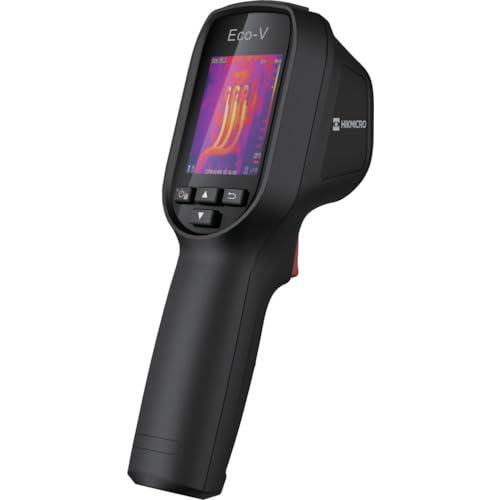
Figure 1: HIKMICRO ECO-V Handheld Thermography Camera
2. Информация по технике безопасности
Перед использованием данного изделия, пожалуйста, внимательно ознакомьтесь со всеми предупреждениями и инструкциями по технике безопасности. Несоблюдение этих инструкций может привести к поражению электрическим током, пожару или серьезным травмам.
Общие меры предосторожности
- Не эксплуатируйте устройство во взрывоопасной среде, например, в присутствии легковоспламеняющихся жидкостей, газов или пыли.
- Держите устройство вдали от воды и других жидкостей.
- Не пытайтесь вскрывать или модифицировать устройство. По всем вопросам обслуживания обращайтесь к квалифицированному персоналу.
- Use only HIKMICRO-approved accessories.
- Avoid direct exposure of the thermal lens to strong light sources (e.g., sun, laser) as this may damage the detector.
Безопасность аккумулятора
- The device contains a built-in Lithium-ion battery. Do not expose the battery to excessive heat, direct sunlight, or fire.
- Не прокалывайте, не вскрывайте и не разбирайте батарею.
- Charge the battery only with the provided USB cable and a compatible power adapter.
- Утилизируйте батареи в соответствии с местным законодательством.
3. Содержимое упаковки
The HIKMICRO ECO-V package includes the following items:
- HIKMICRO Handheld Thermography Camera ECO-V
- USB Type-C Кабель
- Краткое руководство пользователя (не упоминается явно, но является стандартным)
- Calibration Certificate (not explicitly mentioned but standard)
Video 3.1: Unboxing the HIKMICRO M-Series (similar to ECO-V, showing typical package contents and device appearance).
4. Устройство перешлоview
Familiarize yourself with the physical components and interface of your HIKMICRO ECO-V camera.
Внешний вид и интерфейс
The ECO-V features a compact, ergonomic design for comfortable handheld use. Key components include the thermal lens, optical lens, laser indicator, white light, trigger button, navigation buttons, and a 2.4-inch display.
Video 4.1: This video demonstrates the physical appearance and interface of a HIKMICRO M-Series camera, which shares similar design elements and interface components with the ECO-V.
5. Настройка
5.1 Зарядка устройства
Before initial use, fully charge the device's built-in Lithium-ion battery.
- Подключите прилагаемый кабель USB Type-C к USB-порту устройства.
- Connect the other end of the USB cable to a compatible power adapter (5V2A recommended) and plug it into a power outlet.
- The charging indicator will show red during charging and turn green when fully charged.
Video 5.1: This HIKMICRO ECO operation video demonstrates the charging process for the device.
5.2 Включение/выключение питания
To power on the device, press and hold the power button for more than 6 seconds. To power off, press and hold the power button again until the device shuts down.
Video 5.2: This HIKMICRO ECO operation video demonstrates how to power on the device.
6. Инструкция по эксплуатации
This section covers the basic and advanced operational features of your ECO-V camera.
6.1 Image Capture and Display
To capture a thermal image, aim the camera at the target and press the trigger button. The captured image will be saved to the internal EMMC storage. To view saved images, navigate to the 'Albums' section in the menu.
Video 6.1: This HIKMICRO ECO operation video demonstrates image capture and viewing saved snapshots.
6.2 Инструменты измерения
The ECO-V provides various measurement tools to analyze thermal images:
- Горячая точка: Automatically identifies and displays the highest temperature point.
- Холодная точка: Automatically identifies and displays the lowest temperature point.
- Центральное пятно: В центре экрана отображается температура.
Video 6.2: This HIKMICRO ECO operation video demonstrates the use of measurement tools like hot, cold, and center spots.
6.3 Улучшение изображения SuperIR
SuperIR technology enhances the thermal image resolution, providing more detail for analysis. You can enable or disable this feature in the settings menu.
Video 6.3: This HIKMICRO ECO operation video demonstrates how to enable and use the SuperIR image enhancement feature.
6.4 режимов изображения
The ECO-V supports multiple image modes for different inspection needs:
- Термический: Отображает только тепловое изображение.
- Слияние: Blends the thermal and visible light images for enhanced detail.
- PIP (картинка в картинке): Накладывает уменьшенное тепловое изображение на изображение в видимом свете.
- Оптический: Отображает только изображение в видимом свете.
Video 6.4: This HIKMICRO B10S product video demonstrates switching between different image modes, including Thermal, Fusion, PIP, and Optical.
6.5 Parallax Correction
When using fusion modes, adjust the parallax correction based on the distance to the target to ensure accurate alignment between thermal and visible images.
Video 6.5: This HIKMICRO B10S product video demonstrates how to adjust parallax correction for accurate image fusion.
6.6 Palette Adjustment
Select from various color palettes (e.g., White Hot, Black Hot, Rainbow, Ironbow) to visualize temperature differences more effectively. This can be adjusted in the settings menu.
Video 6.6: This HIKMICRO B10S product video demonstrates how to adjust color palettes.
6.7 Настройки коэффициента излучения и расстояния
For accurate temperature measurements, it is crucial to set the correct emissivity value for the target material and the distance to the target. Refer to the general emissivity reference table in the specifications section.
Video 6.7: This HIKMICRO ECO operation video demonstrates setting emissivity and distance for accurate temperature readings.
6.8 Лазерный указатель
The built-in laser pointer helps to precisely identify the measurement target. It can be enabled or disabled in the settings menu.
Video 6.8: This HIKMICRO ECO operation video demonstrates how to enable and use the laser pointer.
6.9 Сигнализация высокой температуры
Set a high temperature alarm threshold to be notified when temperatures exceed a predefined limit. This feature is useful for identifying potential overheating issues.
Video 6.9: This HIKMICRO B10S product video demonstrates how to set a high temperature alarm.
6.10 Hotspot Connection
The ECO-V can connect to a mobile device via Wi-Fi hotspot for live viewing and data transfer. Enable the Wi-Fi hotspot function in the device settings and connect your mobile device.
Video 6.10: This HIKMICRO M-Series video demonstrates how to establish a hotspot connection with a mobile device.
6.11 ХИКМИКРО Viewer App Connection
Скачайте HIKMICRO Viewer app on your mobile device to access live view, manage images and videos, and generate reports. Connect the device to your phone via Wi-Fi.
Video 6.11: This HIKMICRO Pocket series video demonstrates connecting the device to the HIKMICRO Viewer app for various functions.
7. Техническое обслуживание
7.1 Очистка
- Протрите корпус устройства мягкой, тряпкой.amp Ткань. Не используйте абразивные чистящие средства или растворители.
- Аккуратно протрите линзы салфеткой для чистки линз. Избегайте прикосновения к поверхности линз голыми руками.
7.2 Хранение
- Храните устройство в прохладном, сухом месте, вдали от прямых солнечных лучей и экстремальных температур.
- При длительном хранении убедитесь, что аккумулятор частично заряжен (около 50%), и перезаряжайте его каждые несколько месяцев, чтобы поддерживать его работоспособность.
8. Поиск Неисправностей
If you encounter issues with your HIKMICRO ECO-V, refer to the following common problems and solutions:
| Проблема | Возможная причина | Решение |
|---|---|---|
| Устройство не включается | Низкий заряд батареи; неисправность устройства | Зарядите аккумулятор; обратитесь в службу поддержки. |
| Неточные показания температуры | Incorrect emissivity/distance settings; Dirty lens | Adjust emissivity/distance; Clean the lens |
| Cannot connect to Wi-Fi hotspot | Incorrect password; Hotspot not enabled | Verify password; Enable hotspot in settings |
9. Технические характеристики
Detailed technical specifications for the HIKMICRO ECO-V camera:
| Особенность | Спецификация |
|---|---|
| Модель | ЭКО-В |
| Диапазон измеряемых температур | -20°С до 550°С |
| Minimum Temperature Display | 0.1°С |
| Поле View (поле обзора) | 50° × 50° |
| Пространственное разрешение (IFOV) | 8.89 мрад |
| Диапазон рабочих температур | -10°С до 50°С |
| Диапазон температур хранения | -40°С до 70°С |
| Размер дисплея | 2.4 дюймов |
| Источник питания | Встроенный литий-ионный аккумулятор |
| Время работы батареи | 8 часа |
| Wi-Fi | Нет в наличии |
| Уровень защиты | IP54 |
| Интерфейс | USB-порт типа C |
| Шаг пикселя | 12μm |
| Измерение длины волны | 7.5-14μm |
| NETD-файл | < 40 мК (@ 25°C, F#=1.0) |
| Фокусное расстояние | 1.35 мм |
| Диафрагма | Ф1.0 |
| Минимальное расстояние фокусировки | 0.1 м (0.33 футов) |
| Частота кадров | 25 Гц |
| Система фокусировки | Без фокуса |
| Носители информации | EMMC (4GB) |
| Емкость хранения изображений | 30,000 XNUMX изображений |
| Изображение File Формат | BMP (includes measurement data) |
| Тепловое разрешение изображения | 96×96 (9,216 pixels) |
| Разрешение видимого изображения | 640×480 |
| Точность | ±2°C or ±2% (whichever is greater), when ambient temperature is 15°C to 35°C and target temperature is 0°C or above. |
| Материалы | Поликарбонат, АБС-смола. |
| Масса | 360 г |
General Emissivity Reference
| Материал | излучательная способность |
|---|---|
| Человеческая кожа | 0.98 |
| Печатная плата | 0.91 |
| Цемент Бетон | 0.95 |
| Керамика | 0.92 |
| Резина | 0.95 |
| Краска | 0.93 |
| Древесина | 0.85 |
| Кирпич | 0.96 |
| Песок | 0.90 |
| Земля | 0.92 |
| Хлопок | 0.98 |
| Картон | 0.90 |
| Белая книга | 0.96 |
| Вода | 0.96 |
10. Гарантия и поддержка
HIKMICRO products are covered by a limited warranty. For detailed warranty terms and conditions, please refer to the official HIKMICRO webсайт или свяжитесь с вашим местным дистрибьютором.
Поддержка клиентов
If you require technical assistance, troubleshooting, or have questions about your ECO-V camera, please contact HIKMICRO customer support through their official webсайт или контактную информацию, указанную на упаковке вашего продукта.


