1. Введение
Спасибо за выбор VIM.TAG Light Bulb Security Camera Model 847. This device is designed to provide reliable surveillance for your home, offering 2.5K/4MP high-definition video, pan/tilt functionality, night vision, two-way audio, and smart detection features. This manual will guide you through the setup, operation, and maintenance of your camera to ensure optimal performance.
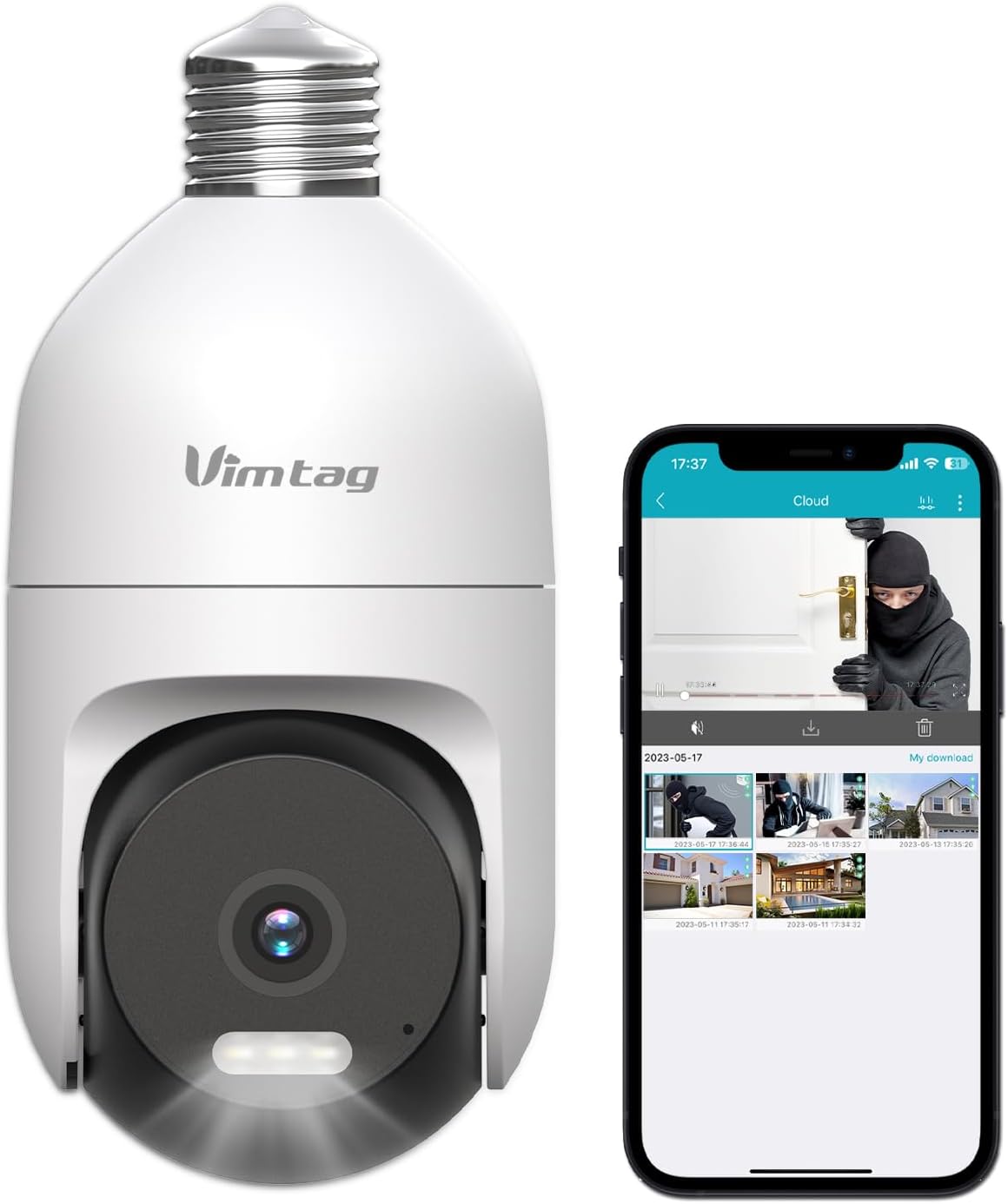
Изображение: VIMTAG Light Bulb Security Camera Model 847, shown alongside a smartphone displaying its live feed.
2. Информация по технике безопасности
- Ensure the power is off before installing or removing the camera from a light socket.
- Install the camera in a standard E27/E26 light bulb socket.
- Не подвергайте камеру воздействию экстремальных температур или влажности, выходящих за пределы ее рабочего диапазона.
- Держите камеру вдали от сильных магнитных полей.
- Не пытайтесь разбирать или ремонтировать камеру самостоятельно. Обратитесь в службу поддержки клиентов за помощью.
- This camera is rated IP66 for weather resistance, suitable for outdoor use, but avoid submerging it in water.
3. Содержимое упаковки
ВИМTAG Light Bulb Security Camera package includes:
- ВИМTAG Light Bulb Security Camera (Model 847)
- Руководство по эксплуатации (данный документ)
Note: An SD card for local storage is not included and must be purchased separately if desired.
4. Продукт закончилсяview
ВИМTAG Light Bulb Security Camera features a compact design that fits into a standard light bulb socket. Key components include:
- Объектив камеры: Captures 2.5K/4MP video.
- Инфракрасные (ИК) светодиоды: Для черно-белого ночного видения.
- В центре внимания: Provides color night vision and acts as a deterrent.
- Микрофон: Для ввода аудиосигнала во время двусторонней связи и обнаружения звука.
- Спикер: For audio output during two-way talk and siren alarms.
- Слот для карты Micro SD: Для локального хранения видео (поддерживает до 512 ГБ).
- Кнопка сброса: Used for factory reset (usually a small pinhole).
- E27/E26 Base: Standard light bulb screw-in base for power and mounting.
5. Настройка
5.1 Физическая установка
- Выключение: Ensure the power to the light socket is turned off at the circuit breaker before installation.
- Ввинтить: Carefully screw the VIMTAG Light Bulb Camera into a standard E27/E26 light bulb socket. Ensure it is securely fastened.
- Включение питания: Restore power to the light socket. The camera will power on and initiate its startup sequence.

Image: Illustration of screwing the camera into a light bulb socket.
5.2 Загрузка приложения и создание учетной записи
- Скачать приложение: Искать "Vimtag" in your smartphone's app store (iOS App Store or Google Play Store) and download the official VIMTAG приложение.
- Регистрация Аккаунта: Open the app and follow the on-screen instructions to register a new account using your email address or phone number.

Image: A smartphone screen showing the VIMTAG app icon, indicating the app download step.
5.3 Сопряжение камеры и подключение по Wi-Fi
- Добавить устройство: In the VIMTAG app, tap the "+" icon (usually in the top right or center) to add a new device.
- Выберите тип камеры: Choose "Light Bulb Camera" from the list of device types.
- Follow In-App Prompts: The app will guide you through connecting the camera to your 2.4GHz Wi-Fi network. This typically involves scanning a QR code generated by the app with the camera lens or listening for an audio prompt.
- Подтверждение подключения: Once connected, the camera will indicate successful pairing (e.g., a voice prompt or LED indicator change), and its live feed will appear in the app.

Image: A smartphone screen showing the process of adding a new device, specifically selecting the light bulb camera.

Image: A smartphone displaying the live video feed from the VIMTAG camera after successful setup.
6. Эксплуатация камеры
6.1 Прямой эфир View и управление панорамированием/наклоном
Once connected, open the VIMTAG app and select your camera to view the live feed. Use the on-screen controls to pan (horizontal 355°) and tilt (vertical 100°) the camera lens to adjust the viewing angle. The camera offers 8x digital zoom for closer inspection.

Image: Multiple devices (phone, tablet, laptop, desktop) displaying the live feed from the VIMTAG camera, illustrating multi-terminal viewинж.
6.2 Двусторонняя аудиосвязь
The camera features a built-in microphone and speaker. Tap the microphone icon in the app to speak through the camera, and listen to audio from the camera's location. This allows for real-time communication with visitors or to deter intruders.

Image: A person speaking into a phone to communicate with a delivery person at the door via the VIMTAG camera's two-way audio.
6.3 Режимы ночного видения
Камера поддерживает два режима ночного видения:
- ИК ночного видения: Defaults to black and white infrared vision in low light conditions.
- Color Night Vision with Spotlight: When the spotlight mode is activated (manually or via motion detection settings), the camera will switch to full-color night vision.
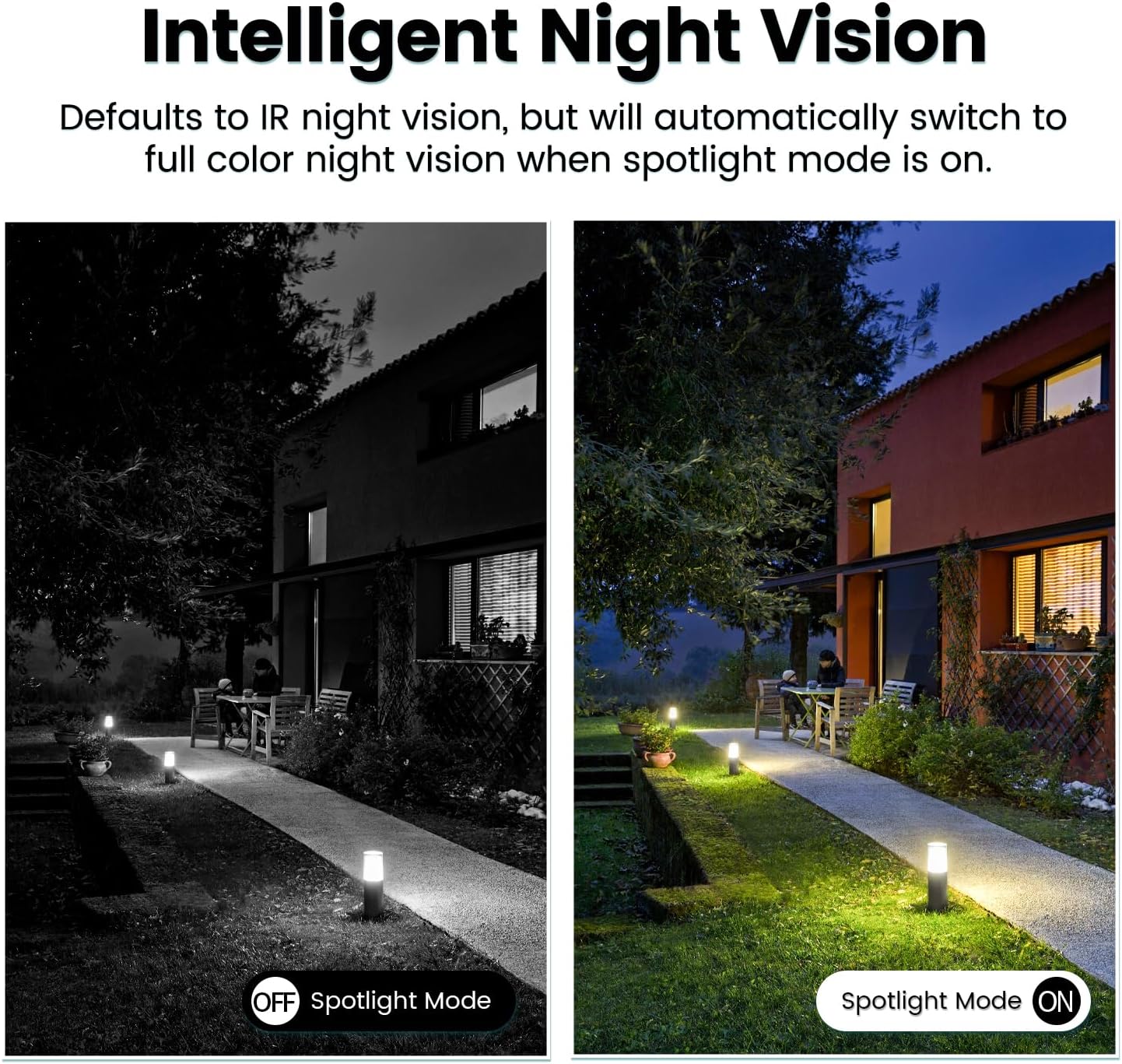
Image: Comparison of IR night vision (black and white, spotlight off) and color night vision (full color, spotlight on) from the VIMTAG камера.
6.4 AI Human/Motion/Sound Detection and Alarms
Configure detection settings in the VIMTAG app. The camera can detect human shapes, general motion, and sounds. Upon detection, you will receive notifications on your phone, and the camera can trigger a siren alarm or activate its spotlight to deter unwanted activity.

Image: An illustration of the VIMTAG camera detecting an intruder, triggering a spotlight and sending an alert to a smartphone.

Image: A smartphone displaying a "Motion Detection Alert" notification from the VIMTAG приложение.
6.5 Видеозапись и хранение
Камера поддерживает два варианта хранения:
- Локальное хранилище: Insert a Micro SD card (up to 512GB, not included) into the camera's SD card slot for continuous 24/7 recording. Recorded footage can be accessed and managed through the VIMTAG приложение.
- Облачное хранилище: An optional cloud storage service is available through the VIMTAG app for secure, encrypted video storage. Subscription details can be found within the app.
6.6 Интеграция с Alexa
ВИМTAG camera is compatible with Amazon Alexa. To integrate:
- Enable the VIMTAG навык в приложении Alexa.
- Link your VIMTAG счет.
- Откройте для себя устройства.
You can then use voice commands such as, "Alexa, show me the [camera name]" to view the live feed on compatible Alexa-enabled devices with screens (e.g., Echo Show).

Image: A person interacting with an Amazon Echo Show to view ВИМTAG camera feed using voice commands.
7. Техническое обслуживание
- Уборка: Аккуратно протрите объектив и корпус камеры мягкой сухой тканью. Не используйте агрессивные химические вещества или абразивные чистящие средства.
- Обновления прошивки: Регулярно проверяйте VIM.TAG app for available firmware updates. Keeping your camera's firmware updated ensures optimal performance, security, and access to new features.
- Управление SD-картой: При использовании SD-карты периодически переустанавливайте ее.view и сделайте резервную копию важных файловtage. Format the SD card through the app if you experience recording issues or to clear old data.
8. Поиск Неисправностей
| Проблема | Возможная причина | Решение |
|---|---|---|
| Camera fails to power on. | No power to the light socket; camera not screwed in properly. | Check the light socket's power supply; ensure the camera is securely screwed in. |
| Невозможно подключиться к Wi-Fi. | Неверный пароль от Wi-Fi; камера находится слишком далеко от роутера; используется сеть Wi-Fi 5 ГГц. | Verify Wi-Fi password; move camera closer to router; ensure you are connecting to a 2.4GHz Wi-Fi network. |
| Плохое качество видео. | Слабый сигнал Wi-Fi; загрязненный объектив. | Improve Wi-Fi signal strength; clean the camera lens. |
| Обнаружение движения не работает. | Detection settings disabled or sensitivity too low; camera positioned incorrectly. | Check and adjust motion detection settings in the app; ensure camera has a clear view области. |
| Запись на SD-карту невозможна. | SD-карта заполнена или повреждена; неправильные настройки записи. | Format the SD card via the app; check recording schedule and settings. Replace SD card if necessary. |
9. Технические характеристики
| Особенность | Деталь |
|---|---|
| Название модели | 847 |
| Разрешение видео | 2.5K / 4MP (1440p) |
| Диапазон панорамирования/наклона | 355° по горизонтали, 100° по вертикали |
| Цифровой зум | 8x |
| Ночное Видение | IR Night Vision & Color Night Vision with LED Spotlight |
| Двусторонняя аудиосвязь | Да (встроенный микрофон и динамик) |
| Обнаружение | AI Human, Motion, Sound Detection |
| Связность | Wi-Fi 2.4 ГГц (IEEE 802.11b/g/n) |
| Варианты хранения | Micro SD Card (up to 512GB), Cloud Storage (optional subscription) |
| Источник питания | Corded Electric (E27/E26 Light Bulb Socket) |
| Для использования в помещении и на открытом воздухе | Да (защита от атмосферных воздействий IP66) |
| Совместимые устройства | iOS, Android, Mac, iPad, Windows, Amazon Alexa |
| Размеры (Д x Ш x В) | 3.07 x 3.07 x 5.31 дюйма |
| Вес товара | 9.1 унции |
| Частота кадров | 25 кадров в секунду |
| Кодирование видео | H.264/H.265 |
10. Гарантия и поддержка
ВИМTAG products come with a standard manufacturer's warranty. For specific warranty terms and conditions, please refer to the warranty card included with your product or visit the official VIMTAG website. For technical support, troubleshooting assistance, or any product-related inquiries, please contact VIMTAG customer service through the VIMTAG app or their official webсайт.
Интернет-ресурсы:
- ВИМTAG Официально Webсайт: Visit the VIMTAG Магазин на Amazon
- In-App Support: Access support features directly within the VIMTAG мобильное приложение.


