Введение
Welcome to the Kuephom Portable CD Player Boombox. This versatile device offers multiple audio playback options including CD, MP3, FM radio, Bluetooth, USB, and TF card support. Designed for both home and portable use, it features stereo speakers and a rechargeable battery for extended listening enjoyment. Please read this manual thoroughly to ensure proper operation and care of your new device.
Важная информация по безопасности
- Предупреждение: Не подвергайте прибор воздействию дождя или влаги.
- Осторожность: Во избежание поражения электрическим током не открывайте крышку.asinг. По всем вопросам обслуживания обращайтесь к квалифицированному персоналу.
- Avoid placing the unit near heat sources such as radiators, heat registers, stoves, or other apparatus that produce heat.
- Используйте только те насадки/аксессуары, которые указаны производителем.
- Не наступайте на шнур питания и не защемляйте его, особенно у вилок, розеток и в местах выхода из прибора.
- Отключайте прибор от сети во время грозы или если он не используется в течение длительного времени.
- Не закрывайте вентиляционные отверстия. Устанавливайте в соответствии с инструкциями производителя.
- Ensure proper ventilation when operating the unit.
- Do not insert foreign objects into the unit.
- Держите устройство вдали от сильных магнитных полей.
- Утилизируйте батареи правильно, в соответствии с местными правилами.
Содержимое упаковки
Пожалуйста, проверьте наличие всех предметов:
- Kuephom Portable CD Player Boombox (Model W15)
- USB-кабель для зарядки
- Адаптер питания
- Руководство пользователя
Продукт болееview
Familiarize yourself with the main components and controls of your CD player boombox.

Рисунок 1: Передняя часть View - This image displays the main unit with its top-loading CD compartment open, revealing a CD. The front panel features control buttons for playback (play/pause, skip), a mode button, an LCD screen showing track time, and a large rotary volume knob. Two speaker grilles are visible at the bottom.

Рисунок 2: Сзади View - The rear of the boombox is shown, highlighting the extendable FM antenna. Below the antenna, from left to right, are the USB port, TF (Micro SD) card slot, DC 5V IN power input, and a headphone jack. The speaker grilles are also visible from this angle.
Элементы управления и порты:
- Кнопка воспроизведения/паузы (►▮▮): Нажмите, чтобы воспроизвести или приостановить воспроизведение звука.
- Previous/Rewind Button (◀◀): Press to go to the previous track or rewind the current track.
- Next/Fast Forward Button (►►): Press to go to the next track or fast forward the current track.
- Кнопка режима (М): Press to switch between CD, FM Radio, Bluetooth, USB, and TF card modes.
- Repeat/Random Button (↺): Press to cycle through repeat modes (repeat one, repeat all) or enable random playback (shuffle).
- Volume Knob (MIN-MAX): Rotate to adjust the volume level. Also serves as the power on/off switch.
- ЖК-дисплей: Отображает текущий режим, номер трека, время и частоту FM.
- Отделение для компакт-дисков: Top-loading tray for inserting audio CDs.
- FM-антенна: Выдвижная антенна для улучшения приема FM-радио.
- USB-порт: Для воспроизведения MP3/WMA fileс USB-флеш-накопителя (до 32 ГБ).
- Слот для TF-карты: Для воспроизведения MP3/WMA files from a TF (Micro SD) card (up to 32GB).
- Входное напряжение 5 В постоянного тока: Power input for charging the internal battery or operating the unit via the included power adapter.
- Headphone Jack (🎧): Для индивидуального прослушивания с помощью проводных наушников.
Настраивать
1. Питание устройства
Your Kuephom CD player boombox comes with a built-in rechargeable Lithium Ion battery. Before first use, it is recommended to fully charge the battery.
- Connect the provided USB charging cable to the DC 5V IN port on the back of the unit.
- Connect the other end of the USB cable to the power adapter, and plug the adapter into a standard wall outlet.
- The LCD display will indicate charging status. Charging typically takes 3-4 hours for a full charge.
- Alternatively, the unit can be powered directly from the wall adapter without battery charge.

Рисунок 3: Варианты зарядки - This image illustrates the versatility of charging the boombox. It can be charged using a standard wall charger, a car charger (via a USB car adapter, not included), or a portable power bank, making it convenient for both indoor and outdoor use.
2. Включение/выключение
To turn the unit on, rotate the Volume Knob clockwise from the MIN position. To turn off, rotate the Volume Knob counter-clockwise to the MIN position until it clicks.
Режимы работы
Нажмите Режим (М) button repeatedly to cycle through the available playback modes: CD, FM Radio, Bluetooth, USB, and TF Card.

Figure 4: 5 Play Modes - This graphic highlights the five primary playback modes of the Kuephom boombox: CD Player, Bluetooth, FM Radio, TF Card, and USB Input, emphasizing its multi-functional capabilities.
1. Воспроизведение компакт-диска
- Open the CD compartment lid by gently lifting it.
- Place an audio CD or MP3 CD onto the spindle, label side up.
- Плотно закройте крышку отсека для компакт-дисков.
- Нажмите Режим (М) Нажимайте кнопку до тех пор, пока на ЖК-дисплее не появится надпись "CD".
- Воспроизведение компакт-диска начнётся автоматически. Если этого не произойдёт, нажмите кнопку. Воспроизведение/Пауза (►▮▮) кнопка.
- Используйте Предыдущая (◀◀) и Далее (►►) кнопки для пропуска треков.
- Нажмите и удерживайте Предыдущая (◀◀) or Далее (►►) кнопки для перемотки вперед или назад.
- Нажмите Repeat/Random (↺) button to cycle through repeat modes (Repeat One, Repeat All) or enable random (shuffle) playback.
2. Воспроизведение через Bluetooth
- Нажмите Режим (М) button until "BT" appears on the LCD display. The unit will enter Bluetooth pairing mode, indicated by a flashing "BT".
- On your Bluetooth-enabled device (e.g., smartphone, tablet), turn on Bluetooth and search for available devices.
- Select "Kuephom W15" from the list of devices.
- Once paired, "BT" will stop flashing and remain solid. You can now play audio from your device through the boombox.
- Use the playback controls on your connected device or the boombox's Воспроизведение/Пауза (►▮▮), Предыдущая (◀◀), и Далее (►►) кнопки для управления воспроизведением.

Figure 5: CD Player & Bluetooth Speaker Functionality - This image demonstrates the dual functionality of the device, showing it first as a standalone CD player and then as a Bluetooth speaker, with a smartphone successfully paired to it. This highlights its versatility for different audio sources.
3. Работа FM-радио
- Extend the FM antenna on the back of the unit for optimal reception.
- Нажмите Режим (М) Нажимайте кнопку до тех пор, пока на ЖК-дисплее не появится надпись "FM".
- Для автоматического сканирования и сохранения станций: нажмите и удерживайте кнопку. Воспроизведение/Пауза (►▮▮) button. The unit will automatically scan for available FM stations and save them as presets (up to 30 stations).
- To tune to a saved preset station: Use the Предыдущая (◀◀) и Далее (►►) buttons to navigate through the saved presets.
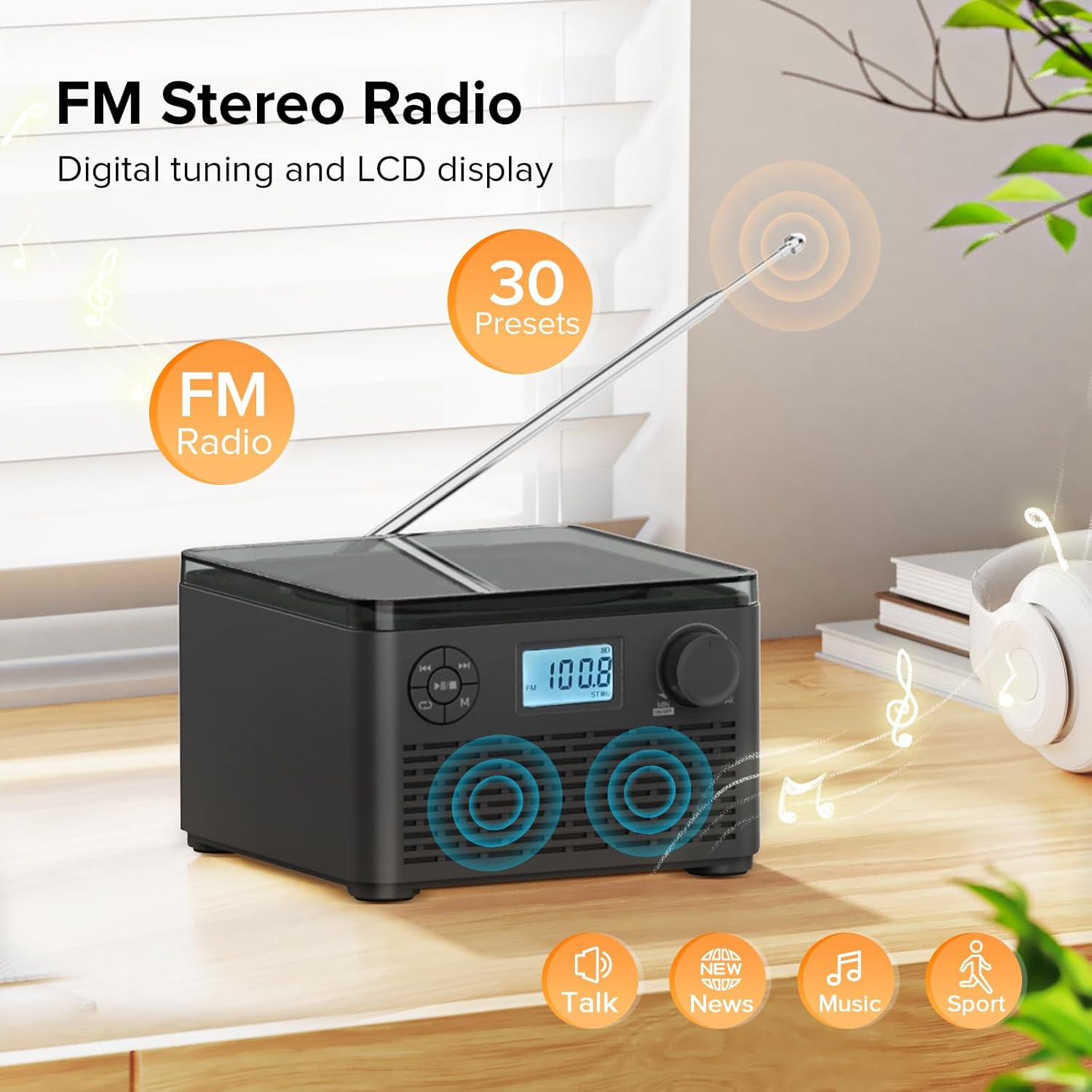
Figure 6: FM Stereo Radio - This image focuses on the FM radio feature, showing the digital display tuned to a frequency and indicating the availability of 30 presets. The extendable antenna is also visible, emphasizing its radio capabilities.
4 Воспроизведение с USB/TF-карт
The unit supports MP3 and WMA audio formats from USB flash drives and TF (Micro SD) cards up to 32GB.
- Insert a USB flash drive into the USB port or a TF card into the TF card slot on the back of the unit. Ensure the antenna is moved out of the way if necessary.
- Нажмите Режим (М) Нажимайте кнопку до тех пор, пока на ЖК-дисплее не появится надпись "USB" или "TF".
- Устройство автоматически обнаружит аудио и начнет его воспроизведение. fileс вставленного запоминающего устройства.
- Используйте Воспроизведение/Пауза (►▮▮), Предыдущая (◀◀), и Далее (►►) кнопки для управления воспроизведением.
- Нажмите Repeat/Random (↺) button to cycle through repeat modes or enable random playback.
5 Использование наушников
For private listening, connect standard 3.5mm headphones to the headphone jack on the back of the unit. The internal speakers will automatically mute when headphones are connected.
Техническое обслуживание и уход
- Уборка: Для очистки внешней поверхности устройства используйте мягкую сухую ткань. Не используйте абразивные чистящие средства или растворители.
- Уход за компакт-диском: Держите компакт-диски за края. Следите за их чистотой и отсутствием царапин. Протирайте компакт-диски мягкой безворсовой тканью, двигаясь от центра к краям.
- Хранилище: Если устройство не используется в течение длительного времени, храните его в прохладном, сухом месте, вдали от прямых солнечных лучей и экстремальных температур.
- Уход батареи: To prolong battery life, avoid fully discharging the battery frequently. Recharge the unit regularly, even if not in constant use.
Поиск неисправностей
| Проблема | Возможная причина | Решение |
|---|---|---|
| Блок не включается. | Battery is depleted or power adapter is not connected properly. | Ensure the volume knob is rotated clockwise to turn on. Connect the power adapter and charge the unit. |
| CD is skipping or not playing. | CD-диск загрязнен, поцарапан или вставлен неправильно. | Clean the CD with a soft cloth. Ensure the CD is placed correctly in the compartment. Try a different CD. |
| Плохой прием FM-радио. | Антенна не выдвинута или сигнал слабый. | Fully extend the FM antenna. Try repositioning the unit for better signal. |
| Не удается выполнить сопряжение Bluetooth-устройства. | Unit is not in pairing mode or device is too far. | Ensure the unit is in "BT" mode and flashing. Move your Bluetooth device closer to the boombox. Disconnect other Bluetooth devices. |
| USB/TF-карта не распознана. | Неподдерживаемый file format or card capacity. | Гарантировать files are MP3 or WMA format. Check that the card capacity is 32GB or less. Reinsert the card/drive. |
Технические характеристики
- Модель: В15
- Бренд: Куэпхом
- Размеры продукта (Д x Ш x В): 6.3 x 6.3 x 4.2 дюйма
- Вес товара: 1.9 фунта
- Потребляемая мощность: 5 В постоянного тока
- Аккумулятор: 1 литий-ионный аккумулятор (входит в комплект)
- Время воспроизведения батареи: 6-10 hours (approx., varies with usage)
- Поддерживаемые форматы дисков: CD, CD-R, CD-RW, MP3 CD
- Supported USB/TF Card Formats: MP3, WMA (up to 32GB)
- FM Radio Frequency Range: 87.5 - 108 МГц
- Тип динамика: Встроенные стереодинамики
- Порт для наушников: 3.5 мм
Гарантия и поддержка
Kuephom products are designed and manufactured to the highest quality standards. For any questions, technical support, or warranty claims, please contact Kuephom customer service through the retailer where you purchased the product or visit the official Kuephom webсайт для получения дополнительной информации.
Сохраните чек о покупке для гарантийных целей.


