Введение
Thank you for choosing the RAINPOINT Digital Sprinkler Timer, Model ITV105. This programmable 1-outlet automatic hose water timer is designed to provide convenient and precise control over your watering schedule, ensuring optimal moisture levels for your lawn and garden. This manual provides detailed instructions for setup, operation, maintenance, and troubleshooting to help you get the most out of your new device.
Продукт болееview и ключевые особенности
The RAINPOINT ITV105 Sprinkler Timer is engineered for durability and ease of use, offering a reliable solution for automated garden irrigation.
- Стандартная совместимость: Features a 3/4" inlet and outlet thread, compatible with most standard garden hoses.
- Устойчивость к атмосферным воздействиям: IP54 waterproof rating and heavy-duty weather-resistant ABS housing ensure durability for outdoor use.
- Настраиваемое программирование: Easy-to-use interface allows customization of start time, watering frequency, and duration for automated irrigation.
- Встроенный фильтр: Includes a built-in metal filter to improve water quality and protect plants from debris.
- Leakage Prevention: Upgraded strong and durable ABS material and water inlet thread, paired with Teflon tape and rubber washer to prevent water leakage.
- Большой ЖК-экран: Displays detailed information such as watering time, frequency, power, and battery life for easy readability.
- Уведомление о низком заряде батареи: Powered by 2 AAA batteries (not included), with a low battery notification and automatic valve shut-off to prevent water waste.
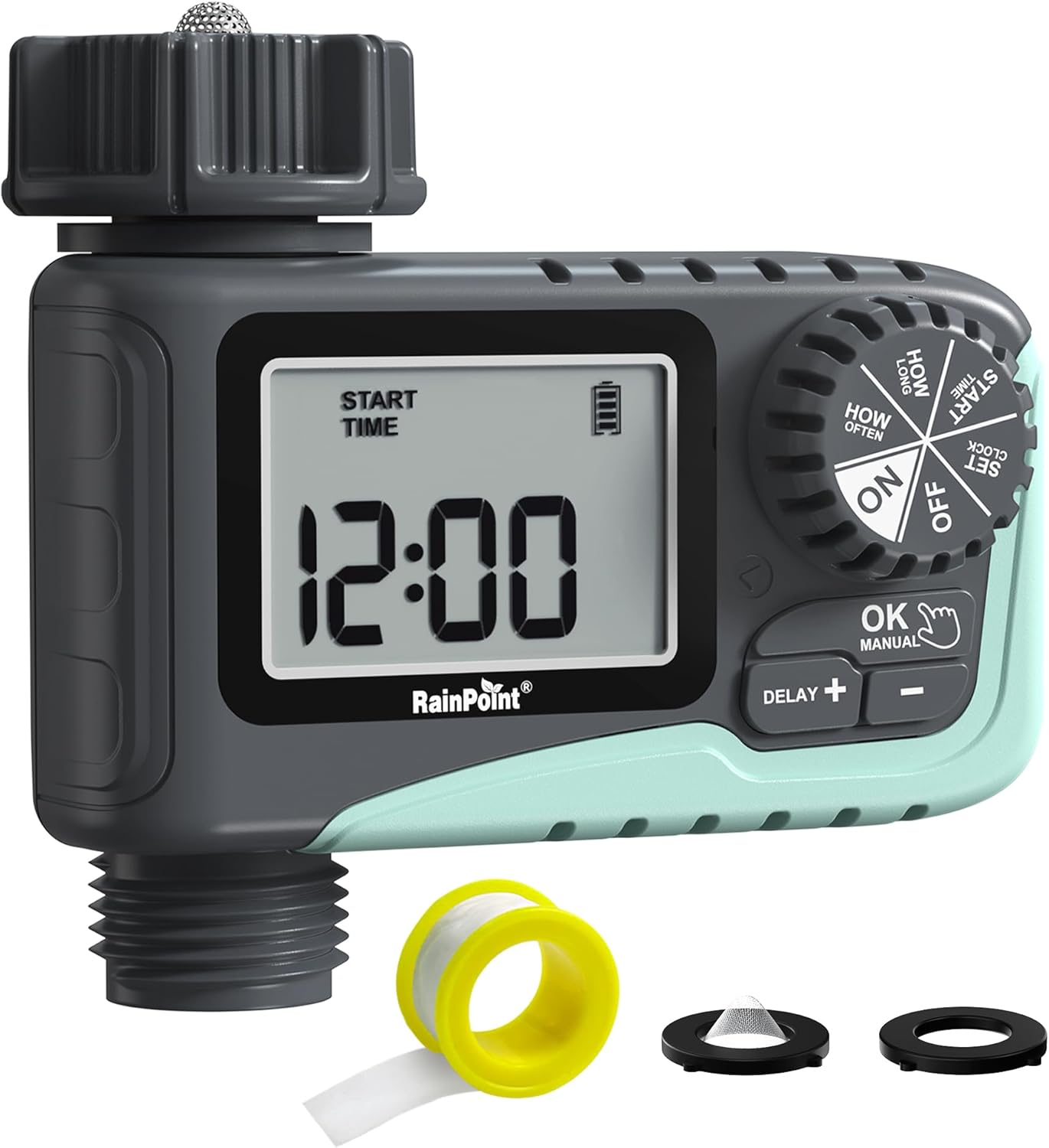
Рисунок 1: Передняя часть view of the RAINPOINT Digital Sprinkler Timer (ITV105) showing the large LCD screen, control dial, and buttons.
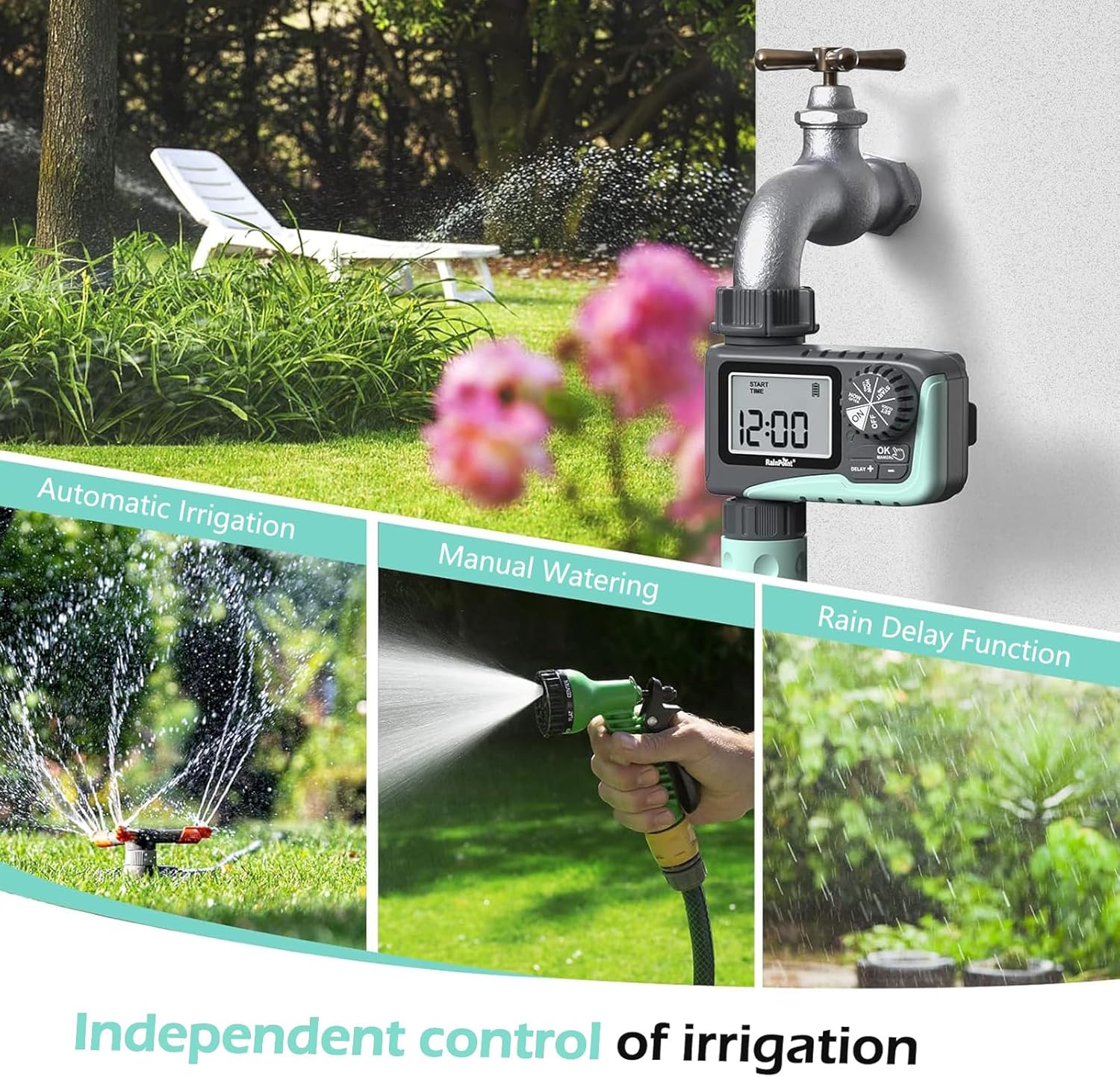
Figure 2: Illustration of the timer's three main functions: automatic irrigation, manual watering, and rain delay.
Содержимое упаковки
Пожалуйста, проверьте содержимое упаковки при открытии, чтобы убедиться в наличии всех предметов:
- 1 x RAINPOINT Digital Sprinkler Timer (ITV105)
- 1 x Руководство пользователя (этот документ)
- 1 х тефлоновая лента
- 1 x Rubber washer
- 1 x Spare filter
Настройка и установка
Follow these steps to properly set up your sprinkler timer:
- Установите батареи:
Locate the battery compartment on the back of the timer. Insert 2 new AAA (1.5V) alkaline batteries, ensuring correct polarity. Close the battery compartment securely. The LCD screen will power on.
- Подготовьте кран:
Ensure your outdoor hose faucet is clean and free of debris. If necessary, apply the included Teflon tape to the faucet threads for a watertight seal.
- Attach Timer to Faucet:
Screw the timer's inlet (top connector) onto your 3/4" outdoor hose faucet. Hand-tighten firmly. Ensure the rubber washer is properly seated inside the timer's inlet to prevent leaks. The timer features a 360° rotating connector for easy positioning.
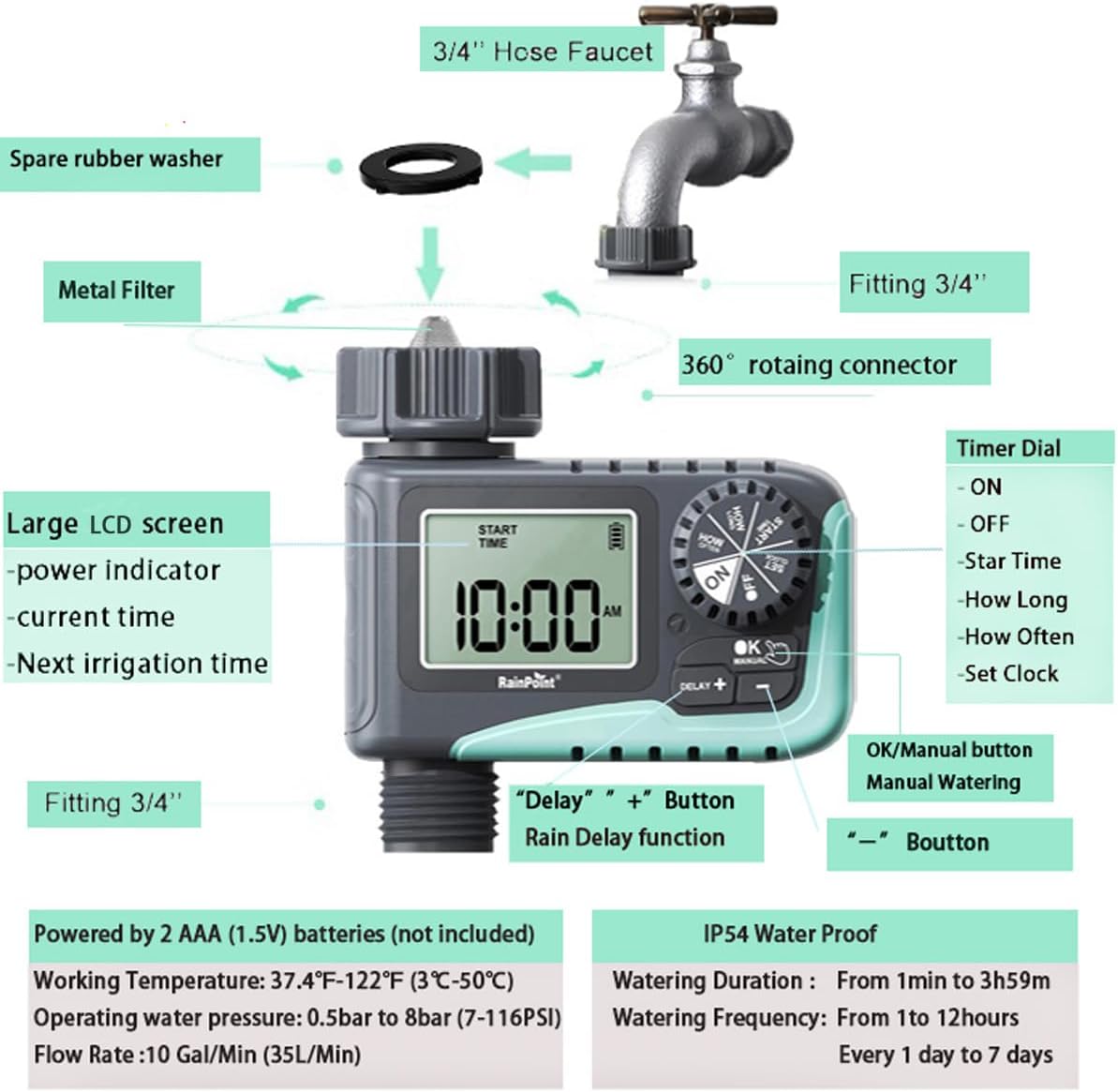
Figure 3: Diagram illustrating the components of the sprinkler timer, including the 3/4" hose faucet connection, metal filter, and LCD screen.
- Подсоедините шланг:
Attach your garden hose to the timer's outlet (bottom connector). Hand-tighten securely. Ensure a proper washer is in place at the hose connection point.
- Откройте кран:
Fully open your outdoor hose faucet. The timer is designed to withstand water pressure from 0.5 bar to 8 bar (7-116 PSI). The timer will control the water flow, not the faucet.
Инструкция по эксплуатации
The RAINPOINT ITV105 timer features a large dial and intuitive buttons for easy programming.
Положения диска управления:
- НА: Activates the timer for automatic watering.
- OFF: Deactivates the timer, stopping all watering.
- УСТАНОВИТЬ ЧАСЫ: Установите текущее время.
- НАЧАЛЬНОЕ ВРЕМЯ: Установите желаемое время начала циклов полива.
- СКОЛЬКО: Set the duration of each watering cycle.
- КАК ЧАСТО: Set the frequency of watering cycles.
Кнопки:
- OK/MANUAL: Confirms settings or initiates manual watering.
- DELAY +: Increases values during setting or activates/adjusts rain delay.
- -: Уменьшает значения во время настройки.
Setting the Current Time (SET CLOCK):
- Поверните диск, чтобы УСТАНОВИТЬ ЧАСЫ.
- Используйте + и - Кнопки для настройки часа. Нажмите OK для подтверждения.
- Используйте + и - Кнопки для настройки минут. Нажмите OK для подтверждения.
- Поверните диск, чтобы ON to save the time and return to normal operation.
Setting Automatic Watering Program:
This timer allows you to set a start time, duration, and frequency for automated watering.
- Set Start Time (START TIME):
Поверните диск, чтобы ВРЕМЯ НАЧАЛА. Использовать + и - to set the desired watering start hour and minute. Press OK для подтверждения каждой настройки.
- Установите продолжительность полива (КАК ДОЛГО):
Поверните диск, чтобы СКОЛЬКО. Использовать + и - to set the watering duration from 1 minute to 3 hours and 59 minutes. Press OK для подтверждения.

Figure 4: Screen showing settings for "HOW OFTEN" (frequency) and "HOW LONG" (duration) for automatic watering.
- Установите частоту полива (КАК ЧАСТО):
Поверните диск, чтобы КАК ЧАСТО. Использовать + и - to set the frequency:
- Every 1 hour to 12 hours.
- Every 1 day to 7 days.
Нажимать OK для подтверждения.
- Активировать программу:
Поверните диск, чтобы ONТеперь таймер будет работать в соответствии с запрограммированным вами расписанием.
Ручной полив:
Чтобы полить немедленно, не нарушая запланированного графика:
- Ensure the dial is in the ON позиция.
- Нажмите ОК/РУЧНОЙ button. The display will show the default manual watering duration (e.g., 10 minutes).
- Используйте + и - кнопки для ручной регулировки продолжительности полива от 1 минуты до 8 часов.
- Нажимать OK again to start manual watering. The timer will count down the set duration.
- Чтобы остановить ручной полив раньше времени, нажмите ОК/РУЧНОЙ снова.

Figure 5: Display showing the manual watering duration setting, adjustable from 1 minute to 8 hours.
Функция задержки дождя:
The rain delay function allows you to pause your watering schedule for a set period due to rain or other reasons, preventing overwatering.
- Ensure the dial is in the ON позиция.
- Нажмите DELAY + button. The display will show a default delay time (e.g., 24H).
- Нажимать DELAY + repeatedly to cycle through delay options (e.g., 24H, 48H, 72H).
- Once you select the desired delay, the timer will enter rain delay mode. The display will show the remaining delay time.
- After the delay period ends, the timer will automatically resume its programmed watering schedule.
- To cancel the rain delay, press the DELAY + button until the delay time disappears, or rotate the dial to OFF and then back to ON.

Figure 6: The timer displaying the rain delay countdown, highlighting its IP54 waterproof rating.
Обслуживание
Proper maintenance ensures the longevity and optimal performance of your RAINPOINT Sprinkler Timer.
- Очистить фильтр: Periodically check and clean the metal filter located at the timer's inlet. Remove the timer from the faucet, unscrew the filter, rinse it under running water to remove any debris, and reinsert it.
- Замена батареи: When the low battery indicator appears on the LCD screen, replace the 2 AAA batteries promptly. Always use new alkaline batteries.
- Подготовка к зиме: Before the first frost, remove the timer from the faucet and store it indoors in a dry, frost-free location. Remove the batteries before storage.
- Проверьте на наличие утечек: Regularly inspect all connections (faucet to timer, timer to hose) for any signs of leakage. Ensure all connections are hand-tightened and that rubber washers are properly seated.

Figure 7: Visual representation of the built-in metal filter and durable plastic material designed for anti-leakage and longer service life.
Поиск неисправностей
If you encounter issues with your RAINPOINT Sprinkler Timer, refer to the following common problems and solutions:
| Проблема | Возможная причина | Решение |
|---|---|---|
| Timer not turning on / LCD blank. | Разряженные или неправильно установленные батареи. | Replace with 2 new AAA alkaline batteries, ensuring correct polarity. |
| Нет потока воды. |
|
|
| Утечка воды из соединений. |
|
|
| Timer not following schedule. |
|
|
Технические характеристики
| Особенность | Спецификация |
|---|---|
| Модель | ИТВ105 |
| Размеры продукта | 10.5 x 10.3 x 5 см (4 x 4 x 2 дюймов) |
| Материал | Акрилонитрилбутадиенстирол (АБС) |
| Watering Duration (Automatic) | от 1 минут до 3 часов 59 минут |
| Watering Frequency (Automatic) | Every 1 hour to 12 hours, or every 1 day to 7 days |
| Watering Duration (Manual) | 1 minute to 8 hours (Default: 10 minutes) |
| Максимальная скорость потока | 10 Gal/Min (35 L/Min) |
| Диапазон давления воды | 0.5 bar to 8 bar (7-116 PSI) |
| Рабочая температура | 3 ℃ -50 ℃ (37.4 ℉ -122 ℉) |
| Источник питания | 2 x AAA (1.5V) batteries (not included) |
| Рейтинг водонепроницаемости | IP54 |
Гарантия и поддержка
RAINPOINT products are manufactured to high-quality standards. For specific warranty details, please refer to the warranty card included with your product or visit the official RAINPOINT website. If you encounter any issues or have questions not covered in this manual, please contact RAINPOINT customer support through their official webсайт или у розничного продавца, где вы приобрели товар.
Для получения дополнительной информации и поддержки вы можете посетить [ссылка]. Магазин RAINPOINT на Amazon.


