Продукт болееview
The DYNAVIN D9-DMI Ultra Flex is an advanced Android car radio navigator designed to upgrade your in-car entertainment and navigation experience. It features a 6.5-inch high-resolution anti-glare touchscreen, integrated GPS navigation, wireless CarPlay, and Android Auto compatibility. This unit seamlessly integrates with your vehicle's existing systems, including steering wheel controls, climate control, and parking sensors, for a cohesive user experience.
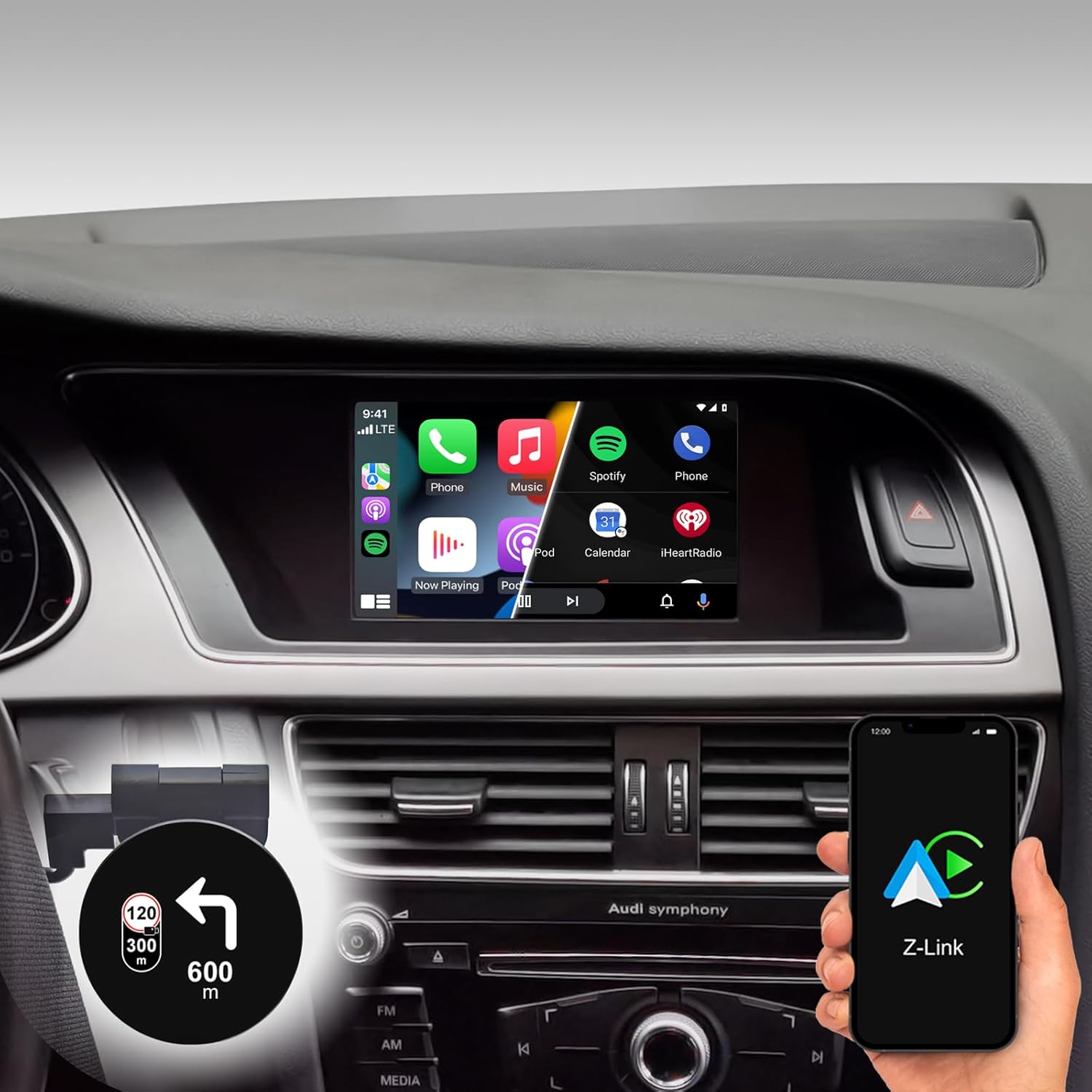
Figure 1: DYNAVIN D9-DMI Ultra Flex Car Radio Navigator installed in an Audi dashboard, showcasing its CarPlay interface and integration with navigation features.
Совместимость
This Android Navi Radio is specifically designed for Audi vehicles equipped with a Concert or Symphony radio. Please verify your vehicle's radio type before installation to ensure compatibility.
- Ауди А4: 2007 – 2015
- Ауди А5: 2007 – 2016
- Audi Q5: 2008 – 2017
- Audi S4: 2009 – 2016
- Audi S5: 2009 – 2016
The unit is compatible with the original AUDI sound system and can receive the AUDI vehicle menu.

Figure 2: Compatible Audi Concert and Symphony radio units.

Figure 3: How to check your car's system version for compatibility.
Основные характеристики
- Отображать: 6.5-inch high-resolution (1024 x 600 pixels) anti-glare touchscreen.
- Операционная система: Android 11 OS with quad-core CPU and 4 GB RAM.
- Связь: Wireless CarPlay, Android Auto, and Smartphone Mirroring.
- Навигация: Integrated GPS navigation with Dynaway app (31-day trial, activation code required), including speed camera information.
- Аудио: Highly sensitive FM-RDS tuner with 15 presets for clear, noise-free playback. Supports audio streaming via smartphone/USB.
- Микрофон: Compact digital dual microphone with noise reduction for excellent call quality.
- Интеграция: Integrated CANBUS solution for seamless control via steering wheel, air conditioning display, and parking sensor information.
- Проекционный дисплей (HUD): Included HUD shows navigation directions, vehicle speed, and speed camera alerts.
- Dynapp Pack: Access to Google Playstore, third-party app installation, and display of speed limits (31-day trial, activation code required).

Figure 4: DYNAVIN's commitment to quality and experience.

Figure 5: The innovative Dynavin Digital Dual-Microphone.

Figure 6: Upgrade your Audi system with the DYNAVIN DMI Ultra Flex.
Настройка и установка
Installation of the DYNAVIN D9-DMI Ultra Flex requires careful attention to detail. It is recommended to have the installation performed by a qualified professional. The unit integrates with your vehicle's existing wiring and CAN-BUS system.
Включенные компоненты:
Ensure all components listed below are present in your package before beginning installation.

Figure 7: Complete list of accessories included in the package.
- Dynavin Radio Unit
- Соединительный кабель
- Антенна DAB
- DAB / CAN Interface
- Кабель задней камеры
- GPS-антенна
- Удлинительный кабель USB
- Антенный адаптер
- Микрофон
- Climate Control Cable
- HUD 150 (проекционный дисплей)
- Антенна Bluetooth/Wi-Fi
- Инструменты для разборки
- Краткое пособие
Этапы установки (общие):
Refer to the included Quick Guide for detailed, step-by-step installation instructions specific to your Audi model. Professional installation is highly recommended.
- Подготовка: Disconnect the vehicle's battery. Use the provided disassembly tools to carefully remove the original radio unit and trim.
- Проводка: Connect the Dynavin radio unit using the supplied connection cables, ensuring all connections are secure. Integrate the DAB/CAN interface and connect the GPS antenna, DAB antenna, and BT/Wi-Fi antenna.
- Установка микрофона: Install the compact digital dual microphone in a suitable location, typically near the rearview mirror or steering column, for optimal call quality.
- Head-up Display Installation: Mount the HUD 150 unit on your dashboard or windshield as per the instructions, ensuring it does not obstruct your view.
- Интеграция CAN-BUS: Ensure the CAN-BUS connections are correctly made to enable steering wheel control, climate display, and parking sensor integration.
- Тестирование: Reconnect the vehicle's battery. Power on the unit and perform initial function tests for radio, navigation, CarPlay/Android Auto, and vehicle system integration.
- Повторная сборка: Аккуратно соберите компоненты приборной панели.
Инструкция по эксплуатации
Основная операция:
- Включение/выключение питания: Как правило, устройство включается и выключается вместе с зажиганием автомобиля.
- Сенсорное управление: Navigate menus and select functions using the responsive 6.5-inch touchscreen.
- Органы управления на рулевом колесе: Utilize your vehicle's existing steering wheel controls for volume, track skipping, and call management, thanks to CAN-BUS integration.
Навигационная система:
The integrated GPS navigation system uses the Dynaway app. A 31-day trial is included, after which an activation code must be purchased.
- Ввод данных о пункте назначения: Enter destinations via the touchscreen.
- Голосовое руководство: Follow clear voice instructions for turn-by-turn navigation.
- Маршрутная инструкция: Select preferred route options (e.g., fastest, shortest).
- Оповещения о камерах контроля скорости: The navigation software includes alerts for speed cameras.
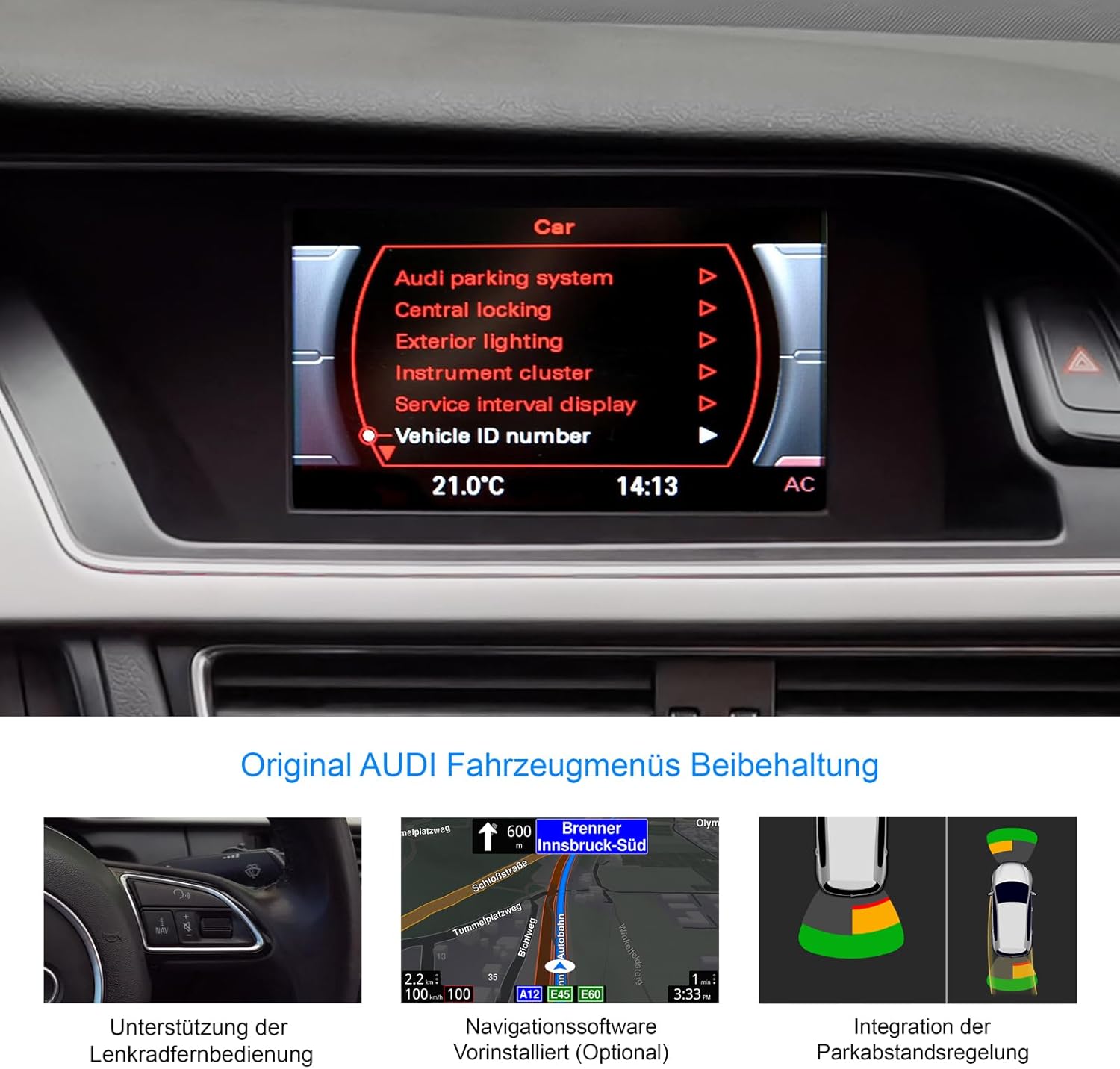
Figure 8: Retention of original Audi vehicle menus and integrated features.
CarPlay и Android Auto:
Connect your smartphone wirelessly to access CarPlay (for iOS devices) or Android Auto (for Android devices). A 31-day trial is included, after which an activation code must be purchased.
- Беспроводное соединение: Pair your phone via Bluetooth and follow the on-screen prompts to establish a wireless CarPlay or Android Auto connection.
- Доступ к приложению: Use compatible apps for navigation (Apple Maps, Google Maps), music streaming (Spotify, Apple Music), messaging, and calls directly from the unit's display.
Проекционный дисплей (HUD):
The included HUD 150 projects key information onto your windshield, allowing you to keep your eyes on the road.
- Отображаемая информация: Navigation directions (from Dynaway, Apple Maps, Google Maps), vehicle speed, and Blitzer.de speed camera information.
- Размещение: Position the HUD unit to ensure clear visibility without obstructing your driving view.

Figure 9: Head-up Display in action, showing navigation and time.
Обслуживание
To ensure the longevity and optimal performance of your DYNAVIN D9-DMI Ultra Flex, follow these maintenance guidelines:
- Очистка экрана: Используйте мягкую безворсовую ткань, специально предназначенную для электронных экранов. Не используйте абразивные чистящие средства или растворители. Аккуратно протрите экран, чтобы удалить пыль и отпечатки пальцев.
- Обновления программного обеспечения: Periodically check for software updates from DYNAVIN to ensure the system runs efficiently and has the latest features and bug fixes. Updates can typically be performed via Wi-Fi or USB.
- Общий уход: Не подвергайте устройство воздействию экстремальных температур, прямых солнечных лучей в течение длительного времени или чрезмерной влажности.
- Кабельные соединения: Убедитесь, что все кабели надежно подключены. Избегайте сильного натяжения кабелей.
Поиск неисправностей
This section addresses common issues you might encounter with your DYNAVIN D9-DMI Ultra Flex. For more complex problems, contact customer support.
| Проблема | Возможная причина | Решение |
|---|---|---|
| Блок не включается. | Ненадежное соединение электропитания, перегоревший предохранитель, проблема с аккумулятором транспортного средства. | Проверьте все силовые кабели и соединения. Осмотрите предохранители автомобиля. Убедитесь, что аккумулятор автомобиля заряжен. |
| Нет аудиовыхода. | Volume too low, mute activated, incorrect audio source selected, wiring issue. | Увеличьте громкость. Проверьте, активен ли режим отключения звука. Выберите правильный источник звука. Проверьте правильность подключения проводов динамиков. |
| CarPlay/Android Auto не подключается. | Bluetooth not paired, Wi-Fi disabled, trial period expired, activation code not entered. | Ensure Bluetooth and Wi-Fi are enabled on both devices. Re-pair the phone. Check trial status and enter activation code if necessary. |
| Сигнал GPS потерян или неточен. | Антенна GPS заблокирована или отключена, плохой прием спутникового сигнала. | Убедитесь, что антенна GPS установлена правильно и имеет чистое покрытие. view из неба. Проверьте подключение антенны. Переместитесь на открытую местность. |
| Не работают кнопки управления на руле. | CAN-BUS connection issue, incorrect vehicle configuration. | Verify CAN-BUS wiring. Check unit settings for correct vehicle model configuration. |
Технические характеристики
| Особенность | Деталь |
|---|---|
| Бренд | ДИНАВИН |
| Модель | D9-DMI Ultra Flex |
| Совместимые транспортные средства | Audi A4 (2007-2015), A5 (2007-2016), Q5 (2008-2017), S4 (2009-2016), S5 (2009-2016) with Concert/Symphony radio |
| Размер экрана | 6.5 дюймов |
| Тип дисплея | LCD, Anti-glare |
| Разрешение | 1024 x 600 пикселей |
| Операционная система | Андроид 11 |
| Процессор | Четырехъядерный |
| БАРАН | 4 ГБ |
| Связность | Wireless CarPlay, Android Auto, Bluetooth, USB |
| Режим аудиовыхода | Стерео (2.0 канала) |
| Радио тюнер | FM-RDS with 15 presets |
| Особые возможности | Integrated GPS Navigation, Head-up Display (HUD), CAN-BUS Integration (steering wheel, climate, parking sensors), Digital Dual Microphone |
| Размеры упаковки | 28 х 23 х 10 см |
| Вес товара | 2 кг |
| ASIN | B0CS67GQKN |
Гарантия и поддержка
For warranty information, please refer to the documentation provided with your purchase or contact DYNAVIN customer service directly. DYNAVIN offers customer support for product inquiries, technical assistance, and troubleshooting.
For the Dynapp package, CarPlay, and Android Auto features, a 31-day trial phase is included. An activation code must be purchased online to continue using these features after the trial period.
Please visit the official DYNAVIN website or contact your retailer for the most up-to-date support information and contact details.


