Введение
This user manual provides detailed instructions for setting up, operating, and maintaining your RGBlink ASKnano 4K-1V2 Wireless HDMI Transmitter and Receiver Kit. This plug-and-play system allows for seamless, high-definition wireless transmission of 4K video and audio from a single source to up to two displays simultaneously, ideal for various applications including home entertainment, presentations, and live broadcasts.
Содержимое упаковки
Проверьте наличие всех предметов в посылке:
- 1 x ASK nano 4K TX (Transmitter)
- 2 x ASK nano 4K RX (Receivers)
- 3 кабеля питания переменного тока USB
- 3 удлинительных кабеля HDMI «папа-мама»
- 1 x Адаптер Micro/Mini HDMI — HDMI
- 1 x Руководство пользователя (этот документ)

RGBlink ASKnano 4K-1V2 Kit contents including transmitter, two receivers, cables, and adapters.
Руководство по настройке
1. Подключение передатчика (TX)
The transmitter (TX) connects to your video source device (e.g., laptop, PC, gaming console, camera).
- Plug the HDMI male interface of the TX directly into the HDMI output port of your source device.
- If the HDMI port is difficult to access, use one of the provided HDMI Male to Female Extender Cables.
- For devices with Micro HDMI or Mini HDMI outputs (e.g., some cameras), use the Micro/Mini HDMI to HDMI Adapter.
- Power Supply for TX: The TX unit typically draws power directly from the HDMI port (especially USB 3.0 compatible ports). If additional power is needed, connect one of the USB A-C Power Cables to the Type-C power supply port on the TX and to a 5V/1A USB power source (e.g., a USB port on your computer or a USB wall adapter).

Diagram showing the RGBlink ASKnano 4K Transmitter (TX) connecting to various HDMI output devices like a PC, laptop, camera, and PS4.
Video: How to connect RGBlink Ask Nano 4K Wireless HDMI Transmitter and Receiver. This video demonstrates the physical connection process for both the transmitter and receiver units.
2. Подключение приемников (RX)
The receivers (RX) connect to your display devices (e.g., TV, monitor, projector).
- Plug the HDMI male interface of each RX directly into an available HDMI input port on your display device.
- If the HDMI port is difficult to access, use one of the provided HDMI Male to Female Extender Cables.
- Power Supply for RX: Connect one of the USB A-C Power Cables to the Type-C power supply port on the RX and to a 5V/1A USB power source (e.g., a USB port on your TV/monitor or a USB wall adapter). Ensure sufficient power for optimal performance.

Diagram illustrating the RGBlink ASKnano 4K Receiver (RX) connecting to HDMI input devices such as a projector and TV/display.
3. Сопряжение (при необходимости)
The TX and RX units are pre-paired from the factory. If pairing is lost or you are adding new receivers, follow these steps:
- Long press the RX's middle button until the "reset symbol" appears on the connected display.
- Power on the TX unit and wait for it to automatically pair with the RX.
- Wait 10-20 seconds. The display will show "Paired is OK" once the connection is established.
Инструкция по эксплуатации
Подключи и работай
Once the TX and RX units are connected and powered, the system is designed for immediate use. The TX will automatically project the screen of your signal source to the connected RX displays.
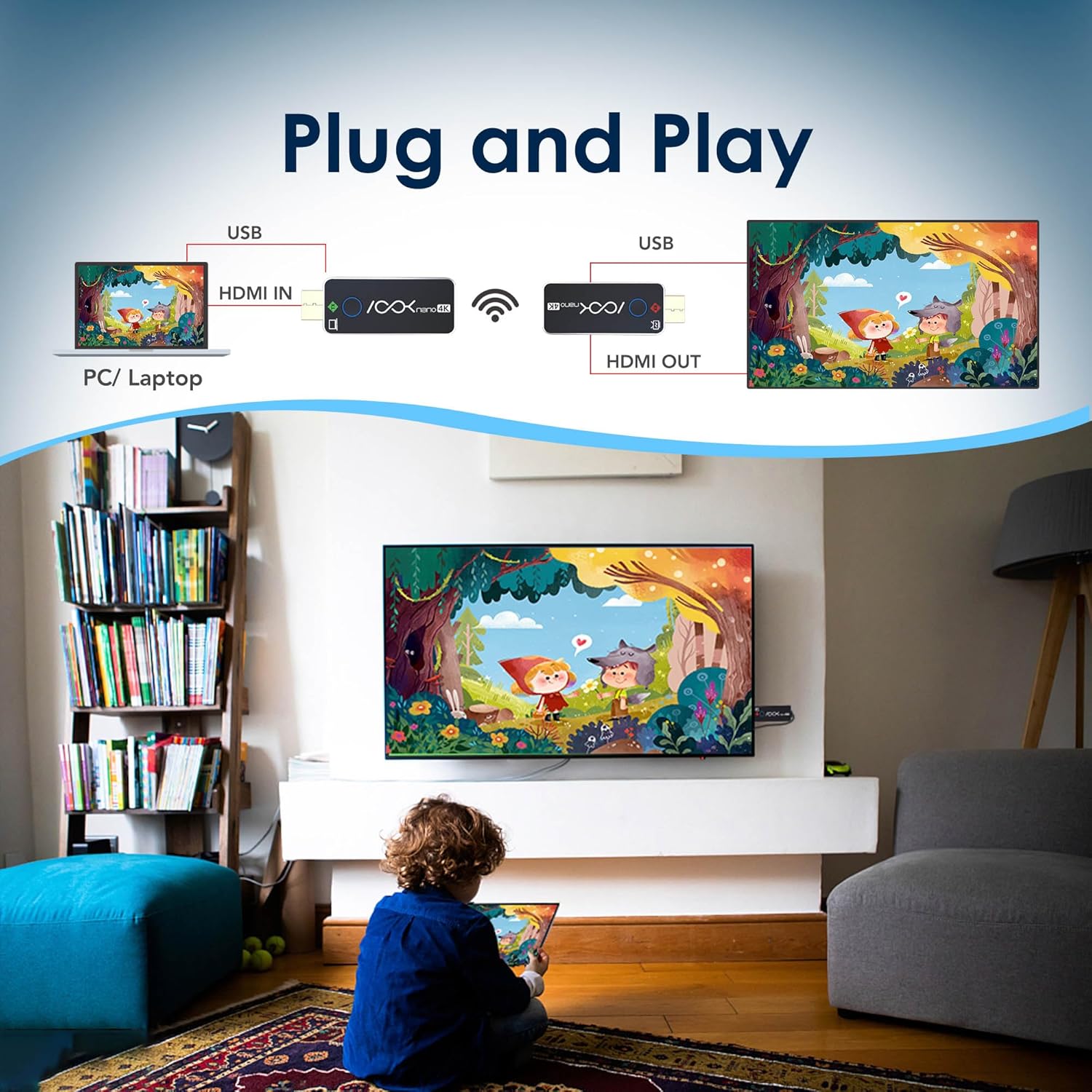
Illustration of the RGBlink ASKnano 4K system in a plug-and-play setup, showing a PC/laptop connected to the TX, wirelessly transmitting to an RX connected to a TV.
Multi-Display Support (1 Transmitter to 2 Receivers)
This kit supports transmitting content from one source (TX) to two displays (RX) simultaneously, providing unmatched flexibility for dual monitor setups, presentations, or extended viewинж.

Image showing a laptop wirelessly transmitting to two separate displays, demonstrating the 1-to-2 receiver capability of the RGBlink ASKnano 4K.
Video: How to wirelessly transfer HDMI video to 4 screens. This video demonstrates setting up multiple receivers for multi-screen display.
Диапазон беспроводной передачи
The RGBlink ASKnano 4K offers a stable signal within a range of 65 feet (20 meters) in open areas without obstructions. For optimal and uninterrupted streaming, a distance of 32 feet (10 meters) is recommended.
Важное примечание:
Do not place the wireless transmitter or receiver in enclosed spaces like drawers or behind TVs, as this may affect signal transmission and lead to interference or signal loss.

Image depicting the RGBlink ASKnano 4K system in a meeting room, illustrating a long-range wireless transmission of up to 100 feet (30 meters) from a laptop to a large display.
Screen Mirroring (via RX)
The RX unit can also function independently for screen mirroring from compatible smartphones or tablets (not compatible with mobile phones or tablets directly via TX, but RX can mirror from them). It supports WIFI 5G transmission protocol and automatically selects the optimal channel.
Video: RGBLink HDMI transmitter + Screen mirroring Operation & Demo. This video demonstrates the screen mirroring functionality using a smartphone.
Обслуживание
To ensure the longevity and optimal performance of your RGBlink ASKnano 4K-1V2 kit, follow these maintenance guidelines:
- Содержите устройства в чистоте и не допускайте попадания пыли. Для чистки используйте мягкую сухую ткань.
- Избегайте воздействия на устройства экстремальных температур, влажности или прямых солнечных лучей.
- Do not block the ventilation holes on the devices to prevent overheating.
- Handle the HDMI connectors and USB-C ports with care to prevent damage.
- Когда набор не используется, храните его в прохладном, сухом месте.
Поиск неисправностей
If you encounter issues with your RGBlink ASKnano 4K-1V2 kit, refer to the following common problems and solutions:
| Проблема | Возможная причина | Решение |
|---|---|---|
| Нет сигнала / черный экран | Insufficient power, incorrect HDMI input, pairing issue, signal interference. | Ensure both TX and RX have stable 5V/1A power. Verify correct HDMI input on display. Re-pair units if necessary (see Setup Guide). Reduce distance between TX/RX or remove obstructions. |
| Lag / Stuttering Video | Signal interference, excessive distance, obstructions, low power. | Move TX/RX closer together (recommended within 32 feet). Remove physical obstructions. Ensure stable 5V/1A power. Avoid placing units in enclosed spaces. |
| Нет звука | Audio settings on source/display, HDCP compatibility. | Check audio output settings on your source device and input settings on your display. Ensure HDCP compatibility (TX supports 1.4, RX supports 2.2). |
| Ошибка сопряжения | Incorrect pairing procedure, power issues. | Follow the manual pairing steps precisely (see Setup Guide). Ensure both units are properly powered. |
| Not compatible with mobile phones/tablets | Direct TX connection is not supported for mobile devices. | The TX unit is designed for HDMI output devices. For mobile devices, use the RX unit's screen mirroring function (AirPlay/Miracast) if supported by your mobile device. |
Технические характеристики
| Особенность | Деталь |
|---|---|
| Модель | ASKnano 4K-1V2 |
| Бренд | RGBссылка |
| Transmitter (TX) Max Resolution | 4K (3840x2160) @ 24/25/30Hz; 1080P @ 24/25/30/50/60Hz; 720P @ 50/60Hz |
| Receiver (RX) Max Output Resolution | Разрешение до 4K (3840x2160) при 60 Гц |
| Стандарт HDMI | HDMI 2.0 (RX), HDMI 2.0 / HDCP 2.2 (TX) |
| Поддержка HDCP | TX: HDCP 1.4, RX: HDCP 2.2 |
| Технология связи | Беспроводная связь (протокол передачи Wi-Fi 5G) |
| Дальность беспроводной связи | Up to 65 feet (20 meters) in open areas; 32 feet (10 meters) recommended for stable connection. |
| Источник питания | USB-C, DC 5V/1A (Max 3.0W) |
| Размеры | 6.7 x 4.72 x 2 дюйма |
| Вес товара | 12.6 унции |
Гарантия и поддержка
For warranty information and technical support, please refer to the official RGBlink webили обратитесь в службу поддержки напрямую. Сохраните чек о покупке для предъявления гарантийных претензий.
Официальное руководство пользователя (PDF): Скачать PDF-файл


