1. Введение
Welcome to your new Powtree Wireless Controller. This manual provides detailed instructions for setting up, operating, and maintaining your controller. Please read this manual carefully before use to ensure optimal performance and longevity of your device.
2. Содержимое упаковки
- 2 x Powtree Wireless Controllers
- 2 зарядных кабеля USB Type-C
- 2 руководства пользователя (данный документ)
3. Продукт закончилсяview
Familiarize yourself with the various components and controls of your Powtree Wireless Controller.

Изображение: Сверху и снизу view of the Powtree Wireless Controller, highlighting key components such as the D-Pad, Action Buttons, Joysticks, Touch Pad, Share button, Options button, Home button, Speaker, 3.5mm stereo port, EXT charging port, Light Bar, and USB Charging Jack.
- Крестовина: Directional Pad for navigation.
- Кнопки действий: Triangle, Circle, Cross, Square buttons for in-game actions.
- Левый/правый джойстики: Analog sticks for precise movement and camera control.
- Сенсорная панель: Multi-touch pad for interactive gameplay.
- Кнопка «Поделиться»: For sharing gameplay content.
- Кнопка «Параметры»: For accessing in-game menus and options.
- Домашняя кнопка: For returning to the system menu.
- Спикер: Built-in speaker for enhanced audio feedback.
- 3.5mm Stereo Port: Для подключения наушников или гарнитуры.
- EXT Charging Port: Для зарядки контроллера.
- Световая панель: Indicates player number and provides in-game visual cues.
- USB-разъем для зарядки: Для подключения зарядного кабеля Type-C.
- Кнопки L1/L2/R1/R2: Кнопки на плечах и курки для различных внутриигровых функций.
4. Настройка
4.1 Первоначальное подключение
- For the first connection, you must activate the device using the provided USB Type-C cable. Connect one end of the cable to the controller and the other end to your console (PS4/PS5) or PC.
- Once connected, press the Home button on the controller to pair it with your device.
- After successful pairing, you can disconnect the USB cable for wireless use.
Примечание: If the controller fails to connect, it is recommended to try a high-power USB Type-C data cable.
4.2 Зарядка контроллера
The controller has a built-in 800mAh lithium battery. To charge:
- Connect the provided USB Type-C charging cable to the controller's USB Charging Jack.
- Connect the other end of the cable to a USB power source (e.g., console, PC, USB wall adapter).
- The controller will fully charge in approximately 2.5 hours. The light bar will indicate charging status.
5. Инструкция по эксплуатации
5.1 Bluetooth-соединение
The controller uses Bluetooth 4.2 technology, providing a stable connection with a receiving distance of up to 10 meters (390 inches). After initial wired activation, the controller should automatically connect wirelessly to your paired device when powered on.
5.2 Функция Турбо
The Turbo function allows for rapid, repeated input of a button press, useful in certain games.
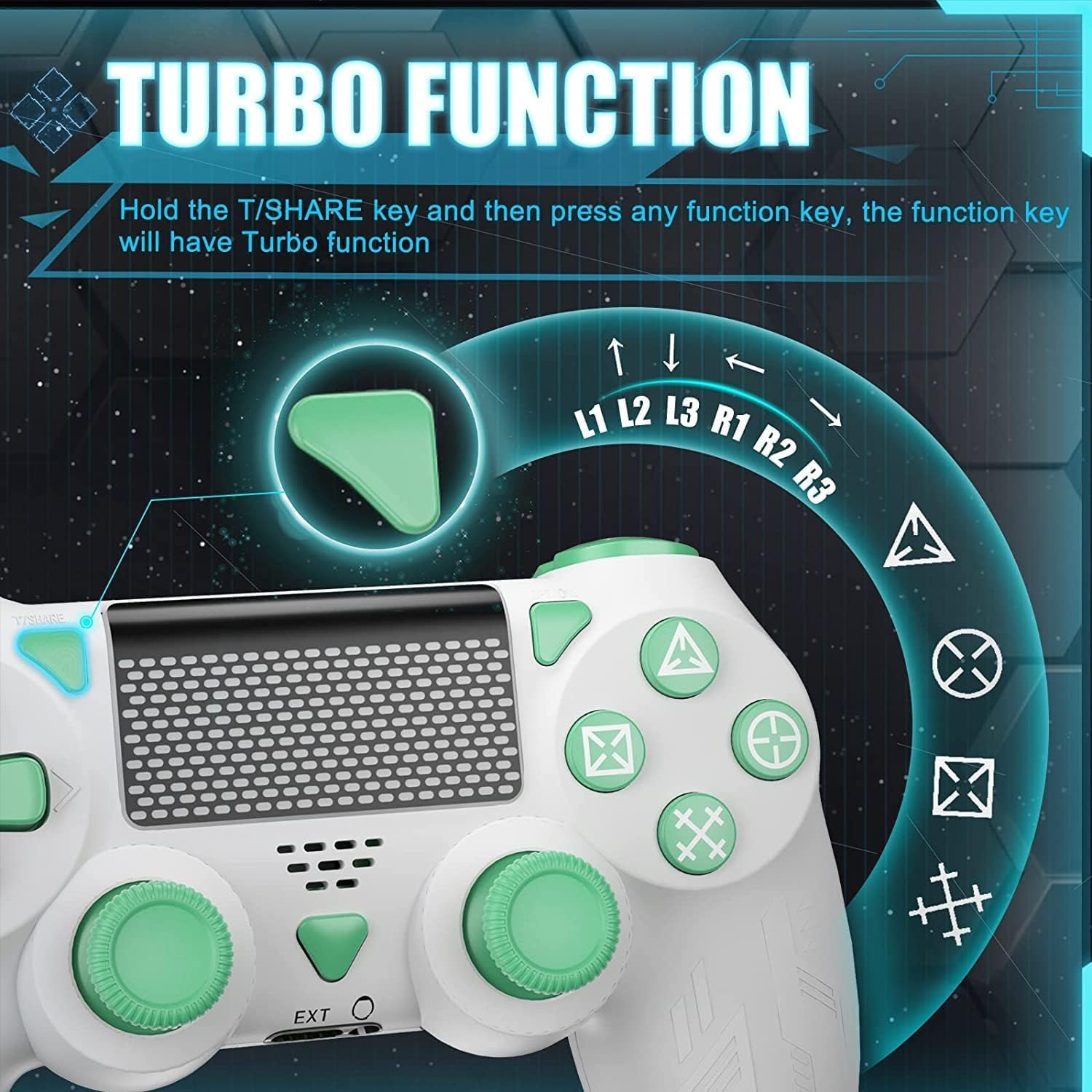
Image: A close-up of the controller showing the 'T/SHARE' button and an arrow pointing to a function button, illustrating the activation of the Turbo function.
To activate the Turbo function: Hold the T/SHARE key, then press any desired function key (e.g., X, O, Triangle, Square, L1, R1, L2, R2). The selected function key will now have Turbo functionality.
5.3-дюймовый 6-осевой гироскопический датчик
The built-in 6-axis motion control system enhances gameplay by allowing for intuitive control through movement and rotation.

Image: A controller with arrows indicating motion, alongside icons representing in-game actions like 'Throw Off', 'Rotation of Direction', and 'Shift of Vision', demonstrating how the 6-axis gyro sensor improves accuracy and speed.
This sensor improves accuracy and speed in games that support motion control, allowing for actions like shifting vision, rotating objects, or throwing items by physically moving the controller.
5.4 Двойная вибрация
The controller is equipped with dual vibration motors to provide immersive haptic feedback during gameplay.

Изображение: Прозрачное view of the controller's grips, showing the internal dual vibration motors emitting blue light, indicating their function in providing haptic feedback.
Experience realistic feedback for in-game events such as collisions, explosions, or weapon recoil, enhancing your gaming immersion.
5.5 Аудиовозможности
The controller includes a 3.5mm stereo audio jack for connecting your headset and a built-in speaker for direct audio output from the controller.
5.6 световая полоса
The front light bar changes color according to game content, providing visual cues and indicating player status.
6. Совместимость
The Powtree Wireless Controller offers broad compatibility across multiple gaming platforms.

Image: A controller displayed alongside icons for various compatible platforms including PS4/PS4 Pro/PS4 Slim, Steam, iPad/Phone/Android/iOS, and PC.
Совместимо с:
- PS4 (P4, P4 Pro, P4 Slim)
- ПК (Windows)
- Android-устройства
- iOS-устройства
- Some PS4 games on PS5
7. Техническое обслуживание
7.1 Управление сроком службы батареи
The 800mAh battery provides approximately 12-15 hours of continuous use on a full charge. To prolong battery life:
- Always shut down the controller when not in use for extended periods.
- Избегайте частой полной разрядки аккумулятора.
- Charge the controller using the provided Type-C cable and a suitable power source.
7.2 Чистка и хранение
- Протирайте контроллер мягкой сухой тканью. Не используйте едкие химикаты или абразивные материалы.
- Храните контроллер в прохладном, сухом месте, вдали от прямых солнечных лучей и экстремальных температур.
- Избегайте падения контроллера и воздействия на него чрезмерной силы.
8. Поиск Неисправностей
- Контроллер не подключается: Ensure the controller is charged. For the first connection, use the USB cable to activate it. If issues persist, try a different high-power USB Type-C data cable.
- Задержка ввода или отключение: Ensure the controller is within the 10-meter Bluetooth range. Check for potential interference from other wireless devices.
- Кнопки не реагируют: Try resetting the controller (refer to the device's specific reset procedure, usually a small pinhole button on the back). Ensure the controller is fully charged.
- Проблемы с зарядкой: Verify the USB Type-C cable and power source are working correctly.
9. Технические характеристики
| Емкость аккумулятора | Литиевая батарея емкостью 800 мАч |
| Время зарядки | Приблизительно 2.5 часов |
| Время использования | Приблизительно 12-15 часа |
| Связность | Блютус 4.2 |
| Дальность беспроводной связи | До 10 метров (390 дюймов) |
| Размеры | 17.2 х 14.2 х 12.3 см |
| Масса | 560 grams (for the package) |
| Функции | Dual Motor Shock, 6-Axis Sensor, Turbo Function, Touchpad, 3.5mm Audio Jack, Built-in Speaker, Light Bar |
10. Гарантия и поддержка
For information regarding product returns within 30 days of receipt due to a change of mind, please consult the relevant help page on the retailer's website. If you have received a defective or damaged product, please refer to the retailer's help page on product defects and damages. For specific information on purchases made through a marketplace, consult the marketplace's help page.
If you have any questions or require further assistance with your Powtree Wireless Controller, please contact our customer support team through the retailer's platform or the contact information provided with your purchase.


