Введение
This manual provides essential instructions for the installation, operation, and maintenance of your Fermax Sup Milo Digital Intercom System. Please read this manual thoroughly before installation and use to ensure proper function and safety. Keep this manual for future reference.
The Fermax Sup Milo Digital Intercom System is designed to provide clear communication and enhanced security for residential and commercial premises. It integrates advanced technology with a robust design to offer reliable access control and communication solutions.
Информация по безопасности
Always follow basic safety precautions to reduce the risk of fire, electric shock, and injury to persons. This product should only be installed and serviced by qualified personnel.
- Отключите питание перед установкой или обслуживанием.
- Не подвергайте устройство воздействию дождя или влаги.
- Убедитесь, что все соединения электропроводки надежны и соответствуют местным электротехническим нормам.
- Не пытайтесь ремонтировать устройство самостоятельно. Все работы по техническому обслуживанию должны выполняться квалифицированным сервисным персоналом.
Содержимое упаковки
Перед началом установки убедитесь в наличии всех компонентов. В комплект обычно входят:
- Fermax Sup Milo Digital Intercom Unit (Aluminum Plate)
- Монтажное оборудование
- Connection cables (may vary by kit)
- Руководство пользователя (этот документ)
Note: Specific components may vary based on the purchased kit.
Настройка и установка
This section outlines the general steps for installing the Fermax Sup Milo Digital Intercom System. Professional installation is recommended.
1. Подготовка места
- Choose a suitable mounting location, typically near an entrance, at an accessible height.
- Убедитесь, что поверхность ровная и устойчивая.
- Verify access to necessary power and communication wiring.
2. Монтаж устройства
- Carefully remove the front panel of the intercom unit to access mounting holes.
- Position the unit and mark the drilling points on the wall.
- Просверлите отверстия и при необходимости вставьте соответствующие дюбели.
- Secure the intercom unit to the wall using the provided mounting screws.
3. Проводные соединения
Refer to the wiring diagram specific to your system configuration. General connections include:
- Источник питания: Connect to a stable 100V power source. Ensure correct polarity.
- Communication Bus: Connect the digital bus lines to the indoor units and central control unit.
- Открывание двери: Connect the door release mechanism (e.g., electric strike) to the designated terminals.
- Вспомогательные входы/выходы: Connect any additional devices such as external cameras or sensors as required.
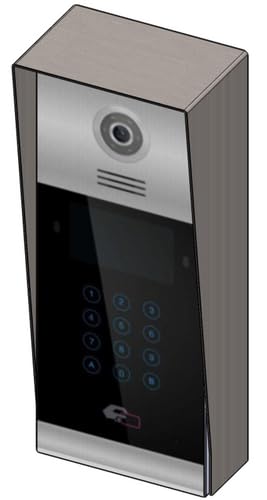 Изображение 1: Спереди view of the Fermax Sup Milo Digital Intercom System, showing the aluminum plate and digital keypad. This image illustrates the exterior design of the main unit.
4 Первоначальное включение и настройка
- Once all wiring is complete and secure, restore power to the system.
- The unit will perform a self-test. Observe any indicator lights or sounds.
- Follow the system's programming guide (usually provided separately or accessible via a master unit) to configure apartment numbers, access codes, and other settings.
Инструкция по эксплуатации
Making a Call from the Outdoor Panel
- To call an apartment: Enter the apartment number using the digital keypad.
- Press the "Call" button (often represented by a bell icon or similar).
- The indoor unit will ring. Once answered, communication can begin.
Receiving a Call and Opening the Door (Indoor Unit)
- When the indoor unit rings, press the "Answer" button to establish communication with the visitor.
- To open the door, press the "Door Release" button on your indoor unit.
- Дверь ненадолго откроется.
Using Access Codes
If configured, authorized users can enter a pre-programmed access code on the outdoor digital keypad to unlock the door without needing to call an indoor unit.
- Enter your personal access code using the digital keypad.
- Press the "Enter" or "Door Release" button.
- Дверь откроется.
Обслуживание
Regular maintenance ensures the longevity and optimal performance of your Fermax intercom system.
Уборка
- Очистите устройство снаружи мягкой тряпкой.amp ткань.
- Не используйте абразивные чистящие средства, растворители или химические аэрозоли, так как они могут повредить покрытие и электронные компоненты.
- Убедитесь, что жидкость не попала в отверстия устройства.
Инспекции
- Periodically check for any visible damage to the unit or wiring.
- Убедитесь, что все крепежные винты затянуты.
- Test the communication and door release functions regularly.
Обновления программного обеспечения
If applicable, consult your installer or Fermax support for information on firmware updates that may improve performance or add new features.
Поиск неисправностей
В этом разделе рассматриваются распространённые проблемы, с которыми вы можете столкнуться. Если у вас возникнут более сложные проблемы, обратитесь в службу технической поддержки.
| Проблема | Возможная причина | Решение |
|---|---|---|
| No communication with indoor unit. |
|
|
| Механизм открывания двери не работает. |
|
|
| Клавиатура не реагирует. |
|
|
Технические характеристики
Technical specifications for the Fermax Sup Milo Digital Intercom System (Model: 8424299951713).
- Модель: Fermax Sup Milo Digital Intercom System
- Номер детали: 8424299951713
- Производитель: Фермакс
- Размеры (упаковка): Приблизительно 0.1 х 0.1 х 0.1 см
- Weight (Unit): 108 грамм
- Материал: Metal, Plastic, Polycarbonate (Aluminum Plate)
- Источник питания: External Power Supply (100V)
- Томtage: 100В
- Ватtage: 100 Вт
- Требуемые батареи: Нет
- Цвет: Multicolored (referring to internal components or subtle design elements, main plate is aluminum)
Информация о гарантии
Fermax products are manufactured to high-quality standards. For specific warranty terms and conditions, please refer to the warranty card included with your product or visit the official Fermax webСохраните чек о покупке для предъявления гарантийных претензий.
Typically, warranty covers manufacturing defects for a specified period from the date of purchase. Damage due to improper installation, misuse, or unauthorized repairs is generally not covered.
Поддержка клиентов
If you require technical assistance, have questions about your product, or need to report a problem, please contact your local Fermax distributor or visit the official Fermax webсайт ресурсов поддержки.
Webсайт: www.fermax.com
Пожалуйста, подготовьте номер вашей модели (8424299951713) и данные о покупке, прежде чем обращаться в службу поддержки.


