1. Введение
This manual provides detailed instructions for the installation, operation, and maintenance of your Fermax F1393 SEE-U 7-inch WiFi Video Intercom Kit. Please read this manual thoroughly before installation and use to ensure proper functionality and safety. The Fermax SEE-U kit offers advanced features including a 7-inch touchscreen monitor, WiFi connectivity for mobile call forwarding, and remote door opening.
2. Информация по технике безопасности
- Рекомендуется профессиональная установка: Due to the electrical nature of this product, professional installation by a qualified electrician is highly recommended to prevent damage and ensure correct operation.
- Отключение питания: Перед выполнением любых электромонтажных работ или технического обслуживания всегда отключайте электропитание в месте установки.
- Томtagе Совместимость: Ensure all connected components, especially the door opener, are compatible with the system's voltage requirements (12Vdc) and do not exceed the maximum current draw (250mA for door openers).
- Условия окружающей среды: The outdoor panel is robust and waterproof (IP54 IK07), but avoid direct high-pressure water jets. The indoor monitor should be kept in a dry environment.
- Характеристики кабеля: Use appropriate cable types and gauges as specified in the installation section to maintain signal integrity and power delivery over distance.
3. Содержимое упаковки
Your Fermax F1393 SEE-U kit includes the following components:
- 1x Fermax SEE-U 7-inch WiFi Monitor (White)
- 1x Fermax SEE-U Outdoor Panel (Gray) with surface-mount box
- 1x Universal Power Adapter (REF. 1390)
- Removable terminal blocks for monitor and panel
- Крепежные винты и дюбели
- Varistors for installation protection
- Руководство по эксплуатации

Figure 3.1: Fermax F1393 SEE-U Kit Packaging

Figure 3.2: Contents of the Fermax F1393 SEE-U Kit, including the outdoor panel, indoor monitor, and power adapter.
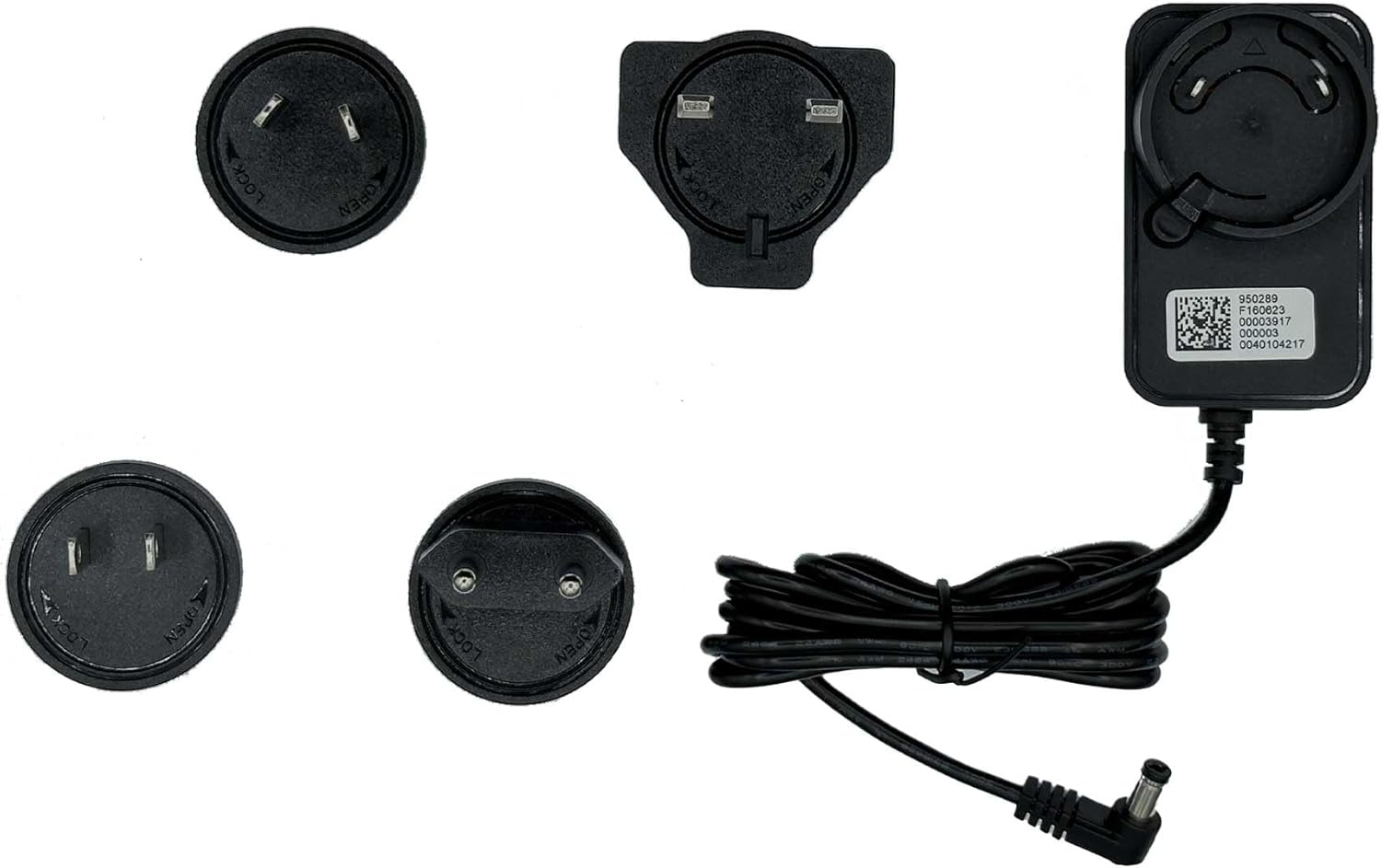
Figure 3.3: The universal power adapter (REF. 1390) with interchangeable plugs included in the kit.
4. Настройка и установка
The Fermax F1393 SEE-U kit utilizes a 2-wire system for simplified installation. The monitor comes pre-programmed for ease of use.
4.1. Cable Distance Guidelines
Ensure proper cable selection based on distance to maintain optimal performance. Refer to the table below for maximum recommended distances:
Video 4.1: Installation of Fermax SEE-U NO WIFI Kit. This video demonstrates the physical mounting and wiring process for the monitor and outdoor panel, including cable distance recommendations.
4.2. Mounting the Monitor (Indoor Unit)
- Подготовьте проводку: Ensure the two wires from the outdoor panel location are routed to the desired monitor location.
- Fix Connector: Secure the monitor's connector plate to the wall using the provided screws. Consider the optimal height for viewing (approximately 1450mm from the floor to the center of the monitor for an average adult).
- Подключить монитор: Carefully place the monitor onto the fixed connector plate, ensuring it clicks securely into place.

Figure 4.2.1: Dimensions of the Fermax SEE-U 7-inch monitor (204mm width, 130mm height, 19mm depth).

Рисунок 4.2.2: Передняя часть view of the Fermax SEE-U 7-inch monitor.
4.3. Монтаж наружной панели
- Исправление поддержки: Secure the outdoor panel's support bracket to the wall using the provided screws. Ensure the height allows for clear viewing of visitors (approximately 1650-1700mm from the floor to the camera).
- Прикрепить панель: Mount the outdoor panel onto the support bracket until it clicks into place.
- Безопасная панель: Insert and tighten the security screw at the bottom of the panel to prevent unauthorized removal.

Figure 4.3.1: Dimensions of the Fermax outdoor panel (90mm width, 149.5mm height, 38mm depth).

Рисунок 4.3.2: Передняя часть view of the robust Fermax outdoor panel with wide-angle camera and call button.
4.4. Проводные соединения
The kit uses a 2-wire bus system. Use the removable terminal blocks for connections.
- Проводка монитора: Connect the two main wires to the 'BUS' terminals on the monitor's terminal block. Ensure the monitor furthest from the outdoor panel has its micro-switches configured as shown in the diagram (Figure 4.4.1).
- Проводка панели: Connect the other end of the two main wires to the 'BUS' terminals on the outdoor panel's terminal block.
- Подключение питания: Plug the universal power adapter into the monitor's power input. Then, plug the adapter into a standard electrical outlet. The system requires 15Vdc / 1.5A (22.5W).

Figure 4.4.1: Back of the Fermax SEE-U monitor showing the terminal block for BUS connections and micro-switches. The diagram indicates the correct micro-switch configuration for the furthest monitor.
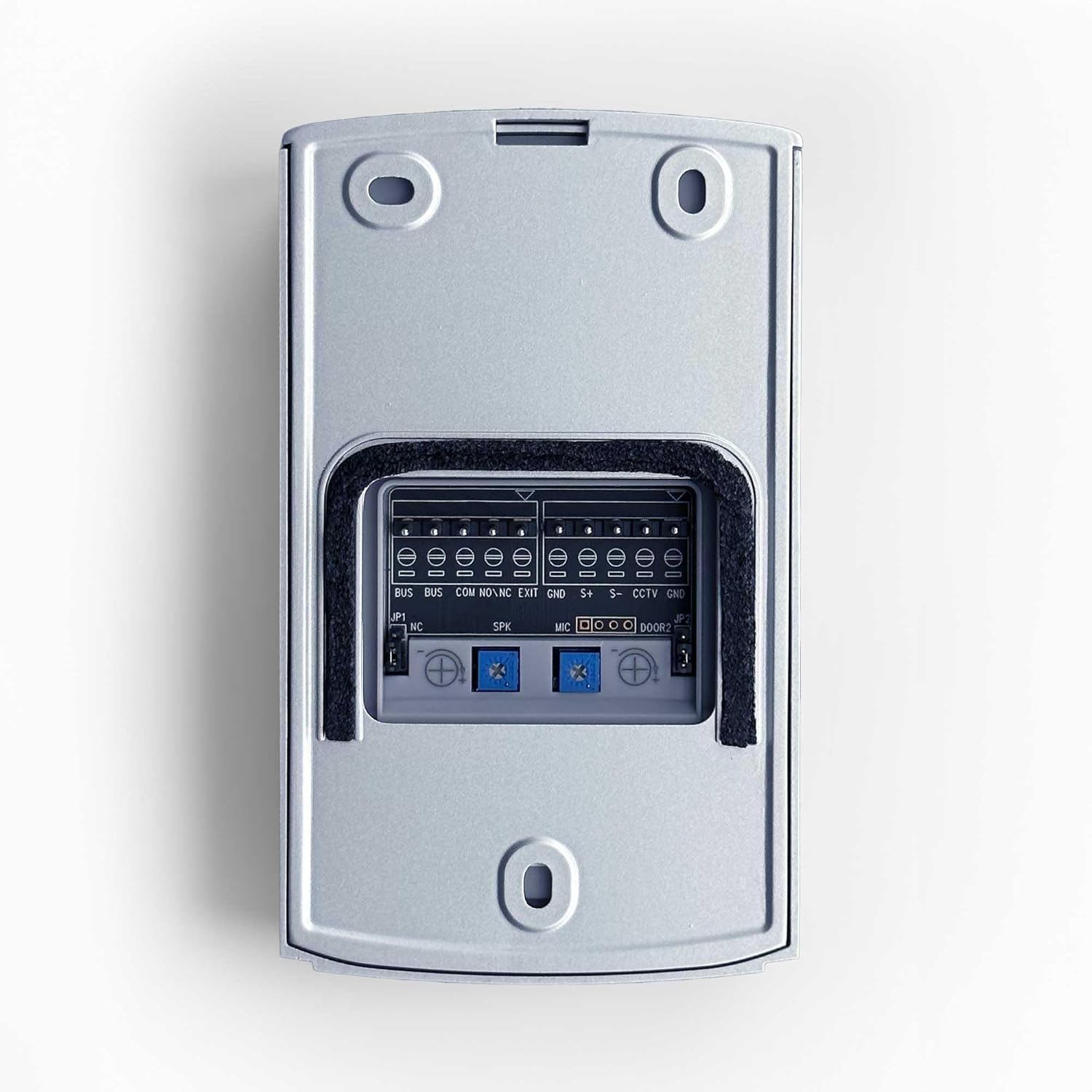
Figure 4.4.2: Back of the Fermax outdoor panel showing the terminal blocks for BUS, COM, NO/NC, EXIT, and CCTV/GND connections. The diagram indicates the correct wiring for the BUS terminals.
4.5. Connecting the Door Opener (Electric Strike)
If you wish to connect an electric door opener, use the 'S+' and 'S-' terminals on the outdoor panel's terminal block. It is crucial to use a 12Vdc low-consumption door opener with a maximum current draw of 250mA. Fermax recommends using door opener REF. 29588. Always use the provided varistors for protection.
- Connect Varistors: Connect one varistor across the S+ and S- terminals on the outdoor panel's terminal block.
- Connect Door Opener: Connect the door opener's wires to the S+ and S- terminals on the outdoor panel's terminal block.
- Connect Second Varistor: Connect the second varistor directly across the terminals of the door opener itself.
4.6. App Connection (WiFi Models)
For WiFi models, download the free SEE-U app from Play Store or App Store. Follow the in-app instructions to connect your monitor to your mobile device for call forwarding and remote functions. The system allows multiple mobile devices to be associated with a single monitor.
5. Инструкция по эксплуатации
5.1. Прием звонков
When a visitor presses the call button on the outdoor panel, the indoor monitor will ring and display the visitor's image. If connected via WiFi, your mobile device will also receive a notification and allow you to answer the call remotely.
5.2. Коммуникация
To speak with the visitor, press the communication button on the monitor. The monitor is hands-free. To end the conversation, press the communication button again.
5.3. Открытие двери
During a call, press the key icon on the monitor to open the door. You will hear a click from the door opener if it functions correctly. By default, the door opener activates for 1 second.
Video 5.3.1: Checking the installation of the Fermax SEE-U NO WIFI Kit. This video demonstrates how to verify the monitor's functionality, including receiving calls and operating the door opener, and how to adjust the door opening time.
5.4. Adjusting Door Opener Time
To change the door opener activation time:
- Press the menu navigation button on the monitor.
- Navigate to 'Configuration' and then 'Additional Options'.
- From this menu, you can adjust the door opener time. For example, вы можете установить его на 5 секунд.
- Подтвердите настройку и выйдите из меню.
5.5. Automatic Image Capture
The monitor features automatic image capture of callers, storing images with date and time on a micro SD card (not included). This function is also available via the mobile app, allowing manual capture of images and videos. Only manually captured images and videos from the mobile device can be viewed on that device.
5.6. Режим "Не беспокоить"
Activate the 'Do Not Disturb' function on the monitor to silence incoming calls. The monitor also offers up to 16 melodies, adjustable call volume, and configurable ring duration up to 30 seconds.
6. Техническое обслуживание
- Уборка: Use a soft, dry cloth to clean the monitor and outdoor panel. Avoid abrasive cleaners or solvents.
- Наружная панель: Periodically check the outdoor panel for any obstructions to the camera or microphone. Ensure the security screw is tight.
- Обновления программного обеспечения: Check the Fermax website or SEE-U app for any available software updates for your monitor.
7. Поиск Неисправностей
- Нет изображения/Низкое качество изображения: Ensure all wiring connections are secure and correctly terminated. Issues with cable section or power supply can affect image quality, especially during conversation. Professional installation can help prevent these issues.
- Нет звука/плохое качество звука: Check wiring connections for the audio lines. Ensure the monitor's volume is adjusted correctly.
- Механизм открывания двери не работает: Verify the door opener is 12Vdc and its current draw does not exceed 250mA. Check the wiring to the S+ and S- terminals and ensure varistors are correctly installed. Confirm the door opener time setting in the monitor's menu.
- No Mobile Notifications/Remote Access: Ensure the monitor is correctly connected to your home WiFi network and the SEE-U app is properly configured on your mobile device. Check your internet connection and router settings.
- Сложность установки: If you encounter significant difficulties during installation, it is strongly recommended to contact a qualified professional for assistance.
8. Технические характеристики
| Особенность | Спецификация |
|---|---|
| Производитель | Фермакс |
| Номер модели | Ф01393 |
| Размеры продукта | 26.5 х 10.8 х 20 см |
| Вес продукта | 1.25 кг |
| Цвет | Gray Panel, White Monitor |
| Материал | Пластик |
| Форм-фактор | Прямоугольный |
| Том системыtage | 15В |
| Электроэнергия | 2.5 Вт |
| Экран монитора | 7-inch Color Touchscreen (16:9) |
| Outdoor Panel Rating | IP54 IK07 (Waterproof, Vandal-resistant) |
| Камера | Wide-angle Color (H=115°, V=65°, D=130°), Night Vision |
| Связность | 2-wire Bus, WiFi for mobile app |
| Additional Monitors | Supports up to 4 additional monitors without extra power |
| Захват изображения | Automatic (Micro SD slot), Manual via mobile app |
| Door Opener Compatibility | 12Vdc, Max. 250mA |
9. Гарантия и поддержка
For warranty information and technical support, please refer to the documentation included with your product or visit the official Fermax webсайт. Вы также можете посетить Fermax Brand Store on Amazon для получения дополнительных ресурсов и контактной информации.


