1. Введение
This manual provides essential information for the safe and efficient use of your Epson PowerLite 970 3LCD Projector. Please read it thoroughly before operating the projector and keep it for future reference.
1.1 продукта болееview
The Epson PowerLite 970 is a versatile 3LCD projector designed for clear and bright presentations. It features 4,000 ANSI lumens brightness, XGA (1024x768) native resolution with support for up to 1080p, and a 15,000:1 contrast ratio. Connectivity options include HDMI (one MHL-compatible), VGA, composite video, USB, LAN, and RS232, making it suitable for various source devices.
1.2 Информация по технике безопасности
- Опасность поражения электрическим током: Never open any covers on the projector except as specifically explained in this manual. Dangerous electrical voltages inside the projector can cause severe injury.
- Горячая поверхность: л проектораamp and surrounding areas can become extremely hot during operation and immediately after shutdown. Avoid touching these surfaces to prevent burns.
- Lamp Замена: Always turn off the projector and allow the lamp to cool completely before attempting replacement. Use only genuine Epson replacement lamps.
- Вентиляция: Ensure adequate ventilation around the projector. Do not block ventilation openings, as this can lead to overheating and damage.
- Источник питания: Connect the projector only to a power outlet that matches the voltage and current specifications indicated on the projector's label.
2. Настройка
2.1 Распаковка и содержимое
Carefully remove the projector and all accessories from the packaging. Verify that all items are present:
- Epson PowerLite 970 Projector
- Силовой кабель
- Кабель VGA
- ИК-пульт дистанционного управления
- Руководство пользователя (этот документ)
2.2 Размещение проектора
Place the projector on a stable, level surface or mount it securely. Ensure there is sufficient space around the projector for proper ventilation. Adjust the projector's distance from the screen to achieve the desired image size. The projector features adjustable feet for minor angle corrections.
2.3 Подключение устройств
The PowerLite 970 offers a variety of input and output ports for connecting different devices. Refer to the image below for port identification.

Image: Rear panel of the Epson PowerLite 970 projector, displaying connectivity options including HDMI 1, HDMI 2/MHL, Computer 1 (VGA), Computer 2 (VGA), Video (RCA), Audio 1, Audio 2, Mic, Monitor Out, Audio Out, RS-232C, USB-B, USB-A, and LAN.
- HDMI (HDMI 1, HDMI 2/MHL): Connect digital video and audio sources such as Blu-ray players, laptops, or streaming devices. HDMI 2 is MHL-compatible for direct connection to compatible smart devices.
- VGA (Computer 1, Computer 2): Connect computers or laptops using the provided VGA cable.
- Composite Video (Video): Connect older video devices using RCA cables (yellow for video, red/white for audio).
- Audio In (Audio 1, Audio 2, Mic): Connect external audio sources or a microphone.
- Аудио выход: Connect to external speakers or an audio system.
- USB-A: For connecting USB storage devices or optional wireless adapters.
- USB-B: For projector control or USB display functions.
- Локальная сеть (RJ-45): Для обеспечения сетевого подключения и управления.
- РС-232С: For serial control from a computer or control system.
2.4 Подключение питания
Connect the power cable to the projector's AC inlet and then to a grounded electrical outlet. The projector is designed for 100-240V~, 50/60Hz power input.
3. Эксплуатация проектора
3.1 Включение/выключение питания
Нажмите Власть button on the projector's control panel or the remote control to turn the projector on. The status light will indicate the projector's state. To turn off, press the Власть button again and confirm shutdown if prompted.

Image: Top panel of the Epson PowerLite 970 projector, showing the control buttons including Power, Menu, Home, Source Search, A/V Mute, and navigation keys, along with focus and zoom rings.
3.2 Выбор источника входного сигнала
Нажмите Исходный поиск button on the control panel or remote control to cycle through available input sources (HDMI 1, HDMI 2, Computer 1, Video, etc.). Alternatively, use the dedicated input buttons on the remote control if available.
3.3 Настройка изображения
- Кольцо фокусировки: Rotate the focus ring located near the lens to sharpen the image.
- Кольцо масштабирования: Rotate the zoom ring to adjust the image size without moving the projector.
- Коррекция трапецеидальных искажений: If the image appears trapezoidal, use the keystone correction feature (often found in the projector's menu or via dedicated buttons) to square the image.
- Регулируемые ножки: Use the adjustable feet on the bottom of the projector to fine-tune the projection angle and level the image.
3.4 Навигация по меню
Нажмите Меню button on the projector or remote to access the on-screen display (OSD) menu. Use the arrow buttons to navigate and the Входить Нажмите кнопку для выбора параметров. Esc Вернуться назад или выйти из меню.
4. Техническое обслуживание
Регулярное техническое обслуживание обеспечивает оптимальную производительность и продлевает срок службы вашего проектора.
4.1 лamp Замена
Проектор lamp имеет ограниченный срок службы. Когда лamp Жизнь подходит к концу, может появиться предупреждающее сообщение, или же...amp indicator light may illuminate. Always replace the lamp with a genuine Epson replacement lamp unit (ELPLP96).

Изображение: сбоку view of the Epson PowerLite 970 projector, highlighting the lamp access cover, which can be removed for lamp замена.
- Выключите проектор и отсоедините кабель питания.
- Allow the projector to cool for at least one hour to prevent burns.
- Найдите лamp cover (as shown in the image above) and remove the screw(s) securing it.
- Осторожно снимите lamp крышка.
- Loosen the screws holding the lamp unit in place and gently pull out the old lamp.
- Вставьте новую букву lamp unit, ensuring it is seated correctly. Tighten the screws.
- Заменить лamp Закройте крышкой и закрепите винтом (винтами).
- Plug in the power cable and reset the lamp таймер в меню проектора.
4.2 Очистка/замена воздушного фильтра
The air filter prevents dust from entering the projector. Clean the filter regularly (e.g., every 100 hours of use) or replace it if it becomes clogged.
- Выключите проектор и отсоедините кабель питания.
- Locate the air filter cover (refer to the manual for exact location).
- Remove the cover and carefully take out the filter.
- Clean the filter using a small vacuum cleaner or compressed air. If heavily soiled or damaged, replace it with a new one.
- Reinsert the clean/new filter and replace the cover.
4.3 Генеральная уборка
- Протрите проекторasing with a soft, dry, lint-free cloth.
- Для стойких загрязнений dampen the cloth slightly with water, but avoid harsh chemicals or abrasive cleaners.
- Gently clean the projector lens with a lens cleaning cloth or lens paper. Do not use abrasive materials.
5. Поиск Неисправностей
В этом разделе рассматриваются распространенные проблемы, с которыми вы можете столкнуться при использовании проектора.
| Проблема | Возможная причина | Решение |
|---|---|---|
| Нет изображения на экране |
|
|
| Изображение расплывчатое |
|
|
| Изображение трапециевидное |
|
|
| Проектор не включается |
|
|
| Пульт дистанционного управления не работает |
|
|
6. Технические характеристики
Detailed technical specifications for the Epson PowerLite 970 Projector.
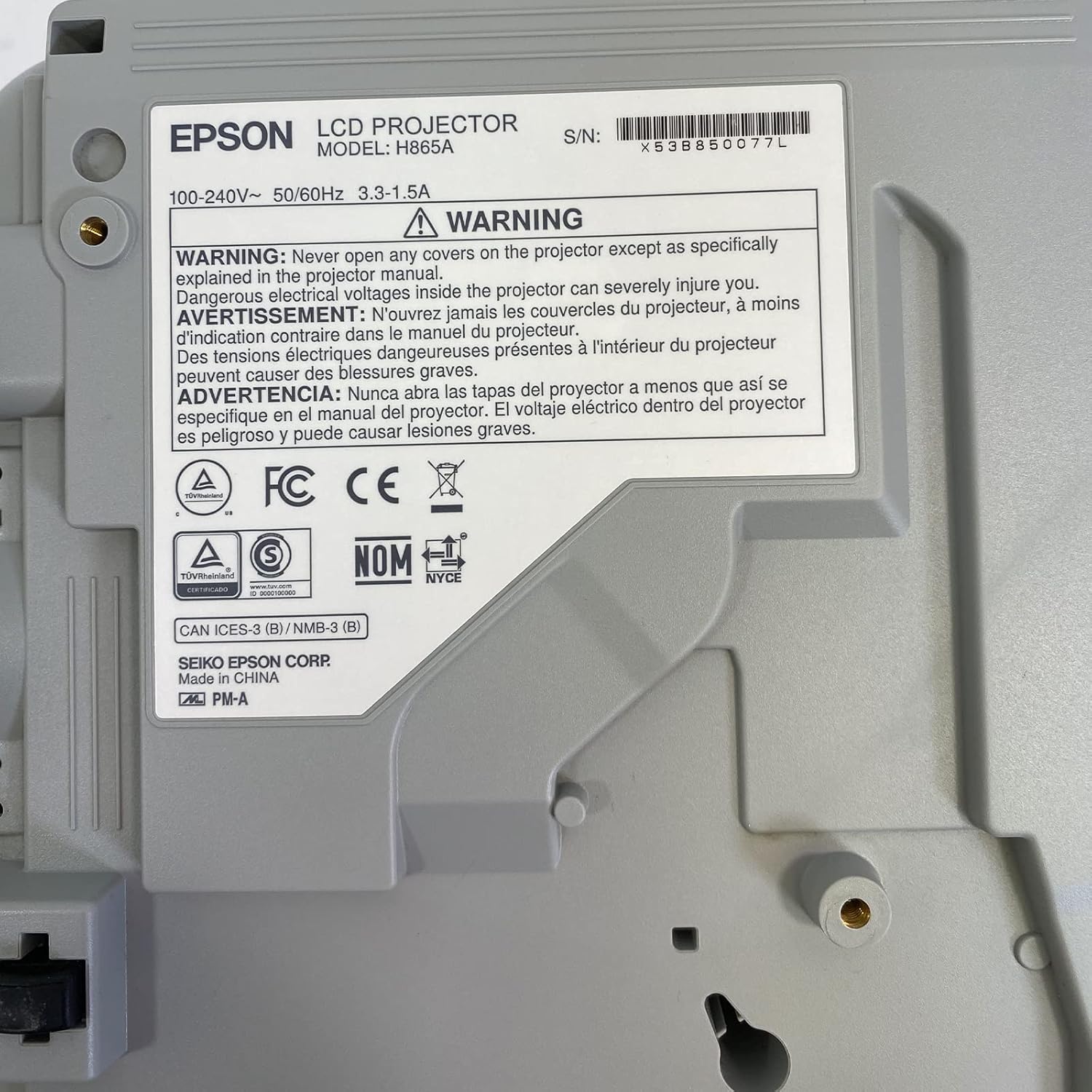
Image: Bottom label of the Epson PowerLite 970 projector, indicating model H865A and serial number X53B850077L, along with electrical ratings and safety certifications.
| Особенность | Спецификация |
|---|---|
| Номер модели | PowerLite 970 (H865A) |
| Технология отображения | 3ЖК-дисплей |
| Яркость | 4,000 ANSI Lumens |
| Собственное разрешение | 1024 x 768 (XGA) |
| Максимальное разрешение | 1920 x 1080 (1080p) |
| Соотношение сторон | 4:3 |
| Коэффициент контрастности | 15,000:1 |
| Связность | HDMI (x2, one MHL), VGA (x2), Composite Video (RCA), Network (RJ-45), RS232 (DB-9pin), USB A, USB B, Audio In (Mini Jack, RCA x2), Audio Out (Mini Jack), VGA Out |
| Поддерживаемые видеорежимы | 720p, 1080i, 1080p/60, 576i, 576p, 480p, 480i |
| Размеры продукта | 12 x 12.2 x 3.93 дюйма |
| Особые возможности | Портативный |
7. Гарантия и поддержка
7.1 Информация о гарантии
This Epson PowerLite 970 projector is offered with a 60-day replacement warranty provided by the seller, Good-DeAlZ-Online. This warranty covers functional defects and ensures a replacement if the product does not perform as expected within the specified period. Please retain your proof of purchase for warranty claims.
7.2 Поддержка клиентов
For technical assistance, troubleshooting, or warranty inquiries, please contact the seller, Good-DeAlZ-Online. Customer service typically responds within 24 hours.
For general product information or support related to Epson products, you may visit the official Epson support webсайт.