1. Введение
This manual provides detailed instructions for the installation, operation, and maintenance of your Tiandy TC-C32XN 2MP Fixed IP Dome Turret Camera. Please read this manual thoroughly before using the product to ensure correct usage and optimal performance. Keep this manual for future reference.
2. Информация по технике безопасности
- Убедитесь, что блок питания соответствует требованиям камеры, чтобы предотвратить её повреждение.
- Не подвергайте камеру воздействию экстремальных температур, влажности или агрессивных сред.
- Избегайте длительного направления камеры непосредственно на яркие источники света, так как это может повредить датчик изображения.
- Обращайтесь с камерой бережно. Не роняйте её и не подвергайте сильным вибрациям.
- Все работы по установке и обслуживанию должны выполняться квалифицированным персоналом.
- Перед чисткой или техническим обслуживанием отключите питание.
3. Содержимое упаковки
Проверьте наличие всех предметов в посылке:
- Tiandy TC-C32XN 2MP Fixed IP Dome Turret Camera
- Адаптер
- Монтажные винты и дюбели
- Краткое руководство пользователя (если включено)
4. Продукт закончилсяview
The Tiandy TC-C32XN is a 2MP Fixed IP Dome Turret Camera designed for reliable surveillance. It features Smart IR for clear night vision up to 30 meters, a built-in microphone, and an SD card slot for local storage.

Рисунок 4.1: Передняя часть view of the Tiandy TC-C32XN camera, showing the lens and IR illuminators.
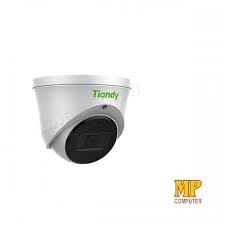
Рисунок 4.2: Сторона view of the Tiandy TC-C32XN camera, highlighting its dome turret form factor.
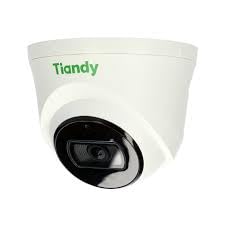
Рисунок 4.3: Наклонный view of the Tiandy TC-C32XN camera, showcasinг его компактный дизайн.
5. Настройка и установка
5.1 Монтаж
- Выберите место: Choose a suitable outdoor or indoor location (IP67 rated for outdoor use) that provides the desired viewing angle and is within reach of power and network connections. The camera is designed for protruding mounting.
- Отверстия для сверления: Use the provided mounting template (if applicable) to mark and drill holes for the mounting screws.
- Защитите камеру: Attach the camera base securely to the mounting surface using the provided screws and wall plugs.
5.2 Подключение
- Подключение питания: Connect the provided adapter to the camera's power input and then to a power outlet. The camera operates on corded electric power.
- Подключение к сети: Connect an Ethernet cable from your network router or PoE switch to the camera's Ethernet port. This camera supports Ethernet connectivity for data transmission.
5.3 Начальная конфигурация
- Включение питания: Once wired, power on the camera.
- Обнаружение сети: Use the Tiandy client software or a network scanner tool to discover the camera's IP address on your local network.
- Доступ к камере: Откройте web браузер и введите IP-адрес камеры, чтобы получить к ней доступ web interface. Log in using the default credentials (refer to the quick start guide for default username/password).
- Изменить пароль по умолчанию: В целях безопасности немедленно меняйте пароль по умолчанию при первом входе в систему.
- Интеграция с NVR: If using with an NVR, add the camera to your NVR system following the NVR's instructions. This camera is compatible with all brand NVRs.
- Настройка мобильного приложения: Download the official Tiandy mobile application (available for Android and iOS) and follow the in-app instructions to add your camera for remote viewing и контроль.
6. Инструкция по эксплуатации
6.1 Прямой эфир View и запись
Доступ к прямой трансляции с камеры view через web interface, NVR, or mobile app. Configure recording schedules and methods (continuous, motion-triggered) via the camera's settings.
6.2 Smart IR and Night Vision
The camera features Smart IR technology, which automatically adjusts the intensity of its infrared LEDs to prevent overexposure of objects close to the camera, ensuring clear images in low-light conditions up to 30 meters. It also supports 'Night Color' low light technology for enhanced visibility.
6.3 Обнаружение движения и оповещения
Configure motion detection zones and sensitivity in the camera settings. The camera supports 'Motion Only' alert types. When motion is detected, the camera can trigger recordings, send notifications to your mobile device, or activate other configured actions. It also supports advanced features like tripwire and perimeter intrusion detection.
6.4 Аудиофункциональность
The built-in microphone allows for audio monitoring of the surveillance area. Audio settings can be adjusted in the camera's web интерфейс или NVR.
6.5 ГБ памяти на SD-карте
Insert a compatible SD card into the camera's SD card slot for local storage of recordings. Ensure the card is formatted correctly via the camera's settings. The camera supports SD flash memory type.
6.6 Кнопка сброса
A reset button is included for restoring the camera to its factory default settings. Consult the quick start guide for the exact location and procedure for your model.
7. Техническое обслуживание
- Уборка: Аккуратно протрите объектив и корпус камеры мягкой сухой тканью. Не используйте агрессивные химические вещества или абразивные чистящие средства.
- Обновления прошивки: Regularly check the Tiandy official webСайт для обновления прошивки. Поддержание прошивки вашей камеры в актуальном состоянии обеспечивает оптимальную производительность и безопасность.
- Проверка кабеля: Периодически проверяйте все кабели на предмет износа или повреждений, особенно при наружной прокладке.
8. Поиск Неисправностей
- Нет питания: Убедитесь, что адаптер питания надежно подключен и розетка исправна.
- Нет видео: Check network cable connections. Verify the camera's IP address and network settings. Ensure the camera is properly added to your NVR or viewпрограммное обеспечение ing.
- Плохое качество изображения: Clean the camera lens. Adjust focus if applicable. Check lighting conditions and camera placement.
- Проблемы с сетевым подключением: Verify router and network cable functionality. Restart the camera and network devices.
- Невозможно получить доступ Web Интерфейс: Ensure your computer is on the same network segment as the camera. Verify the camera's IP address. Try resetting the camera to factory defaults if necessary (this will erase all settings).
9. Технические характеристики
| Особенность | Спецификация |
|---|---|
| Модель | TC-C32XN |
| Эффективное разрешение неподвижного изображения | 2 МП (1920x1080) |
| Частота кадров | 30 кадров в секунду |
| Технология фотодатчика | CMOS (1/2.8") |
| Диапазон ночного видения | 30 Metres (Smart IR) |
| Технология слабого освещения | Ночной цвет |
| Оптический зум | 3 х |
| Встроенный микрофон | Да |
| Слот для SD-карты | Yes (Flash Memory Type: SD) |
| Тип предупреждения | Motion Only (supports tripwire and perimeter) |
| Технология связи | Wireless (IR), Ethernet |
| Источник питания | Проводной электрический |
| Международный рейтинг защиты | IP67 |
| Форм-фактор | Dome Turret |
| Тип крепления | торчащий |
| Совместимость с операционными системами | Android, iOS |
| Размеры продукта (Д x Ш x В) | 50 x 50 x 70 миллиметров |
| Вес товара | 20 грамм |
| Включенные компоненты | Адаптер |
| Цвет | Белый |
10. Гарантия и поддержка
For warranty information and technical support, please refer to the warranty card included with your product or visit the official Tiandy website. Contact the seller or manufacturer directly for assistance with product issues or inquiries.


