1. Введение
This manual provides detailed instructions for the installation, operation, and maintenance of your MekedeTech M6 Pro Plus Android Car Radio. Please read this manual thoroughly before using the device to ensure proper functionality and to maximize your user experience. Keep this manual for future reference.
2. Продукт закончилсяview
The MekedeTech M6 Pro Plus is an advanced in-dash car stereo system featuring an Android 12 operating system. It is designed to provide comprehensive multimedia and navigation capabilities for your vehicle.

Изображение 2.1: Спереди view of the MekedeTech M6 Pro Plus Android Car Radio.
Основные характеристики:
- Операционная система: Android 12 with an 8-core processor (2 cores ARM Cortex A75 + 6 cores ARM Cortex A55) for responsive performance.
- Отображать: 10.36-inch 2000x1200 QLED full-fit screen, offering clear visuals and reduced light reflection.
- Память: 4 ГБ оперативной памяти и 64 ГБ встроенной памяти.
- Связь: Qualcomm 3031 Bluetooth 5.1 chip for stable connections, Wireless CarPlay, and Android Auto support.
- Аудио: DSP 36-band equalizer and DTS 4.1/5.1 channel surround sound systems for enhanced audio output.
- Контроль: Supports intelligent voice control for hands-free operation.
- Дополнительные возможности: Integrated GPS, 4G LTE support, FM/AM RDS Radio, Split Screen functionality, AHD reversing camera compatibility, and ADAS DVR anti-collision warning support.
3. Содержимое упаковки
Убедитесь, что все перечисленные ниже предметы входят в комплект поставки. Если какие-либо предметы отсутствуют или повреждены, обратитесь в службу поддержки клиентов.

Рисунок 3.1: Визуальное представление содержимого упаковки.
- 10.36 inch touch screen (Host Device)
- Кабель питания
- USB-кабель
- RCA кабель
- Реверсивный трос
- Кронштейн (2 шт.)
- GPS-антенна Fakra
- Антенна Fakra 4G
- Микрофон (микрофон)
- USB-разъем x3
- Инструкция по эксплуатации
- Упаковочная коробка
4. Настройка и установка
Professional installation is recommended for this device. Ensure the vehicle's power is disconnected before beginning installation. Refer to your vehicle's specific wiring diagram for accurate connections.
4.1 Схема электропроводки
The following diagram illustrates the general connection points for the car radio. Specific wiring may vary based on your vehicle model. If your car requires a CANBUS module, please ensure it is correctly connected.
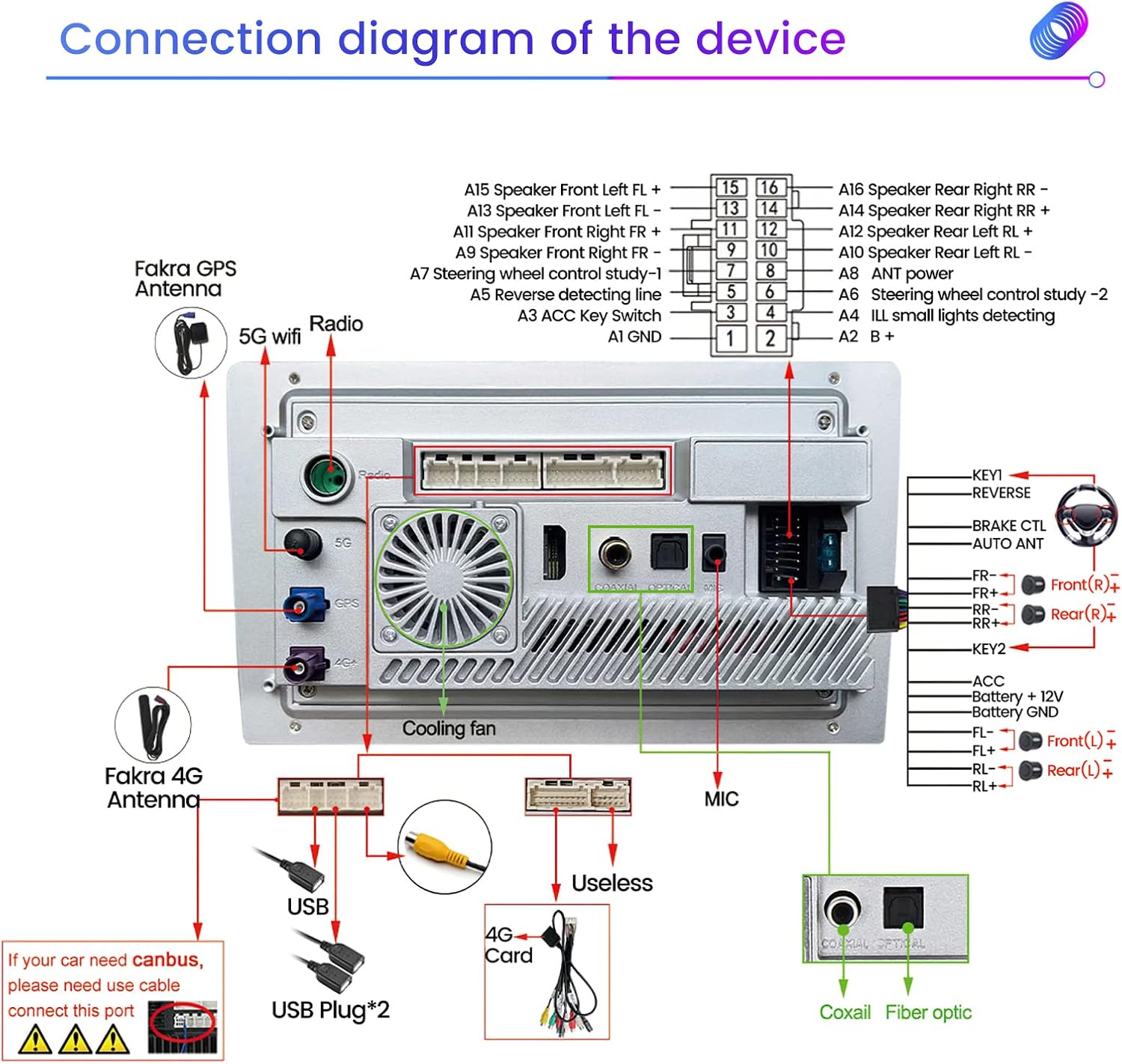
Image 4.1: Connection diagram of the device.
- Подключения питания: Connect ACC, Battery +12V, and Battery GND wires to the corresponding vehicle power sources.
- Выходы на динамики: Connect the speaker wires (Front Left FL+, FL-, Front Right FR+, FR-, Rear Left RL+, RL-, Rear Right RR+, RR-) to your vehicle's speakers.
- Антенны: Подключите GPS-антенну Fakra и 4G-антенну Fakra к соответствующим разъемам.
- USB-порты: Подключите прилагаемые USB-кабели для подключения внешних устройств или передачи данных.
- RCA-подключения: Use the RCA cable for audio/video input/output, including subwoofer output.
- Камера заднего вида: Connect the reversing cable and an AHD reversing camera (not included) for rear-view функциональность.
- Управление на рулевом колесе: Connect KEY1 and KEY2 wires for steering wheel control integration.
- Внешний микрофон: Connect the external microphone for improved voice command and call quality.
5. Инструкция по эксплуатации
5.1 Включение/выключение питания и базовый интерфейс
Press the power button to turn the unit on or off. The main screen displays time, date, speed, and quick access icons for navigation, video player, radio, music player, and settings. The touch screen interface allows for intuitive control.
Image 5.1: Main user interface.
5.2 Беспроводной CarPlay и Android Auto
The device supports both Wireless CarPlay and Android Auto for seamless smartphone integration.
5.2.1 Wireless CarPlay Connection Steps:
- Подключите свой iPhone к автомобильной магнитоле через Bluetooth.
- On the car radio, click on the "Car Link" application.
- Дождитесь установления соединения. CarPlay также можно подключить через USB-кабель.

Image 5.2: Wireless CarPlay connection guide.
5.2.2 Wired Android Auto Connection Steps:
- Подключите свой Android-телефон к автомобильной магнитоле с помощью USB-кабеля.
- On the car radio, click on the "Car Link" application.
- Дождитесь установления соединения.

Image 5.3: Wired Android Auto connection guide.
5.3 Голосовое управление
The device supports intelligent voice control for hands-free operation, enhancing driving safety and convenience. You can use voice commands for navigation, music playback, calls, and other functions.

Изображение 5.4: Примерampголосовых команд.
5.4 Радио (FM/AM RDS)
Access the FM/AM radio application to tune into your favorite stations. The RDS (Radio Data System) feature provides additional information where available.

Image 5.5: Radio interface.
5.5 GPS-навигация
The unit features a built-in global positioning system for accurate navigation. It supports omni-directional map display and real-time traffic conditions.

Image 5.6: GPS navigation display.
5.6 DSP 36-Band EQ and DTS Sound
Customize your audio experience with the 36-band Digital Sound Processor (DSP) equalizer. The DTS 4.1/5.1 channel surround sound systems provide a dynamic and immersive audio environment.

Image 5.7: DSP equalizer and DTS sound features.
5.7 Функция разделения экрана
Utilize the split-screen feature to display two applications simultaneously, such as navigation and music, for enhanced convenience.
Image 5.8: Split screen in use.
5.8 Подключение 4G
Insert a 4G SIM card (not included) into the designated slot to enable internet access, allowing for online streaming, app downloads, and real-time data services.
Image 5.9: 4G connectivity feature.
5.9 AHD Reversing Camera Support
The unit supports AHD (Analog High Definition) reversing cameras for clear rear-view imaging. A reversing camera is not included and must be purchased separately.
Image 5.10: AHD reversing camera feature.
5.10 ADAS DVR Anti-collision Warning
The device supports ADAS (Advanced Driver-Assistance Systems) DVR for anti-collision warning and driving recording. This feature requires a compatible DVR camera (not included).
Image 5.11: ADAS DVR feature.
6. Техническое обслуживание
To ensure the longevity and optimal performance of your MekedeTech M6 Pro Plus car radio, follow these maintenance guidelines:
- Уборка: Для очистки экрана и корпуса используйте мягкую сухую ткань. Для удаления стойких пятен слегка протрите поверхность сухой тканью.amp Для чистки можно использовать ткань с мягким неабразивным чистящим средством, но избегайте прямого распыления на устройство.
- Температура: Не подвергайте устройство воздействию экстремальных температур, прямых солнечных лучей в течение длительного времени или высокой влажности.
- Вентиляция: Убедитесь, что вентилятор охлаждения и вентиляционные отверстия не заблокированы, чтобы предотвратить перегрев.
- Обновления программного обеспечения: Periodically check for and install official software updates to improve performance and add new features.
7. Поиск Неисправностей
If you encounter issues with your device, refer to the following common problems and solutions. If the problem persists, contact customer support.
| Проблема | Возможная причина | Решение |
|---|---|---|
| Блок не включается. | Incorrect power wiring, blown fuse, vehicle power issue. | Check power cable connections (ACC, B+, GND). Verify vehicle fuse. Consult a professional installer. |
| Нет звука или звук искажен. | Неправильное подключение акустических систем, слишком низкая громкость, неправильно настроенные параметры звука. | Check speaker connections. Adjust volume. Reset audio settings or EQ. |
| Touch screen unresponsive or requires multiple touches. | Программный сбой, проблема с калибровкой экрана, физическое повреждение. | Restart the unit. Check for software updates. If persistent, contact support. |
| Беспроводная связь CarPlay/Android Auto не подключается. | Bluetooth not paired, "Car Link" app not launched, phone settings. | Ensure Bluetooth is on and paired. Open "Car Link" app. Check phone's CarPlay/Android Auto settings. Try restarting both devices. |
| Сигнал GPS слабый или неточный. | Антенна GPS заблокирована или установлена неправильно. | Убедитесь, что антенна GPS имеет чистое пространство. view неба и надежно подключен. |
| Unit occasionally shuts off or restarts. | Power supply instability, overheating, software issue. | Verify stable power connection. Ensure proper ventilation. Check for software updates. |
8. Технические характеристики
Detailed technical specifications for the MekedeTech M6 Pro Plus Android Car Radio.
| Особенность | Спецификация |
|---|---|
| Название модели | M6ProPlus |
| Операционная система | Андроид 12 |
| Процессор | 8-core (2 cores ARM Cortex A75 + 6 cores ARM Cortex A55) |
| Память (ОЗУ) | 4 ГБ |
| Память (ПЗУ) | 64 ГБ |
| Размер дисплея | 10.36 дюйма |
| Разрешение дисплея | 2000x1200 (2K QLED) |
| Версия Bluetooth | 5.1 (Qualcomm 3031 chip) |
| Режим аудиовыхода | Stereo, DSP 36-Band EQ, DTS 4.1/5.1 Channel Surround |
| Технология связи | Wireless (Wireless CarPlay, Android Auto), 4G LTE |
| Голосовое управление | Supported (Buttons, Microphone, Touchscreen) |
| Тип карты | Worldwide (GPS, GLONASS, BDS) |
| Вес товара | 3.76 фунта |
| Размеры упаковки | 11.22 x 6.89 x 4.09 дюйма |
| Производитель | Shenzhen Mekede Technology Co.,Ltd |
9. Гарантия и поддержка
MekedeTech products are covered by a manufacturer's warranty. For specific warranty terms and conditions, please refer to the documentation included with your purchase or visit the official MekedeTech webсайт.
For technical assistance, troubleshooting, or any inquiries regarding your MekedeTech M6 Pro Plus Android Car Radio, please contact MekedeTech customer support. Contact information can typically be found on the product packaging, the official webсайте или через точку покупки.