Введение
This manual provides essential information for the safe and efficient operation of your TECNO Pova 5 Pro 5G smartphone. Please read it thoroughly before using your device to ensure optimal performance and longevity.

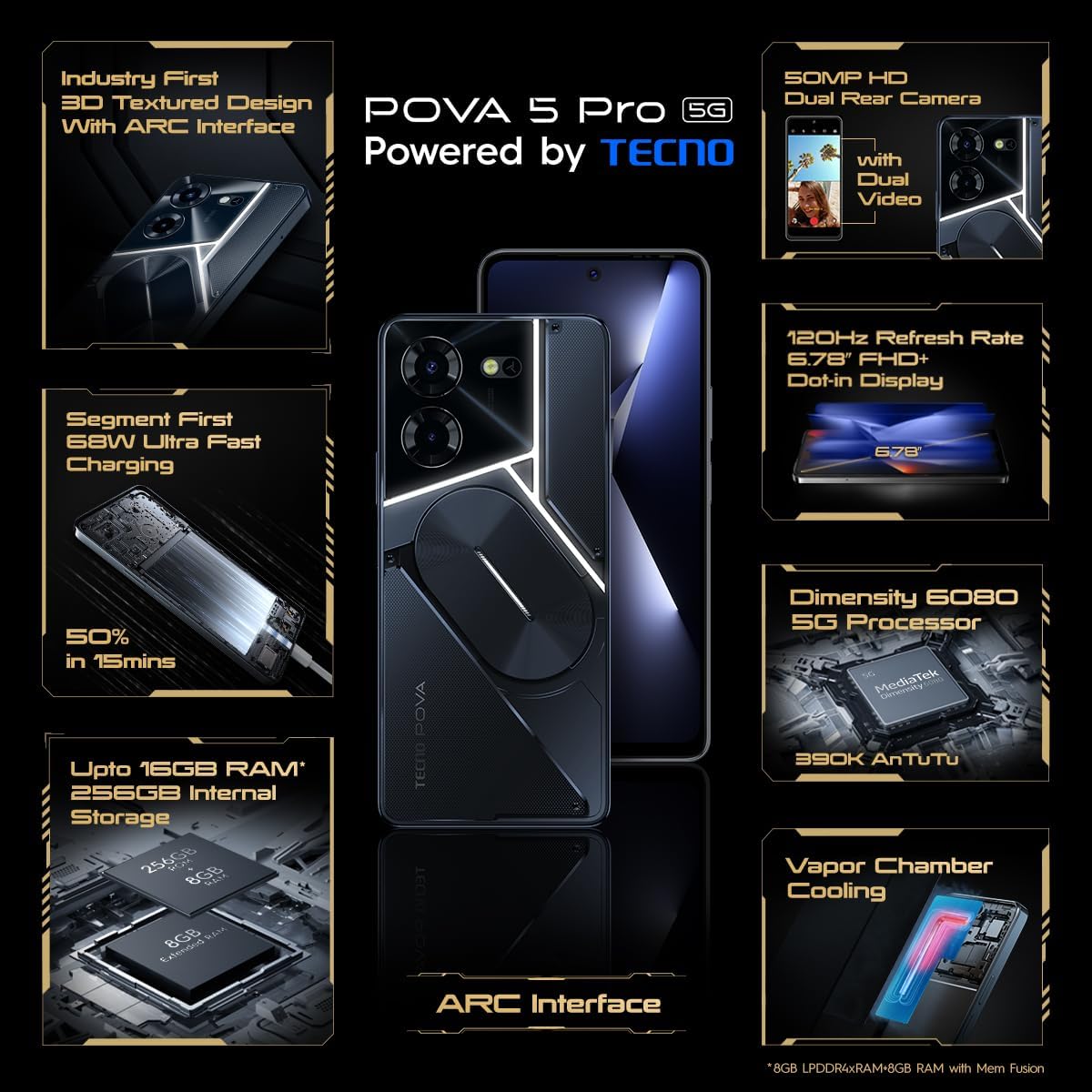
Image: The TECNO Pova 5 Pro 5G smartphone, showcasing its design and key feature of 68W Ultra Fast Charging.
Что в коробке?
Проверьте наличие всех предметов в упаковке:
- Смартфон
- Адаптер питания 68 Вт
- Кабель типа C
- Чехол из ТПУ
- Инструмент для извлечения SIM-карты

Image: A flat lay of the TECNO Pova 5 Pro 5G packaging contents, showing the smartphone, 68W power adapter, USB-C cable, TPU protective cover, and the SIM ejector tool.
Настраивать
Начальная настройка
- Вставьте SIM-карту/SD-карту: Locate the SIM tray on the side of the device. Use the provided SIM ejector tool to open the tray. Insert your Nano-SIM card(s) and/or microSD card into the designated slots. Ensure the tray is fully reinserted.
- Включение питания: Press and hold the Power button (located on the right side) until the TECNO logo appears.
- Следуйте инструкциям на экране: The device will guide you through initial setup, including language selection, Wi-Fi connection, Google account setup, and security settings.
Зарядка устройства
The TECNO Pova 5 Pro 5G supports 68W Ultra Fast Charging.
- Подключите кабель Type-C к порту зарядки в нижней части телефона.
- Другой конец кабеля подключите к адаптеру питания мощностью 68 Вт.
- Подключите адаптер питания к розетке.
- A full charge typically takes approximately 45 minutes, with 50% charge achievable in about 15 minutes.
Изображение: чистый фронт view of the TECNO Pova 5 Pro 5G smartphone, highlighting its display and front camera.
Эксплуатация устройства
Базовая навигация
- Сенсорный экран: Нажмите для выбора, проведите пальцем для прокрутки, сведите пальцы для изменения масштаба.
- Кнопка питания: Нажмите, чтобы включить/выключить экран. Нажмите и удерживайте, чтобы выключить или перезагрузить устройство.
- Кнопки громкости: Отрегулируйте громкость мультимедиа, громкость вызова или громкость рингтона.
Использование камеры
The device features a 50MP AI Dual Rear Camera and a 16MP Selfie Camera.
- Откройте приложение «Камера» на главном экране или в панели приложений.
- Выберите нужный режим (Фото, Видео, Портрет и т. д.).
- Нажмите кнопку спуска затвора, чтобы сделать снимок или начать/остановить запись видео.
- Utilize AI enhancements for optimized scene recognition and image quality.
ARC Interface and Notifications
The TECNO Pova 5 Pro 5G features a unique multi-color ARC interface with backlighting.
- The ARC interface provides customizable light effects for notifications, incoming calls, gaming, and music playback.
- Access settings to personalize the light patterns and colors for different alerts.

Изображение: Вид сзади view of the TECNO Pova 5 Pro 5G, showcasing its distinctive 3D textured design and the illuminated ARC interface.

Изображение: Подробный view of the TECNO Pova 5 Pro 5G's ARC interface, illustrating the multi-color backlighting feature.
Обслуживание
- Уход батареи: To prolong battery life, avoid exposing the device to extreme temperatures. Do not fully discharge the battery regularly.
- Уборка: Для чистки экрана и корпуса используйте мягкую безворсовую ткань. Избегайте использования едких химикатов или абразивных материалов.
- Обновления программного обеспечения: Регулярно проверяйте наличие и устанавливайте обновления системы, чтобы обеспечить оптимальную производительность, безопасность и доступ к новым функциям. Перейдите в Настройки > Система > Обновление системы.
- Управление хранилищем: Периодически очищайте ненужное fileприложения и программы для обеспечения достаточного объема памяти и скорости работы устройства.
Поиск неисправностей
- Устройство не включается: Ensure the battery is charged. Connect the device to the charger for at least 15 minutes before attempting to power on again. If the issue persists, perform a forced restart by holding the Power button for 10-15 seconds.
- Проблемы с зарядкой: Verify that the charging cable and adapter are securely connected and undamaged. Try using a different outlet.
- Сбой/зависание приложения: Закройте проблемное приложение и откройте его снова. Если проблема не исчезнет, очистите кэш и данные приложения в разделе «Настройки» > «Приложения». В крайнем случае удалите и переустановите приложение.
- Плохое сетевое соединение: Check if Airplane Mode is off. Restart the device. If using mobile data, ensure your SIM card is properly inserted and your data plan is active.
- Перегрев: Avoid using the device in direct sunlight or during intensive tasks for extended periods. Close background applications.
Технические характеристики
| Особенность | Спецификация |
|---|---|
| Название модели | Pova 5 Pro 5G |
| Операционная система | Андроид 13.0 |
| Процессор | Dimensity 6080 (2.4 GHz Octa-Core) |
| БАРАН | 8 GB (expandable up to 16 GB with Memory Fusion) |
| Внутреннее хранилище | 256 GB (UMCP) |
| Отображать | 6.78-inch FHD+ Dot-in Display |
| Частота обновления | 120 Гц |
| Задняя камера | Двойная камера 50 МП с искусственным интеллектом |
| Передняя камера | 16 MP Selfie Camera |
| Аккумулятор | 5000 мАч литий-полимерн. |
| Зарядка | 68W Ultra Fast Charging |
| Размеры | 16.9 х 7.7 х 16.9 см |
| Масса | 214 грамм |
| Связность | 5G (10 bands supported), NFC, Bluetooth 5.1 |

Image: An internal diagram or view of the TECNO Pova 5 Pro 5G, illustrating its vapor chamber cooling system for efficient heat dissipation.
Гарантия и поддержка
Your TECNO Pova 5 Pro 5G comes with a manufacturer's warranty. Please refer to the warranty card included in your product packaging for specific terms and conditions.
For technical support, service, or warranty claims, please contact TECNO customer service. TECNO maintains a large service network with over 1200 service centers in India.
You can find more information and support resources by visiting the official Tecno store on Amazon: Tecno Store


