1. Введение
This manual provides essential instructions for the safe and effective use of your FLYLINKTECH 4000A Portable Car Battery Jump Starter. Please read this manual thoroughly before operation and retain it for future reference. This device is designed to jump-start vehicles with dead or low-voltage batteries and can also function as a portable power bank and LED flashlight.
2. Что в коробке
Убедитесь, что все предметы присутствуют при вскрытии упаковки:
- FLYLINKTECH CF900 Jump Starter Unit
- Умные кабели-перемычки
- Зарядный кабель USB-C
- Portable EVA Carrying Case
- Руководство пользователя (этот документ)

Image: Contents of the FLYLINKTECH CF900 package. This includes the jump starter unit, smart jumper cables, a USB-C charging cable, a portable EVA carrying case, and the user manual.
3. Особенности продукта
- High-Power Jump Starter: Delivers 4000A peak current, suitable for vehicles with up to 9.0L gas or 8.0L diesel engines. Capable of up to 30 jump starts on a single charge.
- Versatile Power Bank: Features an 18,000mAh battery capacity and dual USB ports, including Quick Charge 3.0, for charging various electronic devices. Maintains charge for up to 24 months when not in use.
- Многофункциональный светодиодный фонарик: Equipped with a bright 600-lumen LED light offering standard, SOS, and strobe modes for emergencies. Provides up to 48 hours of continuous illumination.
- Улучшенные функции безопасности: Integrated smart protection system provides 10 layers of safety, including reverse polarity, over-current, and over-voltage protection. Ensures safe operation in extreme temperatures (-4°F to 140°F) and prevents sparks or incorrect connections.
- Прочный и портативный дизайн: Compact and lightweight (820g) with a rugged ABS exterior for protection against impacts and scratches.

Изображение: подробное view of the FLYLINKTECH CF900 jump starter, highlighting the LED display, power button, LED flashlight, USB output ports (USB1 5V/2.4A, USB2 Quick Charge 3.0), jump start socket, and 5V/2A USB-C input port.
4. Настройка и зарядка
Перед первым использованием полностью зарядите пусковое устройство. Рекомендуется заряжать устройство каждые 3–6 месяцев для поддержания оптимального состояния аккумулятора.
- Найдите входной порт USB-C на пусковом устройстве.
- Подключите прилагаемый зарядный кабель USB-C к входному порту пускового устройства.
- Подключите другой конец кабеля USB-C к сетевому адаптеру USB 5 В/2 А (не входит в комплект) или к совместимому USB-порту для зарядки.
- На ЖК-дисплее будет отображаться ход зарядки. Заряжайте до тех пор, пока на дисплее не отобразится 100%.

Image: The FLYLINKTECH jump starter functioning as a portable power bank, charging a smartphone and a tablet via its USB output ports. The image highlights the 18000mAh capacity and Quick Charge 3.0 feature.
5. Инструкция по эксплуатации
5.1. Запуск двигателя автомобиля
Прежде чем пытаться запустить автомобиль, убедитесь, что пусковое устройство заряжено не менее чем на 50%.
- Подключите кабели Smart Jumper Cables: Insert the blue plug of the smart jumper cables completely into the jump start socket on the jump starter unit. Ensure a secure connection. The indicator light on the smart clamp will flash green and red.
- Подключение к аккумулятору автомобиля: Прикрепите красный clamp к положительной (+) клемме автомобильного аккумулятора и черному контактуamp к отрицательной (-) клемме.
- Проверьте световой индикатор:
- Сплошной зеленый: Connection is correct and safe. Proceed to start the vehicle.
- Красный цвет со звуковым сигналом: Обнаружена обратная полярность. Отключите замочную скважину.ampи правильно прикрепите обратно.
- Мигающий зеленый: Объем аккумулятораtage is too low. Press the "BOOST" button on the smart clamp for 3 seconds until the light turns solid green. Start the vehicle within 30 seconds.
- No Light/No Beep: Check connections or if the car battery is severely damaged.
- Стартовый автомобиль: Once the indicator light is solid green, start your vehicle's engine.
- Удалить Clamps: As soon as the engine starts, remove the smart jumper cables from the car battery terminals first, then disconnect the blue plug from the jump starter unit.

Image: Easy operation guide for jump starting a car. Step 1: Insert the jump clamp into the booster. Step 2: Connect the clamps to the car battery. Step 3: Start your car. Step 4: Remove the clamps.
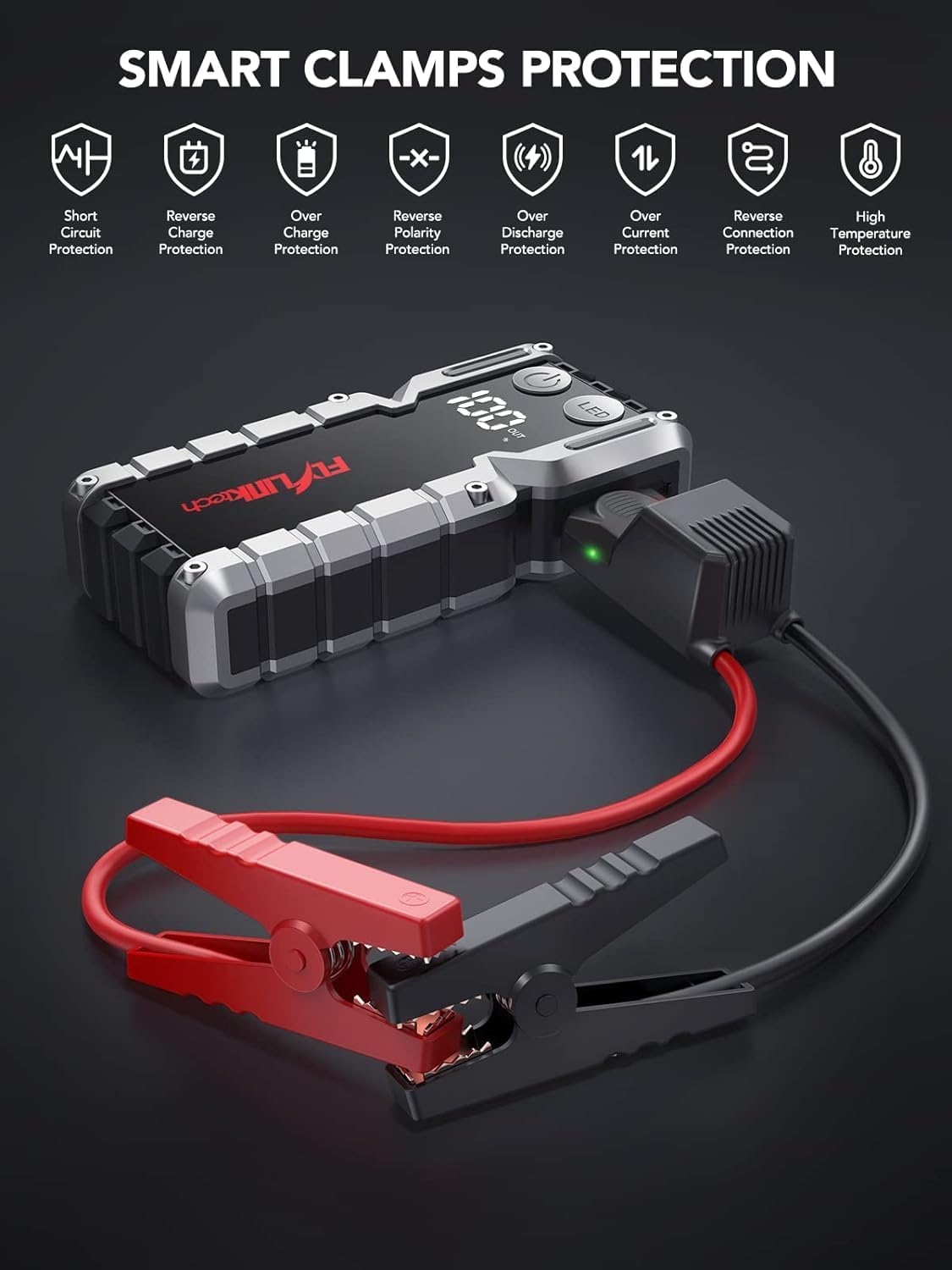
Изображение: Smart Clamps Protection. Icons represent various safety features including short circuit protection, reverse charge protection, over charge protection, reverse polarity protection, over discharge protection, over current protection, and high temperature protection.
5.2. Использование в качестве внешнего аккумулятора
Пусковое устройство может заряжать различные устройства с питанием от USB.
- Connect your device's USB charging cable to one of the USB output ports (USB1 or USB2 QC3.0) on the jump starter.
- Пусковое устройство автоматически начнет заряжать ваше устройство.
- На ЖК-дисплее будет отображаться процент оставшегося заряда батареи.tage пускового устройства.
5.3. Использование светодиодного фонарика
The built-in LED flashlight has three modes: standard, SOS, and strobe.
- Press and hold the "LED" button for 3 seconds to turn on the standard flashlight mode.
- Press the "LED" button again to cycle through the modes: Standard > SOS > Strobe.
- Press and hold the "LED" button for 3 seconds to turn off the flashlight.

Image: The built-in LED flashlight of the FLYLINKTECH jump starter, demonstrating its three modes: standard flashlight, SOS signal, and strobe light.
6. Техническое обслуживание
- Store the jump starter in its portable EVA carrying case when not in use to protect it from dust and damage.
- Recharge the unit every 3-6 months, even if not used, to maintain battery health and extend its lifespan.
- Протирайте внешнюю поверхность мягкой сухой тканью. Не используйте едкие химикаты или абразивные чистящие средства.
- Keep the jump starter away from direct sunlight, heat sources, and moisture.
- Do not disassemble the unit. Servicing should only be performed by qualified personnel.
7. Поиск Неисправностей
| Проблема | Возможная причина | Решение |
|---|---|---|
| Стартер не включается. | Аккумулятор полностью разряжен. | Charge the jump starter fully using the provided USB-C cable. |
| После подключения автомобиль не заводится. | Неверный кл.amp соединение (обратная полярность). Слишком низкий заряд батареи пускового устройства. Автомобильный аккумулятор сильно поврежден. Смарт clamp indicator not solid green. | Убедитесь, что clampКрасные провода подключены правильно (красный к +, черный к -). Перезарядите пусковое устройство. Обратитесь к профессиональному механику. Follow indicator light instructions in Section 5.1. If flashing green, use BOOST function. |
| Смарт clamp indicator is solid red and beeping. | Подключение с обратной полярностью. | Немедленно отключите clamps and re-attach correctly (red to +, black to -). |
| Фонарик не работает. | Батарея разряжена. LED button not pressed correctly. | Зарядите пусковое устройство. Press and hold the "LED" button for 3 seconds to activate. |
| Devices not charging via USB ports. | Слишком низкий заряд батареи пускового устройства. Проблема с подключением кабеля. | Зарядите пусковое устройство. Ensure USB cables are securely connected to both the jump starter and the device. Try a different cable. |
8. Технические характеристики
| Особенность | Деталь |
|---|---|
| Модель | CF900 |
| Емкость аккумулятора | 18000 мАч (66.6Wh) |
| Пиковый ток | 4000А |
| Выход из скачка | 12В |
| Выход USB1 | 5В/2.4А |
| Выход USB2 (QC3.0) | 5V/2.4A, 9V/2A, 12V/1.5A |
| Вход типа C | 5В/2А |
| Рабочая температура | -20°C до 60°C (-4°F до 140°F) |
| Размеры продукта | 19 см x 9 см x 4 см (приблизительно) |
| Вес товара | 820 г |
| Совместимость двигателя | До 9.0 л бензина или 8.0 л дизельного топлива |
9. Гарантия и поддержка
FLYLINKTECH provides the following support for this product:
- Бесплатная гарантия сроком на 3 год: Покрывает производственные дефекты и неисправности при нормальном использовании.
- Пожизненная техническая поддержка: Assistance with product usage, troubleshooting, and general inquiries.
- Круглосуточное обслуживание клиентов: Available around the clock for any questions or concerns.
For support, please refer to the contact information provided in your product packaging or visit the official Flylinktech webсайт.


