Введение
Thank you for choosing the TAB ErasePro H6 Portable Carpet Cleaner. This user manual provides essential information for the safe and efficient operation, maintenance, and troubleshooting of your new appliance. Please read this manual thoroughly before first use and keep it for future reference.
Важная информация по безопасности
Всегда соблюдайте основные меры предосторожности при использовании электроприборов, чтобы снизить риск возникновения пожара, поражения электрическим током или получения травм.
- Перед использованием прибора прочтите все инструкции.
- Используйте только так, как описано в данном руководстве. Используйте только насадки, рекомендованные производителем.
- Не погружайте прибор в воду или другие жидкости.
- Не используйте с поврежденным шнуром или вилкой. Если прибор не работает должным образом, упал, был поврежден, оставлен на улице или упал в воду, верните его в сервисный центр.
- Не разрешать использовать в качестве игрушки. Необходимо особое внимание при использовании детьми или вблизи них.
- Use only non-foaming cleaning solutions specifically designed for carpet cleaners.
- Перед началом эксплуатации убедитесь, что резервуары надежно закреплены.
- Do not tilt the machine or use it upside down.
Содержимое упаковки
Проверьте наличие всех предметов в посылке:
- TAB ErasePro H6 Portable Carpet Cleaner Unit
- PowerBrush Attachment
- Extend Hose with cleaning head
- Зарядный кабель типа C

Image: The TAB ErasePro H6 Portable Carpet Cleaner shown with its main unit, PowerBrush, and extendable hose attachment.

Image: Close-up of the extendable hose and its cleaning head, which are included with the cleaner.
Продукт болееview
Familiarize yourself with the main components of your TAB ErasePro H6:
- Основной блок: Вмещает двигатель, аккумулятор и панель управления.
- Резервуар для чистой воды (350 мл): Вмещает резервуар для чистой воды и чистящего раствора.
- Резервуар для грязной воды (260 мл): Собирает грязную воду и мусор.
- PowerBrush: Integrated brush head for agitating and lifting stains.
- Удлинить шланг: For cleaning hard-to-reach areas.
- Светодиодный цифровой дисплей: Shows battery level, hose connection status, and brush switch status.

Image: Close-up of the cleaner's LED digital display, indicating battery level, spray function, hose connection, and power brush status.
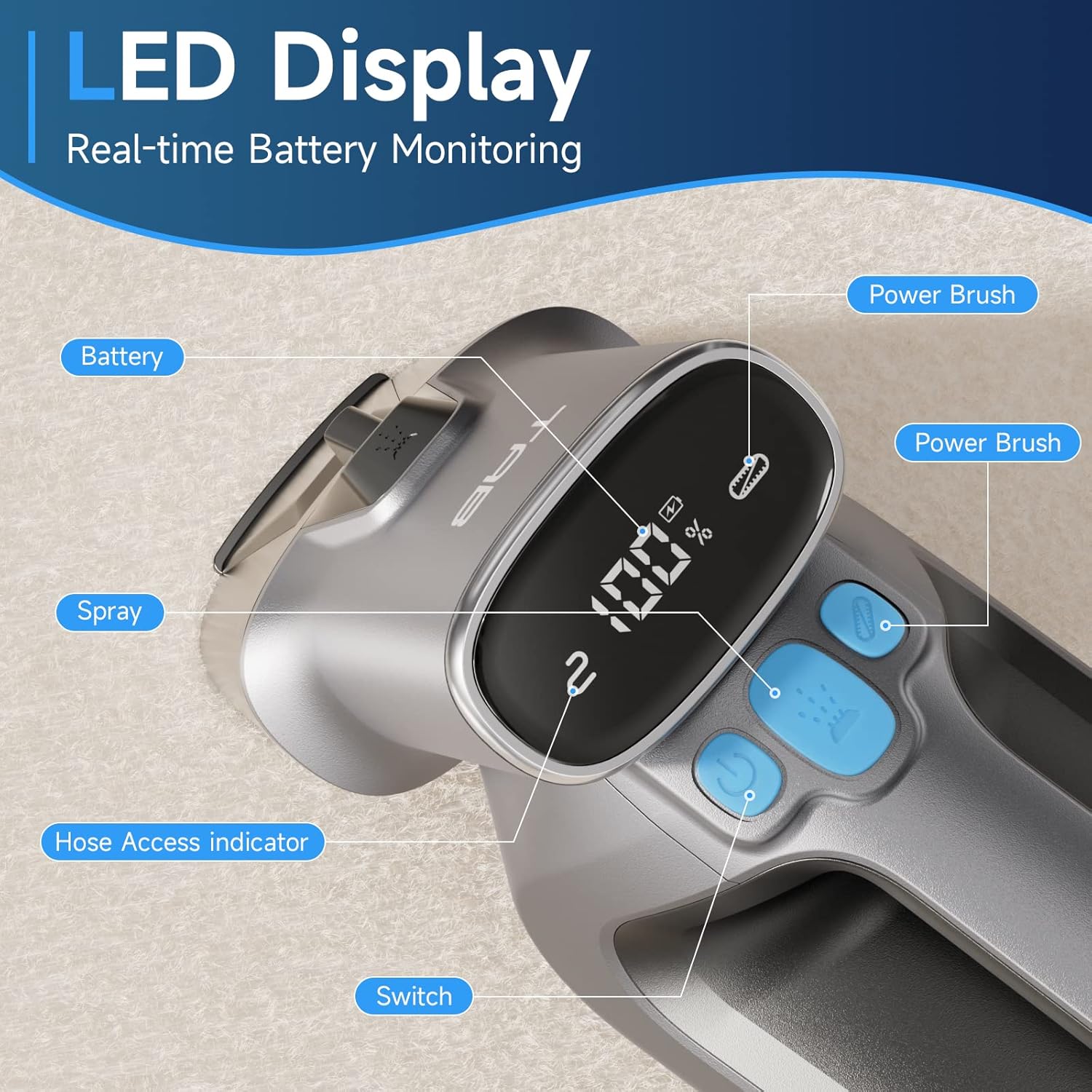
Image: Diagram showing the separate 350ml clean water tank and 260ml dirty water tank, highlighting their removable design.
Настраивать
Зарядка аккумулятора
Before first use, fully charge the appliance. The LED display will show the battery percentage.
- Locate the Type-C charging port on the cleaner.
- Connect the provided Type-C charging cable to the port and a 5V/2A adapter (not included).
- The LED display will show charging progress. A full charge provides up to 20 minutes of runtime.

Image: Close-up of the Type-C charging port on the cleaner, with the charging cable connected.
Заполнение бака чистой воды
- Снимите резервуар для чистой воды с основного блока.
- Open the tank cap and fill with clean water. You may add a non-foaming cleaning solution as recommended by the solution manufacturer. Do not overfill.
- Securely close the cap and reinsert the tank into the cleaner until it clicks into place.
Инструкция по эксплуатации
Общая операция
- Ensure the clean water tank is filled and the dirty water tank is empty and properly installed.
- Нажмите кнопку питания, чтобы включить пылесос.
- To activate the PowerBrush, press the dedicated PowerBrush button. The brush will rotate to agitate stains.
- To spray cleaning solution, press the spray button.
- Move the cleaner slowly over the stained area, allowing the PowerBrush and suction to work.

Image: The PowerBrush mechanism shown in operation, highlighting its high-speed automatic washing action for better cleaning.

Image: The cleaner demonstrating its strong suction power on a carpet, suitable for various fabric surfaces like mattresses and sofas.
Очистка различных поверхностей
- Ковры и ковровые изделия: Use the main PowerBrush head directly on the carpet. For deep stains, pre-treat the area if necessary.
- Upholstery & Car Interiors: For delicate fabrics or hard-to-reach spots, attach the Extend Hose. Ensure the hose is securely connected; the LED display will indicate proper connection.
- Пятна от домашних животных: The PowerBrush is effective for agitating and lifting pet messes. Apply cleaning solution, scrub gently, and then suction up the dirty liquid.

Image: The cleaner being used to remove a pet stain from a carpet, illustrating its effectiveness for quick spot cleaning.

Image: A user demonstrating the use of the extended hose to clean curtains, showcasing its ability to reach various areas.

Image: The cordless cleaner being used to clean a car seat, emphasizing its portability and 20-minute run time for on-the-go cleaning.
Official Product Video: Usage Demonstration
Video: This official product video demonstrates the TAB ErasePro H6 Portable Carpet Cleaner in action, showing its effectiveness on various stains and surfaces, including the PowerBrush and extended hose features. It also illustrates the ease of use and maintenance.
Обслуживание
Опорожнение и очистка резервуаров
For optimal performance and hygiene, empty and clean both water tanks after each use.
- Снимите резервуар для грязной воды с основного блока.
- Open the tank and dispose of the dirty water. Rinse the tank thoroughly with clean water.
- Remove the clean water tank and rinse it if any cleaning solution residue remains.
- Allow both tanks to air dry completely before reassembling.

Image: A visual representation of the clean and dirty water tanks, indicating their positions on the cleaner for easy removal and cleaning.
Cleaning the PowerBrush
Regularly inspect and clean the PowerBrush to prevent hair and debris buildup.
- Detach the PowerBrush head from the main unit.
- Удалите с щетинок щетки все спутанные волосы и мусор.
- Промойте щетку под проточной водой.
- Allow the PowerBrush to air dry completely before reattaching.

Изображение: крупный план view of the detachable PowerBrush component, showing its bristles for effective cleaning and ease of maintenance.
Поиск неисправностей
If you encounter issues with your TAB ErasePro H6, refer to the table below for common problems and solutions.
| Проблема | Возможная причина | Решение |
|---|---|---|
| Очиститель не включается. | Батарея разряжена или имеет низкий уровень заряда. | Полностью зарядите аккумулятор. |
| Распыление отсутствует или слабое. | Clean water tank is empty or improperly installed. Nozzle is clogged. | Refill clean water tank. Reinstall tank correctly. Clean the spray nozzle. |
| Плохое всасывание. | Dirty water tank is full. Dirty water tank is improperly installed. Suction nozzle is blocked. | Empty dirty water tank. Reinstall tank correctly. Clear any blockages from the suction nozzle. |
| PowerBrush not rotating. | PowerBrush button not pressed. Brush is jammed by debris. | Press the PowerBrush button. Remove any hair or debris from the brush. |
| Cleaner leaks. | Water tanks are not properly sealed or installed. | Ensure tank caps are securely closed and tanks are correctly seated in the unit. |
Технические характеристики
| Особенность | Спецификация |
|---|---|
| Бренд | ВКЛАДКА |
| Название модели | Н6-3 |
| Специальная характеристика | Портативный очиститель ковров |
| Тип фильтра | Мыло |
| Емкость резервуара для чистой воды | 0.35 литра (350 мл) |
| Емкость бака для грязной воды | 0.26 литра (260 мл) |
| Батарея Ватtage | 2200 миллиamp_часы |
| Время выполнения | До 20 минут |
| Рекомендуемое использование | Carpet, Upholstery, Stairs, Car |
| Форм-фактор | Ручной |
| Уровень шума | 80 дБ |
| Вес товара | 4.4 фунта |
| Размеры упаковки | 17.28 x 13.07 x 6.69 дюйма |
Гарантия и поддержка
Your TAB ErasePro H6 Portable Carpet Cleaner comes with a standard manufacturer's warranty. For detailed warranty information, product support, or to purchase replacement parts, please visit the official TAB webили свяжитесь со службой поддержки клиентов через вашего продавца.
For further assistance, please refer to the contact information provided with your purchase documentation.


