Введение
This manual provides essential information for setting up, operating, and maintaining your Hisense 75-Inch Class U6 Series Mini-LED ULED 4K UHD Google Smart TV (Model 75U6K). Please read this manual thoroughly before using your television to ensure proper and safe operation. The U6 Series integrates advanced display technologies such as Mini-LED, Quantum Dot Color, and Full Array Local Dimming to deliver a high-quality visual experience. It also features Dolby Vision IQ, HDR10+, VRR Game Mode Plus, and Google Smart TV functionality for comprehensive entertainment.
Настраивать
1. Распаковка и комплектация
Аккуратно извлеките телевизор из упаковки. Убедитесь, что все компоненты на месте:
- ТВ блок
- Силовой кабель
- Дистанционное управление
- Stand (2 base stands)
2. Установка подставки
Your TV comes with two base stands. For the 75-inch model, the stand width is adjustable, allowing for flexibility in placement. The stand can be set to 23.2 or 55.3 inches apart. Attach the stands securely to the bottom of the TV using the provided screws.

Изображение: Спереди view of the Hisense 75U6K TV with its adjustable stand, showing dimensions and the included voice remote control.
3. Настенный монтаж
To mount your TV on a wall, a VESA standard bracket (400x400mm or 15.7x15.7 inches) is recommended for the 75-inch model. Use M6 screws for all sizes. Ensure the wall mount is installed by a qualified professional to prevent damage or injury.

Изображение: сзади view of the Hisense 75U6K TV, illustrating the VESA mounting points and their dimensions (400mm x 400mm).
4. Подключение устройств
Ваш телевизор предлагает различные варианты подключения:
- HDMI: Connect external devices like Blu-ray players, game consoles, or set-top boxes. The TV supports HDMI 2.0/1.4 with HDCP 2.2.
- USB: Подключите USB-накопители для воспроизведения мультимедиа.
- Ethernet (локальная сеть): Для проводного подключения к Интернету.
- Wi-Fi: Для беспроводного подключения к Интернету.
- Bluetooth: Для подключения беспроводных аксессуаров.
- Антенна/кабель: Для подключения антенны или кабельного телевидения.

Изображение: сбоку view of the Hisense 75U6K TV, highlighting the various input ports including HDMI, USB, and antenna connections.
5. Первоначальное включение
After connecting the power cable, press the power button on the remote control to turn on the TV. Follow the on-screen instructions to complete the initial setup, including network connection and Google TV account login.
Управление телевизором
1. Функции дистанционного управления
The included voice remote control allows for easy navigation and control of your TV. It features dedicated buttons for popular streaming services and a microphone for voice commands.

Image: Close-up of the Hisense 75U6K TV remote control, showing its layout and dedicated buttons for streaming services and voice control.
2. Интерфейс Google TV
The Hisense U6K runs on Google TV, providing a personalized and intuitive user experience. You can browse content from various streaming services, get recommendations, and install a wide range of applications from the Google Play Store.
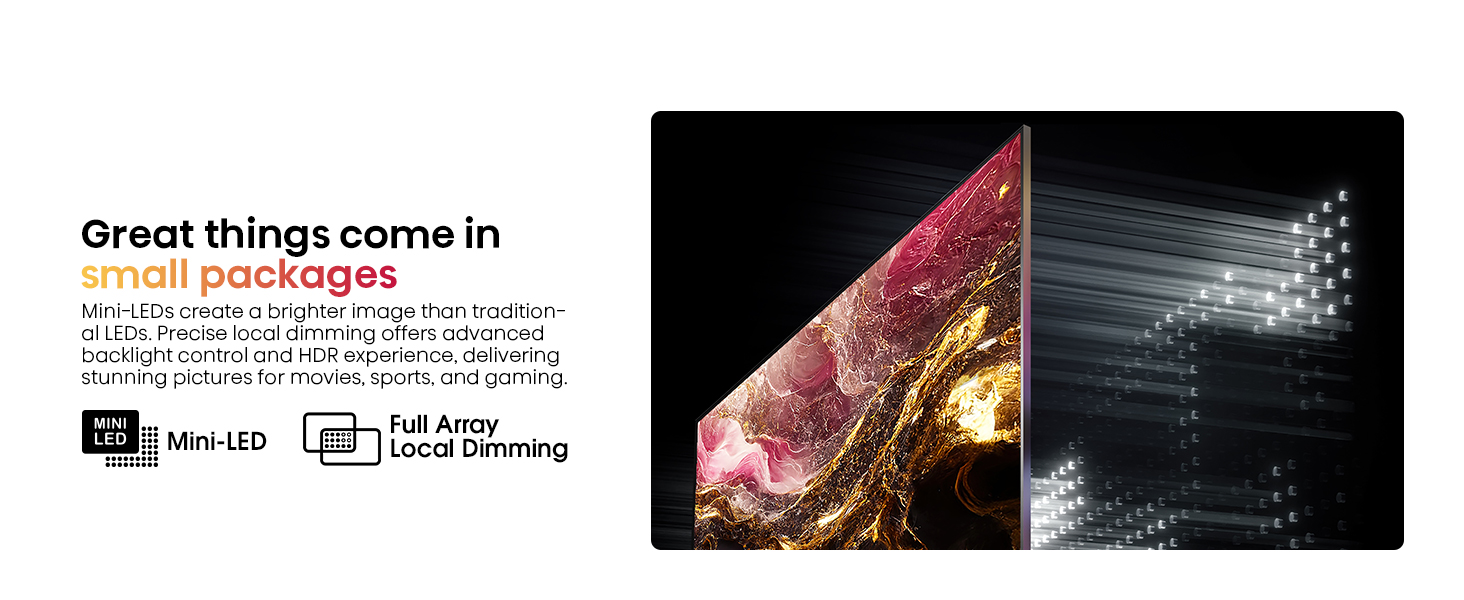
Image: Screenshot of the Google TV interface on the Hisense U6K, displaying various streaming apps and content recommendations.
3. Настройки изображения
Оптимизируйте свой viewУлучшите качество изображения, настроив параметры картинки:
- Mini-LED with Full Array Local Dimming: This technology enhances contrast and black levels by precisely controlling individual backlight zones.
- Цвет квантовой точки: Delivers over a billion shades of vivid color for a richer and more accurate color reproduction.
- Dolby Vision IQ / HDR10+: Supports advanced HDR formats for dynamic scene-by-scene optimization, adjusting brightness and contrast based on room lighting.
- Изображение ИИ: Real-time scenario-specific optimization for brightness, color, and resolution.
- Режим кинорежиссера: Preserves the original aspect ratio, color, and frame rate as intended by the director.

Image: Illustration demonstrating the precise backlight control of Mini-LED with Full Array Local Dimming on the Hisense U6K TV.

Image: Visual representation of Quantum Dot Color technology on the Hisense U6K TV, showcasing a wide spectrum of vibrant colors.

Image: Scene from a nature documentary displayed on the Hisense U6K TV, highlighting the detailed and vibrant picture quality with Dolby Vision IQ and HDR10+.
4. Настройки звука
The TV supports Dolby Atmos for immersive audio. You can adjust sound modes and output settings through the TV menu. The TV has an output wattagе 30 Вт.
5. Игровые возможности
For gamers, the U6K includes Game Mode Plus with a variable refresh rate (VRR) at 60Hz, ensuring smoother gameplay and reduced input lag on compatible consoles.

Image: Action scene from a video game displayed on the Hisense U6K TV, illustrating the smooth and responsive gaming experience with Game Mode Plus and VRR.
6. Голосовое управление
Utilize the Hands-Free Voice Control feature or the voice remote to search for content, control playback, and manage TV settings using voice commands. The TV is also Alexa compatible.
7. Official Product Video: Hisense U6K Google Smart TV
Video: An official Hisense video showcasing the features and user experience of the Hisense U6K Google Smart TV.
Обслуживание
1. Чистка телевизора
Чтобы очистить экран, аккуратно протрите его мягкой тканью без ворса. Для удаления стойких загрязнений слегка потрите.ampen the cloth with water or a screen-cleaning solution. Avoid using harsh chemicals or abrasive materials. For the TV body, use a soft, dry cloth.
2. Обновления программного обеспечения
Your Google Smart TV may receive automatic software updates to improve performance and add new features. Ensure your TV is connected to the internet to receive these updates. You can also manually check for updates in the TV's settings menu.
Поиск неисправностей
Если у вас возникли проблемы с телевизором, воспользуйтесь следующими распространенными решениями:
- Нет питания: Проверьте, надёжно ли подключён кабель питания к телевизору и розетке. Убедитесь, что розетка исправна.
- No Picture/Poor Picture Quality: Verify that the correct input source is selected. Check cable connections for external devices. Adjust picture settings (brightness, contrast, etc.) in the TV menu.
- Нет звука/плохое качество звука: Check the volume level and ensure the TV is not muted. Verify audio cable connections for external sound systems. Adjust sound settings in the TV menu.
- Пульт дистанционного управления не работает: Replace the AAA batteries (2 required, included). Ensure there are no obstructions between the remote and the TV's IR sensor.
- Проблемы с сетевым подключением: For Wi-Fi, ensure the router is on and within range. For Ethernet, check the cable connection. Try restarting your router and TV.
Для получения дополнительной помощи обратитесь в службу поддержки клиентов.
Технические характеристики
| Особенность | Спецификация |
|---|---|
| Бренд | Hisense |
| Номер модели | 75У6К |
| Размер экрана | 75 дюйма |
| Технология отображения | Mini-LED ULED (QLED) |
| Разрешение | 4K UHD (3840 x 2160) |
| Частота обновления | 60 Hz (VRR Game Mode Plus) |
| Поддержка HDR | Dolby Vision IQ, HDR10+ |
| Операционная система | Гугл Смарт ТВ |
| Связность | Bluetooth, Ethernet, HDMI, USB, Wi-Fi |
| HDMI-порты | 4 (HDMI 2.0/1.4 with HDCP 2.2) |
| USB-порты | 2 |
| Аудиовыход | 30 Watts, Dolby Atmos |
| Размеры изделия (с подставкой) | 65.9" Ш x 41.4" В x 14.6" Г |
| Размеры изделия (без подставки) | 65.9" Ш x 38.0" В x 3.1" Г |
| Вес товара | 94.8 фунта |
| Включенные компоненты | Телевизор, кабель питания, пульт дистанционного управления, подставка |
Гарантия и поддержка
1. Информация о гарантии
Your Hisense 75U6K TV comes with a Гарантия 2 год. Please retain your proof of purchase for warranty claims. For specific terms and conditions, refer to the warranty card included with your product or visit the official Hisense webсайт.
2. Поддержка клиентов
If you have any questions, require technical assistance, or need to report an issue, please contact Hisense customer support:
- Телефон: +1 (888) 935-8880
- Webсайт: www.hisense-usa.com

Image: A badge indicating the 2-year warranty provided with the Hisense TV.


