1. Введение
Thank you for choosing the Maxcom FW36 Aurum SE Smartwatch. This manual provides detailed instructions to help you set up, operate, and maintain your device, ensuring optimal performance and longevity. Please read this manual carefully before using your smartwatch.

Рисунок 1: Передняя часть view of the Maxcom FW36 Aurum SE Smartwatch, displaying time and health metrics.
2. Настройка
2.1 Распаковка и первоначальный осмотр
Upon opening the package, verify that all components are present: Maxcom FW36 Aurum SE Smartwatch, charging cable, and this user manual. Inspect the device for any visible damage.
2.2 Зарядка умных часов
Before first use, fully charge your smartwatch. Connect the charging cable to the charging port on the back of the watch and to a standard USB power adapter (not included). The battery icon on the screen will indicate charging status. A full charge typically takes approximately 2 hours.
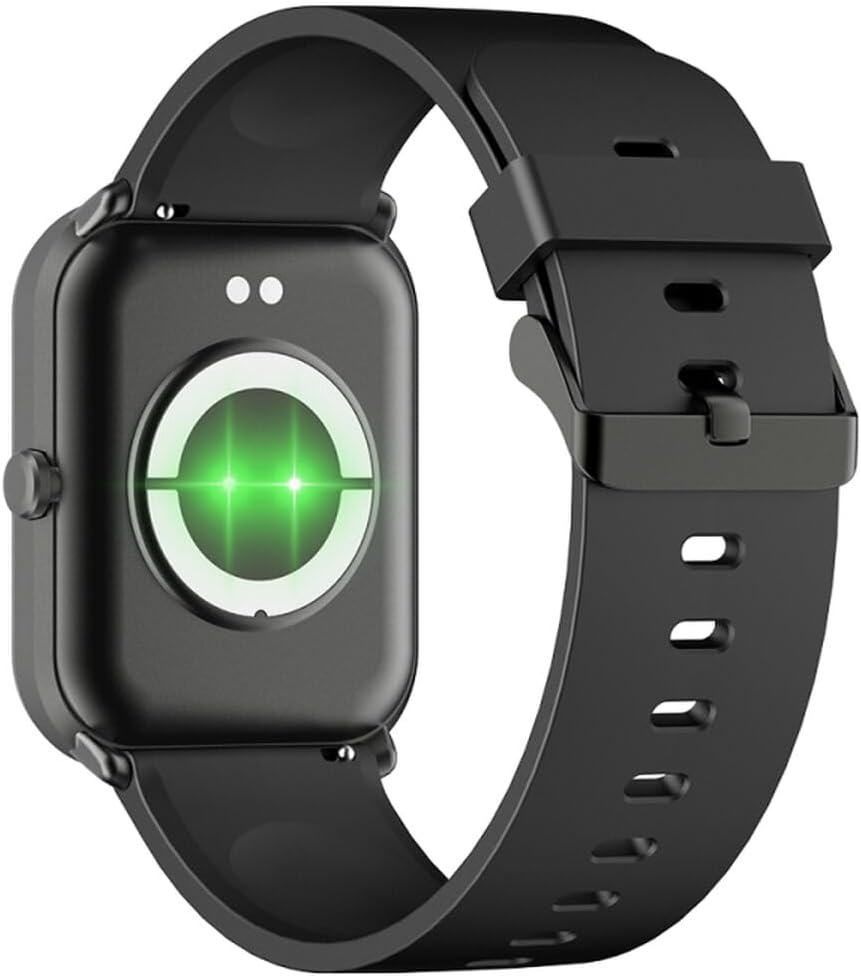
Рисунок 2: Сзади view of the smartwatch, highlighting the charging contacts and health sensors.
2.3 Включение/выключение питания
- Включение питания: Нажмите и удерживайте боковую кнопку в течение нескольких секунд, пока не загорится экран.
- Выключение: На циферблате часов проведите пальцем вниз, чтобы открыть быстрые настройки, затем коснитесь значка питания или перейдите в «Настройки» > «Система» > «Выключить». Подтвердите свой выбор.
2.4 Установка и сопряжение приложения
- Загрузите приложение: Scan the QR code in the manual (if provided) or search for "GLORY FIT" in your smartphone's app store (Google Play Store for Android, Apple App Store for iOS).
- Зарегистрироваться/Войти: Open the GLORY FIT app and follow the on-screen instructions to create an account or log in.
- Сочетание:
- Убедитесь, что Bluetooth включен на вашем смартфоне.
- Open the GLORY FIT app, go to "Device" or "My Device", and tap "Add Device".
- The app will search for nearby devices. Select "FW36 Aurum SE" from the list.
- Подтвердите запрос на сопряжение на смартфоне и умных часах.
Once paired, the smartwatch will synchronize data with your phone, including time and date settings.
3. Инструкция по эксплуатации
3.1 Базовая навигация
- Сенсорный экран: Swipe left/right to navigate between main functions (e.g., activity, heart rate). Swipe up to view Уведомления. Проведите пальцем вниз, чтобы получить доступ к быстрым настройкам.
- Боковая кнопка: Press once to return to the watch face or wake the screen. Press and hold for power options.

Рисунок 3: Сторона view of the smartwatch, illustrating the physical button and strap design.
3.2 Мониторинг здоровья
The Maxcom FW36 Aurum SE Smartwatch features several health monitoring functions:
- Монитор сердечного ритма: Swipe to the heart rate interface and wait for the measurement to complete. Ensure the watch is snug on your wrist.
- Датчик кислорода в крови: Similar to heart rate, navigate to the SpO2 interface for measurement.
- Прибор для измерения артериального давления: Access this function from the main menu or by swiping to its dedicated screen.
- Мониторинг качества сна: Часы автоматически отслеживают режим вашего сна, если их носить во время сна. View detailed reports in the GLORY FIT app.
- Шагомер: Tracks your daily steps, distance, and calories burned automatically.
Важный: The health data provided by this device is for reference only and should not be used for medical diagnosis or treatment.
3.3 Мульти-спортивный режим
Access the multi-sport mode from the main menu to select various activities such as running, walking, cycling, etc. The watch will track specific metrics relevant to your chosen activity.
3.4 Уведомления
Once paired with your smartphone and notification permissions are granted in the GLORY FIT app, your smartwatch will display incoming calls, messages, and app notifications. Swipe up from the watch face to view ваша история уведомлений.
4. Техническое обслуживание
4.1 Очистка
Regularly clean your smartwatch and strap with a soft, dry cloth. For stubborn dirt, use a slightly damp Протрите тряпкой и тщательно высушите. Избегайте использования агрессивных химикатов и абразивных материалов.
4.2 Защита от воды и пыли
The Maxcom FW36 Aurum SE Smartwatch is designed to be dust resistant and water resistant. This means it can withstand splashes, rain, and brief immersion in shallow water. However, it is not suitable for hot showers, saunas, diving, or high-speed water sports. Avoid pressing buttons underwater.
4.3 Уход за аккумулятором
Чтобы продлить срок службы аккумулятора, избегайте его частой полной разрядки. Регулярно заряжайте устройство, даже если оно не используется в течение длительного времени. Храните устройство в прохладном, сухом месте.
5. Поиск Неисправностей
- Умные часы не включаются: Ensure the device is fully charged. Press and hold the side button for an extended period (10-15 seconds).
- Невозможно подключиться к смартфону:
- Ensure Bluetooth is enabled on your phone and the smartwatch is within range.
- Перезагрузите смартфон и умные часы.
- Check if the GLORY FIT app has necessary permissions.
- Если устройство ранее было сопряжено, попробуйте разорвать сопряжение и заново подключить его.
- Неточные показания о состоянии здоровья: Ensure the watch is worn snugly on your wrist, not too tight or too loose. Clean the sensors on the back of the watch. Avoid excessive movement during measurement.
- Уведомления не получены: Verify that notification permissions are enabled for the GLORY FIT app in your phone's settings. Ensure the app is running in the background.
6. Технические характеристики
| Модель | FW36 Aurum SE |
| Бренд | Макском |
| Операционная система | андроид |
| Отображать | 1.69" (4.29 cm) Color Touchscreen, 240 x 280 pixels, Digital, Rounded Corners |
| Емкость аккумулятора | 220 мАч литий-ионный |
| Связность | Bluetooth |
| Датчики | Heart Rate Monitor, Blood Oxygen Sensor, Blood Pressure Monitor, Pedometer |
| Защита | Dust Resistant, Water Resistant |
| Совместимое приложение | GLORY FIT |
| Dimensions (W x T x D) | 44.6 mm x 1.04 cm x 35 mm |
| Функции GPS | Нет в наличии |
7. Гарантия и поддержка
The Maxcom FW36 Aurum SE Smartwatch comes with a двухлетняя гарантия against factory defects. Please retain your proof of purchase for warranty claims.
For technical support, troubleshooting assistance, or warranty inquiries, please contact Maxcom customer service through their official webсайт или контактную информацию, указанную в документации о покупке.


