Введение
Спасибо за покупкуasing the THOMSON Sound Bar B206. This sound bar is designed to enhance your audio experience for television, music, and gaming, featuring multiple connectivity options and two wireless microphones for karaoke. This manual provides essential information for safe and efficient use of your device. Please read it thoroughly before operation and retain it for future reference.
Информация по безопасности
- Не подвергайте устройство воздействию дождя, влаги или экстремальных температур.
- Ensure proper ventilation around the sound bar to prevent overheating.
- Не открывайте сasinг; поручайте все работы по обслуживанию квалифицированному персоналу.
- Используйте только прилагаемый адаптер питания.
- Держите устройство вдали от сильных магнитных полей.
- Не ставьте на саундбар тяжелые предметы.
Содержимое упаковки
Убедитесь, что все перечисленные ниже предметы включены в ваш пакет:
- THOMSON Sound Bar (B206) x 1
- Пульт дистанционного управления х 1
- Беспроводной микрофон х 2
- Адаптер питания х 1
- Аудиокабель x 1
- Coaxial Cable x 1
- Optical Fiber Cable x 1
- Wall Mounting Kit x 1 (includes padlocks, gel column, screws)
- Руководство пользователя х 1

Рисунок 1: Входящие в комплект аксессуары
This image displays the complete set of items provided with your THOMSON Sound Bar B206, including the sound bar unit, remote control, two wireless microphones, power adapter, user manual, audio cable, coaxial cable, optical fiber cable, and wall mounting kit components.
Продукт болееview
Sound Bar Components
The THOMSON Sound Bar B206 features a sleek design with integrated controls and various input ports for versatile connectivity.

Figure 2: Sound Bar, Microphones, and Remote
This image shows the main sound bar unit, two wireless microphones, and the remote control, providing a complete view основных компонентов.
Internal Speaker Design
The sound bar is equipped with four large dual drive units, delivering a maximum output power of 200 Watts for HiFi sound quality, including dual bass and clear mid-range frequencies for a 3D surround sound effect.

Figure 3: Internal Speaker Structure
This diagram illustrates the internal construction of the sound bar's speakers, emphasizing the dual drive units responsible for audio output, alongside the Bluetooth connectivity symbol.
Rear Panel Connections and Remote Control
The rear panel provides various input options, while the remote control offers full command over the sound bar's functions.

Figure 4: Rear Panel Ports and Remote Control
This image details the connectivity options on the sound bar's rear panel, including the power switch, HDMI ARC, power input, subwoofer output, coaxial, optical, and AUX inputs. The accompanying remote control is also shown, indicating various function buttons.
Настраивать
1. Варианты размещения
The THOMSON Sound Bar B206 can be placed on a desktop or mounted on a wall. A wall mounting kit is included for convenient installation.
- Размещение на рабочем столе: Place the sound bar on a stable, flat surface in front of your TV.
- Настенный монтаж: Use the provided wall mounting kit (padlocks, gel column, screws) to securely attach the sound bar to a wall below your TV. Ensure the wall material can support the weight of the sound bar.
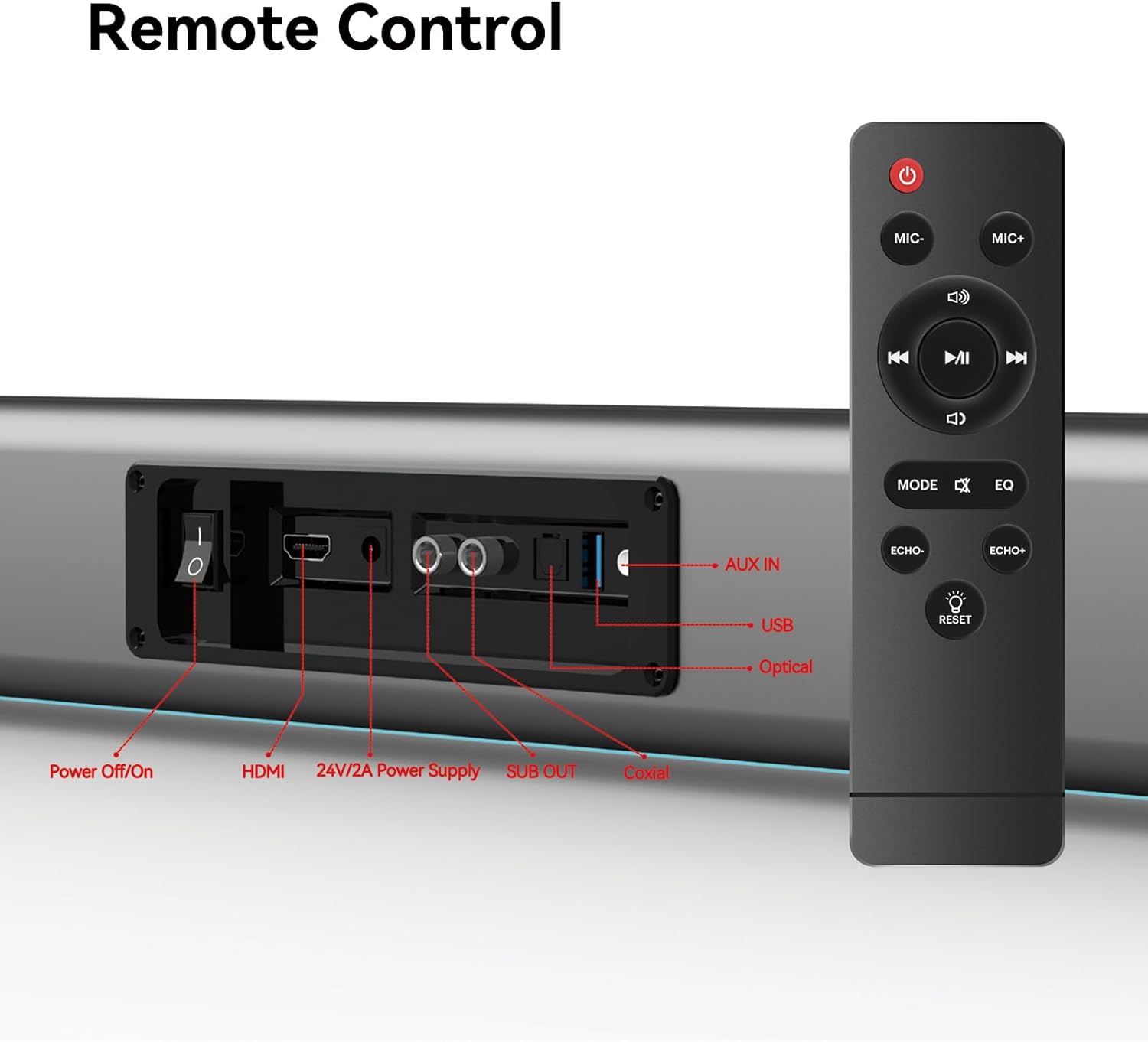
Figure 5: Placement Options (Wall Mount and Desktop)
This image illustrates the versatility of the sound bar's placement, showing it both mounted on a wall beneath a television and resting on a media console, highlighting the included wall mount kit for an elegant setup.
2. Подключение к источнику питания
- Connect the power adapter to the "24V/2A Power Supply" port on the sound bar's rear panel.
- Подключите адаптер питания к розетке.
3. Аудиоподключения
Choose one of the following methods to connect the sound bar to your audio source (e.g., TV, smartphone, tablet, laptop):
- АРК HDMI:
Connect an HDMI cable (not included) from the HDMI ARC port on your TV to the HDMI port on the sound bar. Ensure your TV's HDMI ARC function is enabled in its settings.
- Оптический:
Connect the provided optical fiber cable from your TV's optical output to the "Optical" port on the sound bar. Select "Optical" as the input source on the sound bar.
- AUX (аудиоразъем 3.5 мм):
Connect the provided audio cable from your device's headphone jack or audio output to the "AUX IN" port on the sound bar. Select "AUX" as the input source.
- Коаксиальная:
Connect the provided coaxial cable from your TV's coaxial output to the "Coaxial" port on the sound bar. Select "Coaxial" as the input source.
- USB:
Вставьте USB-накопитель с аудиофайлами files into the "USB" port. The sound bar will automatically switch to USB mode and begin playback.
- Bluetooth:
Refer to the "Bluetooth Pairing" section under Operating Instructions for detailed steps.
Инструкция по эксплуатации
1. Включение/выключение питания
Нажмите Выключение / включение button on the sound bar's rear panel or the Власть Кнопка на пульте дистанционного управления для включения или выключения устройства.
2. Выбор источника входного сигнала
Нажмите РЕЖИМ button on the remote control to cycle through available input sources: HDMI ARC, Optical, AUX, Coaxial, USB, and Bluetooth. The LED display on the sound bar will indicate the currently selected mode.
3. Регулятор громкости
Используйте Объем + и Объем - buttons on the remote control or the physical controls on the right side of the sound bar to adjust the volume. The sound bar supports 8 levels of bass and treble adjustment.
4. Режимы эквалайзера
The sound bar offers 5 Equalizer (EQ) modes to optimize audio for different content types. Press the EQ button on the remote control to switch between modes:
- Режим кино: Улучшает звуковые эффекты и диалоги в кинематографе.
- Музыкальный режим: Оптимизирует звук для воспроизведения музыки.
- Режим новостей: Clarifies spoken dialogue for news and talk shows.
- Additional modes may be available for specific audio profiles.

Figure 6: EQ Modes
This image illustrates the three primary equalizer modes (News, Movie, Music) available on the sound bar, demonstrating how each mode is tailored for different audio experiences.
5. Сопряжение по Bluetooth
- Turn on the sound bar and select Bluetooth mode using the РЕЖИМ button on the remote. The LED display will show "BT" and flash, indicating pairing mode.
- На вашем устройстве (смартфоне, планшете и т. д.) включите Bluetooth и выполните поиск доступных устройств.
- Select "THOMSON B206" from the list. Once connected, the sound bar's LED display will stop flashing.
6. Беспроводные микрофоны
The sound bar comes with two wireless microphones for karaoke or vocal use.
- Ensure the microphones have fresh batteries (AAA, not included).
- Turn on the microphones. They should automatically pair with the sound bar.
- Используйте MIC + и MIC- buttons on the remote to adjust microphone volume.
- Используйте ЭХО+ и ЭХО- buttons to adjust the echo effect.

Figure 7: Karaoke Functionality
This image depicts two individuals enjoying a karaoke session, utilizing the THOMSON sound bar and its wireless microphones connected to a large display, showcasing the product's entertainment capabilities.
Поиск неисправностей
| Проблема | Возможная причина | Решение |
|---|---|---|
| Нет электричества | Кабель питания не подключен; розетка неактивна. | Убедитесь, что кабель питания надежно подключен. Проверьте, работает ли розетка. |
| Нет звука | Выбран неверный источник входного сигнала; Слишком низкий уровень громкости; Кабели подключены неправильно. | Select the correct input source (HDMI, Optical, AUX, etc.). Increase volume. Check all audio cable connections. |
| Не удалось выполнить сопряжение Bluetooth | Sound bar not in pairing mode; Device too far; Bluetooth disabled on device. | Ensure sound bar is in Bluetooth mode and flashing. Move device closer. Enable Bluetooth on your device. |
| Микрофоны не работают | Microphone batteries low/dead; Microphones not turned on. | Replace microphone batteries. Ensure microphones are switched on. |
| Volume jumps too much with one press | This can be a characteristic of the sound bar's volume control sensitivity. | Adjust volume carefully. Consider using the TV's volume control if connected via HDMI ARC, as it may offer finer adjustments. |
Технические характеристики
| Особенность | Деталь |
|---|---|
| Название модели | THOMSON Sound Bar B206 |
| Тип динамика | Саундбар |
| Максимальная выходная мощность динамика | 200 Вт |
| Конфигурация каналов объемного звука | 2.0 |
| Технология связи | Auxiliary, Bluetooth, Coaxial, HDMI ARC, Optical, USB |
| Технология беспроводной связи | Bluetooth |
| Метод контроля | Удаленный |
| Размеры продукта | 37"Д x 3.35"Ш x 2.9"В |
| Вес товара | 8.63 фунта |
| Материал | Пластик |
| Источник питания | Проводной электрический |
| Специальная характеристика | Беспроводные микрофоны |
Обслуживание
- Уборка: Для очистки поверхности звуковой панели используйте мягкую сухую ткань. Не используйте жидкие чистящие средства или абразивные материалы.
- Хранилище: When not in use for extended periods, store the sound bar in a cool, dry place, away from direct sunlight and extreme temperatures.
- Уход за микрофоном: Если вы не планируете использовать беспроводные микрофоны длительное время, извлеките из них батарейки, чтобы предотвратить протечку.
Гарантия и поддержка
THOMSON products are designed and manufactured to the highest quality standards. For warranty information and customer support, please refer to the warranty card included in your package or visit the official THOMSON webСохраните чек в качестве подтверждения покупки.
Информация о соответствии
This device complies with relevant regulations for electronic equipment. Any changes or modifications not expressly approved by the manufacturer could void the user's authority to operate the equipment.


