Введение
This manual provides essential instructions for the proper use and maintenance of your Kawai Universal Mini HD Satellite Remote Control. This remote is designed for seamless compatibility with various Kawai satellite receiver models, including Kw 900, Kw 6820, Kn 650, Kw 2000, 6850, 6950, and 8400. Please read this manual thoroughly before operating the device to ensure optimal performance and longevity.
Продукт болееview
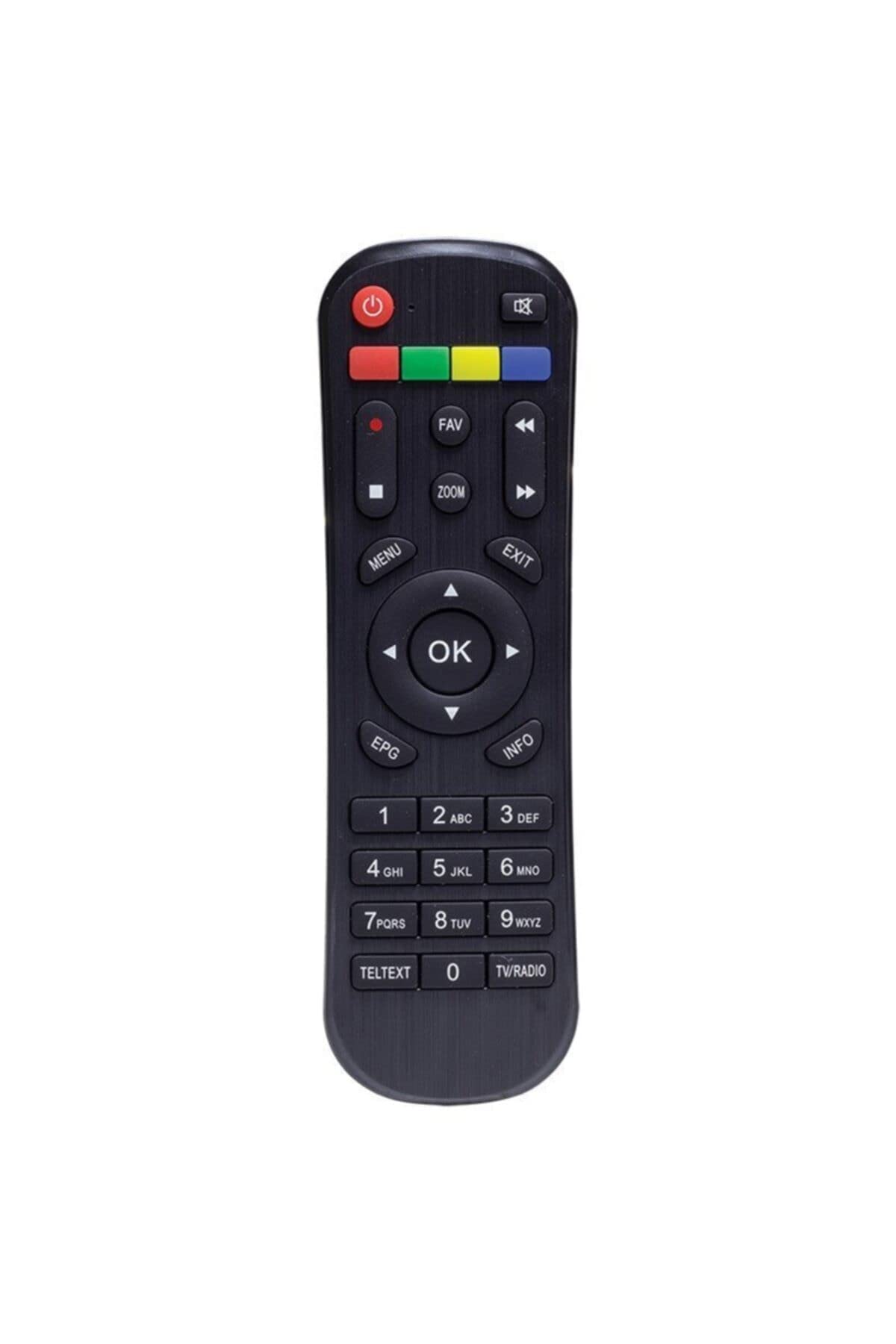
Рисунок 1: Передний view of the Kawai Universal Mini HD Satellite Remote Control. This image displays the ergonomic design and button layout of the remote, highlighting its compact size and standard control functions.
The Kawai Universal Mini HD Satellite Remote Control is a compact and efficient device designed to provide full control over your compatible Kawai satellite receiver. Its intuitive button layout ensures ease of use for channel navigation, volume control, menu access, and other essential functions.
Настраивать
1. Установка аккумулятора
- Найдите батарейный отсек на задней стороне пульта дистанционного управления.
- Чтобы открыть крышку батарейного отсека, сдвиньте ее вниз или в направлении, указанном стрелкой.
- Вставьте две батарейки AAA (не входят в комплект), убедившись, что положительный (+) и отрицательный (-) полюса совпадают с изображениями внутри отсека.
- Установите крышку батарейного отсека на место, сдвинув ее на место до щелчка.
2. Первоначальное использование
This remote control is pre-programmed for compatibility with the listed Kawai satellite receiver models. No additional pairing or setup is typically required. Simply point the remote at your satellite receiver and begin operation.
- Ensure there are no obstructions between the remote control and the satellite receiver.
- Confirm that the satellite receiver is powered on.
Инструкция по эксплуатации
Familiarize yourself with the primary functions of the remote control buttons:
- Кнопка питания (●): Turns the satellite receiver on or off.
- Канал вверх/вниз (CH +/-): Меняет телеканал.
- Увеличение/уменьшение громкости (ГРОМКОСТЬ +/-): Регулирует громкость звука.
- Немой (MUTE): Отключает вывод звука.
- Цифровые кнопки (0-9): Введите номера каналов напрямую.
- Меню (МЕНЮ): Accesses the satellite receiver's main menu.
- Кнопки навигации (▲ ▼ ◀ ▶): Навигация по опциям меню.
- OK/Enter (OK): Подтверждает выбор в меню.
- Exit/Back (ВЫХОД): Exits current menu or returns to the previous screen.
- Информация (ИНФОРМАЦИЯ): Отображает информацию о программе.
Specific button functions may vary slightly depending on your Kawai satellite receiver model. Refer to your receiver's manual for detailed information on advanced features.
Обслуживание
Уборка
Для очистки пульта дистанционного управления используйте мягкую сухую ткань. Для удаления стойких загрязнений слегка протрите поверхность.ampen the cloth with water or a mild, non-abrasive cleaner. Avoid using harsh chemicals, solvents, or abrasive materials, as these can damage the remote's surface and internal components.
Замена батареи
Replace batteries when the remote control's response becomes sluggish or stops functioning. Always replace both batteries simultaneously with new ones of the same type (AAA). Do not mix old and new batteries, or different types of batteries, as this can lead to leakage or damage.
- Remove old batteries promptly to prevent leakage.
- Утилизируйте использованные батареи в соответствии с местным законодательством.
Поиск неисправностей
| Проблема | Возможная причина | Решение |
|---|---|---|
| Пульт дистанционного управления не работает. |
|
|
| Некоторые кнопки не работают. |
|
|
Технические характеристики
- Бренд: Kawai (Listed as Generic by seller)
- Производитель: Общий
- ASIN: B0BW4KLTDS
- Первая доступная дата: 17 февраля 2023 г.
- Совместимость: Kawai Kw 900, Kw 6820, Kn 650, Kw 2000, 6850, 6950, 8400 Mini HD Satellite Receivers
- Источник питания: Батареи 2 x AAA (не входят в комплект)
Гарантия и поддержка
For warranty information and technical support, please refer to the documentation provided with your original Kawai satellite receiver or contact the retailer from whom you purchased this remote control. Keep your purchase receipt as proof of purchase.
For further assistance, you may also visit the official Kawai website or contact their customer service department if available in your region.


