Введение
The Alula Slimline Touchpad PRO provides modern and intuitive control for your smart security system. Featuring a 7-inch full-color touchscreen, this device can be wall-mounted or placed on a tabletop, offering complete control of your security system from anywhere within your premises. It allows you to arm and disarm the system, view cameras, control smart devices, and initiate scenes. Its interface mirrors the Alula Smart Security app, ensuring ease of use and a familiar experience.

Figure 1: Alula Slimline Touchpad Pro main interface.
Содержимое упаковки
- Alula Slimline Touchpad PRO
- Настенный кронштейн
- Настольная подставка
- 110V Plug-in Transformer
- Зарядное устройство
Настройка и установка
The Slimline Touchpad PRO offers flexible installation options, including wall mounting or tabletop placement. Ensure the device is placed within Wi-Fi range for optimal performance.
Установка настенного крепления
- Choose a suitable location on a wall, preferably near a power outlet.
- Закрепите кронштейн для настенного монтажа на стене с помощью соответствующих винтов (не входят в комплект).
- Connect the 12V direct wire or use the 110V plug-in transformer to power the device.
- Carefully attach the touchpad to the mounted bracket, ensuring it clicks securely into place.
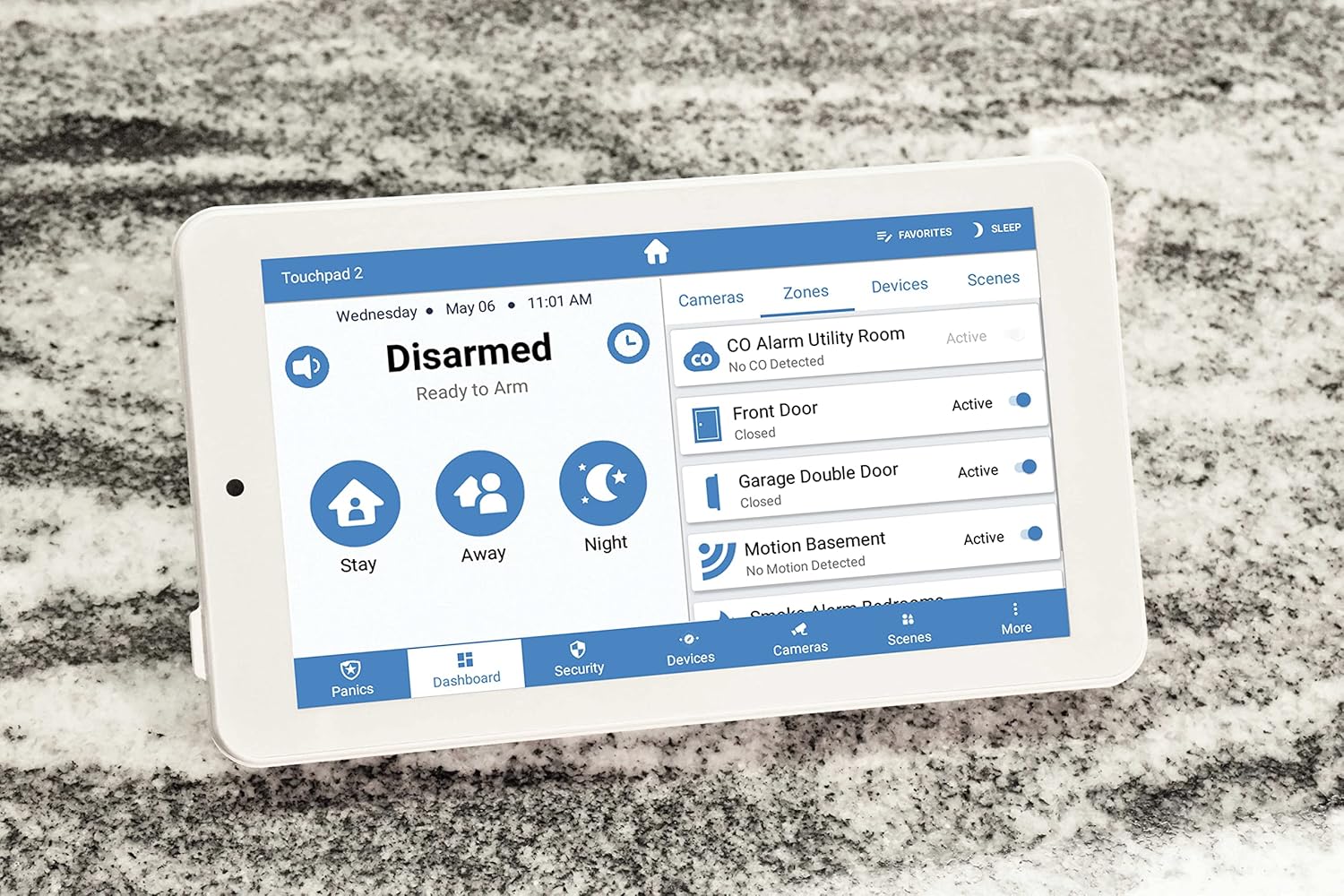
Figure 2: Touchpad in tabletop configuration, showing device and zone management.
Установка настольной подставки
- Attach the tabletop stand to the back of the touchpad.
- Place the touchpad on a flat, stable surface.
- Connect the 110V plug-in transformer to the touchpad and plug it into a power outlet.
Initial Power-Up and Wi-Fi Connection
- Once powered, the touchpad will boot up.
- Follow the on-screen prompts to connect to your home Wi-Fi network.
- Введите пароль Wi-Fi, когда будет предложено.
- The touchpad will then attempt to connect to your Alula smart security system.
Инструкция по эксплуатации
The Slimline Touchpad PRO provides comprehensive control over your Alula smart security system.
Постановка и снятие с охраны
- Удержание руки: Tap the "Stay" icon to arm the system with interior motion sensors bypassed. Ideal for when you are home.
- Рука прочь: Tap the "Away" icon to arm all sensors. Ideal for when you leave the premises.
- Ночной сон: Tap the "Night" icon for a customized arming mode, typically similar to "Stay" but with specific zones armed.
- Снять с охраны: Tap the "Disarmed" area and enter your user code to disarm the system.
Controlling Smart Devices and Scenes
- Navigate to the "Devices" or "Scenes" tab on the bottom menu.
- From the "Devices" tab, you can control connected smart home devices such as lights, locks, and thermostats.
- From the "Scenes" tab, you can activate pre-configured scenes that control multiple devices simultaneously (e.g., "Good Morning" scene).

Figure 3: Touchpad displaying a scenic background in disarmed state.
Двусторонняя аудиосвязь
The touchpad supports two-way audio, allowing communication with monitoring stations or other connected devices if configured within your system.
Обслуживание
To ensure the longevity and optimal performance of your Alula Slimline Touchpad PRO, follow these maintenance guidelines:
- Уборка: Use a soft, dry, lint-free cloth to clean the touchscreen. For stubborn smudges, slightly dampПромокните ткань водой. Избегайте абразивных чистящих средств, растворителей или аэрозольных баллончиков.
- Обновления программного обеспечения: Ensure your touchpad's software is kept up-to-date. Updates are typically pushed automatically via your Wi-Fi connection.
- Источник питания: Always use the original Alula power adapter. Do not use third-party adapters.
- Размещение: Avoid placing the touchpad in direct sunlight, near heat sources, or in areas with extreme humidity.
Поиск неисправностей
| Проблема | Возможная причина | Решение |
|---|---|---|
| Touchpad not powering on. | Отсутствие питания, неисправный адаптер или плохое соединение. |
|
| Невозможно подключиться к Wi-Fi. | Неверный пароль, выход за пределы допустимого диапазона или проблема с маршрутизатором. |
|
| Сенсорный экран не отвечает. | Временный сбой программного обеспечения или физическое повреждение. |
|
| System not arming/disarming. | Incorrect user code, system fault, or communication issue. |
|
Технические характеристики
| Особенность | Деталь |
|---|---|
| Номер модели | RE667W-R-Pro |
| Размер экрана | 7 дюймов |
| Разрешение | 1024 x 600 пикселей |
| Цвет | Белый |
| Источник питания | 110V (with included transformer) or 12V direct wire |
| Связность | Беспроводная связь (Wi-Fi) |
| Метод контроля | Трогать |
| Аудио | Двусторонняя аудиосвязь |
| Размеры (Д x Ш x В) | 9 x 6 x 4 дюйма |
| Тип установки | Настенное крепление, Настольный |
| Совместимые устройства | Smartphone (via Alula Smart Security app) |
| СКП | 810044990607 |
Гарантия и поддержка
For warranty information and technical support, please refer to the official Alula website or contact your authorized Alula dealer. Keep your purchase receipt as proof of purchase.
Alula Support: alula.com/support


