Введение
The Nanlite Forza 300 II is a powerful and versatile LED spotlight designed for professional photography and videography. It features a 5600K daylight-balanced output, advanced control options including Bluetooth app control and DMX, and built-in special effects. Its compact design and AC/battery power capabilities make it suitable for various production environments.
Информация по безопасности
Please read this manual carefully before using the product to ensure proper operation and to prevent damage or injury. Keep this manual for future reference.
- Do not look directly into the light source when the fixture is powered on.
- Do not operate the fixture in wet or damp условия.
- Обеспечьте надлежащую вентиляцию, чтобы предотвратить перегрев.
- Используйте только одобренные адаптеры питания и аксессуары.
- Хранить в недоступном для детей месте.
- Отключите питание перед чисткой или техническим обслуживанием.
Содержимое упаковки
Убедитесь, что все предметы включены в ваш пакет:
- Forza 300 II LED Spotlight Fixture
- Блок управления
- Соединительный кабель
- Силовой кабель
- Рефлектор
- Сумка для переноски
- Руководство пользователя
Продукт болееview
Familiarize yourself with the main components of the Nanlite Forza 300 II.
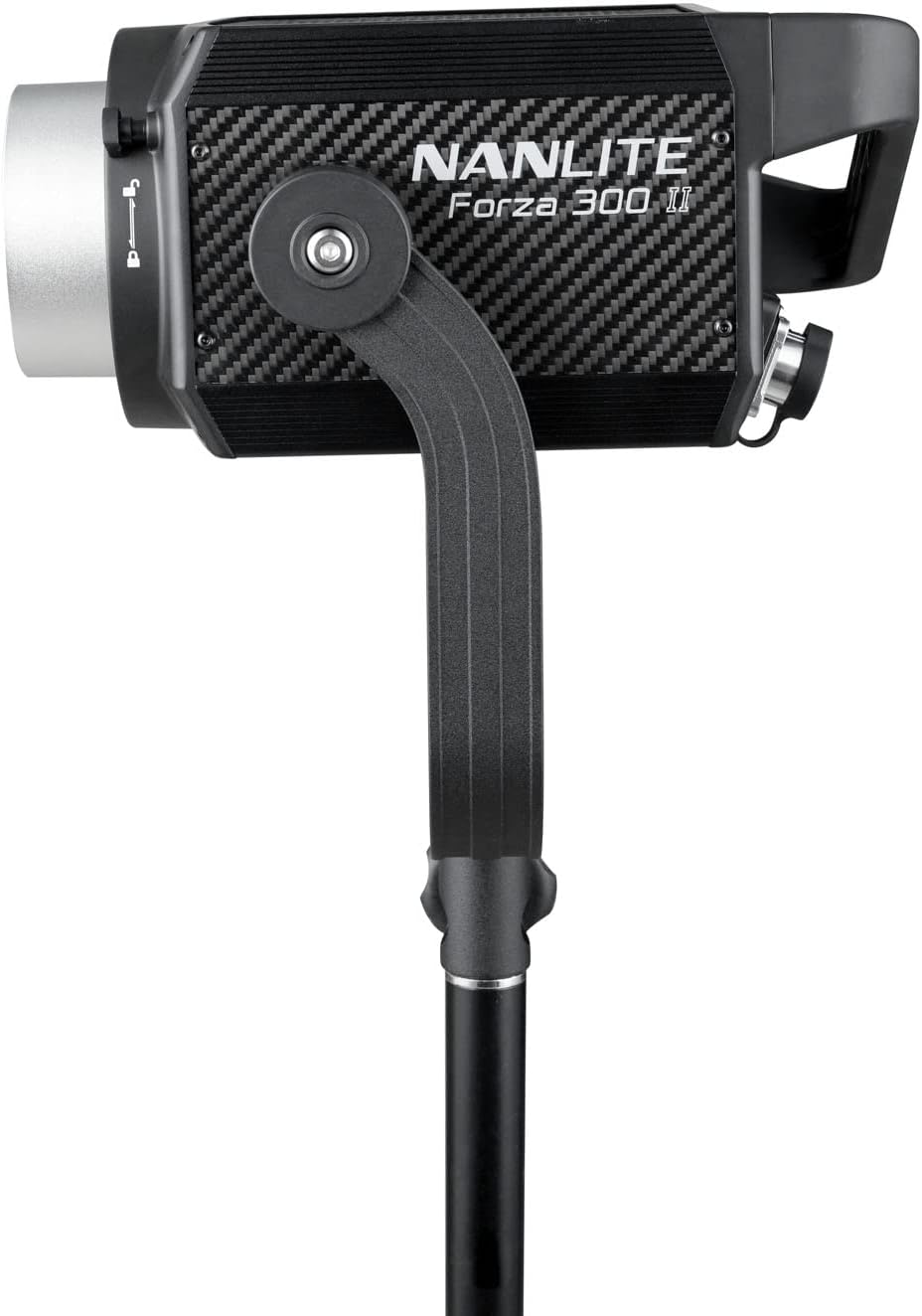
Рисунок 1: Передняя часть view of the Forza 300 II LED Spotlight, showing the light head with its yoke and stand mounting bracket.

Figure 2: The Forza 300 II Control Unit, featuring a display screen, control knobs for brightness and effects, and function buttons.

Рисунок 3: Сзади view of the Forza 300 II Control Unit, highlighting the DMX input/output ports, power input, and output connections to the light fixture.
Ключевые компоненты:
- Светильник: The main LED light source with Bowens mount for accessories.
- Блок управления: External unit housing the power supply, display, and control interface.
- Ярмо: Adjustable bracket for mounting the light fixture onto a light stand.
- Быстросъемный зажимamp: Durable and versatile clamp для надежного крепления.
Настраивать
Follow these steps for initial setup of your Forza 300 II.
- Установите светильник: Attach the Forza 300 II light fixture to a sturdy light stand using the integrated yoke and quick-release clamp. Ensure it is securely tightened.
- Подключите блок управления: Connect the light fixture to the control unit using the provided connecting cable. Align the connectors and twist to lock them securely.
- Подключение питания:
- Питание переменного тока: Connect the power cable to the control unit's AC input and then to a suitable power outlet (100-240V AC).
- Мощность аккумулятора: For portable operation, insert compatible V-mount batteries into the battery plates on the control unit. The unit can run on one battery for extended life.
- Прикрепить отражатель: Align the reflector with the Bowens mount on the front of the light fixture and twist clockwise until it locks into place.

Figure 4: The Forza 300 II light fixture connected to its control unit, demonstrating the power and data cable connections.
Инструкция по эксплуатации
Learn how to operate your Forza 300 II for optimal performance.
1. Включение/выключение питания
Locate the power switch on the control unit and flip it to the "ON" position to power on the light. Flip to "OFF" to power down.
2. Основные операции
- Регулировка яркости: Use the dedicated knob on the control unit to adjust the light intensity from 0% to 100%.
- Регулировка G/M: The W(RG) LED light source allows for Green-to-Magenta shift adjustment by +/- 80. Access this setting via the menu.
3. Режимы управления
- On-Board Control: Use the display and knobs on the control unit for direct adjustments.
- Управление через приложение Bluetooth: Download the free NANLINK app for iOS & Android. Pair your device via Bluetooth for comprehensive control over settings, effects, and firmware updates.
- DMX/РДМ: Connect to a DMX console using the locking DMX ports for professional studio integration. Refer to the DMX chart in the appendix (not included in this manual) for channel assignments.
- Беспроводное управление 2.4G: Compatible with the optional WS-RC-C2 Remote Control and WS-TB-1 Transmitter Box (sold separately).
4. Спецэффекты
The Forza 300 II includes built-in practical effects. Press the "EFFECT" button on the control unit to cycle through or select effects such as:
- Вспышка
- Пульс
- Шторм
- TV
- Папарацци
- Неисправная лампа
- Свеча
- Огонь
- Взрыв
- Сварка
Adjust parameters for each effect using the control knobs.
Обслуживание
Proper maintenance ensures the longevity and optimal performance of your Forza 300 II.
- Уборка: Use a soft, dry cloth to clean the exterior of the light fixture and control unit. Do not use harsh chemicals or abrasive materials.
- Вентиляция: Ensure the fan vents are clear of dust and obstructions to maintain efficient cooling. The Forza 300 II features a quieter fan design.
- Хранилище: When not in use, store the light in its carrying bag in a cool, dry place, away from direct sunlight and excessive humidity.
- Уход за кабелем: Avoid sharp bends or kinks in the power and connecting cables. The included cables are substantially longer and designed for durability.
Поиск неисправностей
If you encounter issues with your Forza 300 II, refer to the following common problems and solutions.
| Проблема | Возможная причина | Решение |
|---|---|---|
| Свет не включается. | No power, loose cable, faulty power supply. | Check power cable connection. Ensure AC outlet is working. If using batteries, check battery charge level and ensure they are properly seated. |
| Свет мерцает или нестабилен. | Loose cable connection, power fluctuations, DMX signal issue. | Secure all cable connections. Try a different power outlet. If using DMX, check DMX cable and console settings. |
| Bluetooth-соединение не работает. | Bluetooth not enabled, app issue, interference. | Ensure Bluetooth is enabled on the control unit and your mobile device. Restart the NANLINK app. Move closer to the light fixture. |
| Предупреждение о перегреве. | Blocked vents, high ambient temperature. | Ensure fan vents are clear. Operate in a well-ventilated area. Allow the unit to cool down. |
Технические характеристики
| Особенность | Деталь |
|---|---|
| Размеры продукта | 13 x 9 x 4.84 дюйма |
| Вес товара | 26.3 фунта |
| Номер модели товара | ФОРЗА300II |
| Бренд | НАНЛИТ |
| Технология связи | Bluetooth |
| Описание режимов вспышки | Постоянное освещение, регулируемая яркость, регулируемая цветовая температура |
| аппаратный интерфейс | Bluetooth |
| Производитель | Нанлит |
| Цветовая температура | 5600 К (дневной свет) |
| CRI | 96 |
| ТЛКИ | 97 |
| ССИ | 73 |
| Output (1 meter) | 69400 Lux, 6447.4 fc |
Гарантия и поддержка
Nanlite products typically come with a limited warranty. Please refer to the warranty card included with your product or visit the official Nanlite webсайт для получения подробных условий гарантии.
For technical support, service, or inquiries, please contact Nanlite customer service through their official webСайт или авторизованные дистрибьюторы. Сохраните чек о покупке в качестве подтверждения покупки для предъявления гарантийных претензий.
Official Nanlite Webсайт: www.nanlite.com


