Введение
This user manual provides detailed instructions for the safe and effective operation of your Nanlite Forza 300B MarkII Bi-Color LED Light. The Forza 300B MarkII is a compact and powerful bi-color spotlight designed for professional content creation, offering precise control over color temperature and green-to-magenta shift. Please read this manual thoroughly before use to ensure optimal performance and longevity of your equipment.
Содержимое упаковки
После распаковки, пожалуйста, убедитесь, что все перечисленные ниже предметы имеются в наличии и находятся в хорошем состоянии:
- Nanlite Forza 300B MarkII Fixture
- Источник питания переменного и постоянного тока
- Bowens Mount Reflector
- Стенд Clamp
- Соединительные кабели
- Чехол для переноски
Руководство по настройке
1. Монтаж приспособления
Attach the Forza 300B MarkII fixture to a compatible light stand using the included stand clamp. Обеспечить клamp is securely tightened to prevent accidental movement or falling.
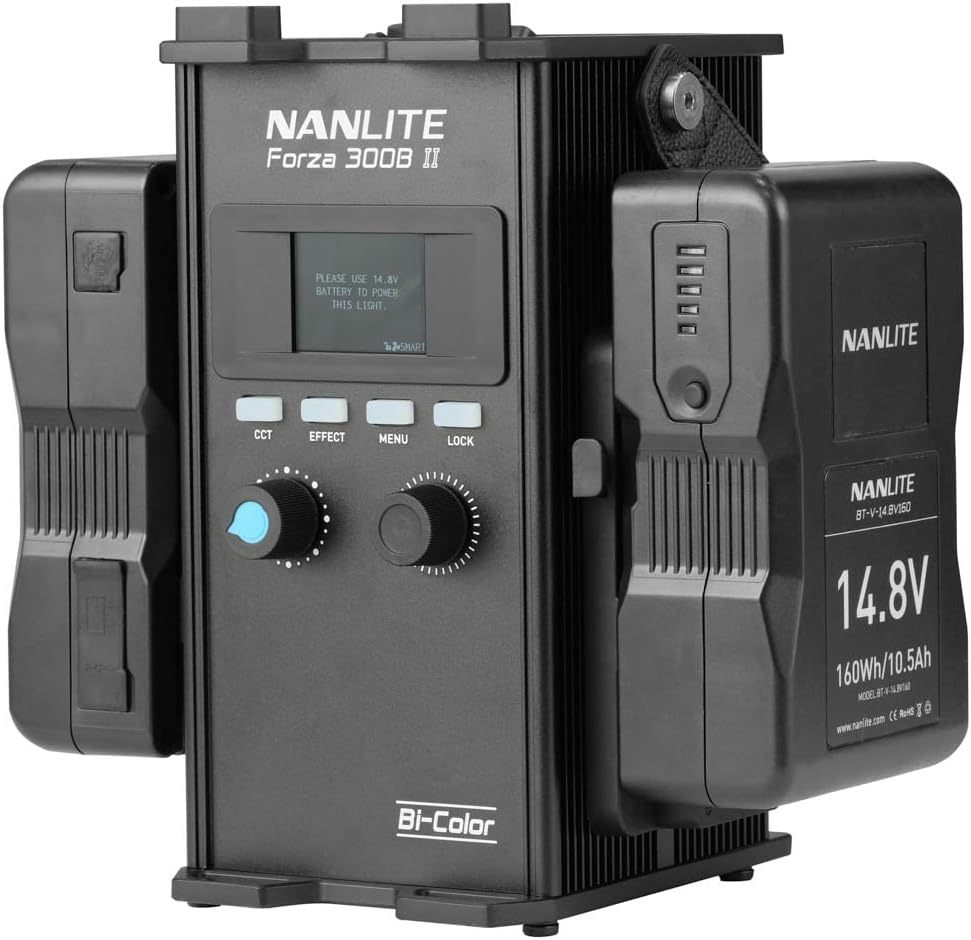
Figure 1: Nanlite Forza 300B MarkII fixture securely mounted on a light stand.
2. Подключение питания
Connect the AC-DC Power Supply to the control unit. Then, connect the control unit to the fixture using the provided connecting cable. Ensure all connections are firm and secure. The control unit can also be powered by compatible V-mount batteries (sold separately) for portable operation.

Figure 2: The control unit connected to the power supply and fixture cable.
3. Прикрепление аксессуаров
The Forza 300B MarkII features a standard Bowens Mount, allowing for easy attachment of various light modifiers such as softboxes, reflectors, and fresnel lenses. Align the accessory with the mount and twist until it locks into place.

Figure 3: The Forza 300B MarkII with a standard Bowens Mount reflector attached.
Инструкция по эксплуатации
1. Control Unit Overview
The control unit provides intuitive access to all light settings. It features a clear display, control knobs, and buttons for various functions.

Figure 4: Front panel of the control unit, showing the display and controls.
2. Включение и выключение
Locate the power switch on the control unit. Flip the switch to the 'ON' position to power on the light. Flip it to 'OFF' to power down.
3. Adjusting Brightness and Color Temperature (CCT)
Use the dedicated knobs on the control unit to adjust the light's intensity (brightness) and Color Correlated Temperature (CCT). The Forza 300B MarkII allows for bi-color adjustment, ranging from warm to cool tones.
4. Green-to-Magenta Adjustment
The Forza 300B MarkII features a unique green-to-magenta shift adjustment (+/- 80), enabling fine-tuning of color accuracy to match other light sources or achieve specific creative looks. This is controlled via the WW(RG) LED source and light-mixing chamber.
5. Режимы спецэффектов (FX)
The control unit provides access to various built-in special effects modes. Refer to the display and controls to navigate and select desired effects such as Storm, TV, or Firework. Adjust the speed and intensity of these effects as needed.
6. Возможности дистанционного управления
The light can be controlled remotely via Bluetooth using the free NANLINK app for iOS & Android devices. It also supports 2.4G for the WS-RC-C2 Remote Control and WS-TB-1 Transmitter Box (both sold separately), and features locking ports for DMX/RDM control for professional setups.
Обслуживание
Regular maintenance ensures the longevity and optimal performance of your Nanlite Forza 300B MarkII.
- Уборка: Use a soft, dry cloth to clean the exterior of the fixture and control unit. For stubborn dirt, a slightly damp Можно использовать ткань с мягким мылом, следя за тем, чтобы жидкость не попала в устройство.
- Хранилище: When not in use, store the light in its original carrying case in a cool, dry place, away from direct sunlight and extreme temperatures.
- Обслуживание вентилятора: The fan in the head is designed for quiet operation. Ensure the fan vents are clear of obstructions to maintain proper airflow and prevent overheating.
- Уход за кабелем: Inspect power and connecting cables regularly for any signs of wear or damage. Replace damaged cables immediately to prevent electrical hazards.
Поиск неисправностей
If you encounter issues with your Nanlite Forza 300B MarkII, refer to the following common problems and solutions:
| Проблема | Возможная причина | Решение |
|---|---|---|
| Свет не включается. | Отсутствие питания, плохое соединение, неисправный блок питания. |
|
| Световой поток нестабилен или мерцает. | Unstable power, overheating, loose cable. |
|
| Remote control/App not connecting. | Bluetooth/2.4G interference, incorrect pairing. |
|
If the problem persists after attempting these solutions, please contact Nanlite customer support for further assistance.
Технические характеристики
| Особенность | Деталь |
|---|---|
| Номер модели | ФОРЗА300БИИ |
| Бренд | НАНЛИТ |
| Размеры продукта | 13 x 9 x 4.84 дюйма |
| Вес товара | 6.38 фунта |
| Технология связи | Bluetooth |
| аппаратный интерфейс | Bluetooth |
| Уровень водонепроницаемости | Не водостойкий |
| CRI | 96 |
| ТЛКИ | 97 |
| Output (1 meter) | 68060 Lux, 6323 fc |
Гарантия и поддержка
For warranty information and technical support, please refer to the official Nanlite webили обратитесь к авторизованному дилеру. Сохраните чек о покупке в качестве подтверждения покупки для предъявления гарантийных претензий.
Optional protection plans may be available for extended coverage. Please check with your retailer for details on plans such as the 3-Year Protection Plan or Complete Protect options.


