1. Введение
Спасибо за покупкуasing the RHYTHM D234 8RZ234SR04 Radio Alarm Clock. This digital alarm clock features a radio-controlled timekeeping function, an electronic sound alarm with snooze, a thermometer, a hygrometer, and a calendar display. Its compact design and clear LCD make it suitable for various indoor environments. Please read this manual thoroughly before use to ensure proper operation and to maximize the clock's features.
2. Информация по технике безопасности
- Не подвергайте устройство воздействию экстремальных температур, прямых солнечных лучей или высокой влажности.
- Не допускайте падения устройства и не подвергайте его сильным ударам.
- Не пытайтесь разбирать или модифицировать устройство. Это приведёт к аннулированию гарантии.
- Храните батареи в недоступном для детей месте. При проглатывании немедленно обратитесь за медицинской помощью.
- Утилизируйте использованные батареи в соответствии с местным законодательством.
- Используйте только батарейки указанного типа (батарейки типа АА).
3. Содержимое упаковки
Убедитесь, что в упаковке присутствуют все предметы:
- RHYTHM D234 8RZ234SR04 Radio Alarm Clock
- Руководство пользователя (этот документ)
4. Продукт закончилсяview
The RHYTHM D234 8RZ234SR04 features a clear LCD display and easily accessible front-facing control buttons for intuitive operation.
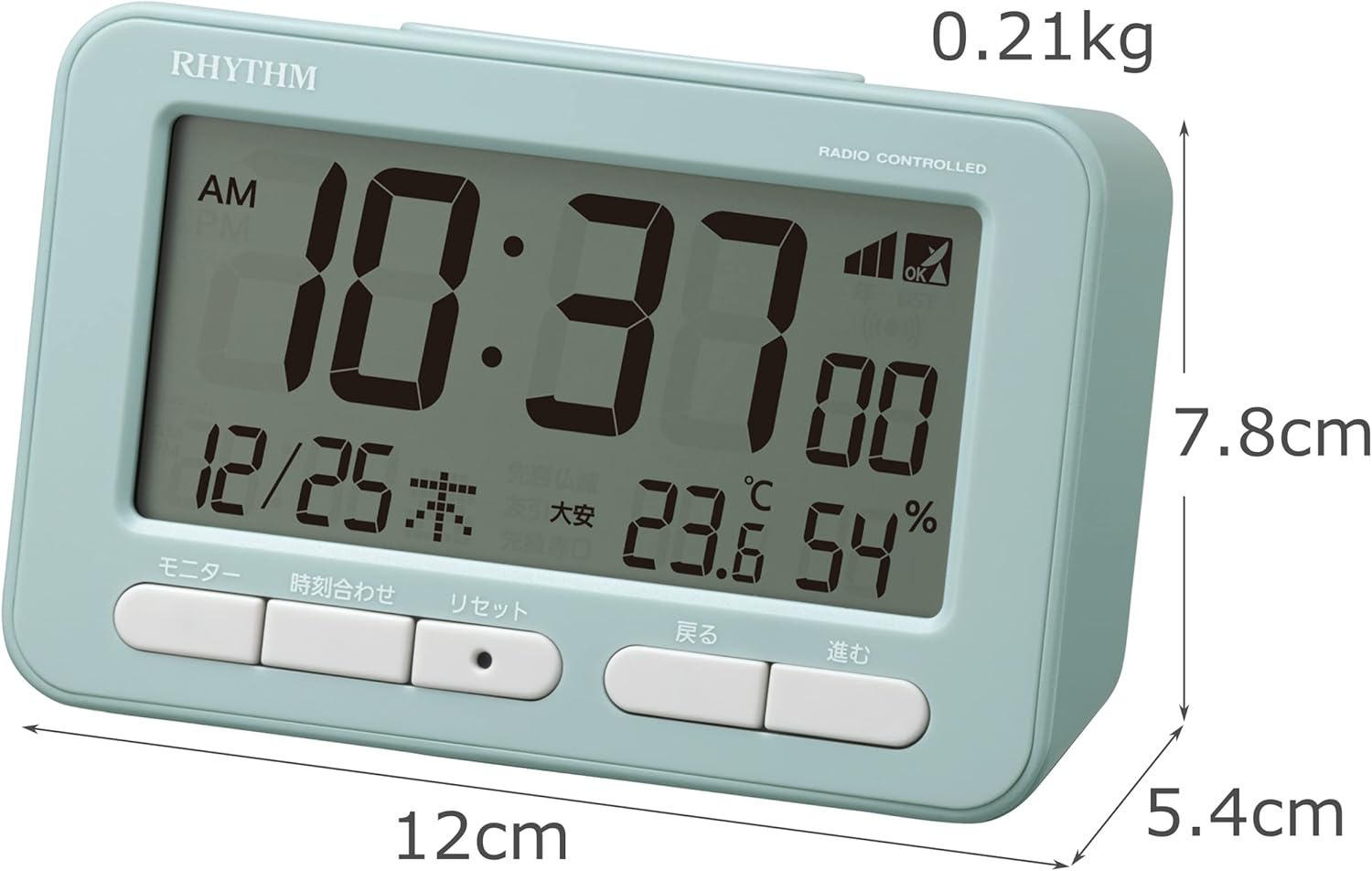
Рисунок 4.1: Передний view of the RHYTHM D234 8RZ234SR04 Radio Alarm Clock, showing its dimensions (7.8cm H x 12cm W x 5.4cm D) and weight (0.21kg).

Рисунок 4.2: Подробный view of the clock's large LCD display and the front control buttons, including 'Monitor', 'Time Set', 'Reset', 'Back', and 'Forward'.
Отображение информации:
- Время: Displays current time in AM/PM or 24-hour format.
- Дата: Shows month, day, and day of the week.
- Температура: Displays current ambient temperature in Celsius.
- Влажность: Shows current ambient humidity percentage.
- Индикатор приема радиоволн: Указывает уровень сигнала.
- Alarm ON/OFF Indicator: Показывает, активна ли сигнализация.
Кнопки управления:
- МОНИТОР: Activates backlight or cycles display modes.
- УСТАНОВИТЬ ВРЕМЯ: Enters time/date setting mode.
- СБРОС: Сбрасывает часы до заводских настроек.
- BACK (<): Adjusts settings backward.
- FORWARD (>): Adjusts settings forward.
- СНУЗ / СВЕТ: Activates snooze during alarm or backlight when pressed.
5. Настройка
5.1 Установка аккумулятора
- Откройте крышку батарейного отсека, расположенную на задней стороне часов.
- Insert two (2) AA batteries (not included) according to the polarity indicators (+ and -) inside the compartment.
- Плотно закройте крышку батарейного отсека.
5.2 Первоначальное включение питания и прием радиоволн
Upon battery installation, the clock will automatically attempt to receive radio time signals to set the correct time and date. This process may take several minutes.

Рисунок 5.1: Illustration of radio wave time signal reception from two transmission stations, ensuring accurate timekeeping.
- Для оптимального приема сигнала разместите часы рядом с окном.
- Избегайте размещения его рядом с электронными устройствами, которые могут создавать помехи (например, телевизорами, компьютерами, мобильными телефонами).
- A signal strength indicator will appear on the display during reception. Once synchronized, the indicator will show a stable signal.
6. Инструкция по эксплуатации
6.1 Ручная настройка времени и даты
If radio signal reception is poor or unavailable, you can set the time and date manually:
- Нажмите и удерживайте УСТАНОВИТЬ ВРЕМЯ Нажимайте кнопку до тех пор, пока не начнет мигать индикатор времени.
- Используйте BACK (<) и FORWARD (>) Кнопки для настройки часа. Нажмите УСТАНОВИТЬ ВРЕМЯ Для подтверждения и перехода к отсчету минут.
- Повторяйте процесс для минут, года, месяца и дня.
- Нажимать УСТАНОВИТЬ ВРЕМЯ Ещё раз, чтобы выйти из режима настроек.
6.2 Установка будильника
- Нажмите БУДИЛЬНИК button (usually located on the side or back, if not on front, refer to product diagram). The alarm time will flash.
- Используйте BACK (<) и FORWARD (>) Нажмите кнопки, чтобы установить желаемое время будильника. БУДИЛЬНИК для подтверждения.
- Отрегулируйте минуты с помощью BACK (<) и FORWARD (>) кнопки. Нажимать БУДИЛЬНИК для подтверждения и выхода.
- Чтобы включить/выключить будильник, нажмите кнопку БУДИЛЬНИК ВКЛ / ВЫКЛ switch or button. An alarm icon will appear/disappear on the display.
6.3 Использование функции отложенного будильника
Когда зазвонит будильник, нажмите большую кнопку СНУЗ / СВЕТ button on the top of the clock. The alarm will pause for approximately 5 minutes and then sound again. This can be repeated multiple times.
6.4 Display Modes and Backlight
The clock continuously displays time, date, temperature, and humidity. To temporarily illuminate the display, press the СНУЗ / СВЕТ Кнопка. Подсветка включится на несколько секунд.

Рисунок 6.1: The clock's display illuminated by its backlight, showing time, date, temperature, and humidity clearly in low light conditions.
6.5 12/24-часовой формат
To switch between 12-hour (AM/PM) and 24-hour formats, locate the 12/24ч button (often on the back or side) and press it. The display will change accordingly.
7. Техническое обслуживание
7.1 Очистка
Wipe the clock with a soft, dry cloth. Do not use abrasive cleaners, solvents, or spray directly onto the unit, as this may damage the finish or internal components.
7.2. Замена батареи
When the display becomes dim or the clock functions irregularly, it is time to replace the batteries. Follow the battery installation steps in Section 5.1. Replace both batteries simultaneously with new ones of the same type.
8. Поиск Неисправностей
| Проблема | Возможная причина | Решение |
|---|---|---|
| Нет дисплея или тусклый дисплей | Батарейки разряжены или неправильно вставлены. | Замените батарейки новыми батарейками типа АА, соблюдая правильную полярность. |
| Неправильное время/дата | Poor radio signal reception or manual setting error. | Move the clock to a location with better signal. Perform manual time setting if necessary. |
| Будильник не звучит | Сигнализация не активирована или установлена неправильно. | Убедитесь, что будильник включен и время его установки установлено правильно. |
| Показания температуры и влажности кажутся неточными. | Unit placed near heat/cold sources or in extreme conditions. | Relocate the clock to a stable indoor environment away from direct heat, cold, or moisture. Allow time for readings to stabilize. |
9. Технические характеристики
- Номер модели: 8RZ234SR04
- Размеры: 7.8 см (H) x 12 см (W) x 5.4 см (D)
- Масса: Approximately 0.21 kg (7.5 oz)
- Источник питания: 2 батарейки типа АА (продаются отдельно)
- Движение: Radio-controlled (Automatic time synchronization)
- Тип дисплея: ЖК-дисплей
- Тревога: Electronic sound, 4-level volume change, with Snooze function
- Диапазон измерения температуры: -9.9°С до 50°С
- Hygrometer Range: 20% до 95%
- Календарь: Programs until December 31, 2099
- Материал: Пластик
- Тип крепления: Настольный
- Особые характеристики: Backlight, 12/24-hour display option
10. Гарантия и поддержка
For warranty information and customer support, please refer to the documentation provided at the time of purchase or contact your local RHYTHM distributor. Keep your purchase receipt as proof of purchase for any warranty claims.


