1. Введение
Thank you for choosing the AgfaPhoto Powerstation PPS 600 Pro. This portable power bank is designed to provide reliable power for various devices during outdoor activities, travel, and emergency situations. This manual provides essential information for safe operation, setup, maintenance, and troubleshooting. Please read it thoroughly before using the product.
2. Инструкции по технике безопасности
- Не разбирайте, не ремонтируйте и не модифицируйте устройство. Неправильная сборка может привести к пожару или травме.
- Не подвергайте устройство воздействию огня или экстремальных температур (выше 60°C / 140°F).
- Не используйте и не храните устройство в ванной комнате или в месте, подверженном воздействию воды или влаги.
- Не роняйте, не ударяйте и не подвергайте устройство сильным ударам.
- Хранить в недоступном для детей месте.
- Используйте только рекомендуемые аксессуары и кабели для зарядки.
- Обеспечьте надлежащую вентиляцию во время использования и зарядки, чтобы предотвратить перегрев.
- In case of leakage from the battery, avoid contact with skin and eyes. Rinse affected areas with water and seek medical attention.
3. Содержимое упаковки
Убедитесь, что в коробке присутствуют все предметы:
- AgfaPhoto Powerstation PPS 600 Pro
- Power Cord (for AC charging)
- Car Cigarette Lighter Adapter
- Руководство пользователя
4. Продукт закончилсяview
Familiarize yourself with the ports, buttons, and display of your Powerstation PPS 600 Pro.

Image: Front panel of the AgfaPhoto Powerstation PPS 600 Pro, showing the LCD screen, DC output, USB-A ports, USB-C port, and AC output switch.
The unit features a clear LCD display that shows battery level, input power, and output power. Various ports are available for charging different devices simultaneously.
- ЖК-дисплей: Отображает состояние батареи, входную/выходную мощность.tagе, и индикаторы ошибок.
- Выход постоянного тока: Для устройств, требующих питания постоянным током.
- Порты USB-A: Для зарядки смартфонов, планшетов и других устройств с питанием от USB.
- Порт USB-C: Для устройств, совместимых с быстрой зарядкой.
- Выход переменного тока: Standard wall outlet for appliances.
- Входной порт: For charging the power station itself.
5. Настройка
5.1 Первоначальная зарядка
Before first use, fully charge your AgfaPhoto Powerstation PPS 600 Pro. This ensures optimal battery performance and longevity.
- Connect the provided power cord to the AC input port on the power station.
- Другой конец шнура питания подключите к стандартной розетке.
- The LCD display will show the charging status. The unit is fully charged when the battery indicator shows 100%.
Charging can also be done via a solar panel (sold separately) or a car cigarette lighter adapter.

Image: Illustration of the three charging methods for the power station: via car cigarette lighter, AC wall adapter, and solar panel.
6. Инструкция по эксплуатации
6.1 Включение/выключение питания
- To turn on the unit, press and hold the main power button for a few seconds. The LCD display will illuminate.
- Чтобы выключить устройство, нажмите и удерживайте главную кнопку питания еще раз, пока дисплей не погаснет.
6.2 Зарядка внешних устройств
The Powerstation PPS 600 Pro offers multiple output options:
- USB-выход: Connect your USB-powered devices (smartphones, tablets, drones, cameras) to the USB-A or USB-C ports. The unit will automatically detect and begin charging.
- Выход переменного тока: For devices requiring standard wall power (laptops, mini-refrigerators, LED TVs), press the AC ON/OFF button to activate the AC outlet. Plug your device into the AC outlet. Remember to turn off the AC output when not in use to conserve battery.
- Выход постоянного тока: For 12V DC devices, connect them to the DC output port.

Image: The AgfaPhoto Powerstation PPS 600 Pro connected and charging a laptop, demonstrating its use for portable electronics.

Image: The power station in use during a power outage, providing light and charging a smartphone, highlighting its emergency backup capability.
7. Техническое обслуживание
7.1 Хранение
- Храните электростанцию в прохладном, сухом месте, вдали от прямых солнечных лучей и источников тепла.
- Для длительного хранения заряжайте устройство примерно до 50-80% каждые 3-6 месяцев, чтобы поддерживать работоспособность батареи.
- Avoid storing in environments with high humidity or extreme temperatures.
7.2 Очистка
- Используйте мягкую сухую ткань для очистки внешних поверхностей устройства.
- Не используйте абразивные чистящие средства или растворители.
- Убедитесь, что все порты свободны от пыли и мусора.
8. Поиск Неисправностей
If you encounter issues with your Powerstation PPS 600 Pro, refer to the following common problems and solutions:
| Проблема | Возможная причина | Решение |
|---|---|---|
| Устройство не включается. | Аккумулятор полностью разряжен. | Зарядите устройство с помощью адаптера переменного тока. |
| No output from AC port | AC output not activated. Device exceeds power limit. | Нажмите кнопку включения/выключения кондиционера. Проверьте мощность устройства.tage against unit specifications. |
| Медленная зарядка внешних устройств | Device requires higher current. Cable issue. | Ensure you are using the correct USB port (e.g., USB-C PD). Try a different cable. |
| Устройство перегревается | Плохая вентиляция. Чрезмерная нагрузка. | Ensure vents are clear. Reduce the number or power of connected devices. Allow unit to cool down. |
Если проблема не устранена, обратитесь в службу поддержки клиентов.
9. Технические характеристики
Technical details for the AgfaPhoto Powerstation PPS 600 Pro:
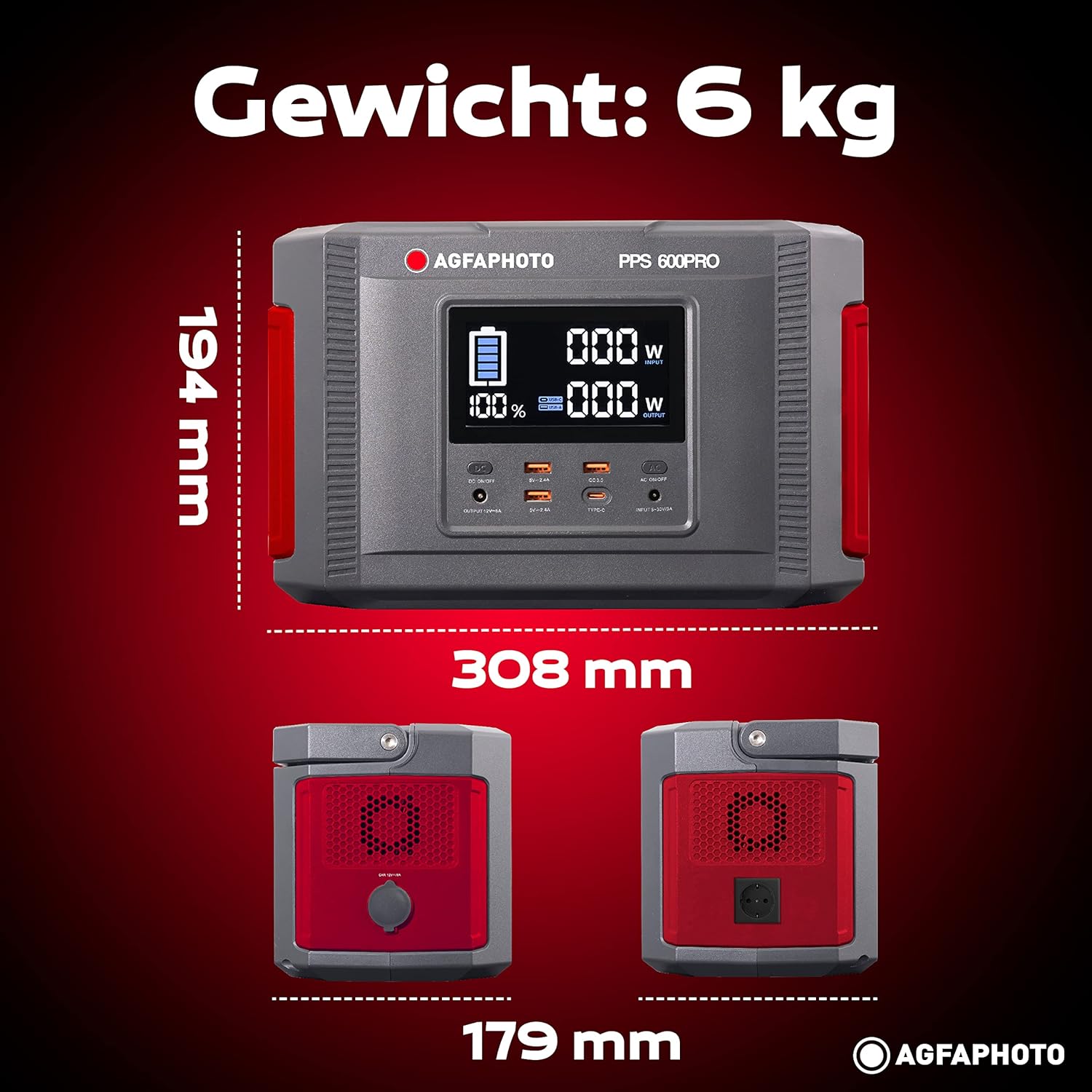
Image: Visual representation of the AgfaPhoto Powerstation PPS 600 Pro's dimensions (308 x 179 x 194 mm) and weight (6 kg).
| Особенность | Спецификация |
|---|---|
| Бренд | AgfaPhoto |
| Номер модели | 717-854742 (PPS600) |
| Емкость аккумулятора | 644 Вт·ч |
| Выходная мощность (непрерывная) | 600 Вт |
| Выходная мощность (пиковая) | 1000 Вт |
| Томtage | 220 Вольт |
| Вес товара | 6.1 Килограмма |
| Размеры (Д x Ш x В) | 308 х 179 х 194 мм |
| Источник питания | Battery Powered (Solaire, électricité) |
| Рекомендуемое использование | Mobile phones, cameras, laptops, tablets |
| Включенные компоненты | Power cord, USB ports, LCD screen, car cigarette lighter adapter |
| Специальная характеристика | Компактный дизайн |
10. Гарантия и поддержка
AgfaPhoto products are manufactured to high-quality standards and are covered by a manufacturer's warranty. For specific warranty terms and conditions, please refer to the warranty card included with your product or visit the official AgfaPhoto webсайт.
For technical support, troubleshooting assistance, or spare parts inquiries, please contact AgfaPhoto customer service. Contact details can typically be found on the product packaging or the official brand webсайт.


