Введение
This manual provides essential information for the safe and effective use of your Insta360 X3 Action Camera. Please read this manual thoroughly before operating the device and retain it for future reference.
Что в коробке?
- 1x камера Insta360 X3
- 1x зарядный кабель
- 1x Защитный чехол
- Тонкая ткань 1x
- Руководство пользователя 1x
- 1x Bullet Time Handle
- 1x Защитная линза
- 1x 256GB SD-карта
- 1x Салфетка для протирки линз EVO Gimbals
Настраивать
Начальная зарядка
Before first use, fully charge the Insta360 X3 camera using the provided charge cable. Connect the cable to the camera's charging port and a USB power source. The battery indicator will show charging status.
Установка SD-карты
Locate the SD card slot on the camera. Insert the 256GB SD card (included) into the slot until it clicks into place. Ensure the camera is powered off before inserting or removing the SD card.
Прикрепление аксессуаров
Attach the lens guard to protect the camera lenses. The bullet time handle can be screwed into the camera's tripod mount for extended reach and unique shooting angles.

Image: Insta360 X3 camera with a protective lens guard.
Инструкция по эксплуатации
Включение/выключение питания
Press and hold the power button to turn the camera on or off. The 2.29'' touchscreen will illuminate upon startup.
Использование сенсорного экрана
Navigate through menus, change settings, and preview фуtage using the intuitive 2.29'' touchscreen. Swipe and tap gestures are supported.

Image: Insta360 X3 camera with its touchscreen displaying a live view.
360-градусный захват и рефрейминг
The X3 captures 5.7K 360 Active HDR video. This allows you to record everything around the camera and choose your preferred angle during post-production using the Insta360 app.

Image: A 360-degree capture showing a person on a sailboat with a wide, spherical view.
Режим 4K с одним объективом
For traditional wide-angle footage, select a single lens to shoot in 4K30fps or 2.7K MaxView for an ultra-wide 170° field of view.

Image: A person on a bicycle on a bridge, demonstrating the 4K Single-Lens Mode.
Стабилизация FlowState и блокировка горизонта на 360 градусов
The camera features FlowState Stabilization and horizon leveling algorithms to ensure smooth and stable video footagто есть, даже во время динамичной деятельности.
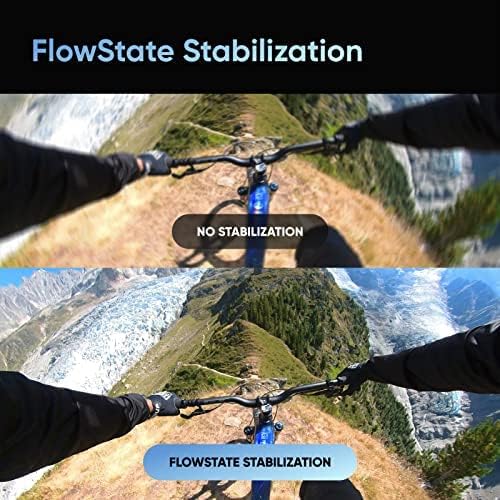
Image: A visual comparison of video footage, illustrating the effectiveness of FlowState Stabilization.
Невидимая палочка для селфи
When using the 360 Lens with a compatible selfie stick, the stick is automatically removed from the footage, creating a third-person perspective or drone-like shots.
Video: An official product video demonstrating the Insta360 X3's features, including the invisible selfie stick effect and 360 capture capabilities.
Обслуживание
Чистка линз
Use the provided lens cloth to gently clean the camera lenses. Avoid using abrasive materials or harsh chemicals that could damage the lens coating.
Гидроизоляция
The Insta360 X3 is IPX8 waterproof. Ensure all port covers are securely closed before exposing the camera to water. After use in saltwater, rinse the camera with fresh water and dry thoroughly.

Image: Insta360 X3 cameras submerged in water, highlighting its waterproof design.
Уход за аккумулятором
The camera uses a 1800 mAh Lithium Ion battery. For optimal battery life, avoid extreme temperatures and store the camera with a partial charge if not used for extended periods.

Image: Insta360 X3 camera alongside its 1800 mAh battery.
Поиск неисправностей
Распространенные проблемы
- Камера не включается: Убедитесь, что аккумулятор заряжен. Подключите камеру к источнику питания и повторите попытку.
- Ошибка SD-карты: Reinsert the SD card. If the issue persists, try formatting the card (this will erase all data) or use a different compatible SD card.
- Нестабильный фуtage: Ensure FlowState Stabilization is enabled in the camera settings.
- Проблемы с подключением (Bluetooth/Wi-Fi): Restart the camera and your connected device. Ensure both are within range and Bluetooth/Wi-Fi is enabled.
Для более подробного устранения неполадок обратитесь в официальную службу поддержки Insta360. webсайт или полное руководство пользователя.
Технические характеристики
| Особенность | Деталь |
|---|---|
| Бренд | Инста360 |
| Номер модели | X3 |
| Технология фотодатчика | КМОП |
| Разрешение видеозахвата | 5.7K (360), 4K (Single-Lens) |
| Максимальное фокусное расстояние | 6.7 миллиметра |
| Максимальная диафрагма | f/2 |
| Тип флэш-памяти | SD |
| Размер экрана | 2.29 дюйма |
| Технология связи | Bluetooth, Wi-Fi |
| Тип батареи | Литий-ионный (1800 мАч) |
| Вес товара | 1.1 фунта |
| Особые возможности | Экшн-камера 360°, редактирование с помощью ИИ, прямая трансляция, видео 360° с активным HDR 5.7K, фото 72 МП, режим съемки с одной линзой 4K, таймлапс 8K, стабилизация FlowState. |
Гарантия и поддержка
The Insta360 X3 camera may be eligible for extended protection plans, such as a 3-Year Protection Plan or a Complete Protect monthly plan, offered by third-party providers. Please refer to your purchase documentation for specific warranty details and coverage.
For product support, technical assistance, or to access the full digital manual, visit the official Insta360 webсайт.


