1. Продукт закончилсяview
The Sinotimer TM618N-2 is a versatile 7-day weekly digital programmable timer designed for automated control of electrical equipment. It allows users to set specific daily or weekly schedules for turning devices on and off, ensuring efficient energy management and convenience. This timer is suitable for a wide range of applications, including controlling lighting, heating, ventilation, and other electrical appliances.

Рисунок 1: Передняя часть view of the Sinotimer TM618N-2 Digital Timer, showing the display and control buttons.
2.Основные характеристики
- Еженедельное программирование: Allows up to 16 ON/OFF programs per day or week.
- Многофункциональный: Includes Clock display, Timer, Countdown, Automatic weekly time deviation correction, and Sleep mode.
- Высокая емкость: Поддерживает 16 Amp / 220 Volt AC loads.
- Широкий объемtagе Совместимость: Operates with 220V, 230V, 240V AC.
- Встроенный аккумулятор: Сохраняет настройки при отключении питанияtages (Lithium battery type).
- Универсальные применения: Ideal for controlling dryers, defrosting equipment, swimming pool pumps, gates, lighting, and more.
3. Технические характеристики
| Особенность | Деталь |
|---|---|
| Модель | ТМ618Н-2 |
| Бренд | Синотимер |
| Томtage | 220 В / 230 В / 240 В переменного тока |
| Текущий рейтинг | 16 Amp |
| Количество программ | 16 программ включения/выключения |
| Материал | Пластик |
| Тип батареи | Lithium (internal, non-replaceable by user) |
| Цвет | Multi-color (typically white/grey) |
4. Установка
Важное примечание о безопасности: Installation should only be performed by a qualified electrician. Ensure power is disconnected before attempting any wiring.
- Монтаж: The TM618N-2 is designed for DIN rail mounting or screw mounting. Secure the timer in a suitable electrical enclosure.
- Проводка: Refer to the wiring diagram on the back of the unit.
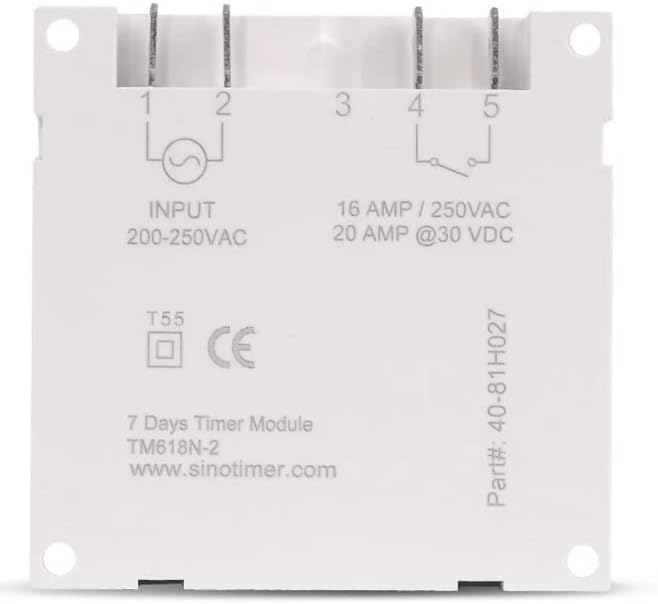
Рисунок 2: Назад view of the Sinotimer TM618N-2, showing input/output terminals and wiring diagram.
- Input (Terminals 1 & 2): Connect your 200-250VAC power supply to these terminals.
- Output (Terminals 3, 4, & 5):
- Terminal 3: Common (COM)
- Terminal 4: Normally Open (NO) - Connect your load here for switched power.
- Terminal 5: Normally Closed (NC) - (Less commonly used for timer applications, but available).
- Включение питания: Once wiring is complete and secure, restore power to the circuit. The timer display should illuminate.

Figure 3: Technical drawing showing the dimensions of the Sinotimer TM618N-2 timer.
5. Инструкция по эксплуатации
5.1 Функции кнопок
- ЧАСЫ: Используется для установки текущего времени и дня.
- ПРОГ: Enters/exits programming mode for ON/OFF schedules.
- НЕДЕЛЯ: Selects the day(s) of the week during time or program setting.
- ЧАС: Adjusts the hour during time or program setting.
- МИН: Adjusts the minute during time or program setting.
- ОТЗЫВАТЬ: Recalls or cancels a program setting.
- РУКОВОДСТВО: Manually overrides the timer's current state (ON/AUTO/OFF).
- R (Сброс): Small button (requires a pointed object) to reset the timer to factory defaults.
5.2 Установка текущего времени и дня
- Нажмите и удерживайте ЧАСЫ кнопка.
- Удерживая ЧАСЫ, нажимать НЕДЕЛЯ установить текущий день недели (ПН, ВТ, СР, ЧТ, ПТ, СБ, ВС).
- Удерживая ЧАСЫ, нажимать ЧАС для установки текущего часа.
- Удерживая ЧАСЫ, нажимать МИН для установки текущей минуты.
- Выпустите ЧАСЫ чтобы сохранить настройки.
5.3. Программирование расписаний включения/выключения
The timer supports up to 16 ON and 16 OFF programs. Each program can be set for a specific day or group of days.
- Нажмите ПРОГ Нажмите кнопку один раз. На дисплее отобразится «1 ВКЛ».
- Нажимать НЕДЕЛЯ repeatedly to select the desired day(s) for this program (e.g., MO, TU, WE, TH, FR, SA, SU; MO-FR; SA-SU; MO-SA; etc.).
- Нажимать ЧАС для установки желаемого часа включения.
- Нажимать МИН для установки желаемой минуты включения.
- Нажимать ПРОГ На дисплее появится надпись «1 OFF».
- Повторите шаги 2-4, чтобы установить желаемое время выключения для первой программы.
- Нажимать ПРОГ to move to the next program ("2 ON", "2 OFF", etc.) and repeat the process for up to 16 programs.
- Чтобы выйти из режима программирования и сохранить настройки, нажмите кнопку. ЧАСЫ кнопка.
5.4. Ручное управление
Нажмите РУКОВОДСТВО кнопка для переключения между режимами вывода:
- НА: Выходной сигнал постоянно включен, игнорируя программы.
- АВТО: Output follows the programmed schedules.
- OFF: Вывод постоянно выключен, программы игнорируются.
Убедитесь, что таймер включен. АВТО mode for programmed operation.
5.5. Сброс таймера
To clear all settings and return the timer to its factory default state, insert a pointed object (like a paperclip) into the small R (Reset) hole and press gently.
6. Техническое обслуживание
The Sinotimer TM618N-2 requires minimal maintenance.
- Содержите устройство в чистоте и не допускайте попадания на него пыли. Для чистки используйте мягкую сухую ткань.
- Не используйте абразивные чистящие средства или растворители.
- Ensure the timer is installed in a dry environment, away from direct moisture or extreme temperatures.
- The internal battery is designed for long life and is not user-replaceable. If the display goes blank or settings are not retained after a power outage, the battery may need professional service.
7. Поиск Неисправностей
| Проблема | Возможная причина | Решение |
|---|---|---|
| Дисплей пуст. | Отсутствует источник питания; внутренняя батарея разряжена. | Check power connections. If power is present, the internal battery may need charging (leave connected to power for several hours) or replacement (professional service required). |
| Таймер не включается/выключается в соответствии с запрограммированными параметрами. | Timer is not in AUTO mode; incorrect program settings; wiring issue. | Нажимать РУКОВОДСТВО до тех пор, пока не отобразится "AUTO".view and correct program settings. Verify wiring connections. |
| Настройки теряются после отключения питания.tage. | Внутренняя батарея разряжена или неисправна. | Leave the timer connected to power for at least 4 hours to charge the internal battery. If the problem persists, the battery may need replacement (professional service recommended). |
| Кнопки не реагируют. | Temporary software glitch; unit needs reset. | Perform a full reset using the R button. If the issue continues, contact support. |
8. Гарантия и поддержка
Для получения информации о гарантии и технической поддержке, пожалуйста, обратитесь к документации, прилагаемой к вашей покупке, или свяжитесь с продавцом. Сохраните чек о покупке для предъявления гарантийных претензий.
Manufacturer: Sinotimer


