1. Введение
The Tenmars TM-901N is a professional LAN cable tester designed for efficient and accurate diagnosis of network cable issues. It is capable of identifying various wiring faults such as discontinuity, short-circuits, incorrect connections, and split pairs in both Shielded Twisted Pair (STP) and Unshielded Twisted Pair (UTP) cables. This device can measure cable lengths up to 265 meters, making it an essential tool for network installers and technicians.
2. Информация по технике безопасности
Перед использованием устройства внимательно ознакомьтесь со всеми инструкциями по технике безопасности. Несоблюдение этих инструкций может привести к травме или повреждению устройства.
- Do not attempt to test live circuits or cables connected to active network equipment.
- Ensure the battery is correctly installed before use.
- Не подвергайте устройство воздействию влаги или экстремальных температур.
- Не открывайте устройство casinг) поскольку это может привести к аннулированию гарантии и подвергнуть вас опасности поражения электрическим током.
- Утилизируйте батареи в соответствии с местным законодательством.
3. Содержимое упаковки
Проверьте наличие всех предметов в посылке:
- Tenmars TM-901N Main Unit
- Remote ID Locator (ID 1)
- Руководство пользователя (этот документ)
- Note: A 9V battery is typically required and may not be included.
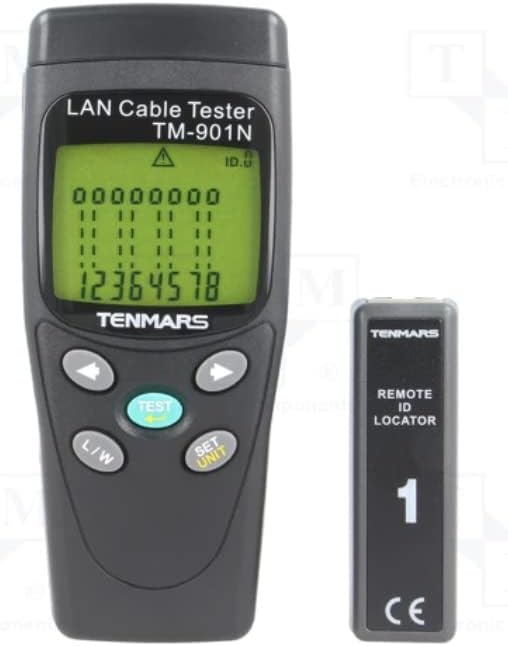
Image 3.1: Tenmars TM-901N Main Unit and Remote ID Locator.
4. Продукт закончилсяview
4.1 Основной блок
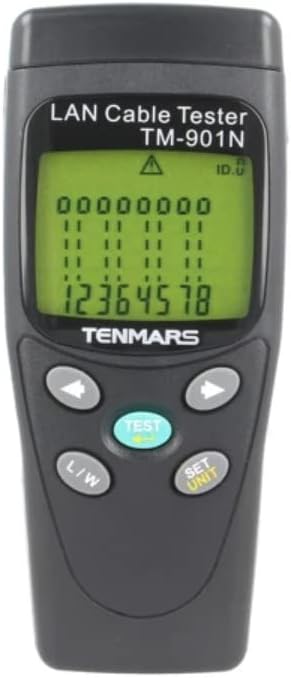
Изображение 4.1: Спереди view of the TM-901N Main Unit.
The main unit features an LCD display for showing test results and cable status. It includes several control buttons:
- Кнопка ТЕСТ: Initiates a cable test.
- L/W Button: Toggles between Length measurement and Wiremap display modes.
- SET/UNIT Button: Used to enter settings mode and change measurement units (e.g., meters, feet).
- Кнопки со стрелками (влево/вправо): Used for navigation in settings or for reviewРезультаты тестирования.
4.2 Remote ID Locator

Image 4.2: Remote ID Locator.
The remote ID locator is a passive unit used in conjunction with the main unit to test installed cables. It connects to one end of the cable while the main unit connects to the other. The remote unit is labeled "ID 1" for identification.
4.3 Rear Panel and Wiring Diagram

Изображение 4.3: Сзади view of the TM-901N Main Unit with wiring diagram.
The rear panel of the main unit includes the battery compartment and a printed wiring diagram for reference, showing standard T568A/B pin assignments for RJ45 connectors.
5. Настройка
5.1 Установка аккумулятора
- Locate the battery compartment cover on the rear of the main unit.
- Slide the cover open or remove it as indicated.
- Вставьте новую батарею напряжением 9 В, соблюдая правильную полярность (+/-).
- Надежно закройте крышку батарейного отсека.
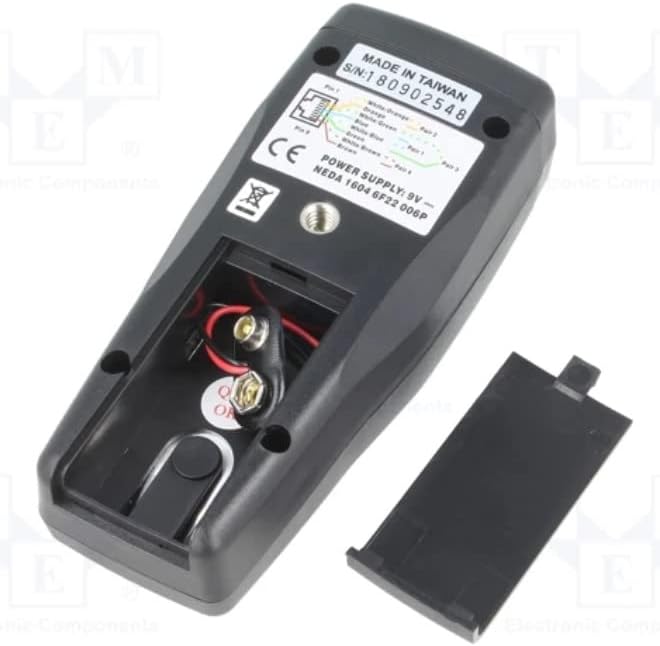
Image 5.1: Battery compartment with cover removed.
5.2 Соединительные кабели для тестирования
Before connecting any cables, ensure they are disconnected from all active network devices.
- For patch cables (uninstalled cables): Connect one end of the cable to the RJ45 port on the main unit and the other end to the RJ45 port on the remote ID locator.
- For installed cables: Connect the main unit to one end of the installed cable (e.g., a wall jack) and the remote ID locator to the other end of the cable (e.g., in a patch panel).
6. Инструкция по эксплуатации
6.1 Включение/выключение питания
The device typically powers on automatically when a cable is connected and the TEST button is pressed, or by pressing the TEST button. It usually powers off automatically after a period of inactivity to conserve battery.
6.2 Проведение проверки кабеля
- Ensure the cable is properly connected to the main unit and the remote ID locator.
- Нажмите ТЕСТ кнопка.
- The tester will automatically scan the cable and display the results on the LCD.
6.3 Interpreting Test Results (Wiremap)
The LCD will display the wiremap, indicating the connection status of each wire pair. Common indications include:
- Проходить: All wires are correctly connected (1-1, 2-2, etc. for straight-through, or appropriate cross-over mapping).
- Open/Discontinuity: A break in one or more wires. The display will show which wire(s) are open.
- Короткое замыкание: Two or more wires are touching. The display will indicate the shorted wires.
- Incorrect Connection/Miswire: Wires are connected to the wrong pins at one or both ends. The display will show the incorrect mapping (e.g., 1-3, 2-6).
- Разделенные пары: A more complex fault where two pairs are swapped, but the wiremap appears correct. The tester is designed to detect this.
6.4 Measuring Cable Length
- After performing a test, press the L / W button to switch to Length measurement mode.
- The display will show the estimated length of the cable.
- To change the unit of measurement (meters, feet), press the SET/UNIT button while in Length mode and use the arrow buttons to select the desired unit. Press SET/UNIT еще раз для подтверждения.
7. Техническое обслуживание
7.1 Очистка
Wipe the device with a soft, dry cloth. Do not use abrasive cleaners or solvents. Ensure no moisture enters the device.
7.2. Замена батареи
When the battery low indicator appears on the display, replace the 9V battery as described in Section 5.1. Remove the battery if the device will not be used for an extended period to prevent leakage.
7.3 Хранение
Храните устройство в прохладном, сухом месте, вдали от прямых солнечных лучей и экстремальных температур. Неиспользуемое устройство следует хранить в оригинальной упаковке или защитном футляре.
8. Поиск Неисправностей
| Проблема | Возможная причина | Решение |
|---|---|---|
| Устройство не включается. | Разряженная или полностью разряженная батарея; неправильно установленная батарея. | Replace the 9V battery; check battery polarity. |
| Inaccurate length measurement. | Cable not fully extended; incorrect cable type setting (if applicable); cable damage. | Ensure cable is straight; verify cable integrity; check if unit calibration is needed (refer to advanced settings if available). |
| "Open" or "Short" displayed for a new cable. | Faulty cable; improper connection to tester. | Re-seat the cable connectors firmly; try testing a known good cable; inspect cable for visible damage. |
| No display or erratic display. | Низкий заряд батареи; внутренняя неисправность. | Замените аккумулятор. Если проблема не устранена, обратитесь в службу поддержки клиентов. |
9. Технические характеристики
| Особенность | Спецификация |
|---|---|
| Модель | ТМ-901Н |
| Type of Tester | LAN wiring |
| Measured Cable Length | Максимум. 265m |
| Разрешение измерения | 1m |
| Cable/Adapter Structure | разъем RJ45 |
| Характеристики измерения | Connection map test: discontinuity, short circuit, incorrect connection, split pairs |
| Поддерживаемые кабели | STP / UTP cables |
| Точность измерения | ±10% ±1m |
| Источник питания | Батарея 9 В x1 |
| Масса | 160 г |
| Размеры | 130x58x35мм |
| Производитель | ТЕНМАРС |
| Страна происхождения | Тайвань |
10. Гарантия и поддержка
For warranty information and technical support, please refer to the documentation provided with your purchase or contact your local distributor. Keep your proof of purchase for warranty claims.


